> For the complete documentation index, see [llms.txt](https://developer.harness.io/llms.txt). Markdown versions of documentation pages are available by appending `.md` to page URLs; this page is available as [Markdown](https://developer.harness.io/web-application-and-api-protection-waap-discovery-discovery-api-security-testing/settings/configuration/teams/service-accounts.md).
# Service Accounts
Create and manage service accounts that give applications, integrations, and automated workflows secure, least-privilege access to Harness RPA.
Updates (October 2026 to December 2026)
* *October 2026* — Updated the topic to add guidance on service account tokens versus API tokens, and on using service account tokens with the GraphQL public APIs. For more information, see [Configure service account authentication](#configure-service-account-authentication).
Service accounts provide a secure way for applications, integrations, and automated workflows to access Traceable. As you scale your integrations and automation, you can enforce least-privilege access by assigning specific roles and environment-level permissions to each automated process. This ensures that integrations and external systems receive only the access required to perform their intended tasks, while maintaining consistent security and operational control across the platform.
## What you will learn from this topic
By the end of this topic, you will be able to:
* Understand why service accounts exist and their needs.
* Understand when to use a service account token and when to use an API token.
* Understand the key capabilities of a service account.
* Understand the steps to create a service account.
* Understand how to generate and manage access tokens.
* Understand how to use a service account token to call Traceable's GraphQL public APIs.
***
## Understand the service account
Before you create a service account, make sure you understand the need for one. The following table explains why, when, and how you can leverage it:
| Why use it? | When to use? | How can you leverage it? |
| -------------------------------------------------------------------------------------------------------------------------------------------------------------------------------------------------------- | ------------------------------------------------------------------------------------------------------------------------------- | ----------------------------------------------------------------------------------------------------------------------------------------------------- |
| It helps you securely manage access by providing dedicated identities for integrations and automation workflows. They reduce reliance on shared credentials and support least-privilege access controls. | You can use it whenever you need to access tokens for role and scope-specific actions, such as ticketing systems and reporting. | You can navigate to the service accounts tabs and assign roles and environment scopes to each Service Account based on your operational requirements. |
***
## Before you begin
Traceable lets you authenticate programmatic requests with either a service account token or an API token. Both can be used to call Traceable's GraphQL public APIs. The following table discusses the comparison to help you decide which one fits your use case before you proceed.
### Service account tokens versus API tokens
| Comparison Metric | Service account token | API token |
| ------------------- | ----------------------------------------------------------------------------------------------------------------------------------------------------- | ----------------------------------------------------------------------------------------- |
| **Identity** | Belongs to a dedicated machine identity (the service account) that is separate from any user account. | Generated by a signed-in user, and tied to that user's account. |
| **Navigation** | **Settings** → **Team** → **Service Accounts** tab. | **Your Account** → **My Preferences** → **API Tokens**. |
| **Sign-in** | The service account does not support interactive sign-in. It exists solely for token-based authentication. | The user signs in to Traceable to generate the token. |
| **Access control** | You assign one or more roles and environment-level scopes to the service account. Tokens generated for it inherit these permissions. | Based on the user who generated the token. |
| **Best suited for** | Automation, integrations, deployment pipelines, reporting systems, and custom tooling that need least-privilege, role- and environment-scoped access. | Personal or ad hoc use by an individual, such as exploring the GraphQL API from a client. |
{% hint style="info" %}
* You can use a service account when the access should belong to an application or automated workflow rather than to an individual user.
* A Harness RPA service account is a Traceable identity. It is not related to the service accounts of cloud providers such as AWS, GCP, or Azure.
{% endhint %}
***
## Key capabilities
Service accounts provide dedicated identities for these workflows, helping you and your team securely manage access, assign only the required permissions, and maintain clear separation between automated processes and user accounts. The following table describes the capabilities available for configuring and managing service accounts:
| Capability | Description |
| ------------------------------------- | --------------------------------------------------------------------------------------------------------------------------------------------------------------------------------------------------------------------------------------- |
| Create a service account | Create dedicated machine identities for automation workflows, integrations, deployment pipelines, reporting systems, and custom tooling. This eliminates the need for access Tokens for automated access. |
| Assign roles and permissions | Control what actions a service account can perform by assigning an appropriate role. Access tokens generated for the service account inherit these permissions, ensuring automated processes operate within clearly defined boundaries. |
| Configure environment-level scope | Restrict service account access to specific environments. This allows you to limit automation to only the resources it requires, helping enforce least-privilege access and reduce unnecessary exposure across environments. |
| Generate and regenerate access tokens | Create access tokens for machine-to-machine authentication and regenerate them when credentials need to be rotated or replaced. This helps maintain secure integrations and supports organizational credential management practices. |
| Update access as requirements evolve | Modify roles and environment scope as automation workflows change. This flexibility allows organizations to adapt access controls without recreating integrations or disrupting operational processes. |
| Delete unused service accounts | Remove service accounts that are no longer required to reduce credential sprawl, maintain a clean access model, and strengthen overall security posture. |
Together, these capabilities enable you to securely manage automated access, establish clear ownership boundaries, and scale integrations without relying on user-based credentials. The following sections discuss service account creation and management in detail.
***
## Steps to create a service account
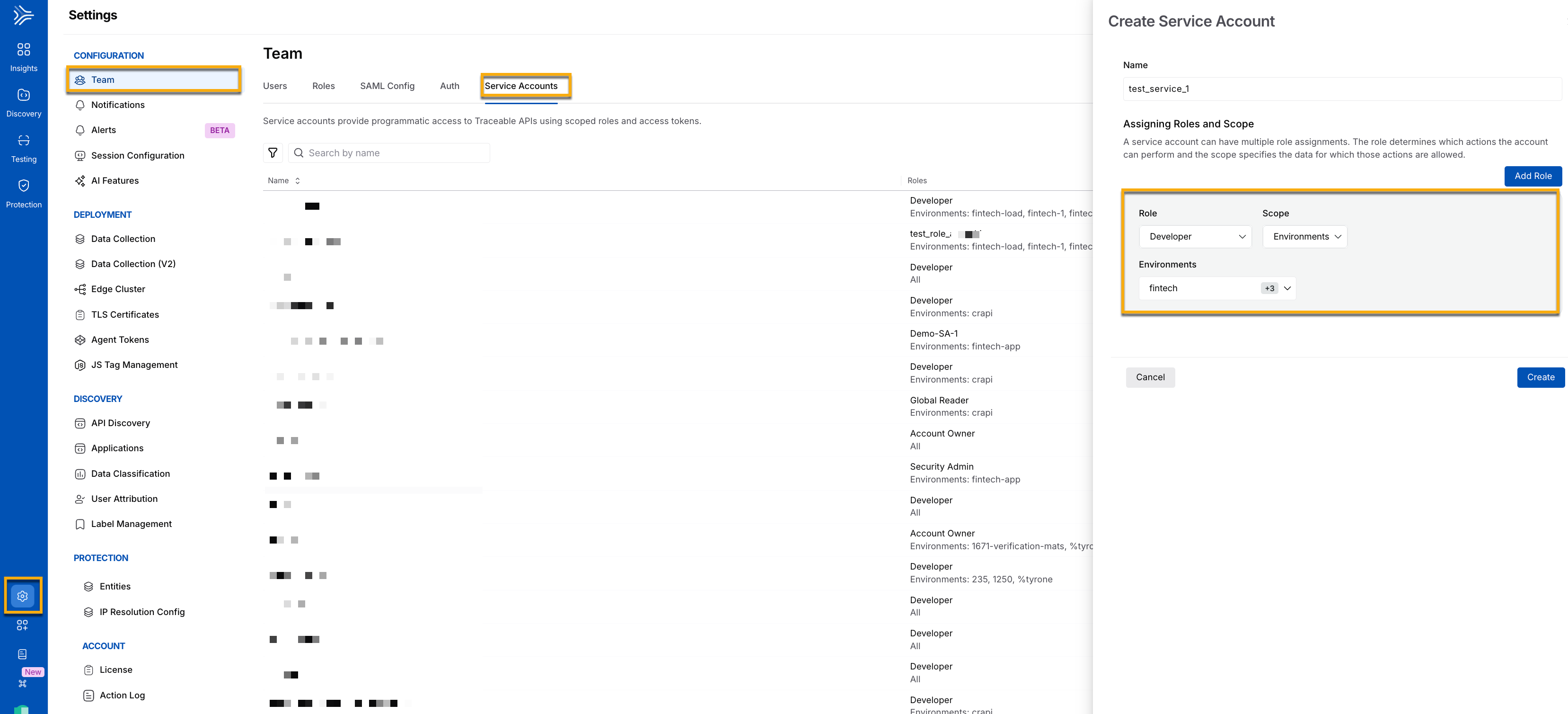
Unlike user accounts, Service Account does not support interactive sign-in and exists solely for token-based authentication. By assigning role-based permissions and environment-specific access, you can ensure that automated processes operate within clearly defined access boundaries. To create a service account, navigate to **Settings** → **Team** → **Service Accounts** tab. Click **+Create Service Account**.
Create Service Account
In the **Create Service Account**, slide-out panel, complete the following steps:
1. **Name**: A name for your service account, for example, *test\_service\_1.*
2. **Role**: A role associated with your service account. You can choose the roles from the drop-down according to your requirements. For example, you can add the role of an *Account owner* with scope access to *all environments*. You can provide multiple roles by clicking **Add Role**. For example, you can also provide role access as a *Developer* or a *Security Analyst* with scope limited to specific relevant environments, such as *Fintech*.
3. **Scope**: The scope of the role that you have chosen above, whether it has access to *All environments* or only to specific environments, for example, *Fintech*.
4. **Environments**: A list of all the available environments. You can choose one or more environments, according to your requirements.
5. Click **Create**.
***
## Generate access tokens
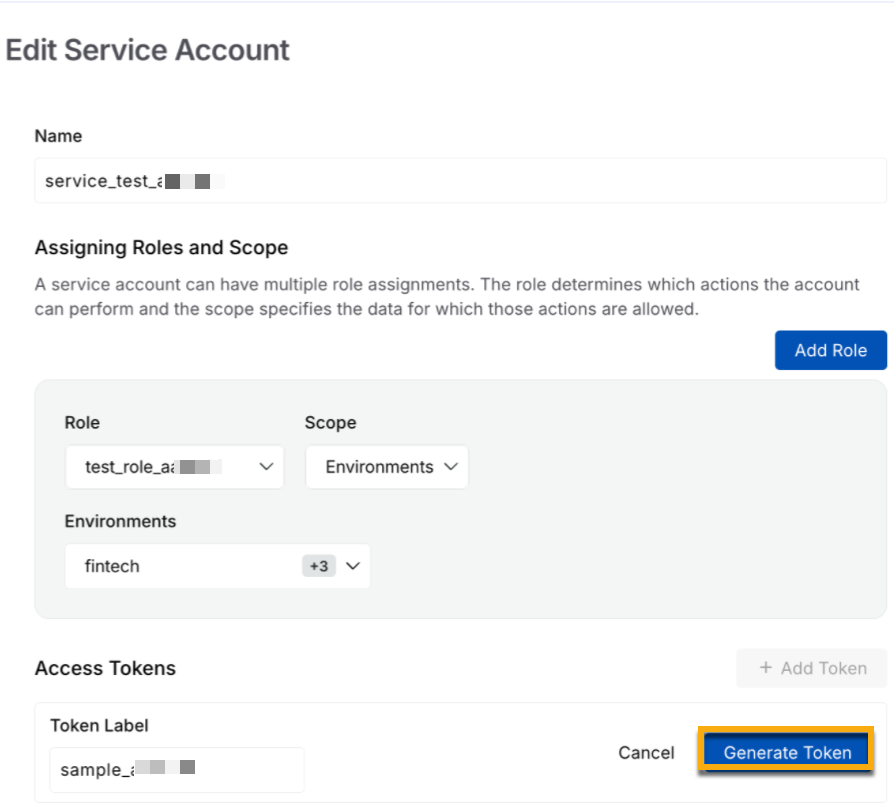
To generate an access token, click the service account you have created above. In the open slide-out panel, specify the **Token Label**, then click **Generate Token.**
Service Account Token Generation
{% hint style="info" %}
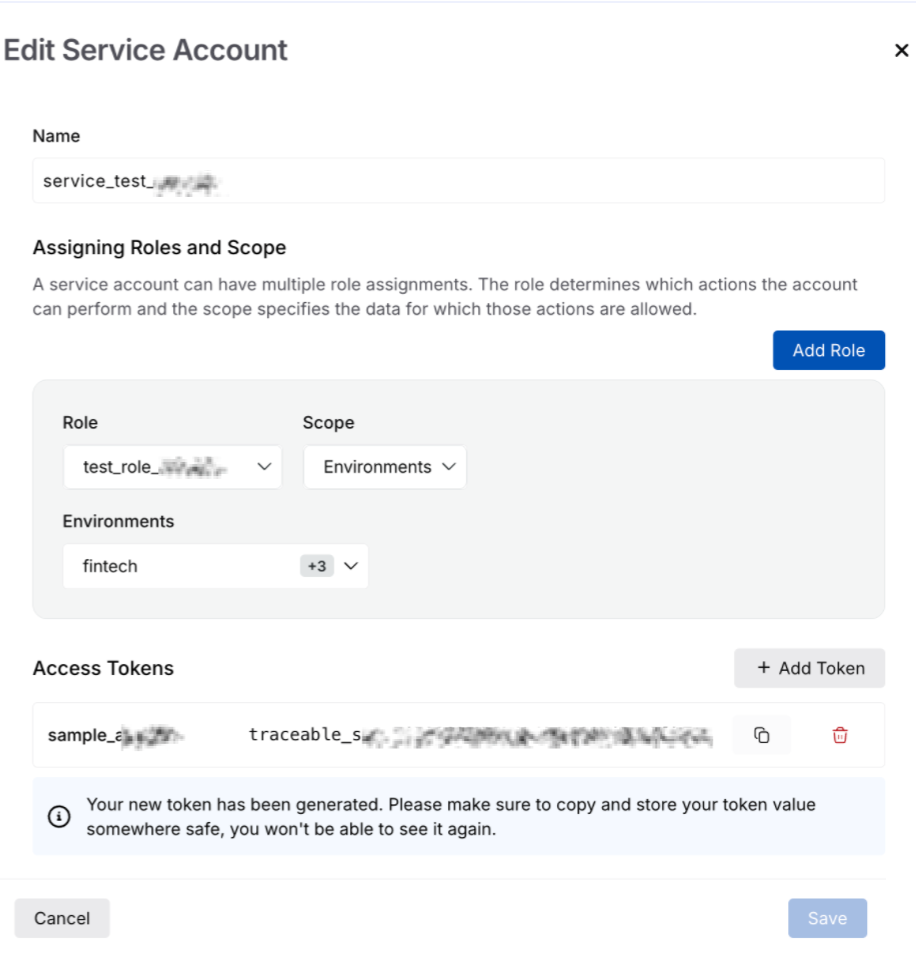
* When you click **Generate Token**, Traceable generates a unique token that you must copy and store for future use, as it is only visible at the time of token creation.
* Additionally, you can also add multiple tokens using the **+Add Token** button, according to your requirements.
{% endhint %}
Accessing Tokens
***
## Configure service account authentication
You can use the access token of a service account to run the GraphQL queries and mutations that Traceable exposes through its [public APIs](https://developer.harness.io/web-application-and-api-protection-waap-discovery-discovery-api-security-testing/settings/public-apis.md). This lets your automation call the APIs without relying on a token generated by an individual user.
To use the token, complete the following steps in your GraphQL client or automation tool:
1. Generate an access token for the service account as described in [Generate access tokens](#generate-access-tokens), and copy it.
2. Add the `Authorization` header to your request and set its value to the service account token.
3. Send your queries and mutations to `https://api.traceable.ai/graphql`.
{% hint style="info" %}
The queries and mutations that a service account token can run depend on the roles and environment scope assigned to the service account. If a request is denied, verify that the service account's role and environment scope allow the action.
{% endhint %}
For more information, see [Public APIs](https://developer.harness.io/web-application-and-api-protection-waap-discovery-discovery-api-security-testing/settings/public-apis.md) for more information about the GraphQL client setup and example queries.
***
## Manage service accounts
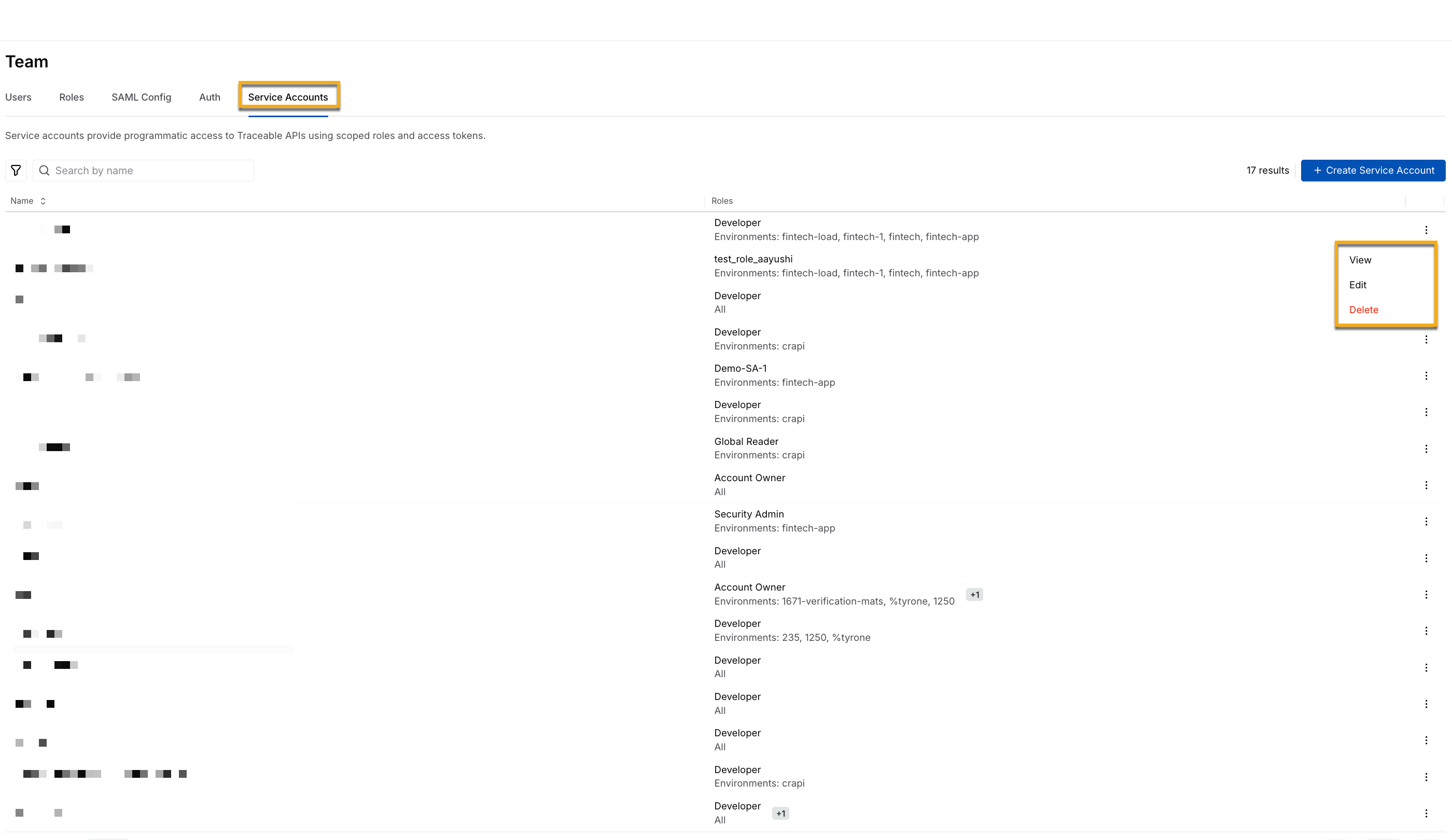
After you have created your account, you can view it on the **Service Accounts** tab page. The page shows the following metrics:
Manage Service Accounts
* **Name**: An identifiable name associated with the service account that you created above.
* **Roles**: The roles associated with your service account.
* **Ellipse** (:ellipsis:) icon: You can perform the following actions on the service account you have created above:
* **View**: View the account and associated role(s), scope, and access tokens.
* **Edit**: Edit the account and associated role(s), scope, and access tokens.
* **Delete**: Delete the account and associated role(s), scope, and access tokens.
You cannot restore a deleted service account.
***
## Demo
The following interactive demo walks you through the steps to navigate, create, and manage service accounts in Harness RPA:
{% embed url="" %}
{% @harness-feedback/feedback %}