> For the complete documentation index, see [llms.txt](https://developer.harness.io/llms.txt). Markdown versions of documentation pages are available by appending `.md` to page URLs; this page is available as [Markdown](https://developer.harness.io/web-application-and-api-protection-waap-discovery-discovery-api-security-testing/settings/public-apis.md).
# Public APIs
Use Traceable GraphQL public APIs for configuration and operational data, authenticating with a platform API token or a service account token
Traceable provides GraphQL public APIs that you can use to access Traceable using your existing automation setup. You can use Traceable's public API for configuration and accessing operational data. To authenticate your requests, you can use either a platform API token or a service account token.
## What you will learn from this topic
By the end of this topic, you will be able to understand:
* How to choose between a [platform API token and a service account token](#choose-a-token-for-authentication) for the public APIs.
* The [steps](#step-1-generate-and-copy-the-platform-api-token) to generate and copy the platform API token.
* The concept of the [Altair GraphQ](https://altairgraphql.dev/)L client.
* The [examples](#example-queries) related to Traceable’s public APIs.
***
## Choose a token for authentication
You can access the GraphQL queries and mutations in Traceable's public API with either of the following tokens:
* **Platform API token**: Generated by a user from **Your Account** → **My Preferences**. Use it for personal or ad hoc access, such as exploring the API from a GraphQL client.
* **Service account token**: Generated for a [service account](https://developer.harness.io/web-application-and-api-protection-waap-discovery-discovery-api-security-testing/settings/configuration/teams/service-accounts.md), which is a dedicated identity for applications, integrations, and automated workflows. Use it when your automation needs role- and environment-scoped access that is not tied to an individual user.
Go to [Service Accounts](https://developer.harness.io/web-application-and-api-protection-waap-discovery-discovery-api-security-testing/settings/configuration/teams/service-accounts.md) to learn how the two token types differ and how to create a service account and generate its token.
***
To use Traceable's GraphQL public API, complete the following two steps:
## Step 1: Generate and copy the Platform API token
Complete the following steps to access the Platform API token:
1. Log in to [Traceable Platform](https://app.traceable.ai/api-activity?time=1d).
2. Navigate to **Your Account** → **My Preferences** as shown below.
3. On the **My Preferences** page, click **API Tokens → Generate API Token.**
4. Copy the token value and then click **Okay**.
- Once you copy the token, you cannot view or access it again. Make sure that you copy and save it. If you lose the token, you must generate a new one.
- When you delete the API token from Traceable, your access from the GraphQL client is blocked.
- You can only edit or delete the token. When you edit the token, you can only change the name of the token and not its value.
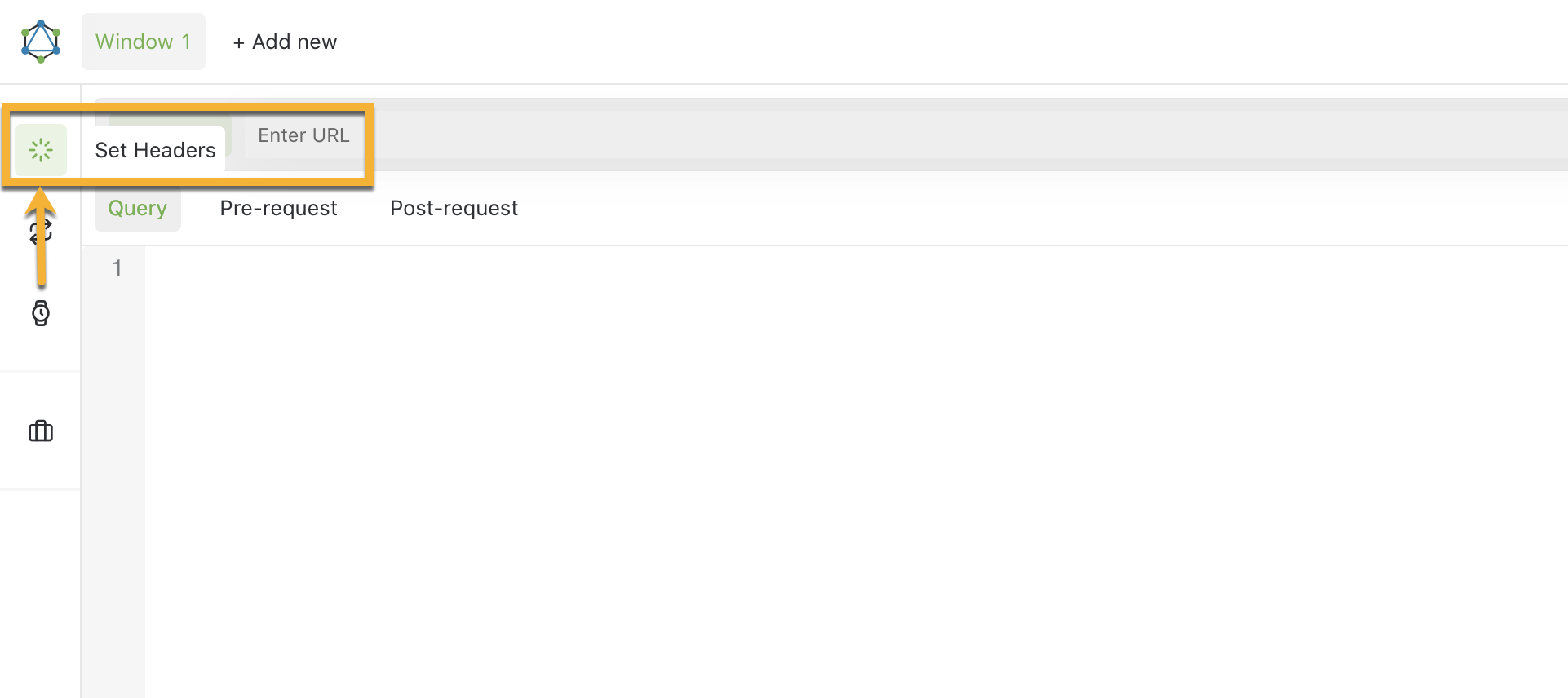 1. Click on **Add header** in the **Headers** window to add the `Authorization` header.
2. Add the **Platform API Token** (or the **service account token**) that you copied in Step 1 and click **Save**.
 3. Add the `https://api.traceable.ai/graphql` URL and click on **Reload Docs** icon as shown below.
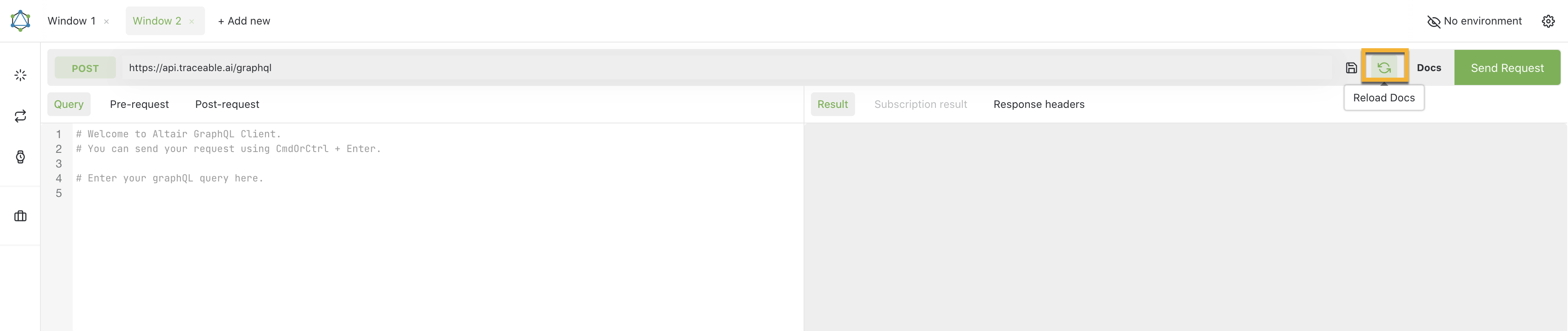 4. Click **Queries** or **Mutations** to start exploring the documentation. You can also type your query in the search field.
***
## Example queries
### Total number of learned APIs
#### Query
```graphql
query {
entities(
scope: "API"
between: {
startTime: "2021-10-27T22:52:55.026Z"
endTime: "2021-10-27T23:52:55.026Z"
}
filterBy: [
{
keyExpression: { key: "isLearnt" }
operator: EQUALS
value: true
type: ATTRIBUTE
}
{
keyExpression: { key: "apiDiscoveryState" }
operator: IN
value: ["DISCOVERED", "UNDER_DISCOVERY"]
type: ATTRIBUTE
}
]
includeInactive: true
) {
total
}
}
```
#### Result
```json
{
"data": {
"entities": {
"total": 658
}
}
}
```
***
### Total number of learning API endpoints
#### Query
```graphql
query {
entities(
scope: "API"
between: {
startTime: "2021-10-27T22:52:55.026Z"
endTime: "2021-10-27T23:52:55.026Z"
}
filterBy: [
{
keyExpression: { key: "isLearnt" }
operator: EQUALS
value: false
type: ATTRIBUTE
}
{
keyExpression: { key: "apiDiscoveryState" }
operator: IN
value: ["DISCOVERED", "UNDER_DISCOVERY"]
type: ATTRIBUTE
}
]
includeInactive: true
) {
total
}
}
```
#### Result
```json
{
"data": {
"entities": {
"total": 33657
}
}
}
```
***
### Total number of services
#### Query
```graphql
{
entities(
scope: "SERVICE"
limit: 1
between: {startTime: "2021-10-27T22:52:55.026Z", endTime: "2021-10-27T23:52:55.026Z"}
includeInactive: true
) {
total
}
}
```
#### Result
```json
{
"data": {
"entities": {
"total": 572
}
}
}
```
***
### Top 10 APIs
The following query fetches top 10 API endpoints by call volume:
#### Query
```graphql
{
explore(
scope: "API"
limit: 10
between: {
startTime: "2022-01-01T22:52:55.026Z"
endTime: "2022-01-10T23:52:55.026Z"
}
filterBy: [
{
keyExpression: { key: "apiDiscoveryState" }
operator: IN
value: ["DISCOVERED", "UNDER_DISCOVERY"]
type: ATTRIBUTE
}
]
groupBy: {
expressions: [{ key: "id" }, { key: "name" }]
groupLimit: 10000
}
orderBy: [
{ keyExpression: { key: "name" }, aggregation: COUNT, direction: DESC }
]
) {
results {
id: selection(expression: { key: "id" }) {
value
}
name: selection(expression: { key: "name" }) {
value
}
count_name: selection(expression: { key: "name" }, aggregation: COUNT) {
value
}
}
}
}
```
#### Result
```json
{
"data": {
"explore": {
"results": [
{
"id": {
"value": "7ccf74e7-8b28-360a-a5b9-e701ddf6b828"
},
"name": {
"value": "hipstershop.ProductCatalogService.GetProduct"
},
"count_name": {
"value": 2784148
}
},
{
"id": {
"value": "457b9ecc-91be-30c2-b814-e11ba0f5b396"
},
"name": {
"value": "GET /product/{product-id}"
},
"count_name": {
"value": 1286569
}
},
{
"id": {
"value": "6806a4b7-ad8a-32b4-83ca-a46653f87cbc"
},
"name": {
"value": "POST /partner/{partner-id}"
},
"count_name": {
"value": 649034
}
},
{
"id": {
"value": "906589e9-2064-3f1c-991f-a71d78d8cce3"
},
"name": {
"value": "GET /loginservice/check"
},
"count_name": {
"value": 492144
}
},
{
"id": {
"value": "ccbd507b-60db-330e-aafa-facc559f0228"
},
"name": {
"value": "hipstershop.CurrencyService.Convert"
},
"count_name": {
"value": 470178
}
},
{
"id": {
"value": "fd271283-9c38-3767-9fb4-5a4a3cc7aec4"
},
"name": {
"value": "hipstershop.ProductCatalogService.ListProducts"
},
"count_name": {
"value": 396176
}
},
{
"id": {
"value": "09b1f28b-9075-3e62-8313-e5640041c143"
},
"name": {
"value": "hipstershop.ProductCatalogService.GetProductsSlice"
},
"count_name": {
"value": 265645
}
},
{
"id": {
"value": "8e4dbf89-ce90-3f3d-8461-0a227b961085"
},
"name": {
"value": "hipstershop.CartService.GetCart"
},
"count_name": {
"value": 211799
}
},
{
"id": {
"value": "1a4dddc6-6bd6-3f31-916b-e8beb514dbf2"
},
"name": {
"value": "hipstershop.RecommendationService.ListRecommendations"
},
"count_name": {
"value": 203979
}
},
{
"id": {
"value": "98a5be1d-ed4b-370c-a953-5ce58441178d"
},
"name": {
"value": "GET /product"
},
"count_name": {
"value": 179195
}
}
]
}
}
}
```
{% @harness-feedback/feedback %}