> For the complete documentation index, see [llms.txt](https://developer.harness.io/llms.txt). Markdown versions of documentation pages are available by appending `.md` to page URLs; this page is available as [Markdown](https://developer.harness.io/web-application-and-api-protection-waap-discovery-discovery-discovery-discovery/integrations/ci-cd/github-actions-1.md).
# GitHub Actions
Discover APIs from code and run Harness RPA APIST scans in GitHub Actions using the code-scan, scan, queue-scan, report, and gate actions, with inputs and sample workflows.
Updates (October 2026 to December 2026)
* *November 2026*: Updated the page to add the `code-scan` action, including its inputs, supported paths, results, and a sample workflow. Go to [Inputs for the code-scan action](#inputs-for-the-code-scan-action) for more details.
GitHub Actions is an automation and workflow tool provided by GitHub. It allows developers to automate tasks and define workflows using YAML files. Workflows are triggered by events such as code pushes or pull requests and can include a series of actions. Actions are reusable tasks that can be combined to create workflows. GitHub Actions is commonly used for continuous integration/continuous deployment (CI/CD) pipelines.
Harness RPA integrates with GitHub Actions by discovering APIs from source code and running security scans. Harness RPA helps you identify vulnerabilities in the early stages of SDLC, giving you more time and context to prioritize vulnerability mitigation and build secure APIs. This topic explains how to configure and use Harness RPA xAST CI/CD integration and how to run the scan during the build step.
***
## What you will learn from this topic
By the end of this topic, you will be able to understand:
* Which GitHub Actions are available for code scanning and APIST.
* What inputs each GitHub Action accepts.
* How the `code-scan` action runs, which code paths it supports, and which results it returns.
* How to pass additional CLI options and scan overrides.
* How the sample workflows combine the actions.
* How to view the scan report.
***
## Before you begin
Make a note of the following before integrating GitHub Actions with Harness RPA:
* Make sure that you have an active account and repository on GitHub.
* Make sure you have a basic understanding of GitHub Actions and workflows. Go to [GitHub Actions documentation](https://docs.github.com/en/actions) to understand workflows.
* Make sure you obtain the platform access token that the CLI uses to authenticate. Go to [Public APIs](https://developer.harness.io/web-application-and-api-protection-waap-discovery-discovery-discovery-discovery/settings/public-apis.md) to create a platform access token.
* Make sure you create the scan that the workflow runs, and note its name or ID. Go to [Creating a Scan](https://developer.harness.io/web-application-and-api-protection-waap-discovery-discovery-discovery-discovery/api-security-testing/ast-basics-and-workflow/creating-a-scan.md) to create a scan.
* Make sure that Docker is available on the runner if you use the `code-scan` action. Go to [Installing a Runner](https://developer.harness.io/web-application-and-api-protection-waap-discovery-discovery-discovery-discovery/api-security-testing/ast-basics-and-workflow/runners-and-cli/installing-a-runner.md#platform-docker) to install Docker on a self-hosted runner.
* Make sure that Traceable CLI version *2.8.0 or later* is installed in your CI system (here, GitHub). Go to [CLI Pre-checks and Installation](https://developer.harness.io/web-application-and-api-protection-waap-discovery-discovery-discovery-discovery/api-security-testing/ast-basics-and-workflow/runners-and-cli/cli-pre-checks-and-installation.md) to install Traceable CLI. If you are using `code-scan` action, make sure that Traceable CLI version *2.8.6 or later* is installed.
To upgrade the Traceable CLI to the latest version, re-run the installation script. The script will upgrade the existing installation in place without removing configuration or credentials. Go to CLI Pre-checks and Installation to upgrade Traceable CLI.
* Make sure that specification generation for code repositories is enabled for your account if you use the `code-scan` action. Go to [API discovery from code](https://developer.harness.io/web-application-and-api-protection-waap-discovery-discovery-discovery-discovery/discovery/discovery-1/inventory/beta-api-discovery-from-code.md) to enable specification generation.
Harness RPA skips the specification if it has not been enabled, and DAST has nothing to scan.
***
## Integration
Integrate Harness RPA xAST into your GitHub workflows using a GitHub Action. The integration provides inputs and outputs, along with example workflows to help you get started. Go to [GitHub Integration](https://developer.harness.io/web-application-and-api-protection-waap-discovery-discovery-discovery-discovery/integrations/ci-cd/beta-github-integration.md) to configure the GitHub App.
### Available GitHub Actions
All the GitHub Actions by Harness RPA are available in [GitHub repository](https://github.com/Traceableai/traceable-github-actions). Each Harness RPA `ast-action` runs a single Traceable CLI command. Add the required steps to build your workflow. The following table describes the available actions:
| Action | CLI command | Purpose |
| -------------------------------------- | ------------------------------------------------------------------------------------ | --------------------------------- |
| `Traceableai/ast-action/code-scan@v2` | `traceable code apis --code-path --token --traceable-server ` | Discovers APIs from source code. |
| `Traceableai/ast-action/scan@v2` | `traceable ast scan initAndRun` | Runs a local scan. |
| `Traceableai/ast-action/queue-scan@v2` | `traceable ast scan queue` | Queues a scan on remote runners. |
| `Traceableai/ast-action/report@v2` | `traceable ast scan report` | Generates and publishes a report. |
| `Traceableai/ast-action/gate@v2` | `traceable ast scan getEvaluationResult` | Passes or fails the pipeline. |
{% hint style="info" %}
You can use the following actions to configure and run API security scans from your GitHub workflows:
* You can use the `code-scan` action to discover APIs from the source code in your checkout, so that the OpenAPI specification of the repository is available before you run a scan.
* You can use the `scan` action when the GitHub runner can directly reach the target APIs.
* You can use the `queue-scan` action when the target APIs are reachable only from your internal network and the runner is deployed remotely.
Go to [Queue scan to a remote runner](#queued-scan-with-a-remote-runner) to review the commands behind these actions.
{% endhint %}
***
## Understand the inputs
Each GitHub Action has its own set of inputs that either select a scan, a CLI version, or a code path to use, or control what the action writes back to the workflow. The following sections describe the inputs for each action:
* Inputs for the code-scan action — The `code-scan` action discovers APIs from source code.
* Inputs for the scan action — The `scan` action runs a scan on the GitHub runner.
* Inputs for the queue-scan action — The `queue-scan` action dispatches a scan to a remote runner.
* Inputs for the report action — The `report` action generates and publishes a report.
* Inputs for the gate action — The `gate` action passes or fails a pipeline.
### Inputs for the code-scan action
The `code-scan` action discovers the APIs that your source code defines. It uploads the discovered APIs to the Traceable platform, where Harness RPA generates the OpenAPI specification of the repository. The action runs the `code apis` command of the Traceable CLI in the `traceableai/traceable-cli` Docker image.
{% hint style="info" %}
* The `code-scan` action requires Docker on the runner. GitHub-hosted runners include Docker, and you must install it on self-hosted runners. Go to [Installing a Runner](https://developer.harness.io/web-application-and-api-protection-waap-discovery-discovery/api-security-testing/ast-basics-and-workflow/runners-and-cli/installing-a-runner#platform-docker) to install Docker on a self-hosted runner.
* The `code-scan` action requires Traceable CLI version *2.8.6 or later*.
{% endhint %}
{% hint style="info" %}
To scan repositories from the Traceable platform, configure the GitHub app. Go to [Configure GitHub Integration](https://developer.harness.io/web-application-and-api-protection-waap-discovery-discovery-discovery-discovery/integrations/ci-cd/beta-github-integration.md) to configure the GitHub app.
{% endhint %}
The following table describes the inputs of the `code-scan` action:
| Input | Description | Required | Default |
| ------------------------ | --------------------------------------------------------------------------------------------------------------------------------------------------- | -------- | -------- |
| `code_path` | The path to the source code, relative to the repository root. Go to [Supported paths](#supported-paths) to review supported paths. | No | — |
| `code_languages` | A comma-separated list of languages to scan: `java`, `python`, `javascript`, and `csharp`. When you omit it, the action auto-detects the languages. | No | — |
| `memory_limit` | The percentage of available memory that the code analysis can use, from 1 to 100. The CLI default is 80. | No | — |
| `client_scan_token` | The platform access token. | Yes | — |
| `traceable_server` | The platform URL. | Yes | — |
| `cli_version` | The `traceableai/traceable-cli` Docker image tag. | No | `latest` |
| `additional_cli_options` | Extra CLI flags that are appended to the command. | No | `''` |
#### Supported paths
The `code_path` input must point to the root of the repository or to a submodule inside the repository. Plain subfolders of the repository are not supported.
The code that the action scans comes from the checkout, which is the workflow step that copies your repository code onto the runner at the start of the job. GitHub provides this step as the `actions/checkout` action, and you add it to your workflow file. Go to [Sample GitHub Actions workflows](#sample-github-actions-workflows) to add the checkout step to your workflow. Go to [actions/checkout](https://github.com/actions/checkout) to review the checkout action reference.
To scan the repository of a submodule on its own, add a separate `actions/checkout` step that checks out the repository of that submodule.
#### Results of the code-scan action
After uploading the discovered APIs, the code-scan action waits up to 10 minutes for the repository's OpenAPI specification. The step fails if:
* The scan or the specification generation fails, or
* The specification is not ready in time; the step log shows the reason.
Go to [Exit codes](https://developer.harness.io/web-application-and-api-protection-waap-discovery-discovery-discovery-discovery/api-security-testing/ast-basics-and-workflow/run-scan-from-cli.md#exit-codes) to understand why the step failed.
You can view the results of a code scan on the Traceable platform, under **Discovery → Inventory → Repositories**. Go to [API discovery from code](https://developer.harness.io/web-application-and-api-protection-waap-discovery-discovery-discovery-discovery/discovery/discovery-1/inventory/beta-api-discovery-from-code.md#scanned-repositories) to view scanned repositories.
### Inputs for the scan action
The `scan` action runs a scan on the GitHub runner. The following table describes its inputs:
| Input | Description | Required | Default |
| ------------------------ | ---------------------------------------------------- | -------- | -------- |
| `scan_name` | The name of the scan. | No | — |
| `scan_id` | The scan configuration ID. | No | — |
| `client_scan_token` | The platform access token. | Yes | — |
| `traceable_server` | The platform URL. | Yes | — |
| `cli_version` | The Traceable CLI version to be used. | No | `latest` |
| `additional_cli_options` | Freeform CLI flags that are appended to the command. | No | — |
| `summary` | Writes the scan output to the GitHub job summary. | No | `true` |
{% hint style="info" %}
You must provide at least one of `scan_name` or `scan_id`.
{% endhint %}
### Inputs for the queue-scan action
The `queue-scan` action dispatches the scan to remote runners. Its inputs mirror those of the `scan` action, with additional inputs for runner selection and wait behavior, as described in the following table:
| Input | Description | Required | Default |
| ------------------------ | ------------------------------------------------------------------------------ | -------- | -------- |
| `scan_name` | The name of the scan. | No | — |
| `scan_id` | The scan configuration ID. | No | — |
| `client_scan_token` | The platform access token. | Yes | — |
| `traceable_server` | The platform URL. | Yes | — |
| `cli_version` | The Traceable CLI version to be used. | No | `latest` |
| `runner_ids` | A comma-separated list of runner IDs. | No | — |
| `wait` | Waits for the scan to complete. | No | `true` |
| `wait_timeout` | The maximum wait time in minutes. | No | — |
| `additional_cli_options` | Extra CLI flags. | No | — |
| `summary` | Writes the output to the job summary. This applies only when `wait` is `true`. | No | `true` |
{% hint style="info" %}
You must provide at least one of `scan_name` or `scan_id`.
{% endhint %}
### Inputs for the report action
The `report` action generates a report for a scan run, regardless of whether it was successfully completed or aborted. The following table describes its inputs:
| Input | Description | Required | Default |
| ------------------------ | --------------------------------------------------------------- | -------- | -------- |
| `id` | The scan run ID. Harness RPA auto-resolves it when you omit it. | No | — |
| `client_scan_token` | The platform access token. | Yes | — |
| `traceable_server` | The platform URL. | Yes | — |
| `cli_version` | The Traceable CLI version to be used. | No | `latest` |
| `output_format` | The report format. | No | `md` |
| `additional_cli_options` | Extra CLI flags. | No | — |
{% hint style="info" %}
* `scan-id` is the configuration ID of the scan. `id` is the scan run ID.
* The `output_format` input determines the report destination. Markdown reports go to `$GITHUB_STEP_SUMMARY`, where they appear on the workflow run page, while every other format goes to the action log.
* To save a non-Markdown report to a file, use `--output-file ` through `additional_cli_options`.
{% endhint %}
### Inputs for the gate action
The `gate` action either passes or fails the pipeline. The following table describes its inputs:
| Input | Description | Required | Default |
| ------------------------ | --------------------------------------------------------------- | -------- | -------- |
| `id` | The scan run ID. Harness RPA auto-resolves it when you omit it. | No | — |
| `client_scan_token` | The platform access token. | Yes | — |
| `traceable_server` | The platform URL. | Yes | — |
| `cli_version` | The Traceable CLI version to be used. | No | `latest` |
| `additional_cli_options` | Extra CLI flags. | No | — |
The outcome of this step depends on the evaluation policy configured for the scan. Go to [Exit codes](https://developer.harness.io/web-application-and-api-protection-waap-discovery-discovery-discovery-discovery/api-security-testing/ast-basics-and-workflow/run-scan-from-cli.md#exit-codes) to review the codes that the action returns.
***
## Additional CLI options
The `additional_cli_options` input appends flags to the underlying CLI command, allowing you to apply scan overrides and other CLI options from a workflow. Go to [Sample GitHub Actions workflows](#sample-github-actions-workflows) to view workflow examples.
You can pass multiple flags for scan overrides, such as the target URL, authentication hooks, and API specifications, along with runner selection, wait behavior, and output flags. Go to [Scan Overrides](https://developer.harness.io/web-application-and-api-protection-waap-discovery-discovery-discovery-discovery/api-security-testing/ast-basics-and-workflow/scan-overrides.md) to configure scan overrides. Go to [Run a Scan from CLI](https://developer.harness.io/web-application-and-api-protection-waap-discovery-discovery-discovery-discovery/api-security-testing/ast-basics-and-workflow/run-scan-from-cli.md) to run scans from the CLI. General CLI settings, such as `--loglevel`, are available for every action. Go to [General CLI options](https://developer.harness.io/web-application-and-api-protection-waap-discovery-discovery-discovery-discovery/api-security-testing/ast-basics-and-workflow/runners-and-cli/cli-pre-checks-and-installation.md#general-cli-options) to review CLI options.
{% hint style="info" %}
The file paths that you provide as part of these flags are relative to the repository root.
{% endhint %}
***
## Sample GitHub Actions workflows
The following workflows show a pipeline that discovers APIs from source code before it queues a scan, a pipeline that scans directly from the GitHub runner, and a pipeline that dispatches the scan to a runner inside your own network.
### Code scan followed by a queued scan
To run a code scan followed by a queued scan, complete the following steps:
1. Add the `code-scan` action to your workflow and run it once.
2. Create an APIST scan for that repository. Go to [Creating a Scan](https://developer.harness.io/web-application-and-api-protection-waap-discovery-discovery-discovery-discovery/api-security-testing/ast-basics-and-workflow/creating-a-scan.md#dast) to create an APIST scan.
3. Add a `queue-scan` (or `scan`) step after `code-scan`, with `scan_name` set to that scan.
The following workflow shows these steps. It refreshes the OpenAPI specification with the `code-scan` action, and then triggers that scan by name:
```yaml
name: Traceable Code Scan & AST
on:
push:
branches: [main]
workflow_dispatch:
jobs:
security-scan:
runs-on: ubuntu-latest
steps:
- name: Checkout
uses: actions/checkout@v4
- name: Discover APIs from source
uses: Traceableai/ast-action/code-scan@v2
with:
code_path: .
client_scan_token: ${{ secrets.CLIENT_SCAN_TOKEN }}
traceable_server: ${{ secrets.TRACEABLE_SERVER }}
- name: Queue AST scan
uses: Traceableai/ast-action/queue-scan@v2
with:
scan_name: 'my-scan'
client_scan_token: ${{ secrets.CLIENT_SCAN_TOKEN }}
traceable_server: ${{ secrets.TRACEABLE_SERVER }}
additional_cli_options: '--target-url https://staging-api.example.com'
- name: Publish report
uses: Traceableai/ast-action/report@v2
with:
client_scan_token: ${{ secrets.CLIENT_SCAN_TOKEN }}
traceable_server: ${{ secrets.TRACEABLE_SERVER }}
- name: Gate pipeline
uses: Traceableai/ast-action/gate@v2
with:
client_scan_token: ${{ secrets.CLIENT_SCAN_TOKEN }}
traceable_server: ${{ secrets.TRACEABLE_SERVER }}
```
### Local scan with overrides
The following workflow runs a scan with a local runner as a GitHub Action:
```yaml
name: API Security Scan
on:
pull_request:
jobs:
ast-scan:
runs-on: ubuntu-latest
steps:
- uses: actions/checkout@v4
- name: Run AST scan
uses: Traceableai/ast-action/scan@v2
with:
scan_name: 'pr-security-scan'
client_scan_token: ${{ secrets.TRACEABLE_TOKEN }}
traceable_server: ${{ secrets.TRACEABLE_SERVER }}
summary: 'false'
additional_cli_options: |
--target-url ${{ steps.deploy.outputs.url }}
--openapi-spec-files ./api/openapi.yaml
--hook-names ci-auth-hook
- name: Publish report
uses: Traceableai/ast-action/report@v2
with:
client_scan_token: ${{ secrets.TRACEABLE_TOKEN }}
traceable_server: ${{ secrets.TRACEABLE_SERVER }}
- name: Gate pipeline
uses: Traceableai/ast-action/gate@v2
with:
client_scan_token: ${{ secrets.TRACEABLE_TOKEN }}
traceable_server: ${{ secrets.TRACEABLE_SERVER }}
```
### Queued scan with a remote runner
The following workflow queues a scan to named runners that are remote, but reachable within your project network, as a GitHub Action:
```yaml
name: API Security Scan (Remote Runner)
on:
push:
branches: [main]
jobs:
ast-scan:
runs-on: ubuntu-latest
steps:
- uses: actions/checkout@v4
- name: Queue AST scan
uses: Traceableai/ast-action/queue-scan@v2
with:
scan_name: 'production-scan'
client_scan_token: ${{ secrets.TRACEABLE_TOKEN }}
traceable_server: ${{ secrets.TRACEABLE_SERVER }}
runner_ids: 'prod-runner-1,prod-runner-2'
wait: 'true'
wait_timeout: '30'
additional_cli_options: |
--target-url https://api.production.example.com
- name: Publish report
uses: Traceableai/ast-action/report@v2
with:
client_scan_token: ${{ secrets.TRACEABLE_TOKEN }}
traceable_server: ${{ secrets.TRACEABLE_SERVER }}
output_format: sarif
additional_cli_options: --output-file results.sarif
- name: Gate pipeline
uses: Traceableai/ast-action/gate@v2
with:
client_scan_token: ${{ secrets.TRACEABLE_TOKEN }}
traceable_server: ${{ secrets.TRACEABLE_SERVER }}
```
### Triggers
A trigger is the event that starts your workflow, such as a push, a pull request, or a manual run. GitHub workflows support a wide range of triggers. Go to [Events that trigger workflows](https://docs.github.com/en/actions/using-workflows/events-that-trigger-workflows) to view supported triggers.
***
## Reports
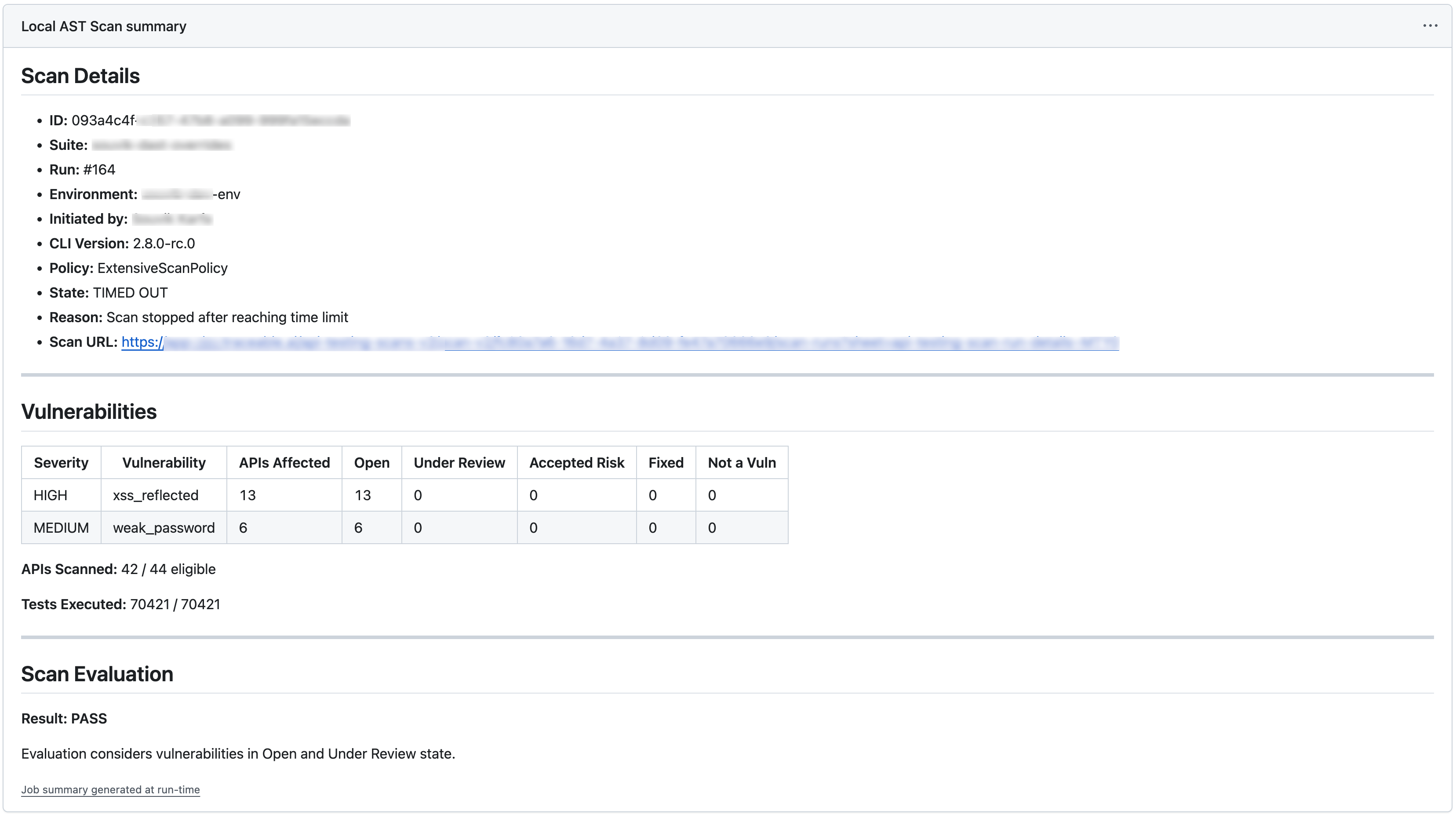
The following is a sample APIST report that Harness RPA generates after the scan runs. The report shows various details about the scan, vulnerabilities, and the scan evaluation status.
Scan report
You can view the report under the **Actions** tab in your GitHub repository: