> For the complete documentation index, see [llms.txt](https://developer.harness.io/llms.txt). Markdown versions of documentation pages are available by appending `.md` to page URLs; this page is available as [Markdown](https://developer.harness.io/web-application-and-api-protection-waap-discovery-discovery-protection-protection/integrations/cloud-security/wiz-integration.md).

# Wiz integration

Integrate Traceable with Wiz and configure the permissions required to push Traceable vulnerabilities to Wiz

<details>

<summary><strong>Updates (October 2026 to December 2026)</strong></summary>

*October 2026*: Updated the Wiz integration documentation to include the permissions required to push Traceable vulnerabilities to Wiz.

</details>

Wiz scans every layer of your cloud environment to provide complete visibility into every technology running in the cloud. Wiz connects to AWS, Azure, GCP, and Kubernetes using APIs across virtual machines, containers, and serverless functions. Traceable protects APIs hosted in this infrastructure and implements application business logic. As part of the integration, Traceable identifies threats for each APIs. These threats and issues in Wiz can be mapped directly in the Traceable Threat Activity screens. This allows you to understand the overall risks for the cloud-native application across API, Kubernetes, serverless, and underlying infrastructure.

To integrate Traceable with Wiz, you need the client ID and secret of the Wiz account. Traceable maps Kubernetes instances, services, VMs, and so on by utilizing the information our tracing agents capture at runtime to query Wiz for the relevant resources. This ensures you do not have to track the resources these APIs are running to understand the overall risk. Traceable allows you to pull Wiz-identified issues or push Traceable-identified issues to Wiz.

{% hint style="info" %}
The Wiz integration supports services deployed as VMs and instrumented using Traceable’s eBPF agent.
{% endhint %}

***

## What you will learn from this topic

By the end of this topic, you will be able to;

* Configure the Wiz integration in Traceable.
* Push logged and blocked threat activity events from Traceable to Wiz.
* Pull Wiz issues and view them in Traceable.
* Push Traceable vulnerability findings to Wiz.

***

## Before you begin

Make a note of the following before proceeding with Wiz integration:

* Ensure you have access to the Wiz Client ID and Wiz Secret Access Key from the Wiz management console.
* Ensure you have the information on relevant services in Traceable, which has cloud resources visible in the Wiz Console.
* Ensure you have read and completed the steps mentioned in the [Wiz documentation](https://docs.wiz.io/wiz-docs/docs/traceable-integration) for integration with Traceable.
* Ensure that Traceable has the following permissions in Wiz:
  * Push notifications: System Activities and External Data Ingestion permissions.
  * Pull issues: Resources and Issues permissions.
  * Push Vulnerability: Required permissions to create or update vulnerability findings in Wiz.

The document assumes that you have reasonable knowledge of the Wiz management console, such as how to look for containers, VMs, and serverless functions under the Overview tab.

***

## Configuration

To configure Wiz integration in Traceable, log in to your account and complete the following steps:

1. Navigate to the **Integrations** page.

![traceable\_wiz\_integration\_dashboard](https://1414883571-files.gitbook.io/~/files/v0/b/gitbook-x-prod.appspot.com/o/spaces%2Fdr7UJpJrdGkkSGT6AFTu%2Fuploads%2Fgit-blob-0d1120173cc387170c233223418b3520f5276ce9%2FTraceable_wiz_navigation.png?alt=media)

2. Click **Configure** to specify the configuration details:

* **API Endpoint URL**: The Wiz Integration API has a single GraphQL endpoint, such as *<https://api.\\><region>.app.wiz.io/graphql*. The region defines where the tenant resides, for example, *us1, us2, eu1, or eu2*.
* **Token URL**: The token URL is an Auth0 or Amazon Cognito endpoint, depending on your service account's identity provider.
* **Client ID and secret**: These are the OAuth credentials required to request a new API token with every API call. A token lasts 24 hours.

3. Choose whether to pull or push the issues or vulnerabilities from Wiz.
4. Click **Test Connection** to see whether Traceable can integrate with Wiz with the given credentials. If the connection fails, an error message is displayed. In case of an error, check the credentials you entered. The **Save** button is enabled only when the test connection succeeds.

<img src="https://1414883571-files.gitbook.io/~/files/v0/b/gitbook-x-prod.appspot.com/o/spaces%2Fdr7UJpJrdGkkSGT6AFTu%2Fuploads%2Fgit-blob-c9382d261305a9e41059b7e3409b4236a42df2a7%2FTraceable_Integrations_update_wiz_integration_slide_out%20(1).png?alt=media" alt="" width="563">

***

## Push events to Wiz

Traceable can push events based on the configuration that you completed above. You can view these events under **Protection** → **Threat activity**. The events that are pushed to Wiz are of the following two types:

* Logged threat activity
* Blocked threat activity

To push the events to Wiz, you need to set up notifications. Complete the following steps:

1. Navigate to **Settings** → **Configurations** → **Notifications**.
2. Click **Create Notification** to create a new notification.
3. Select **Wiz Integration** from the *Who should receive the notification* drop-down list on the Create Notification page.
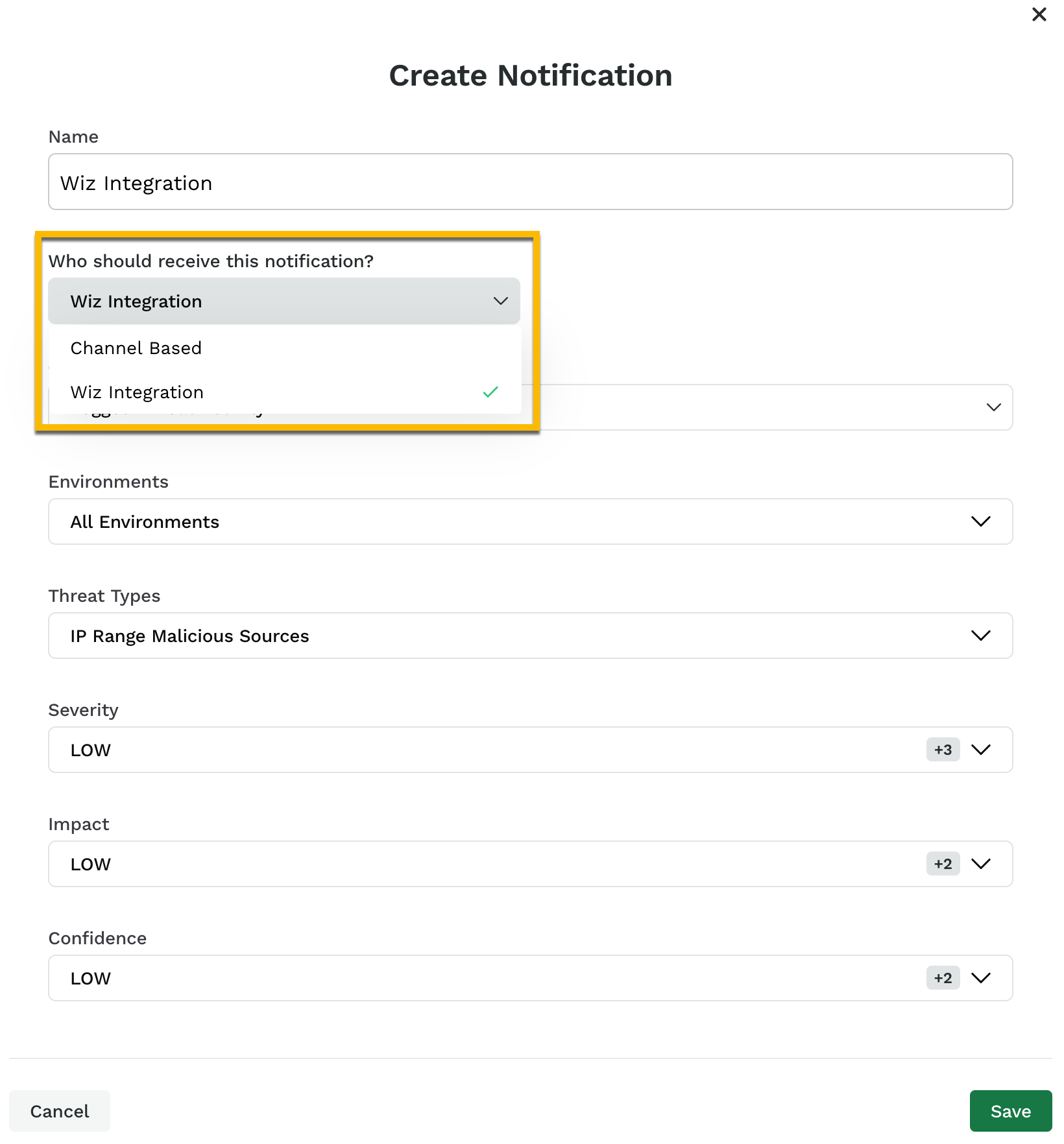
   <img src="https://1414883571-files.gitbook.io/~/files/v0/b/gitbook-x-prod.appspot.com/o/spaces%2Fdr7UJpJrdGkkSGT6AFTu%2Fuploads%2Fgit-blob-376031ce9ee30f0bc3a4716c19696836ba9a6ffb%2Ftraceable_wiz_integration_notification_select_channel-ql38j6.png?alt=media" alt="traceable_wiz_integration_notification_select_channel" width="418">
4. Select Logged Threat Activity or Blocked Threat Activity from the **Category** drop-down list.

   <div data-gb-custom-block data-tag="hint" data-style="info" class="hint hint-info"><p>You can create two different notifications, one each for Logged and Blocked threat activity.</p></div>
5. Configure the remaining options and click **Save**.

Traceable sends a maximum of 250 events in the 24-hour time window, representing the total count of logged and blocked threat activity. You can view these events in the Cloud Events section of Wiz.

{% hint style="info" %}
You need to configure **Notifications** only to push events to Wiz. The pulling of issues from Wiz happens automatically.
{% endhint %}

You can view the events pushed to Wiz by navigating to **Cloud Events** as shown below:

<img src="https://1414883571-files.gitbook.io/~/files/v0/b/gitbook-x-prod.appspot.com/o/spaces%2Fdr7UJpJrdGkkSGT6AFTu%2Fuploads%2Fgit-blob-5e93cd72ef0c001dc31ef2efe275b3bfec5496d3%2Ftraceable_wiz_integration_push_event_in_wiz-ca8cv8.png?alt=media" alt="" width="1016">

***

## Pull issues from Wiz

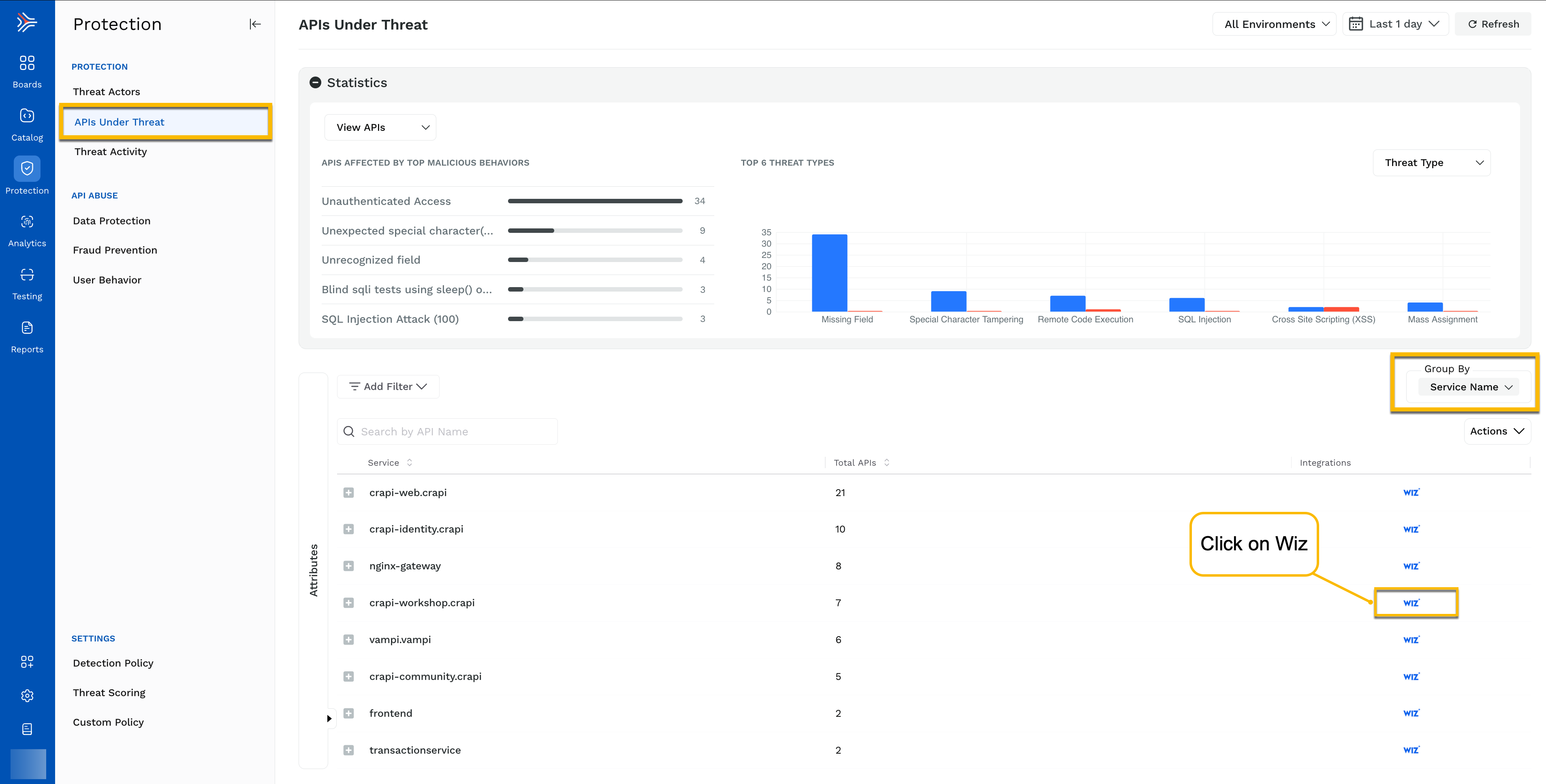
You can view the Wiz issues in Traceable by navigating to **Protection → APIs Under Threat**. To list the Wiz issues in Traceable, group by **Service Name**, as shown in the screenshot below.
<figure><img src="https://1414883571-files.gitbook.io/~/files/v0/b/gitbook-x-prod.appspot.com/o/spaces%2Fdr7UJpJrdGkkSGT6AFTu%2Fuploads%2Fgit-blob-e09d52731cbcefdec54071b0560f91c8342290e5%2Ftraceable_wiz_issues_in_traceable-1--1fnta3r.png?alt=media" alt="traceable_wiz_issues_in_traceable(1)" width="900"><figcaption><p><br></p></figcaption></figure>

You can click **Wiz** under the **Integrations** column to view the **Issues** found through Wiz.

<img src="https://1414883571-files.gitbook.io/~/files/v0/b/gitbook-x-prod.appspot.com/o/spaces%2Fdr7UJpJrdGkkSGT6AFTu%2Fuploads%2Fgit-blob-54ad6fa6801528dd404120ba74f5385df2eab4ab%2Ftraceable_wiz_integration_pull_events_from_wiz-1eetka9.png?alt=media" alt="traceable_wiz_integration_pull_events_from_wiz" width="900">

Traceable automatically determines which APIs are running on cloud resources that Wiz protects. You can further drill down into details by clicking any of the service names as shown below:

<img src="https://1414883571-files.gitbook.io/~/files/v0/b/gitbook-x-prod.appspot.com/o/spaces%2Fdr7UJpJrdGkkSGT6AFTu%2Fuploads%2Fgit-blob-0aca967d7862d81ebf2ea37c7cd7ec92e3cba454%2Ftraceable_wiz_issues_in_traceable_detailed_info-zkvvjf.png?alt=media" alt="" width="1000">

***

## Push vulnerability to Wiz <a href="#push-vulnerability-to-wiz" id="push-vulnerability-to-wiz"></a>

Traceable can push vulnerability findings to Wiz, allowing you to view and manage Traceable vulnerabilities alongside findings from your cloud environment. To enable this capability, configure the Wiz integration with the required permissions to create or update vulnerability findings.

{% @harness-feedback/feedback %}
