> For the complete documentation index, see [llms.txt](https://developer.harness.io/llms.txt). Markdown versions of documentation pages are available by appending `.md` to page URLs; this page is available as [Markdown](https://developer.harness.io/web-application-and-api-protection-waap-discovery-discovery-protection-protection/integrations/siem-soar/http-event-collector-hec-integration.md).

# HTTP Event Collector (HEC) Integration

Learn how to integrate Harness RPA data to SIEM platforms in real time by using the token-based HTTP Event Collector (HEC).

<details>

<summary><strong>Updates ( October 2026 to December 2026)</strong></summary>

* *October 2026:* Updated the topic to add a new HEC-supported SIEM platform, Cortex to better monitor and analyze threats in Harness RPA. For more information, see [Generate the API credentials from your SIEM platform](#generate-the-api-credentials-from-your-siem-platform).

</details>

The HTTP Event Collector (HEC) is a secure, token-based system that allows sending logs, events, and other relevant data without requiring additional software installation or login credentials. It simplifies integration, eliminates the need for agents, supports structured data, such as JSON, and enables users to monitor and respond to issues quickly.

Harness RPA automatically streams real-time data to the external platform, supporting seamless monitoring, analysis, and alerting. This enables you to send and collect data quickly and safely from anywhere, providing real-time visibility and actionable insights. Harness RPA integrates with the following SIEM platforms, *Splunk, CrowdStrike, and Cortex*, through HEC to deliver real-time API security data. Harness RPA provides a seamless, secure, and scalable way to connect API security intelligence with enterprise security workflows by forwarding data through HEC. This integration connects Harness RPA events to threat data, helping you investigate more quickly and strengthen overall response efforts.

{% hint style="info" %}

* HEC is available for Splunk, CrowdStrike, and Cortex integration. Navigate to [Generate the API Credentials from your SIEM platform](#generate-the-api-credentials-from-your-siem-platform) for more details.
* HEC is available across all environments.
  {% endhint %}

***

## What you will learn from this topic

By the end of this topic, you will be able to:

* Understand the need for HTTP Event Collector (HEC).
* Understand the prerequisites for the *CrowdStrike, Splunk, or Cortex* integration.
* Understand the steps to add a new HEC integration.
* Understand the steps to set up a notification channel to receive updates about HEC.

***

## Before you begin

Make a note of the following before proceeding with the integration:

* (For *Splunk* only) Make sure that you have the HTTP Event Collector (HEC) URL and the API token from the Splunk platform. For more information, see [Generate the API Credentials from your SIEM platform](#generate-the-api-credentials-from-your-siem-platform).
* (For *CrowdStrike* only) Make sure that you have the HTTP Event Collector (HEC) URL and the API token from the CrowdStrike platform. For more information, see [Generate the API Credentials from your SIEM platform](#generate-the-api-credentials-from-your-siem-platform).
* (For *Cortex* only) Make sure that you have the HTTP Event Collector (HEC) URL and the API token from the Cortex platform. For more information, see [Generate the API Credentials from your SIEM platform](#generate-the-api-credentials-from-your-siem-platform).

***

## **Generate the API credentials from your SIEM platform**

Harness RPA allows you to integrate with the following SIEM platforms:

{% tabs %}
{% tab title="Splunk" %}
Splunk SIEM provides real-time monitoring and early threat detection, enabling you to identify issues quickly, respond faster, and stay ahead of modern threats. By using the Splunk HTTP Event Collector (HEC), you can send Harness RPA alert notifications over HTTP or HTTPS directly into Splunk, where you can review and take the necessary actions. Harness RPA automatically sends threat activity and detection events to Splunk for analysis and investigation. This integration simplifies monitoring and gives you a single place to capture and respond to critical security events quickly.

To fetch the *HTTP Event Collector URL* and the *API token* for integration, go to [Configure HTTP Event Collector on Splunk Cloud Platform](https://help.splunk.com/en/splunk-enterprise/get-started/get-data-in/9.1/get-data-with-http-event-collector/set-up-and-use-http-event-collector-in-splunk-web#ariaid-title4) and follow the steps. Now, you can use this *API token* and *URL* for HEC integration. For more information, see [Add New HTTP Event Collector Integration](#step-1-add-new-http-event-collector-integration).
{% endtab %}

{% tab title="CrowdStrike" %}
CrowdStrike is a cloud-native platform that centralizes threat data and uses AI-driven analytics to detect and respond to security incidents. It helps us provide deep API security insights such as attack patterns, anomalous behaviors, and sensitive data exposure. This enables faster incident response, improved correlation with enterprise-wide threats, and a stronger overall security posture.

To fetch the *API Key (Token)* and the *API URL* for integrating with Traceable, log in to your CrowdStrike account and complete the following steps:

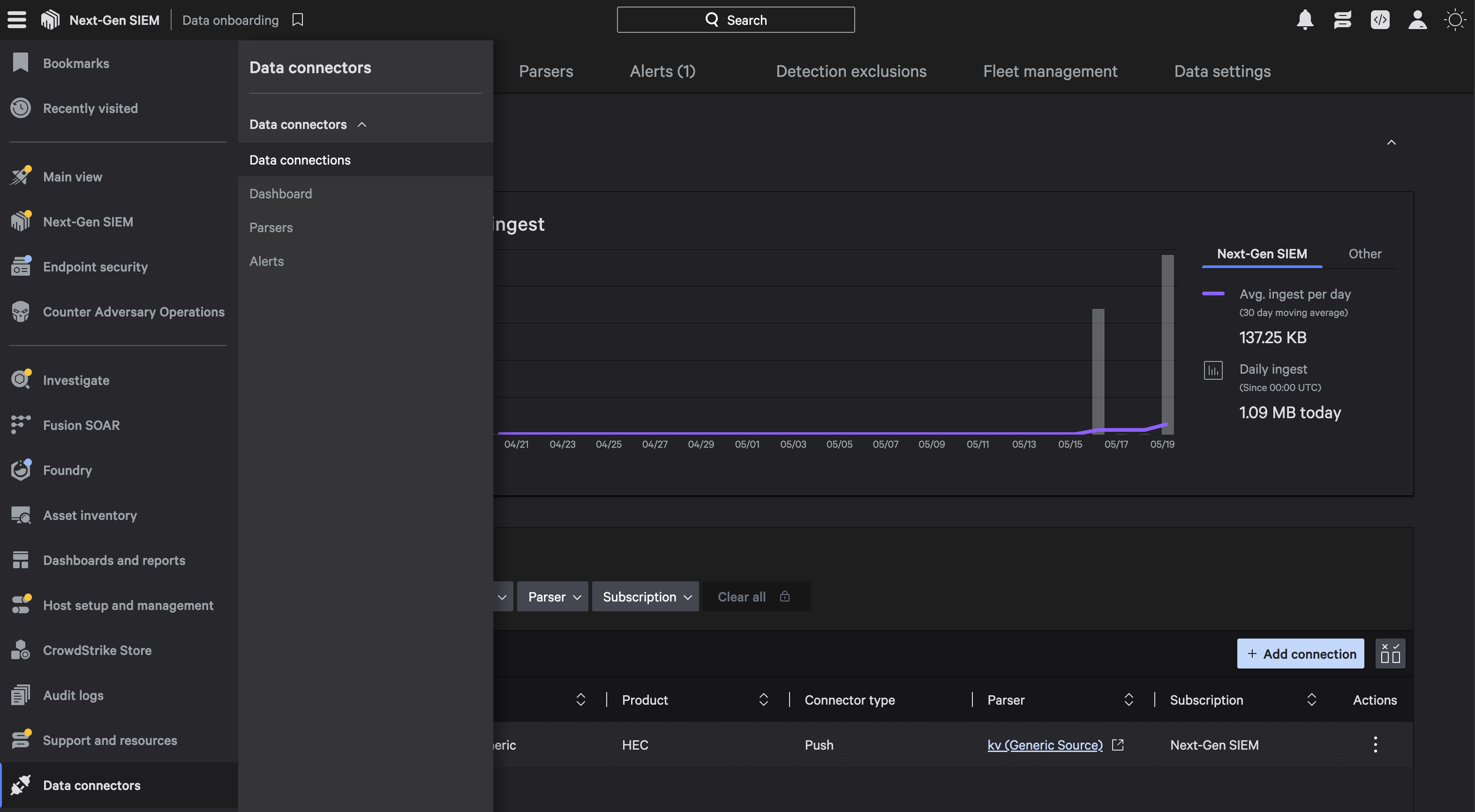
1. Navigate to **Data Connectors** → **Data Connections** in Falcon.

<img src="https://1414883571-files.gitbook.io/~/files/v0/b/gitbook-x-prod.appspot.com/o/spaces%2Fdr7UJpJrdGkkSGT6AFTu%2Fuploads%2Fgit-blob-4993f00c19d1740eaefbc3dd3f85dda39f977486%2Fimage-20250520-120507-20-3--8k9ra5.png?alt=media" alt="" width="750">

1. Select **HEC/HTTP Event Collector**, and click **Configure**.
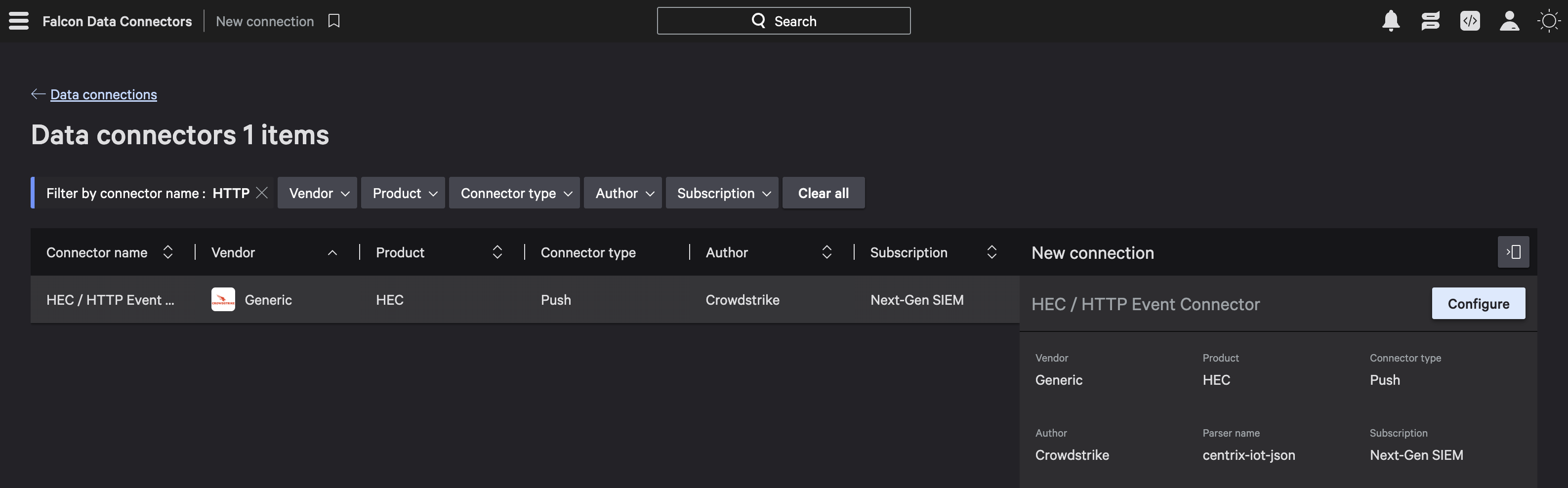
<img src="https://1414883571-files.gitbook.io/~/files/v0/b/gitbook-x-prod.appspot.com/o/spaces%2Fdr7UJpJrdGkkSGT6AFTu%2Fuploads%2Fgit-blob-47b3ebc4c302a4b79ad2290874cdeee82523d2b9%2FData_connectors_CrowdStrikw-lu25db.png?alt=media" alt="" width="750">

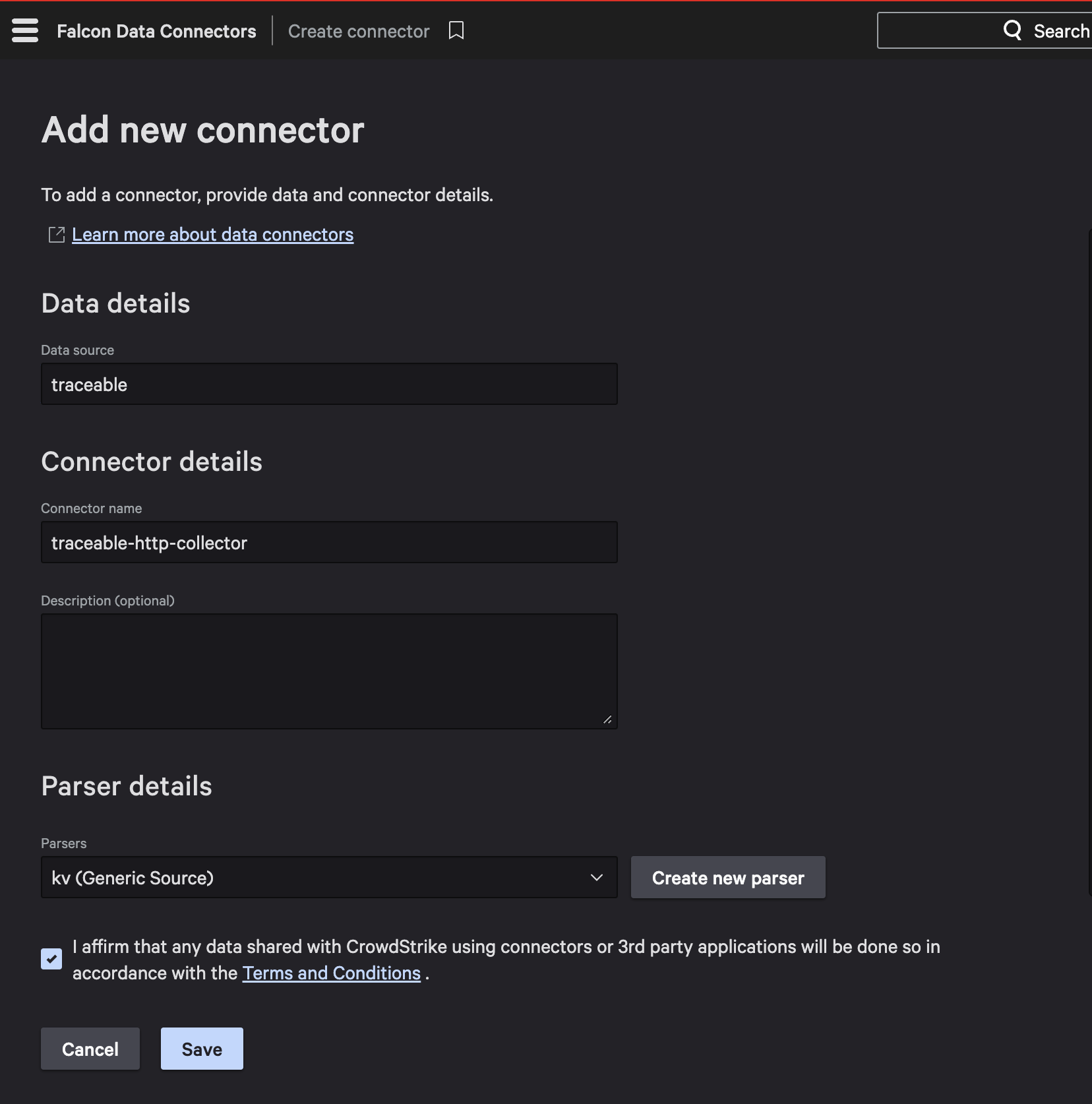
1. Under **Add new connector** provide the **Connector details** and **Parser details** to configure it.

   1. Specify a suitable **data source** name, for example, *traceable*.
   2. Specify a **connector name**, for example, *traceable-http-collector*.
   3. Select *kv (Generic Source)* as the **Parsers**, and click **Save**.
   ![](https://1414883571-files.gitbook.io/~/files/v0/b/gitbook-x-prod.appspot.com/o/spaces%2Fdr7UJpJrdGkkSGT6AFTu%2Fuploads%2Fgit-blob-52a2725bd6642bb78b1a0bb68270a888abe9e0d1%2Fimage-20250520-120902-20-1-1--67i2os.png?alt=media)
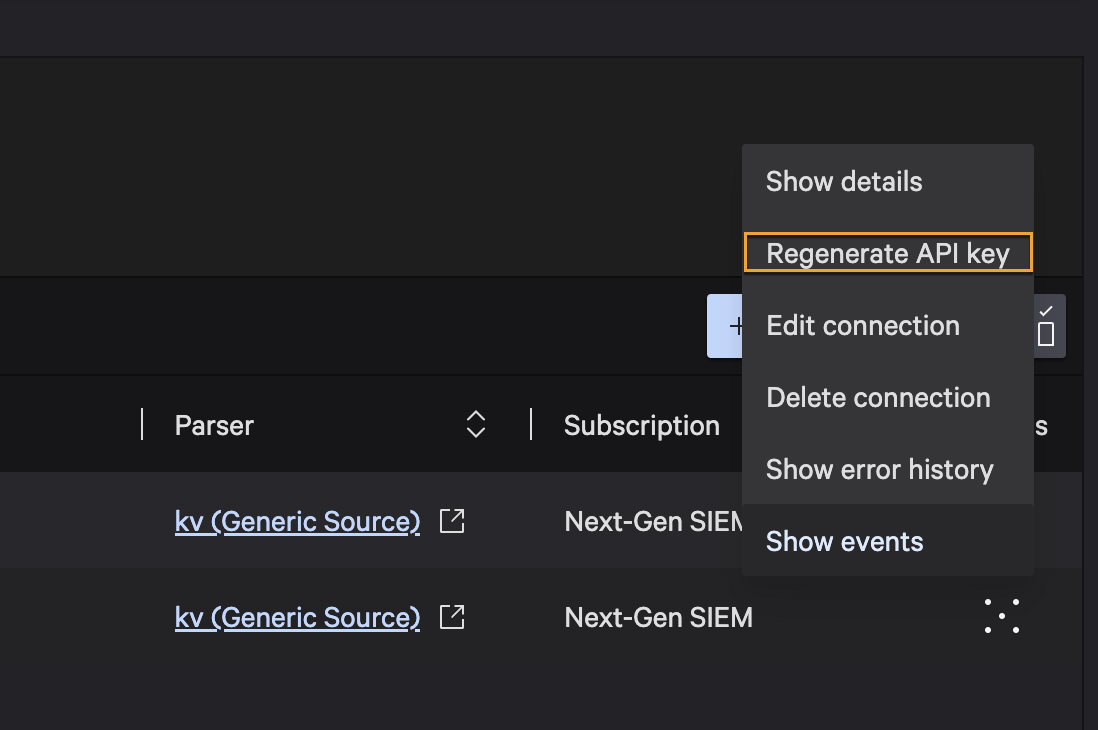
2. Click **Regenerate API Key** to fetch the *API key*.

<div data-with-frame="true"><img src="https://1414883571-files.gitbook.io/~/files/v0/b/gitbook-x-prod.appspot.com/o/spaces%2Fdr7UJpJrdGkkSGT6AFTu%2Fuploads%2Fgit-blob-ad2a9902c5ca3d5b9f2aee0a088b25e67a5f7471%2Fimage-20-6-20-1-2--jsmu37.png?alt=media" alt="API Key Generation"></div>

1. Copy the *API URL* and the *API Key* required for the integration. For more information, see [CrowdStrike URL and API Token Generation](https://developer.crowdstrike.com/docs/openapi/).

![API URL](https://1414883571-files.gitbook.io/~/files/v0/b/gitbook-x-prod.appspot.com/o/spaces%2Fdr7UJpJrdGkkSGT6AFTu%2Fuploads%2Fgit-blob-05479a4e91cff973835f792c5e561bf110d15562%2FAPI_KEY_CrowdStrike-asub54.png?alt=media)

You can now use this *API key( token)* and the *API URL* for setting up the HEC integration. For more information, see [Add New HTTP Event Collector Integration](#step-1-add-new-http-event-collector-integration).
{% endtab %}

{% tab title="Cortex" %}
Palo Alto Networks Cortex integrates with Traceable to bring detected API security threats into your workflows. Traceable's integration with Cortex enables you to import detected threat activities as security incidents, providing context about the threat, the actor, and associated request and response payloads. For more information, see [Cortex Documentation](https://cortex-docs.paloaltonetworks.com/cortex-xsiam/configure-cortex-xsiam/cortex-xsiam-data-sources/vendor-specific-data-sources-and-connectors/http-log-collector/set-up-an-http-log-collector-to-receive-logs)

To fetch the *API Key (Token)* and the *API URL* for integrating with Harness RPA, log in to your Cortex account and complete the following steps:

1. Navigate to **Data Sources and Integrations**, and select **+ Add New**.

<figure><img src="https://1414883571-files.gitbook.io/~/files/v0/b/gitbook-x-prod.appspot.com/o/spaces%2Fdr7UJpJrdGkkSGT6AFTu%2Fuploads%2Fgit-blob-bf539cfe3ec8dfe75bb8d0a4a12cc4e3e0a17385%2FTraceable_integrations_cortex_platofrm_add-sources.png?alt=media" alt="" width="563"><figcaption></figcaption></figure>

2. Search for **Custom - HTTP Log Collector** and select it.

<figure><img src="https://1414883571-files.gitbook.io/~/files/v0/b/gitbook-x-prod.appspot.com/o/spaces%2Fdr7UJpJrdGkkSGT6AFTu%2Fuploads%2Fgit-blob-a7d4f674366a1068a486fd9025bc2f729372ba13%2FTraceable_cortex_add_new_integration.png?alt=media" alt="" width="563"><figcaption></figcaption></figure>

3. Specify the following details, copy the generated API key.

<figure><img src="https://1414883571-files.gitbook.io/~/files/v0/b/gitbook-x-prod.appspot.com/o/spaces%2Fdr7UJpJrdGkkSGT6AFTu%2Fuploads%2Fgit-blob-e160d77e4b7ab0d86c1016137b2f3991ccb5501a%2FTraceable_generate_token_cortex.png?alt=media" alt="" width="375"><figcaption></figcaption></figure>

{% hint style="info" %}
Make sure you securely save the URL and the generated token, as you will need them later in the integration.
{% endhint %}
{% endtab %}
{% endtabs %}

***

## **Set up the integration**

The HTTP Event Collector (HEC) integration is configured to receive data over HTTP(s). You can set up this integration to allow Harness RPA to send security events directly to Splunk, CrowdStrike, or Cortex for threat detection. To set up the integration, complete the following steps:

### Step 1: Add new HTTP Event Collector integration

Log in to your account, navigate to **Integrations**, and do one of the following:

* Under All Integrations, search for *HTTP Event Collector* in the search bar.
* Under All Integrations, navigate to **SIEM/SOAR** → **HTTP Event Collector**.

In the **Add New HTTP Event Collector** **Integration** window, complete the following steps:

<figure><img src="https://1414883571-files.gitbook.io/~/files/v0/b/gitbook-x-prod.appspot.com/o/spaces%2Fdr7UJpJrdGkkSGT6AFTu%2Fuploads%2Fgit-blob-efaac4d5dc8bc2cf8b5ea5e6e30f3709ea2cff68%2FTraceable_HEC_cortex.png?alt=media" alt="" width="563"><figcaption><p>Add new HEC integration</p></figcaption></figure>

1. Specify the **Integration Name**, for example, *HTTP Event Collector*.
2. (Optional) Specify the **Description**, for example, *SIEM/SOAR int*.
3. Select either of the following from the **SIEM platforms** drop-down.
   1. [Splunk (HEC)](#generate-api-credentials-from-your-siem-platform-for-hec-integration)
   2. [Crowdstrike Logscale](#generate-api-credentials-from-your-siem-platform-for-hec-integration)
   3. [Cortex](#generate-the-api-credentials-from-your-siem-platform)
4. Specify the **URL of the** **HTTP Event Collector** fetched from the above chosen SIEM platform. For more information, see [Before you begin](#before-you-begin).
5. Specify the **HTTP Event Collector API Token** fetched from the above chosen SIEM platform. For more information, see [Before you begin](#before-you-begin).

   <div data-gb-custom-block data-tag="hint" data-style="info" class="hint hint-info"><p>It is mandatory to provide a token while configuring this integration in Traceable.</p></div>
6. Click **Test Connection**. Harness RPA validates the *URL* and the *API Token*. Once the validation succeeds, click **Save**.

***

### **Step** **2:** **Create a notification** **channel**

You must create a notification channel to receive notifications when an event is triggered. To create a channel, log in to your account, navigate to **Settings** (<i class="fa-gear">:gear:</i>) → **Notifications** → **Create Channel**, and complete the following steps:

<figure><img src="https://1414883571-files.gitbook.io/~/files/v0/b/gitbook-x-prod.appspot.com/o/spaces%2Fdr7UJpJrdGkkSGT6AFTu%2Fuploads%2Fgit-blob-a8cbbafda2a974701b22a9409b2822c766daedd4%2FTraceable_cortex_notification.png?alt=media" alt="" width="375"><figcaption><p>Create Channel</p></figcaption></figure>

1. Specify a name for the channel, for example, *HEC\_Channel.*
2. Enable the **HTTP Event Collector Webhook** toggle. For more information, see [Notifications](https://developer.harness.io/web-application-and-api-protection-waap-discovery-discovery-protection-protection/settings/configuration/notification.md#step-1-create-a-channel).
3. Once you have enabled the toggle, click **Save**.

***

### **Step** **3:** **Set up** **a notification rule**

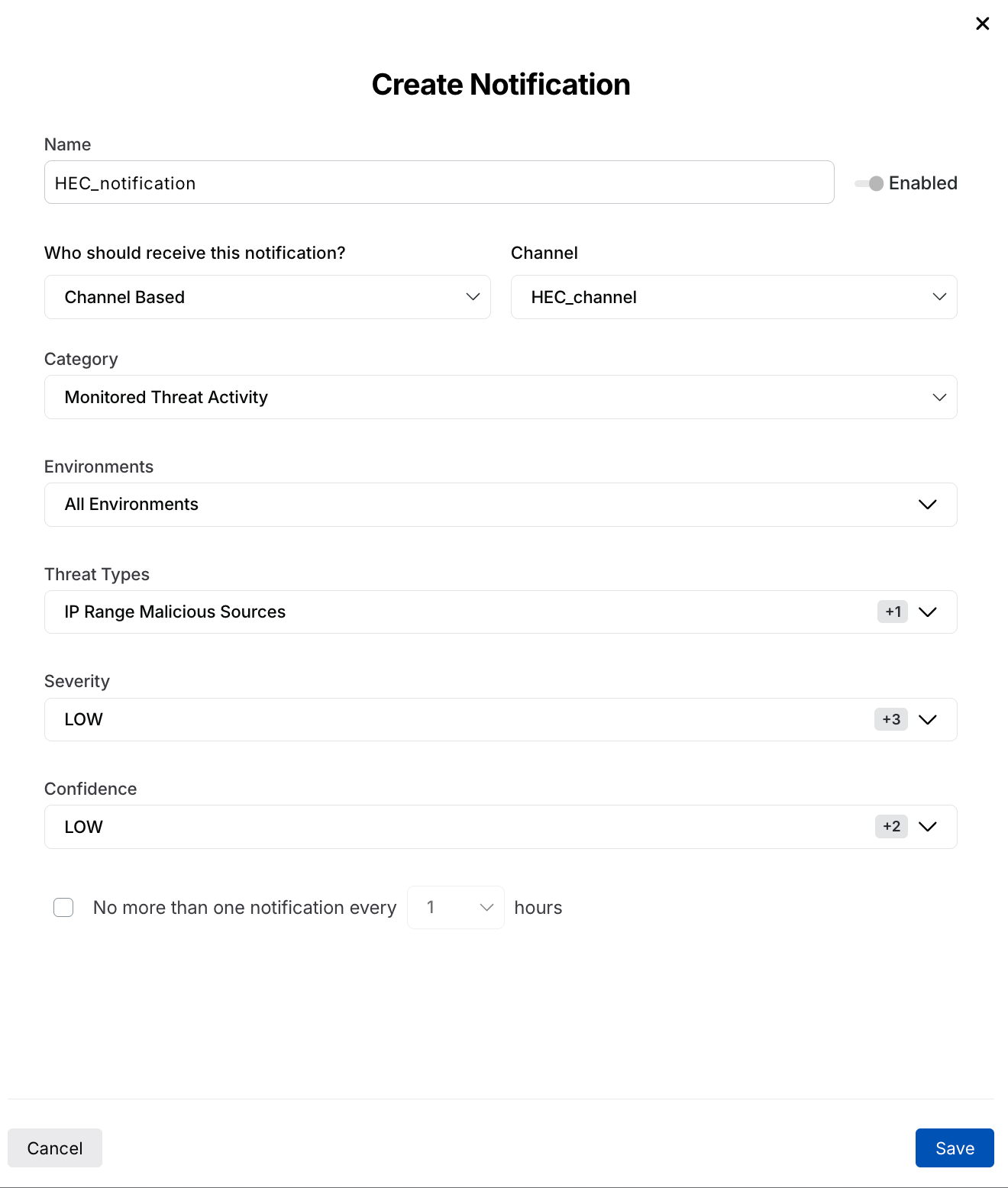
Harness RPA sends a notification through the channel when an event matches the selected category and type. It allows you to be notified if any rule you create triggers an event. To set up the notification, log in to your account, navigate to **Settings** (<i class="fa-gear">:gear:</i>) → **Notifications** → **Create** **Notification**, and complete the following steps:

<figure><img src="https://1414883571-files.gitbook.io/~/files/v0/b/gitbook-x-prod.appspot.com/o/spaces%2Fdr7UJpJrdGkkSGT6AFTu%2Fuploads%2Fgit-blob-f50dbb2a3d5d8b19b7a8ed350abc46b99db08686%2FTraceable_HEC_create_notification-235p1d.png?alt=media" alt="" width="439"><figcaption><p>Create Notification</p></figcaption></figure>

1. Specify a **Name** for your notification, for example, *HEC\_notif.*
2. Select **Who should receive this notification** from the drop-down, for example, *Channel Based*.
3. Select the **Channel** that you created in [Step 2](#step-2-create-a-notification-channel) above, from the drop-down, for example, *HEC\_Channel*.
4. Select the **Category** from the drop-down. For more information, see [Notifications](https://developer.harness.io/web-application-and-api-protection-waap-discovery-discovery-protection-protection/settings/configuration/notification.md#step-2-create-a-notification-rule).
5. Select the **Threat Types** according to your requirements.
6. Select **All Environments** under **Environments**.
7. Click **Save**.

***

## Demo

The following interactive demo walks you through the steps to navigate, integrate the HTTP Event Collector (HEC) with Harness RPA, and create channel notifications.

{% @arcade/embed url="<https://app.arcade.software/share/2uuIPsC5qyjD2pgD3weh>" flowId="2uuIPsC5qyjD2pgD3weh" %}

After you configure the integration, Harness RPA monitors your application traffic and detects security events. When it identifies a threat, it generates a notification and sends the event data via the HTTP Event Collector (HEC).

{% @harness-feedback/feedback %}