> For the complete documentation index, see [llms.txt](https://developer.harness.io/llms.txt). Markdown versions of documentation pages are available by appending `.md` to page URLs; this page is available as [Markdown](https://developer.harness.io/web-application-and-api-protection-waap-discovery-discovery/api-security-testing/advanced-usage/policies.md).

# Policies

<details>

<summary>Updates (July 2026 to September 2026)</summary>

* *August 2026* — Updated the page to add information about the types of predefined policies. For more information, see [Available policies](#available-policies).

</details>

Policies in API Security Testing (APIST) define the vulnerability types you want Traceable to detect in your endpoints, including any AI endpoints.

## What you will learn from this topic <a href="#what-will-you-learn-from-this-topic" id="what-will-you-learn-from-this-topic"></a>

By the end of this topic, you will be able to understand:

* The available predefined policies by Traceable, and when to use each one.
* Steps to create a custom policy.
* The ways you can select attacks when creating a custom policy.

***

## Available policies <a href="#available-policies" id="available-policies"></a>

The following are the available predefined policies by Traceable. These are the system built-in policies that do not require custom YAML configuration:

<table><thead><tr><th width="278.79083251953125">Policy</th><th width="154.5433349609375">Plugin count</th><th>Purpose</th></tr></thead><tbody><tr><td><strong>PipelineScanPolicy</strong></td><td>14</td><td>Runs fast, high-severity checks to secure CI/CD pipelines without slowing delivery.</td></tr><tr><td><strong>DailyScanPolicy</strong></td><td>31</td><td>Runs balanced daily security coverage without excessive execution time.</td></tr><tr><td><strong>SafeScanPolicy</strong></td><td>35</td><td>Runs non-destructive tests safely against production APIs for continuous coverage.</td></tr><tr><td><strong>QuickScanPolicy</strong></td><td>53</td><td>Runs broad, fast checks for ad-hoc, pre-demo, or targeted API testing.</td></tr><tr><td><strong>PciDssScanPolicy</strong></td><td>88</td><td>Tests vulnerability classes relevant to PCI DSS compliance on payment APIs.</td></tr><tr><td><strong>OwaspTopTenScanPolicy</strong></td><td>88</td><td>Tests against the OWASP API Security Top 10 for audit-friendly vulnerability coverage.</td></tr><tr><td><strong>WeeklyScanPolicy</strong></td><td>90</td><td>Runs a thorough weekly scan that balances breadth and execution time for production audit baselines.</td></tr><tr><td><strong>ExtensiveScanPolicy</strong></td><td>124</td><td>Runs the most comprehensive scan available for deep-dive audits and compliance testing.</td></tr></tbody></table>

Traceable measures the performance of these policies to help you anticipate scan behavior before choosing the right policy. For more information, see [Scan Policy Performance](/web-application-and-api-protection-waap-discovery-discovery/api-security-testing/advanced-usage/policies/scan-policy-performance.md). If none of the predefined policies fit your requirements, you can create a custom policy. For more information, see the section below.

***

## Create a policy <a href="#creating-a-policy" id="creating-a-policy"></a>

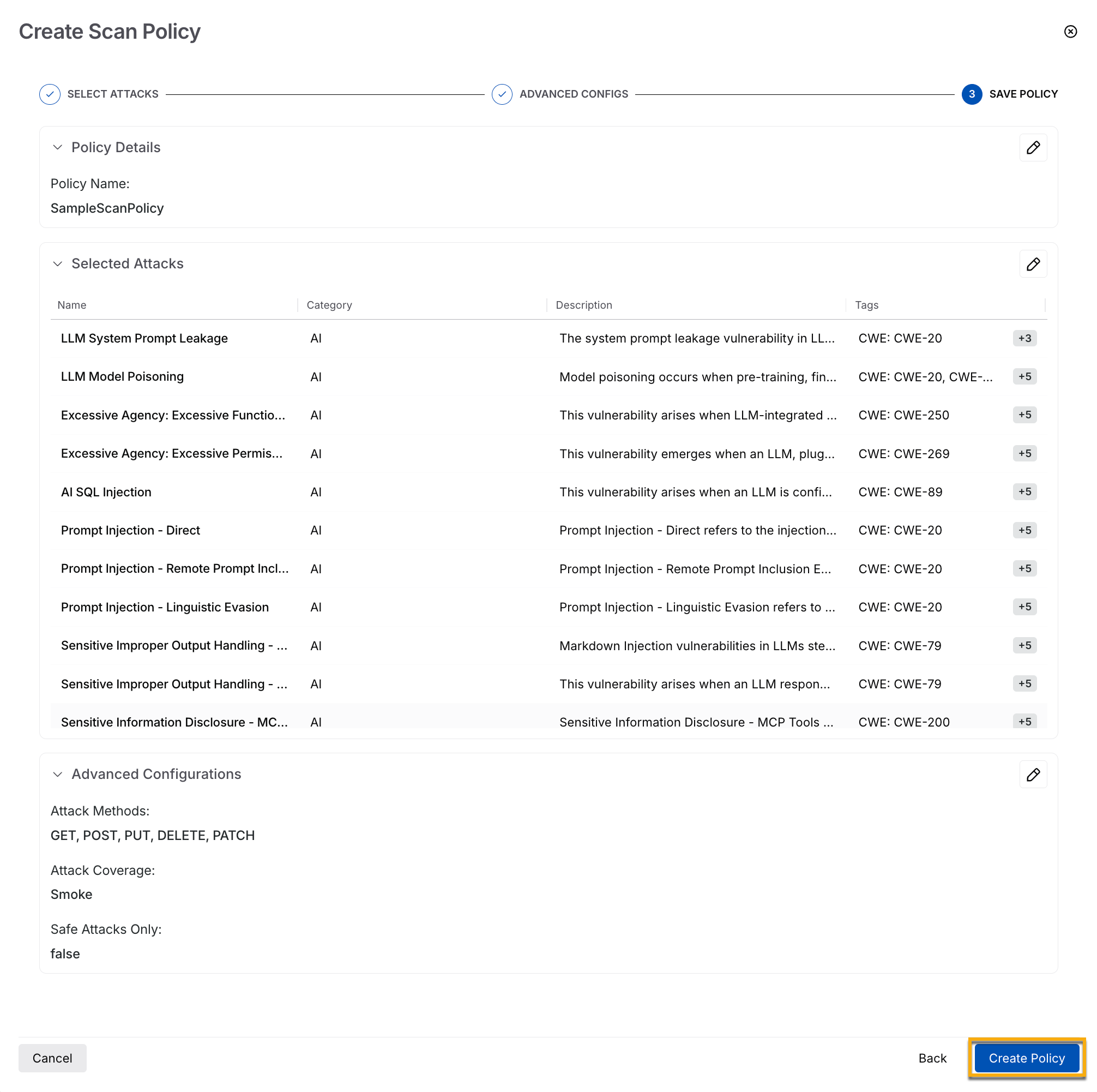
To create a custom policy, navigate to **Testing** → **Policies** and click **Create Scan Policy**. To create a policy, follow the given steps:

<figure><img src="https://1414883571-files.gitbook.io/~/files/v0/b/gitbook-x-prod.appspot.com/o/spaces%2Fdr7UJpJrdGkkSGT6AFTu%2Fuploads%2Fgit-blob-664fe9431e0917df80932dfe9f138a5795d8e296%2Ftraceable_ast_scan_policy-1--k4uq0l.png?alt=media" alt="AST Scan Policy" width="594"><figcaption><p>AST Scan Policy</p></figcaption></figure>

1. **Select the attacks:** Specify the Policy name and select the attacks from one of the three ways listed in [Attack selection](#attack-selection).
2. **Advance configuration:** You can select the following advanced configurations:
   1. **Attack methods:** Choose from GET, PUT, POST, DELETE, and PATCH.
   2. **Attack coverage:** This advanced option lets you choose the type of tests you wish to run:
      * **Smoke:** These are basic security tests for continuous coverage.
      * **Optimized:** Traceable runs fewer, smarter tests using selective payloads and learned data when you select this option.
      * **Exhaustive:** When you choose this option, Traceable attempts to cover all the scenarios with all possible attacks.
   3. **Run only safe attacks:** Choose this option to run API Security Tests directly in the production environment. The tests run when you select this option are non-disruptive.
3. **Save the policy:** Traceable displays a policy summary as the final step. Click **Create Policy** to save the policy.

***

## Attack selection <a href="#attack-selection" id="attack-selection"></a>

AST scans execute attacks on your API endpoints and detect the selected vulnerabilities. You can select the attacks in either of the following ways:

* **Specific attacks**: Traceable runs your selected tests on the API endpoints when you choose this option.
* **All attacks**: Traceable runs all available tests on your API endpoints when you choose this option. However, this may be time-consuming.
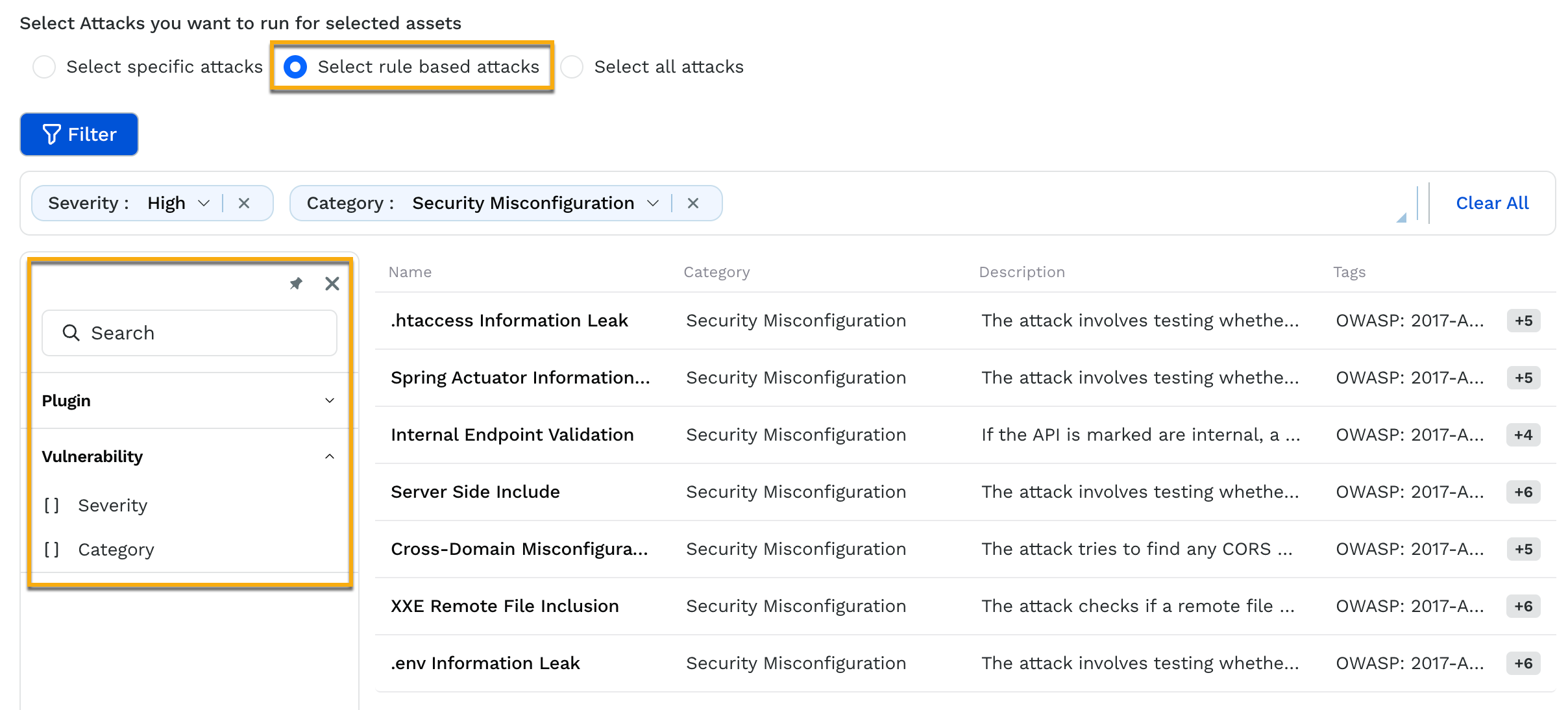
* **Rule-based attacks**: Traceable runs the available tests on the API endpoints based on the filters you apply when you choose this option. For example, the filters in the screenshot identify *Security Misconfiguration* and *High*-severity vulnerabilities.

<figure><img src="https://1414883571-files.gitbook.io/~/files/v0/b/gitbook-x-prod.appspot.com/o/spaces%2Fdr7UJpJrdGkkSGT6AFTu%2Fuploads%2Fgit-blob-3ea64683c4f92d9b6e2ea005cd96cfa2fa127bb4%2Ftraceable_ast_policies_rule_based_attacks-1nmxsra.png?alt=media" alt="" width="860"><figcaption><p>Rule-based Attacks</p></figcaption></figure>

You can choose from the above attacks according to your requirements while creating a policy. For information on the attack recommendations you can use based on the scan you wish to create using the above policy, see [Scan Creation Recommendations](/web-application-and-api-protection-waap-discovery-discovery/api-security-testing/ast-basics-and-workflow/scan-creation-recommendations.md).

For all the categories of attacks, Traceable describes each attack and the OWASP category into which it falls. All the attacks fall into one of the following categories:

* Server-side request forgery
* Security misconfiguration
* JSON Web Token
* Access control
* Insecure design
* SQL injection
* Authorization
* Improper asset management
* Remote code execution
* Data Exposure
* Cross-site scripting
* Security headers
* TLS
* No SQL injection
* Business logic
* Authentication
* AI

{% hint style="info" %}
To run a scan, you need at least one policy. Policies apply to **All Environments.**
{% endhint %}

{% @harness-feedback/feedback %}