> For the complete documentation index, see [llms.txt](https://developer.harness.io/llms.txt). Markdown versions of documentation pages are available by appending `.md` to page URLs; this page is available as [Markdown](https://developer.harness.io/web-application-and-api-protection-waap-discovery-discovery/discovery/discovery-1/application-flow.md).
# Data Flow Map
Updates (October 2026 to December 2026)
*October 2026* — Updated the topic and content to reflect the **Application Flow** renaming to **Data Flow Map** as per the updated user interface.
\
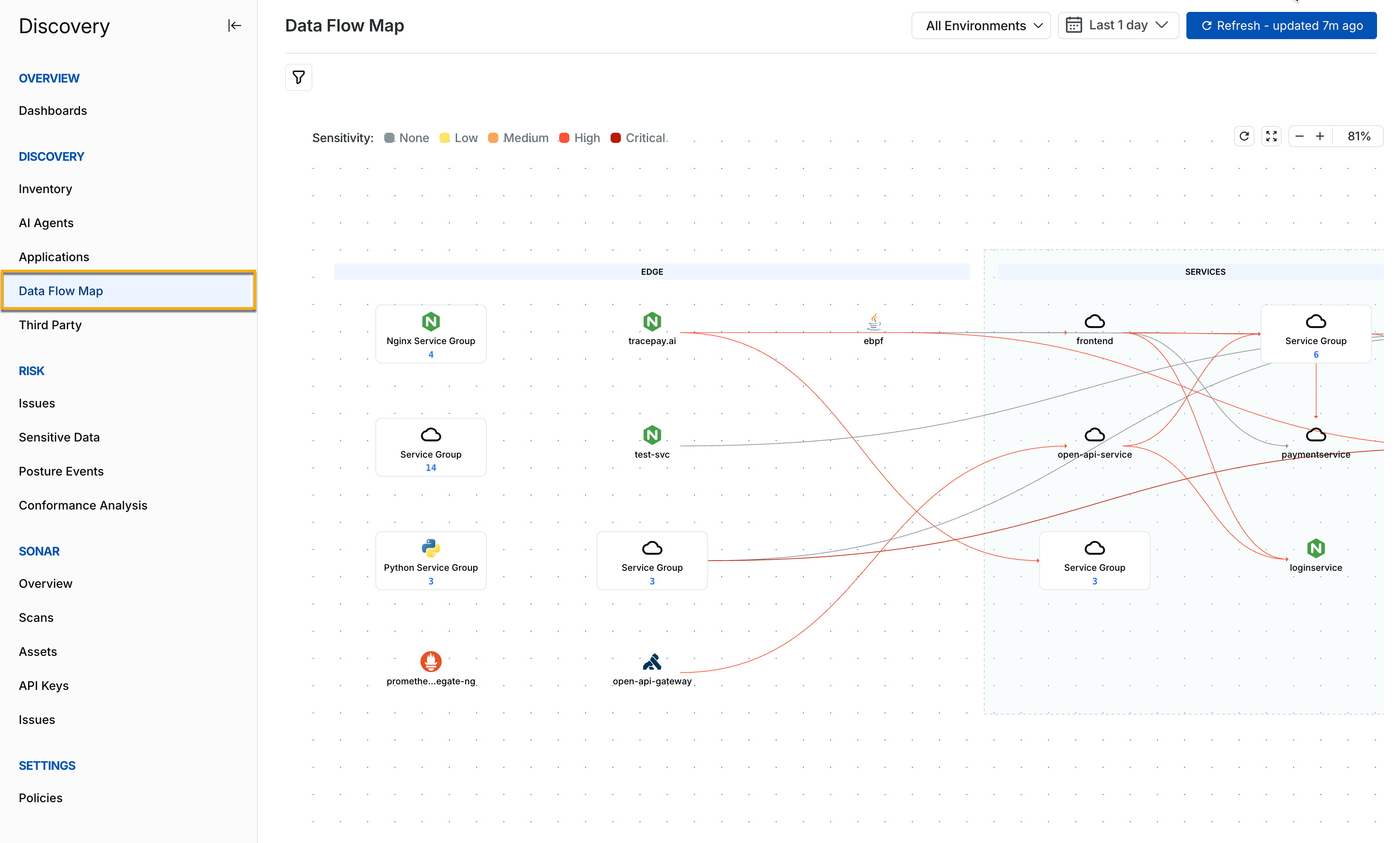
The **Data Flow** **Map** page under **Discovery** depicts the flow of data between multiple components, essentially the Edge, Services, and Backends. The flow visually represents how data and requests traverse through your application. Harness provides this visibility through a map showing traffic flow between services according to your chosen time frame from the top menu bar.
Data Flow Map
***
### **What you will learn from this topic**
By the end of this topic, you will be able to:
* Understand how the **Data Flow Map** represents traffic between Edge, Services, and Backend components.
* Understand how entities are grouped within the Data Flow Map.
* View the entities within a Service Group and their associated APIs.
* Filter the components displayed on the Data Flow Map.
***
### Data Flow Map
The data flow map is useful for simple to complex applications, helping users understand the application’s architecture and functionality quickly and comprehensively. This can help you understand the kind of data flowing and easily identify failures and bottlenecks in the application, leading to faster resolution.
The data flow map contains the following three components:
* **EDGE** — This component represents the entry point of incoming API requests. This may include API gateways, load balancers, or web application firewalls. Edge components are responsible for handling requests, authenticating, and directing them to the appropriate services in the deployment.
* **SERVICES** — This component represents the processing units or microservices within your application. The requests from the Edge are routed to the services. Each service handles specific tasks, such as data processing and interacting with backend databases.
* **BACKEND** — This component represents databases, file systems, and third-party APIs and services that you use in your application to store, manage, and retrieve data. These backends maintain the data and provide it to the services component for processing user requests.
{% hint style="info" %}
The availability of the above components depends on whether there was an interaction between them within your chosen time frame.
{% endhint %}
The following demo illustrates the Data Flow Map in action:
{% @arcade/embed url="" flowId="aPP75CYz5mUap20SgxpX" %}
The components on the flow map are connected using arrows that display the data flow from one component to another. The color of an arrow represents the sensitivity of the data flowing between the components. The sensitivity levels are:
* **None** (gray) — No sensitive data is detected on the connection.
* **Low** (yellow) — The connection carries data with low sensitivity.
* **Medium** (orange) — The connection carries data with medium sensitivity.
* **High** (red) — The connection carries data with high sensitivity.
* **Critical** (dark red) — The connection carries data with critical sensitivity.
For example, in the screenshot, the interaction between the **open-api-gateway** and the **open-api service** contains highly sensitive data, highlighted by the red arrow.
Harness also groups three or more entities (services, backends, or third parties) within a component to simplify and organize the data flow map. The grouping criteria are as follows:
* **Entities with no arrows** — These entities are grouped as they do not have any dependencies or interactions with other entities.
* **Entities with incoming arrows** — These entities are grouped based on receiving requests or data from other entities.
* **Entities with both incoming and outgoing arrows** — These entities are grouped together as they are intermediaries, receiving inputs and sending outputs to other entities.
* **Entities belonging to the same type** — These entities are grouped based on their type and functionality. For example, *Python* entities are grouped together.
You can click on a **Service Group** to view the entities present under it. For example, in the screenshot below, the **cardservice**, **auditservice**, and **kycservice** are grouped. You can also click on an entity to view its list of associated APIs.
Service Group
Harness also allows you to filter the components in the application flow to view the ones according to your requirements. To do so, you can complete either of the following:
Data Flow Map Filters
* Click the **Filter** (:filter:) icon in the top left corner.
* Hover over a service and click the drill-down (:magnifying-glass-chart:) icon to filter components according to that service.
{% @harness-feedback/feedback %}