

GitHub Actions
Run Harness RPA APIST scans in GitHub Actions using the scan, queue-scan, report, and gate actions, with inputs and sample workflows.
GitHub Actions is an automation and workflow tool provided by GitHub. It allows developers to automate tasks and define workflows using YAML files. Workflows are triggered by events such as code pushes or pull requests and can include a series of actions. Actions are reusable tasks that can be combined to create workflows. GitHub Actions is commonly used for continuous integration/continuous deployment (CI/CD) pipelines.
Harness RPA integrates with GitHub Actions by running security scans. Harness RPA helps you identify vulnerabilities in the early stages of SDLC, giving you more time and context to prioritize vulnerability mitigation and build secure APIs. The topic explains how to configure and use Harness RPA xAST CI/CD integration and how to run the scan during the build step.
What you will learn from this topic
By the end of this topic, you will be able to understand:
The available Harness RPA APIST actions, and their usage.
The inputs for the scan, queue-scan, report, and gate GitHub Actions.
Before you begin
Make a note of the following before integrating GitHub Actions with Harness RPA:
Make sure that you have an active account and repository on GitHub.
Make sure you have a basic understanding of GitHub Actions and workflows. For information, see GitHub Actions documentation.
Make sure you obtain the platform access token that the CLI uses to authenticate. For more information, see Public APIs.
Make sure you create the scan that the workflow runs, and note its name or ID. For more information, see Creating a Scan.
Make sure you have updated the Traceable CLI version to 2.8.0 or later installed in your CI system (here, GitHub). For more information, see CLI Pre-checks and Installation.
Integration
Integrate Harness RPA xAST into your GitHub workflows using a GitHub Action. The integration provides inputs and outputs, along with example workflows to help you get started. For more information, see GitHub Integration.
Available GitHub Actions
All the GitHub Actions by Harness RPA are available in GitHub repository. Each Harness RPA ast-action runs a single Traceable CLI command. Add the required steps to build your workflow. The following table describes the available actions:
Traceableai/ast-action/scan@v2
traceable ast scan initAndRun
Runs a local scan.
Traceableai/ast-action/queue-scan@v2
traceable ast scan queue
Queues a scan on remote runners.
Traceableai/ast-action/report@v2
traceable ast scan report
Generates and publishes a report.
Traceableai/ast-action/gate@v2
traceable ast scan getEvaluationResult
Passes or fails the pipeline.
Understand the inputs
Each GitHub Action has its own set of inputs that either select a scan or a CLI version to use, or control what the action writes back to the workflow. The following sections describe the inputs for each action:
Inputs for the scan action — The
scanaction runs a scan on the GitHub runner.Inputs for the queue-scan action — The
queue-scanaction dispatches a scan to a remote runner.Inputs for the report action — The
reportaction generates and publishes a report.Inputs for the gate action — The
gateaction passes or fails a pipeline.
Inputs for the scan action
The scan action runs a scan on the GitHub runner. The following table describes its inputs:
scan_name
The name of the scan.
No
''
scan_id
The scan configuration ID.
No
''
client_scan_token
The platform access token.
Yes
—
traceable_server
The platform URL.
Yes
—
cli_version
The Traceable CLI version to be used.
No
latest
additional_cli_options
Freeform CLI flags that are appended to the command.
No
''
summary
Writes the scan output to the GitHub job summary.
No
true
Inputs for the queue-scan action
The queue-scan action dispatches the scan to remote runners. Its inputs mirror those of the scan action, with additional inputs for runner selection and wait behavior, as described in the following table:
scan_name
The name of the scan.
No
''
scan_id
The scan configuration ID.
No
''
client_scan_token
The platform access token.
Yes
—
traceable_server
The platform URL.
Yes
—
cli_version
The Traceable CLI version to be used.
No
latest
runner_ids
A comma-separated list of runner IDs.
No
''
wait
Waits for the scan to complete.
No
true
wait_timeout
The maximum wait time in minutes.
No
''
additional_cli_options
Extra CLI flags.
No
''
summary
Writes the output to the job summary. This applies only when wait is true.
No
true
Inputs for the report action
The report action generates a report for a scan run, regardless of whether it was successfully completed or aborted. The following table describes its inputs:
id
The scan run ID. Traceable auto-resolves it when you omit it.
No
''
client_scan_token
The platform access token.
Yes
—
traceable_server
The platform URL.
Yes
—
cli_version
The Traceable CLI version to be used.
No
latest
output_format
The report format.
No
md
additional_cli_options
Extra CLI flags.
No
''
Inputs for the gate action
The gate action either passes or fails the pipeline. The following table describes its inputs:
id
The scan run ID. Traceable auto-resolves it when you omit it.
No
''
client_scan_token
The platform access token.
Yes
—
traceable_server
The platform URL.
Yes
—
cli_version
The Traceable CLI version to be used.
No
latest
additional_cli_options
Extra CLI flags.
No
''
The outcome of this step depends on the evaluation policy configured for the scan. For the codes that the action returns, see Exit codes.
Additional CLI options
The additional_cli_options input appends flags to the underlying CLI command, allowing you to apply scan overrides and other CLI options from a workflow. For more information, see Sample GitHub Actions workflows.
You can pass multiple flags for scan overrides, such as the target URL, authentication hooks, and API specifications, along with runner selection, wait behavior, and output flags. For more information, see Scan Overrides and Run a Scan from CLI. General CLI settings, such as --loglevel, are available for every action. For more information, see General CLI options for details.
Sample GitHub Actions workflows
The following workflows show a Traceable pipeline that scans directly from the GitHub runner, and a second pipeline that dispatches the scan to a runner inside your own network.
Local scan with overrides
The following workflow runs a scan with a local runner as a GitHub Action:
Queued scan with a remote runner
The following workflow queues a scan to named runners that are remote, but reachable within your project network, as a GitHub action:
Triggers
A trigger is the event that starts your workflow, such as a push, a pull request, or a manual run. GitHub workflows support a wide range of triggers. For more information, see Events that trigger workflows.
Reports
The following is a sample AST report once the scan is executed. The report shows various details about the scan, vulnerabilities, and the scan evaluation status.
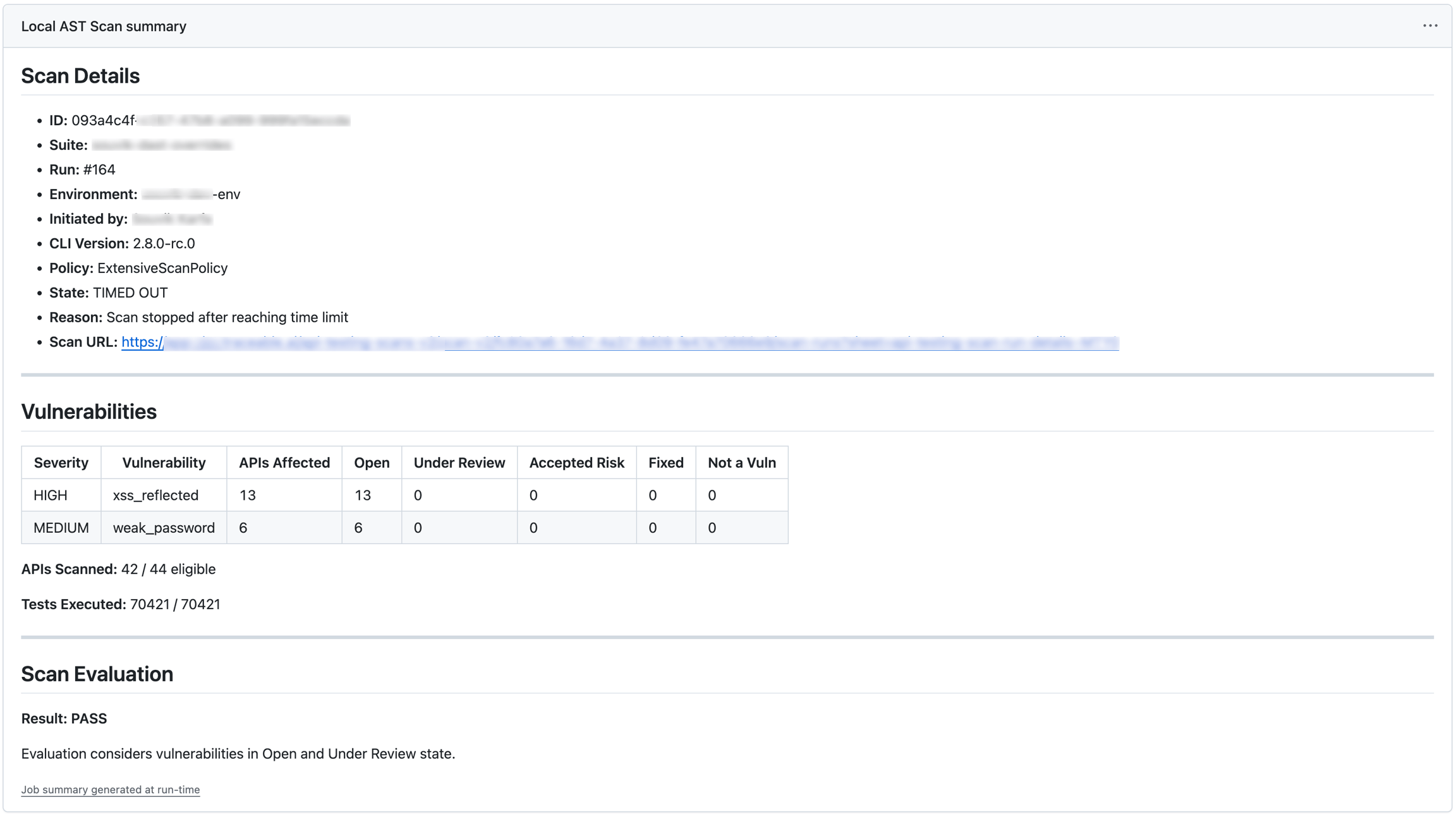
You can view the report under the Actions tab in your GitHub repository:

Last updated
Was this helpful?