

HTTP Event Collector (HEC) Integration
Learn how to integrate Harness RPA data to SIEM platforms in real time by using the token-based HTTP Event Collector (HEC).
The HTTP Event Collector (HEC) is a secure, token-based system that allows sending logs, events, and other relevant data without requiring additional software installation or login credentials. It simplifies integration, eliminates the need for agents, supports structured data, such as JSON, and enables users to monitor and respond to issues quickly.
Harness RPA automatically streams real-time data to the external platform, supporting seamless monitoring, analysis, and alerting. This enables you to send and collect data quickly and safely from anywhere, providing real-time visibility and actionable insights. Harness RPA integrates with the following SIEM platforms, Splunk, CrowdStrike, and Cortex, through HEC to deliver real-time API security data. Harness RPA provides a seamless, secure, and scalable way to connect API security intelligence with enterprise security workflows by forwarding data through HEC. This integration connects Harness RPA events to threat data, helping you investigate more quickly and strengthen overall response efforts.
What you will learn from this topic
By the end of this topic, you will be able to:
Understand the need for HTTP Event Collector (HEC).
Understand the prerequisites for the CrowdStrike, Splunk, or Cortex integration.
Understand the steps to add a new HEC integration.
Understand the steps to set up a notification channel to receive updates about HEC.
Before you begin
Make a note of the following before proceeding with the integration:
(For Splunk only) Make sure that you have the HTTP Event Collector (HEC) URL and the API token from the Splunk platform. For more information, see Generate the API Credentials from your SIEM platform.
(For CrowdStrike only) Make sure that you have the HTTP Event Collector (HEC) URL and the API token from the CrowdStrike platform. For more information, see Generate the API Credentials from your SIEM platform.
(For Cortex only) Make sure that you have the HTTP Event Collector (HEC) URL and the API token from the Cortex platform. For more information, see Generate the API Credentials from your SIEM platform.
Generate the API credentials from your SIEM platform
Harness RPA allows you to integrate with the following SIEM platforms:
Splunk SIEM provides real-time monitoring and early threat detection, enabling you to identify issues quickly, respond faster, and stay ahead of modern threats. By using the Splunk HTTP Event Collector (HEC), you can send Harness RPA alert notifications over HTTP or HTTPS directly into Splunk, where you can review and take the necessary actions. Harness RPA automatically sends threat activity and detection events to Splunk for analysis and investigation. This integration simplifies monitoring and gives you a single place to capture and respond to critical security events quickly.
To fetch the HTTP Event Collector URL and the API token for integration, go to Configure HTTP Event Collector on Splunk Cloud Platform and follow the steps. Now, you can use this API token and URL for HEC integration. For more information, see Add New HTTP Event Collector Integration.
CrowdStrike is a cloud-native platform that centralizes threat data and uses AI-driven analytics to detect and respond to security incidents. It helps us provide deep API security insights such as attack patterns, anomalous behaviors, and sensitive data exposure. This enables faster incident response, improved correlation with enterprise-wide threats, and a stronger overall security posture.
To fetch the API Key (Token) and the API URL for integrating with Traceable, log in to your CrowdStrike account and complete the following steps:
Navigate to Data Connectors → Data Connections in Falcon.
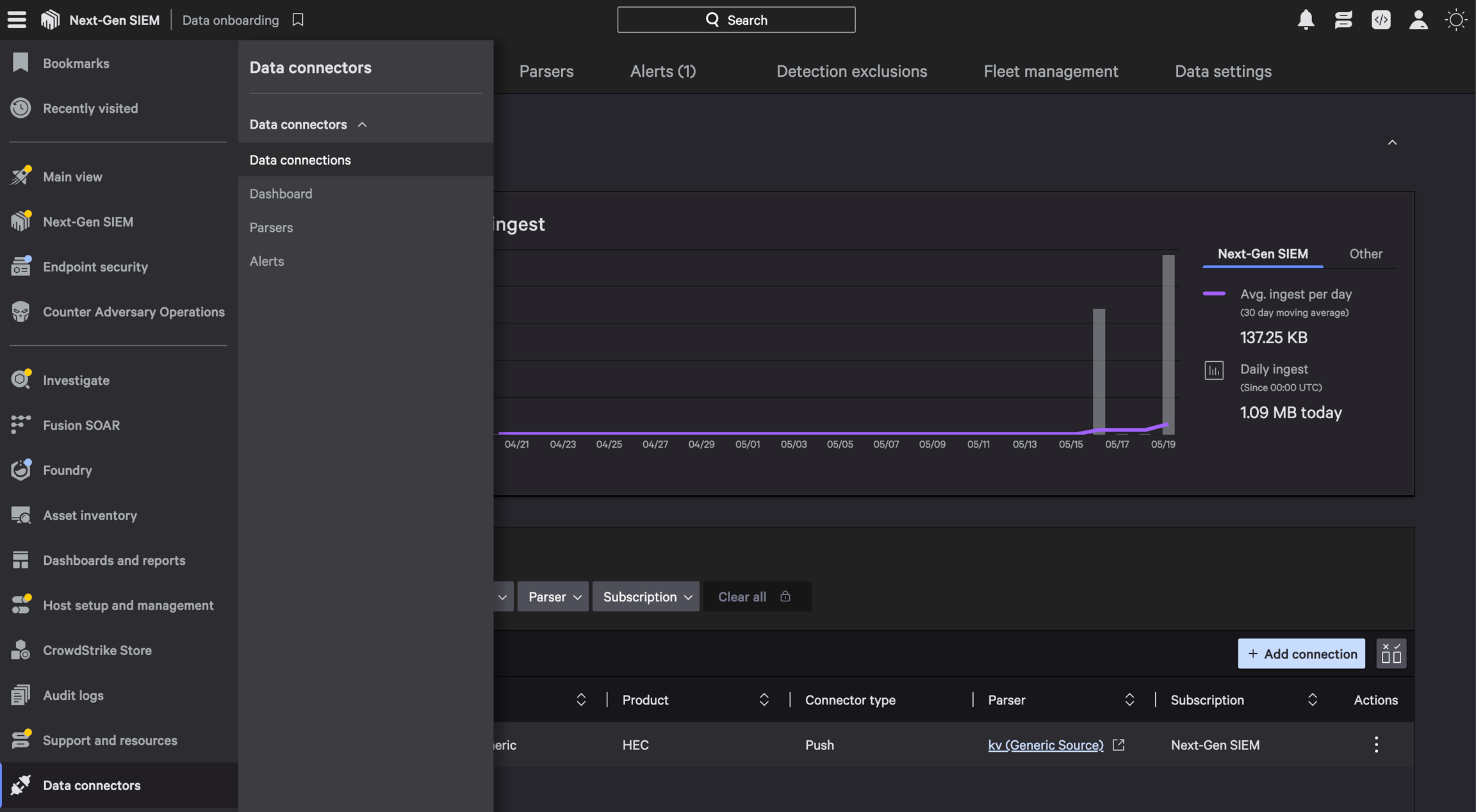
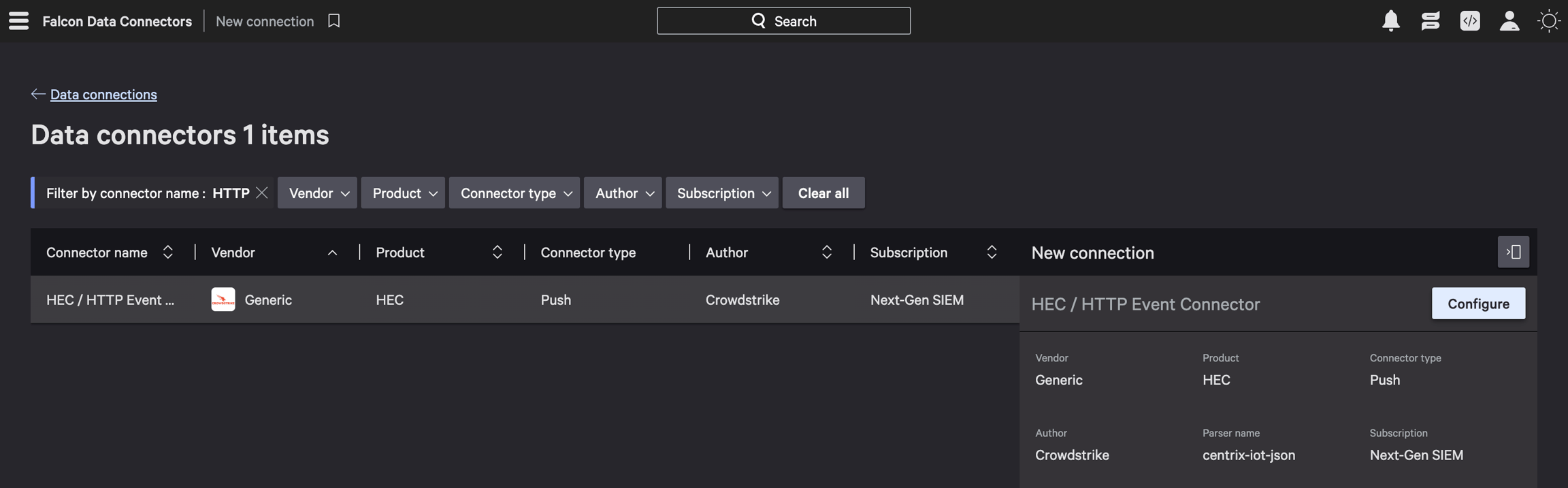
Select HEC/HTTP Event Collector, and click Configure.
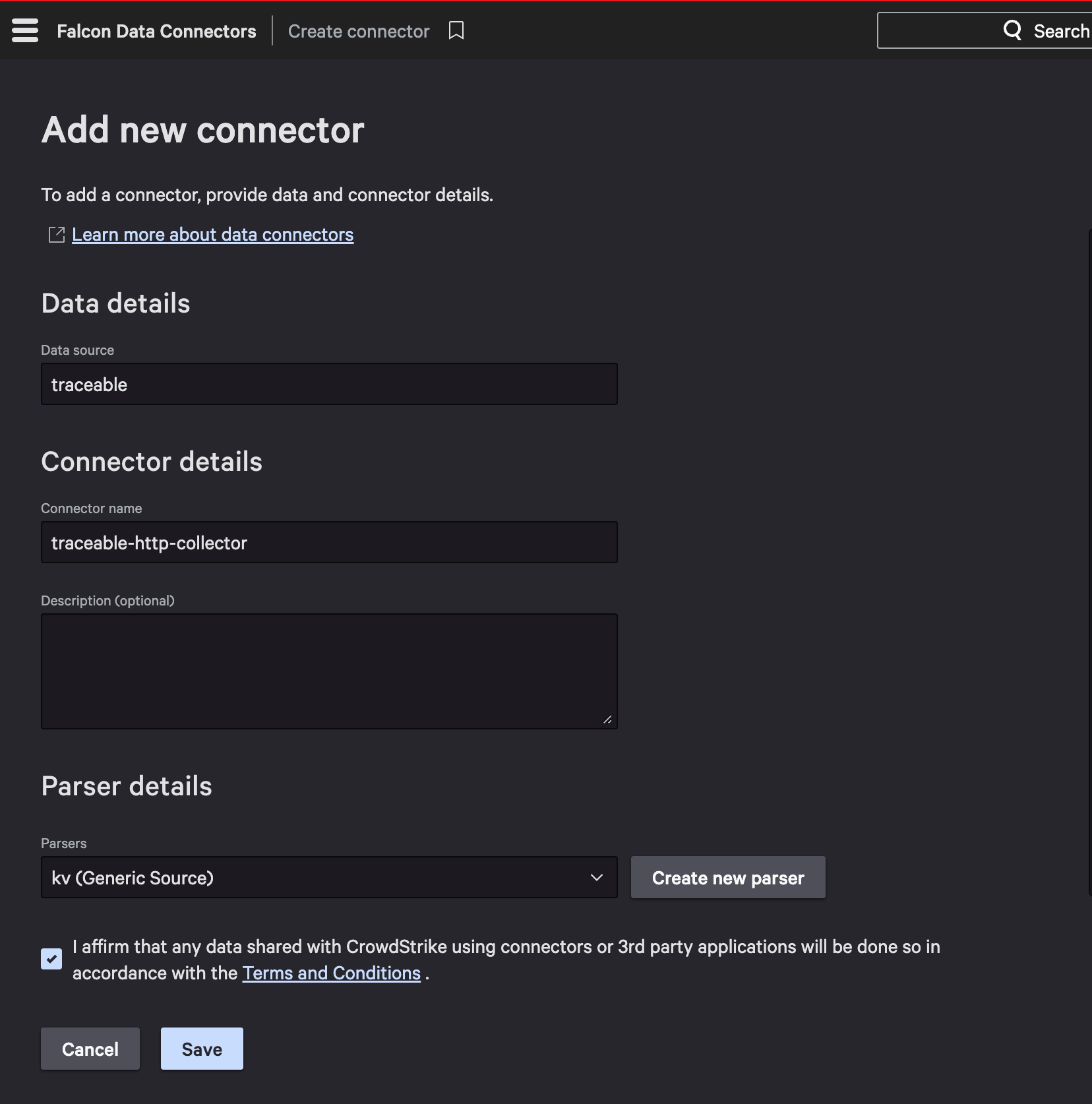
Under Add new connector provide the Connector details and Parser details to configure it.
Specify a suitable data source name, for example, traceable.
Specify a connector name, for example, traceable-http-collector.
Select kv (Generic Source) as the Parsers, and click Save.
Click Regenerate API Key to fetch the API key.
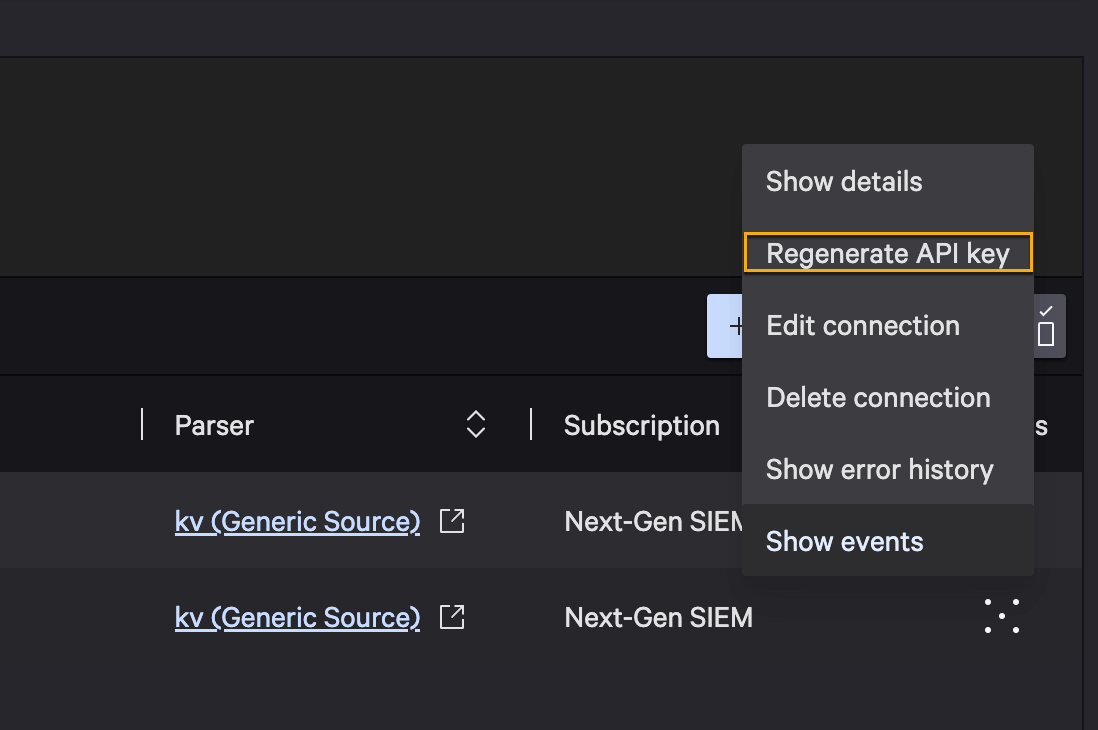
Copy the API URL and the API Key required for the integration. For more information, see CrowdStrike URL and API Token Generation.
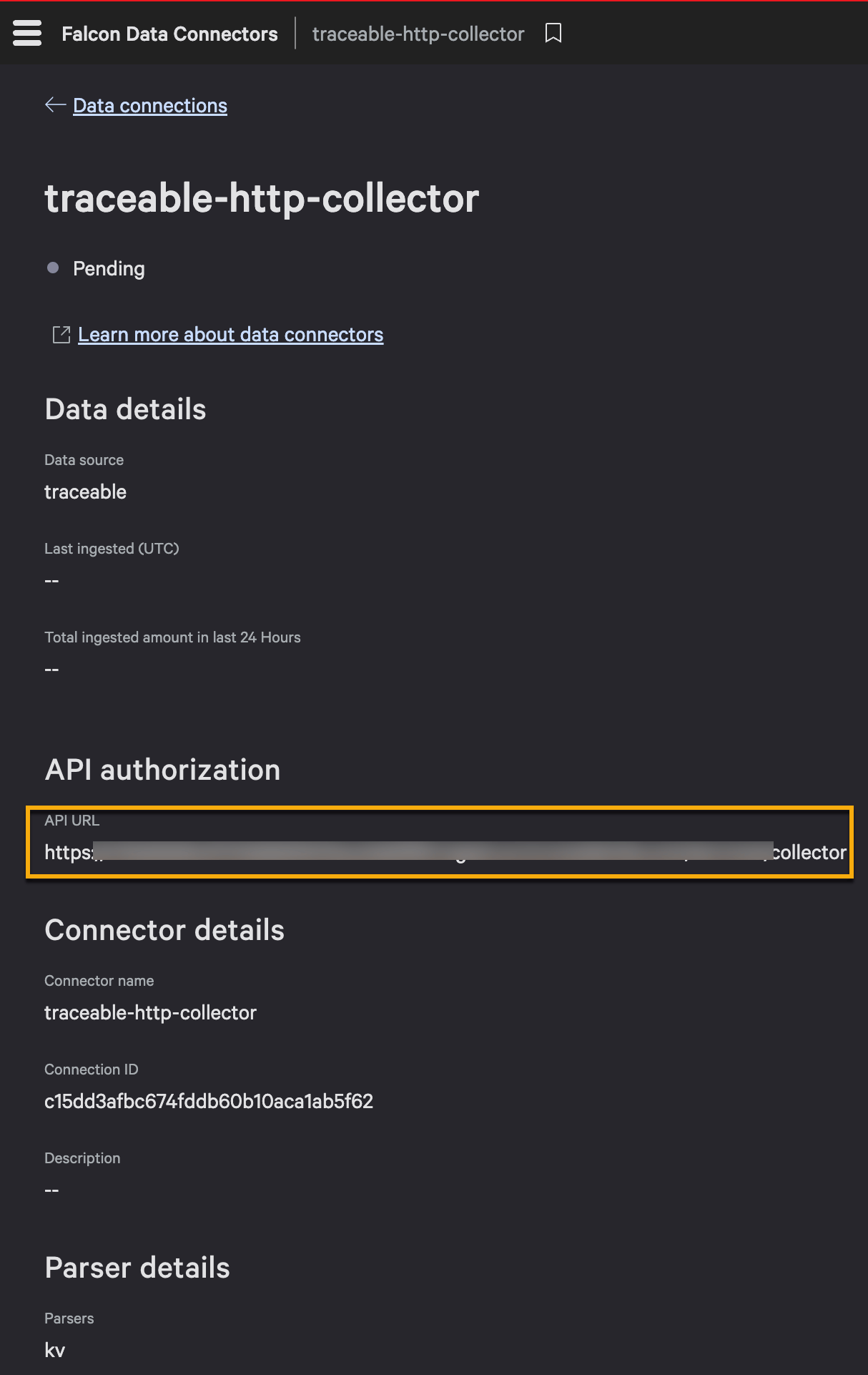
You can now use this API key( token) and the API URL for setting up the HEC integration. For more information, see Add New HTTP Event Collector Integration.
Palo Alto Networks Cortex integrates with Traceable to bring detected API security threats into your workflows. Traceable's integration with Cortex enables you to import detected threat activities as security incidents, providing context about the threat, the actor, and associated request and response payloads. For more information, see Cortex Documentation
To fetch the API Key (Token) and the API URL for integrating with Harness RPA, log in to your Cortex account and complete the following steps:
Navigate to Data Sources and Integrations, and select + Add New.
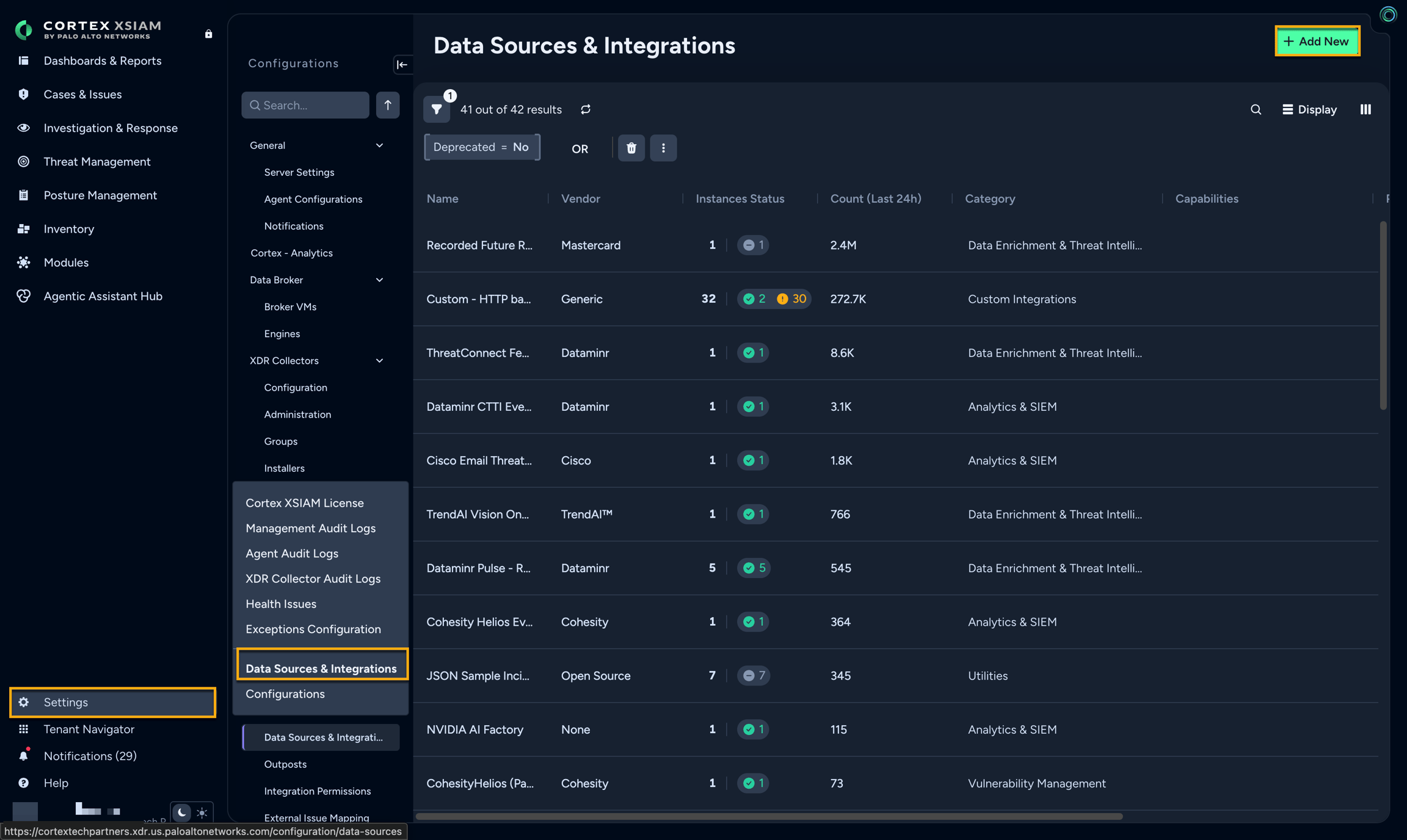
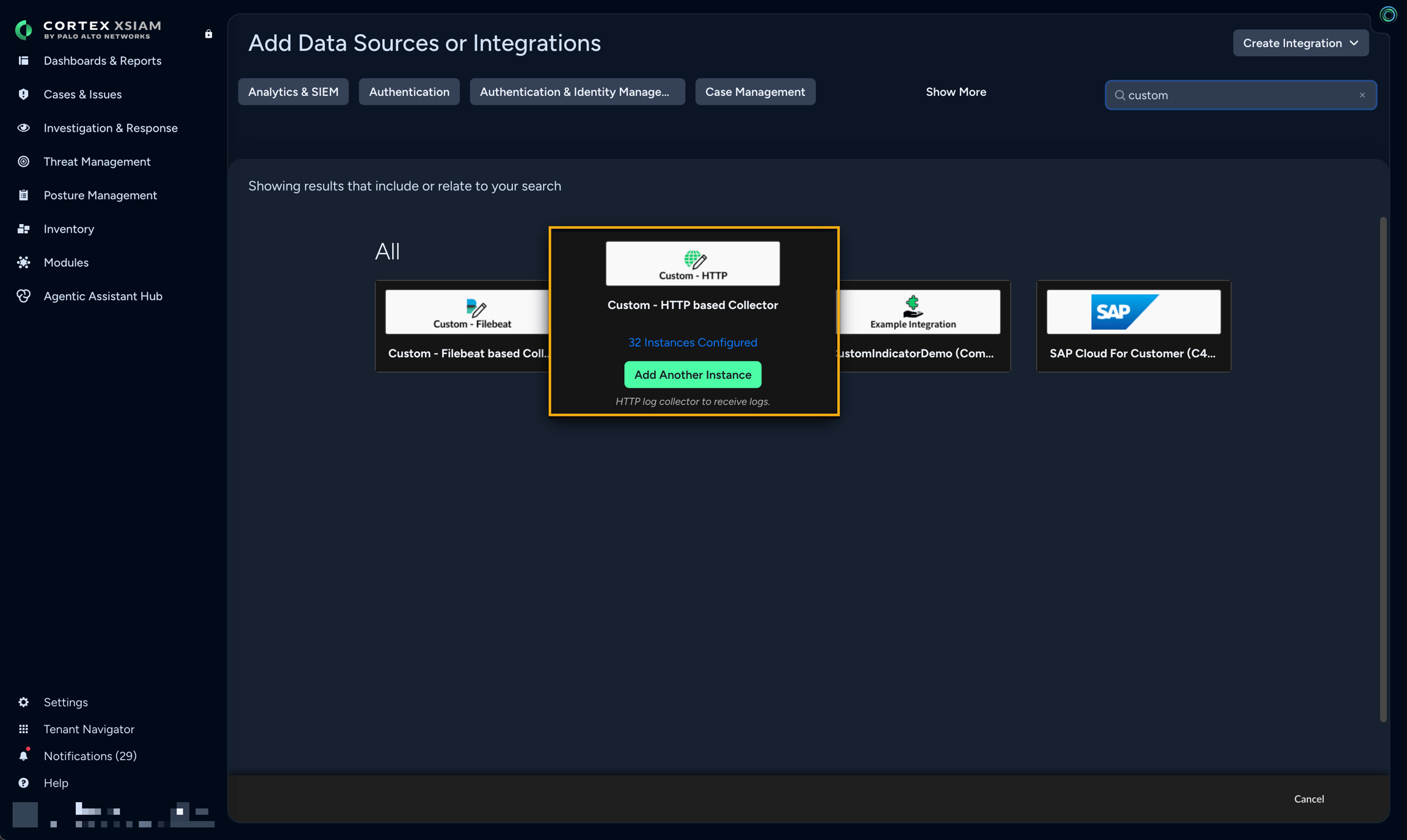
Search for Custom - HTTP Log Collector and select it.
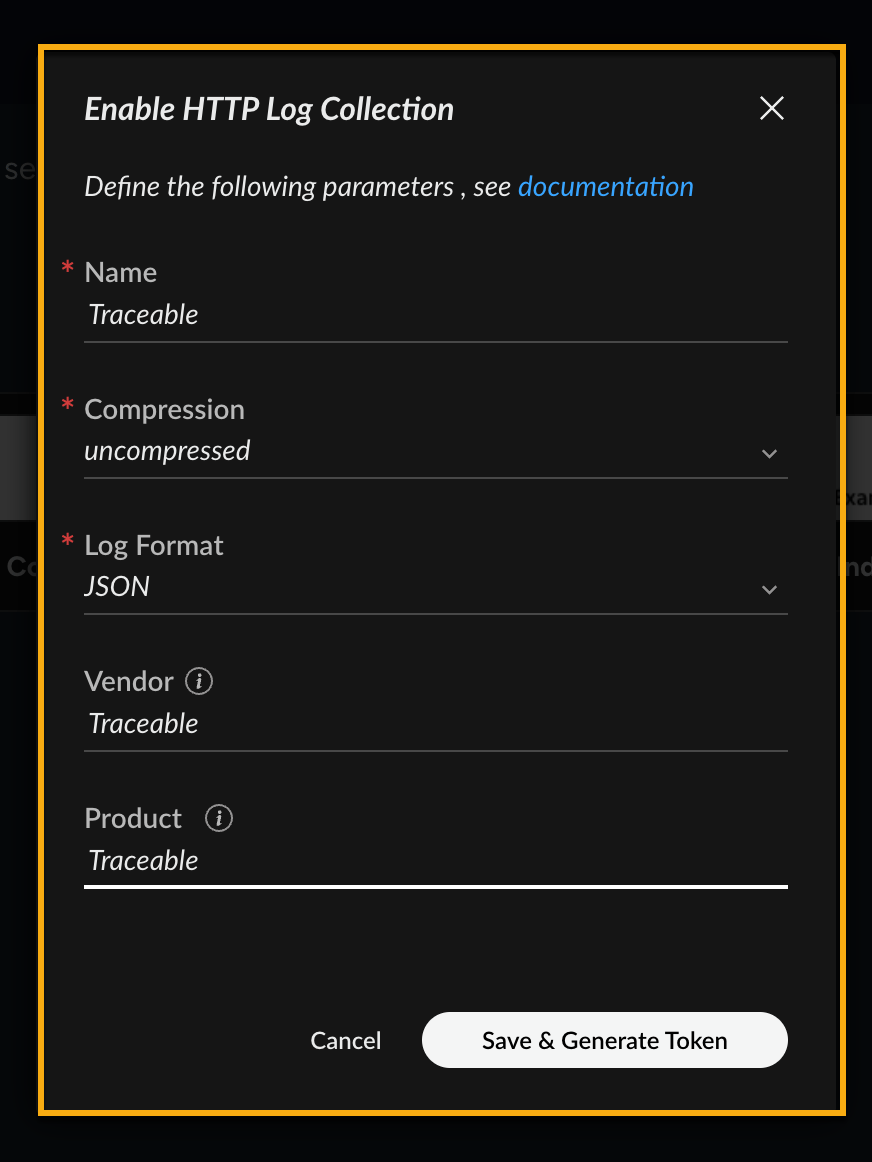
Specify the following details, copy the generated API key.
Set up the integration
The HTTP Event Collector (HEC) integration is configured to receive data over HTTP(s). You can set up this integration to allow Harness RPA to send security events directly to Splunk, CrowdStrike, or Cortex for threat detection. To set up the integration, complete the following steps:
Step 1: Add new HTTP Event Collector integration
Log in to your account, navigate to Integrations, and do one of the following:
Under All Integrations, search for HTTP Event Collector in the search bar.
Under All Integrations, navigate to SIEM/SOAR → HTTP Event Collector.
In the Add New HTTP Event Collector Integration window, complete the following steps:
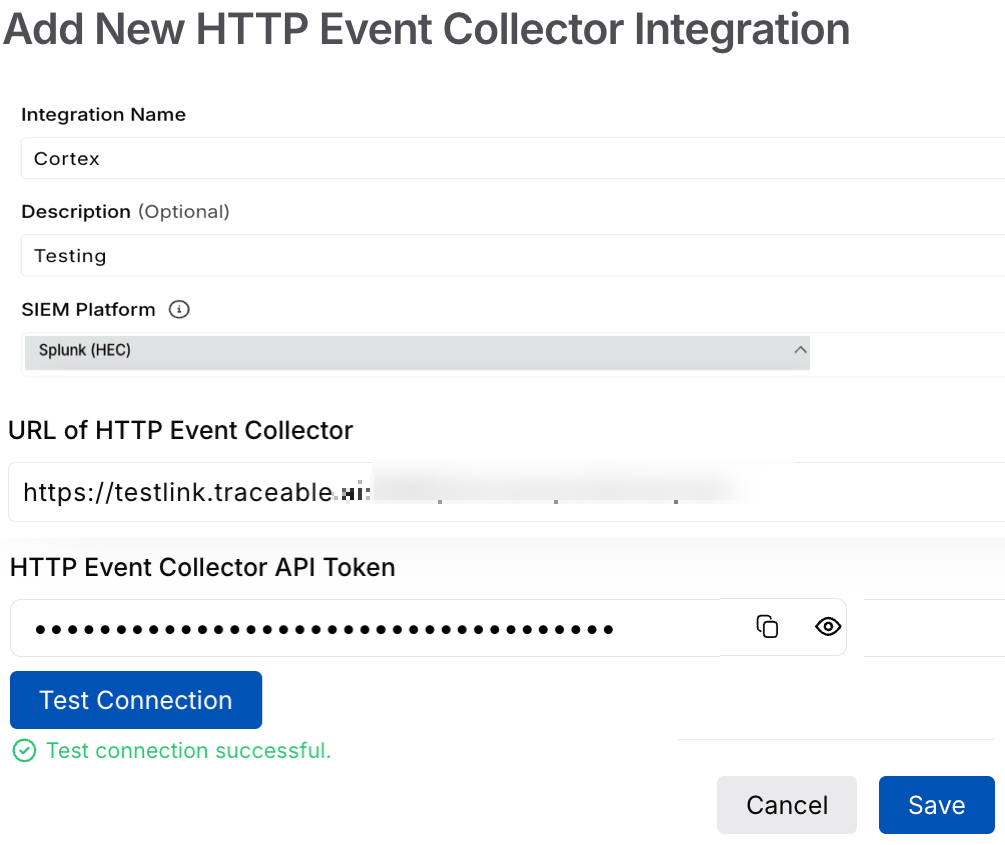
Specify the Integration Name, for example, HTTP Event Collector.
(Optional) Specify the Description, for example, SIEM/SOAR int.
Select either of the following from the SIEM platforms drop-down.
Specify the URL of the HTTP Event Collector fetched from the above chosen SIEM platform. For more information, see Before you begin.
Specify the HTTP Event Collector API Token fetched from the above chosen SIEM platform. For more information, see Before you begin.
Click Test Connection. Harness RPA validates the URL and the API Token. Once the validation succeeds, click Save.
Step 2: Create a notification channel
You must create a notification channel to receive notifications when an event is triggered. To create a channel, log in to your account, navigate to Settings () → Notifications → Create Channel, and complete the following steps:
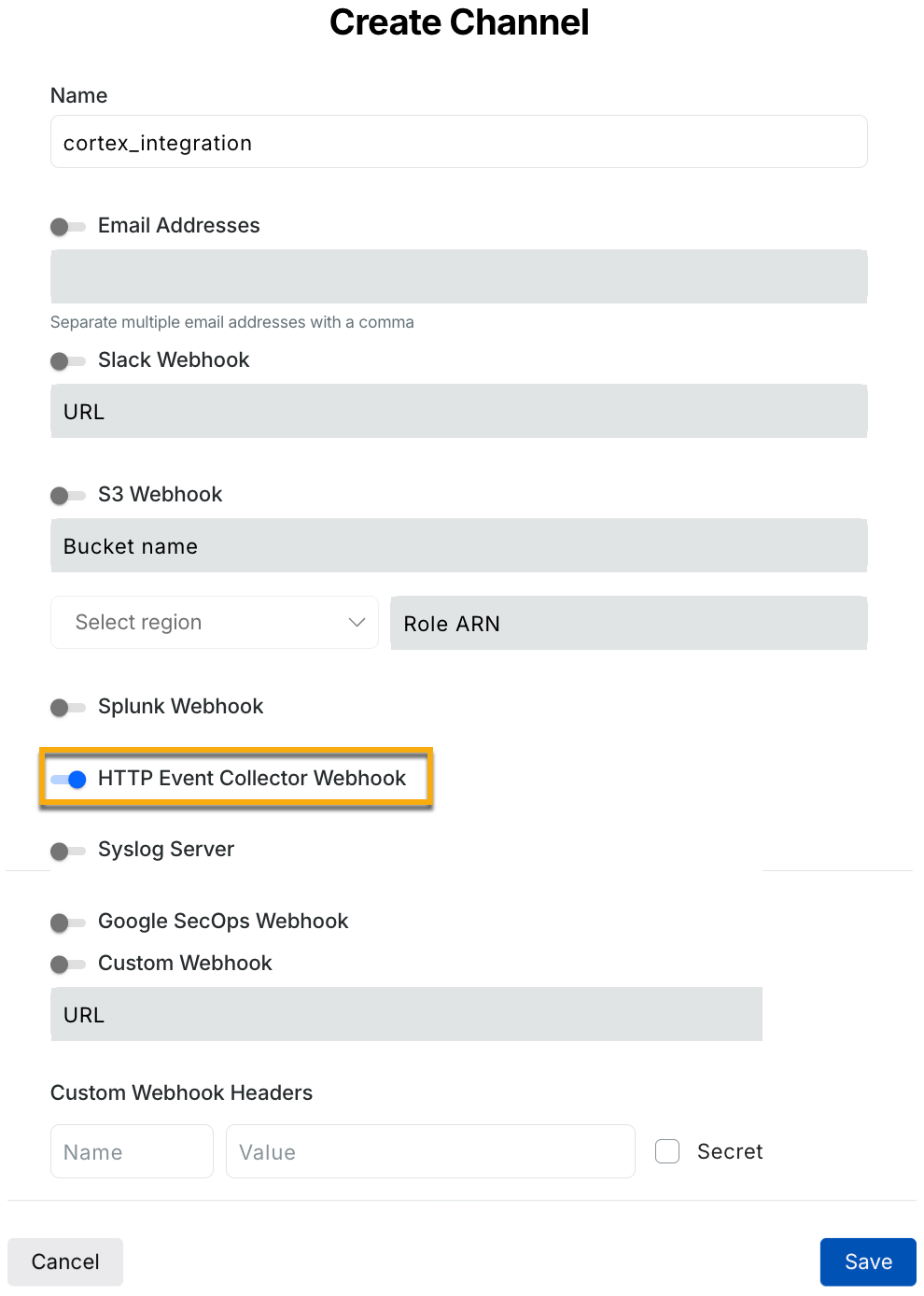
Specify a name for the channel, for example, HEC_Channel.
Enable the HTTP Event Collector Webhook toggle. For more information, see Notifications.
Once you have enabled the toggle, click Save.
Step 3: Set up a notification rule
Harness RPA sends a notification through the channel when an event matches the selected category and type. It allows you to be notified if any rule you create triggers an event. To set up the notification, log in to your account, navigate to Settings () → Notifications → Create Notification, and complete the following steps:
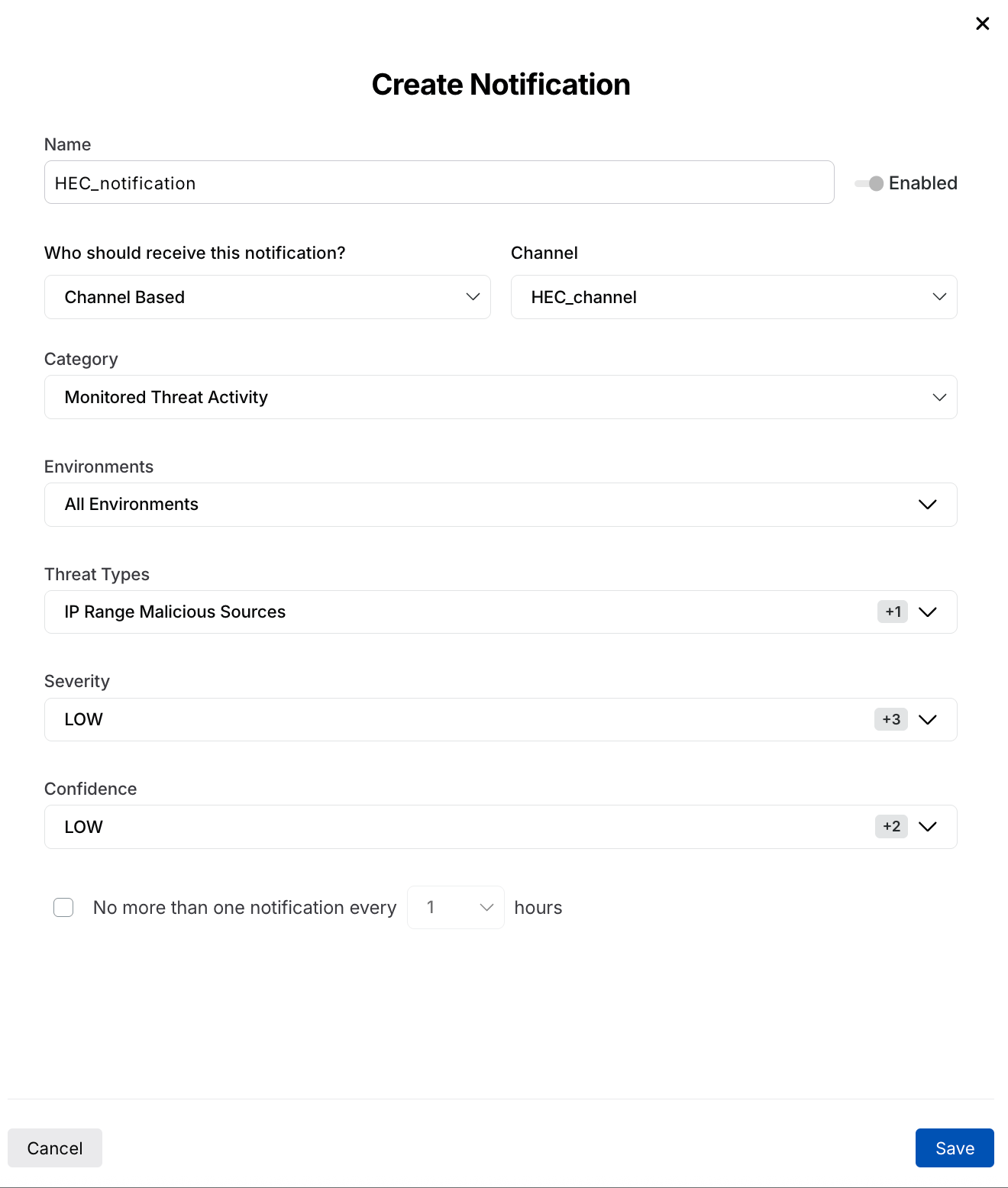
Specify a Name for your notification, for example, HEC_notif.
Select Who should receive this notification from the drop-down, for example, Channel Based.
Select the Channel that you created in Step 2 above, from the drop-down, for example, HEC_Channel.
Select the Category from the drop-down. For more information, see Notifications.
Select the Threat Types according to your requirements.
Select All Environments under Environments.
Click Save.
Demo
The following interactive demo walks you through the steps to navigate, integrate the HTTP Event Collector (HEC) with Harness RPA, and create channel notifications.
After you configure the integration, Harness RPA monitors your application traffic and detects security events. When it identifies a threat, it generates a notification and sends the event data via the HTTP Event Collector (HEC).
Was this helpful?