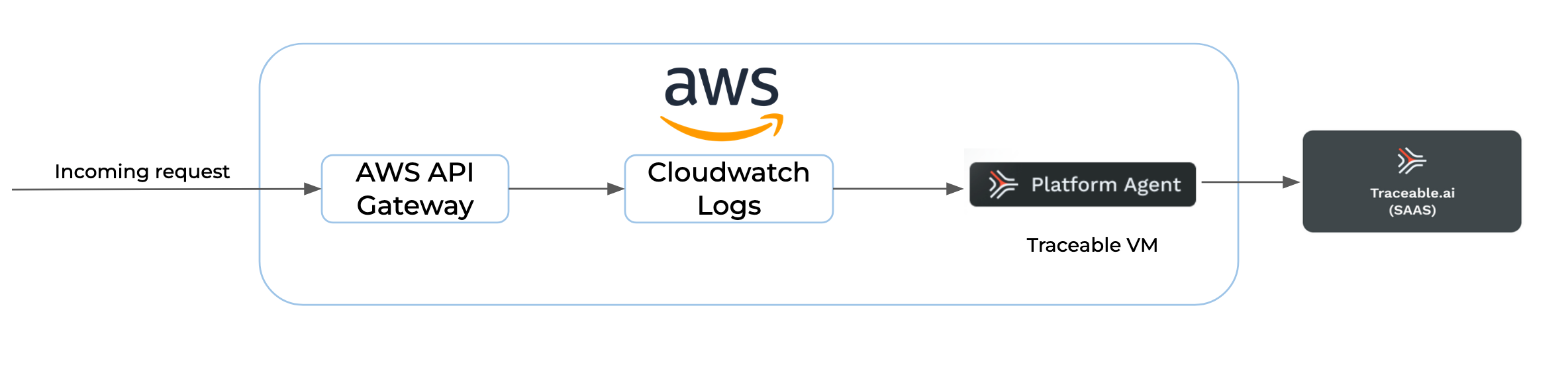
 {% hint style="info" %}
AWS API Gateway currently limits log events to 1024 bytes. It truncates log events larger than 1024 bytes, such as request and response headers/bodies, before submission to CloudWatch Logs. For information on important notes about the AWS API gateway, see the [AWS docs](https://docs.aws.amazon.com/apigateway/latest/developerguide/api-gateway-known-issues.html#api-gateway-known-issues-all-apis).
{% endhint %}
***
## Before you begin
Make a note of the following points before proceeding with configurations:
* Keep Traceable's access token handy. It will be used when configuring the variables in the tfvars (`*.tfvars)` file. You can copy the access token by logging into your Traceable account and then navigating to **Settings** (:gear:)**→Account** → **Agent Token**.
* Make sure that Terraform is already installed. For more information on installing Terraform, see [Download Terraform](https://www.terraform.io/downloads.html).
#### **REST API gateway**
To monitor the REST API gateway, complete the following:
1. Navigate to the console. [aws.amazon.com/apigateway/](https://aws.amazon.com/api-gateway/).
2. Select the API and then select the stage.
3. Navigate to Logs/tracing.
4. Select **Full Request and Response Logs** from **Cloudwatch settings → Cloudwatch Logs** drop-down list.
5. Mark **Enable Access Logging** as `true` under **Custom Access Logging** and append the following JSON in **Log Format**:
```json
{
"requestId":"$context.requestId","ip":"$context.identity.sourceIp","httpMethod":"$context.httpMethod","path":"$context.path","status":"$context.status","responseLength":"$context.responseLength","domainName":"$context.domainName"
}
```
#### **HTTP API gateway**
To monitor the HTTP API gateway, enable access logging and append the JSON mentioned above in the **Log Format**.
#### **Configure AWS**
Configure AWS in your shell and verify that the region is set correctly. Enter the following command to set up your AWS CLI installation:
```bash
aws configure
```
The following example shows sample values. Replace them with your values to configure the credentials correctly.
```
$ aws configure
AWS Access Key ID [None]: AKIAIOSFODNN7EXAMPLE
AWS Secret Access Key [None]: wJalrXUtnFEMI/K7MDENG/bPxRfiCYEXAMPLEKEY
Default region name [None]: us-west-2
Default output format [None]: json
```
For more information on the `credentials` file, see [Configuration and credential file settings](https://docs.aws.amazon.com/cli/latest/userguide/cli-configure-files.html).
If you have configured named AWS profiles, export the environment variable `AWS_PROFILE=myprofile` where the profile named `myprofile` has the credentials that you wish to use to deploy the Traceable mirroring resources.
Finally, run the following command and verify that the AWS region is set to the region where you wish to install Traceable:
```bash
aws configure get region
```
Alternatively, you can configure the following environment variables:
* AWS\_ACCESS\_KEY\_ID
* AWS\_SECRET\_ACCESS\_KEY
* AWS\_REGION or AWS\_DEFAULT\_REGION
* AWS\_DEFAULT\_OUTPUT
For more configuration information, see [AWS documentation](https://docs.aws.amazon.com/cli/latest/userguide/cli-configure-quickstart.html#cli-configure-quickstart-config).
### **Multiple accounts**
A single AWS API Gateway account can support multiple accounts across different regions. However, each region within an account must be configured separately. This setup requires establishing cross-account IAM roles in each account, allowing the host account to authenticate and access the necessary resources.
#### Cross account IAM role
An IAM role is required to authenticate the host account to monitor the API gateways from another account. The following are the required permissions:
```
"logs:describeLogGroups"
"logs:FilterLogEvents"
"apigateway:GET"
```
Alternatively, you can use the following Terraform template to create cross account role. Override the `account_id` variable with the host account’s ID.
```hcl
data "aws_iam_policy_document" "traceable" {
statement {
sid = "readAccess"
actions = [
"logs:describeLogGroups",
"logs:FilterLogEvents",
"apigateway:GET"
]
effect = "Allow"
resources = ["*"]
}
}
resource "aws_iam_policy" "traceable" {
name = "traceable-cross-account-policy"
description = "IAM policy for traceable instance"
path = "/"
policy = data.aws_iam_policy_document.traceable.json
}
resource "aws_iam_role" "traceable" {
name = "traceable-cross-account-role"
description = "IAM role for traceable instance"
path = "/"
force_detach_policies = true
assume_role_policy = jsonencode({
Version = "2012-10-17"
Statement = [
{
Action = "sts:AssumeRole"
Effect = "Allow"
Principal = {
AWS = "arn:aws:iam::${var.account_id}:root"
}
Condition = {}
}
]
})
}
resource "aws_iam_role_policy_attachment" "traceable" {
depends_on = [aws_iam_policy.traceable, aws_iam_role.traceable]
role = aws_iam_role.traceable.name
policy_arn = aws_iam_policy.traceable.arn
}
variable "account_id" {
type = string
}
```
***
## Download
Traceable provides AWS API gateway traffic mirroring tarball. Complete the following steps to download and untar the tarball:
1. Enter the following command to download the tarball:
```bash
curl -O https://downloads.traceable.ai/install/aws-api-gateway/terraform/latest/aws-api-gateway-tf.tar.gz
```
2. Untar the tarball. Enter the following command:
```bash
tar xvzf aws-api-gateway-tf.tar.gz
```
3. Change directory. Enter the following command:
```bash
cd aws-api-gateway-tf/
```
***
## Create tfvars file
Create a `terraform.tfvars` file with terraform variables as shown below:
```hcl
subnet_id = "subnet-0fbc2fd166a8e94eb"
key_name = "traceable-local"
traceable_refresh_token = "***"
traceable_agent_endpoint = "https://1.2.3.4:5443"
traceable_environment = "awsapigw"
traceable_service_name = "awsapigw"
traceable_api_endpoint = "api.apac2.traceable.ai"
accounts = [
{
region = "us-east-1"
api_list = ["625vetvy0f/test"]
cross_account_role_arn = ""
exclude = false
},
{
region = "us-east-1"
api_list = []
cross_account_role_arn = "arn:aws:iam::1234567890:role/aws-apigw-cross-account-role"
exclude = true
}
]
tags = {
owner = "Traceable"
reason = "aws apigw"
expected-end-date = "07/05/2024"
}
service_version = "1.45.0"
```
***
## Configuration variables
The following tables describe the various terraform variables.
| Name | Optional/Mandatory | Default value | Description |
| -------------------------------- | ---------------------- | ----------------------------------------- | --------------------------------------------------------------------------------------------------------------------------------------------------------------------------------------------------------------------------------- |
| `accounts` | Mandatory | `-` | Refer to the next `accounts` section for the description. |
| `subnet_id` | Mandatory | `""` | The subnet ID where the Traceable instance is created. |
| `instance_type` | Optional | `m4.xlarge` | The type of Traceable instance. |
| `traceable_agent_endpoint` | Optional | `http://localhost:5442` | The Traceable Platform agent reporting endpoint for the agent. Platform agent deployment will also be done on the same VM if not overridden. For more information, see the [Traceable Platform agent](#traceable-platform-agent). |
| `traceable_agent_max_batch_size` | Optional | 500 | The maximum number of spans that you wish to bundle in a single request to the Traceable Platform agent. |
| `root_directory` | Optional | `/var/traceable/aws-api-gateway` | Root directory path for traceable files. |
| `log_directory` | Optional | `/var/traceable/log/aws-api-gateway` | Log directory path for traceable log files. |
| `api_gateway_stages_arns` | Optional | \* |
{% hint style="info" %}
AWS API Gateway currently limits log events to 1024 bytes. It truncates log events larger than 1024 bytes, such as request and response headers/bodies, before submission to CloudWatch Logs. For information on important notes about the AWS API gateway, see the [AWS docs](https://docs.aws.amazon.com/apigateway/latest/developerguide/api-gateway-known-issues.html#api-gateway-known-issues-all-apis).
{% endhint %}
***
## Before you begin
Make a note of the following points before proceeding with configurations:
* Keep Traceable's access token handy. It will be used when configuring the variables in the tfvars (`*.tfvars)` file. You can copy the access token by logging into your Traceable account and then navigating to **Settings** (:gear:)**→Account** → **Agent Token**.
* Make sure that Terraform is already installed. For more information on installing Terraform, see [Download Terraform](https://www.terraform.io/downloads.html).
#### **REST API gateway**
To monitor the REST API gateway, complete the following:
1. Navigate to the console. [aws.amazon.com/apigateway/](https://aws.amazon.com/api-gateway/).
2. Select the API and then select the stage.
3. Navigate to Logs/tracing.
4. Select **Full Request and Response Logs** from **Cloudwatch settings → Cloudwatch Logs** drop-down list.
5. Mark **Enable Access Logging** as `true` under **Custom Access Logging** and append the following JSON in **Log Format**:
```json
{
"requestId":"$context.requestId","ip":"$context.identity.sourceIp","httpMethod":"$context.httpMethod","path":"$context.path","status":"$context.status","responseLength":"$context.responseLength","domainName":"$context.domainName"
}
```
#### **HTTP API gateway**
To monitor the HTTP API gateway, enable access logging and append the JSON mentioned above in the **Log Format**.
#### **Configure AWS**
Configure AWS in your shell and verify that the region is set correctly. Enter the following command to set up your AWS CLI installation:
```bash
aws configure
```
The following example shows sample values. Replace them with your values to configure the credentials correctly.
```
$ aws configure
AWS Access Key ID [None]: AKIAIOSFODNN7EXAMPLE
AWS Secret Access Key [None]: wJalrXUtnFEMI/K7MDENG/bPxRfiCYEXAMPLEKEY
Default region name [None]: us-west-2
Default output format [None]: json
```
For more information on the `credentials` file, see [Configuration and credential file settings](https://docs.aws.amazon.com/cli/latest/userguide/cli-configure-files.html).
If you have configured named AWS profiles, export the environment variable `AWS_PROFILE=myprofile` where the profile named `myprofile` has the credentials that you wish to use to deploy the Traceable mirroring resources.
Finally, run the following command and verify that the AWS region is set to the region where you wish to install Traceable:
```bash
aws configure get region
```
Alternatively, you can configure the following environment variables:
* AWS\_ACCESS\_KEY\_ID
* AWS\_SECRET\_ACCESS\_KEY
* AWS\_REGION or AWS\_DEFAULT\_REGION
* AWS\_DEFAULT\_OUTPUT
For more configuration information, see [AWS documentation](https://docs.aws.amazon.com/cli/latest/userguide/cli-configure-quickstart.html#cli-configure-quickstart-config).
### **Multiple accounts**
A single AWS API Gateway account can support multiple accounts across different regions. However, each region within an account must be configured separately. This setup requires establishing cross-account IAM roles in each account, allowing the host account to authenticate and access the necessary resources.
#### Cross account IAM role
An IAM role is required to authenticate the host account to monitor the API gateways from another account. The following are the required permissions:
```
"logs:describeLogGroups"
"logs:FilterLogEvents"
"apigateway:GET"
```
Alternatively, you can use the following Terraform template to create cross account role. Override the `account_id` variable with the host account’s ID.
```hcl
data "aws_iam_policy_document" "traceable" {
statement {
sid = "readAccess"
actions = [
"logs:describeLogGroups",
"logs:FilterLogEvents",
"apigateway:GET"
]
effect = "Allow"
resources = ["*"]
}
}
resource "aws_iam_policy" "traceable" {
name = "traceable-cross-account-policy"
description = "IAM policy for traceable instance"
path = "/"
policy = data.aws_iam_policy_document.traceable.json
}
resource "aws_iam_role" "traceable" {
name = "traceable-cross-account-role"
description = "IAM role for traceable instance"
path = "/"
force_detach_policies = true
assume_role_policy = jsonencode({
Version = "2012-10-17"
Statement = [
{
Action = "sts:AssumeRole"
Effect = "Allow"
Principal = {
AWS = "arn:aws:iam::${var.account_id}:root"
}
Condition = {}
}
]
})
}
resource "aws_iam_role_policy_attachment" "traceable" {
depends_on = [aws_iam_policy.traceable, aws_iam_role.traceable]
role = aws_iam_role.traceable.name
policy_arn = aws_iam_policy.traceable.arn
}
variable "account_id" {
type = string
}
```
***
## Download
Traceable provides AWS API gateway traffic mirroring tarball. Complete the following steps to download and untar the tarball:
1. Enter the following command to download the tarball:
```bash
curl -O https://downloads.traceable.ai/install/aws-api-gateway/terraform/latest/aws-api-gateway-tf.tar.gz
```
2. Untar the tarball. Enter the following command:
```bash
tar xvzf aws-api-gateway-tf.tar.gz
```
3. Change directory. Enter the following command:
```bash
cd aws-api-gateway-tf/
```
***
## Create tfvars file
Create a `terraform.tfvars` file with terraform variables as shown below:
```hcl
subnet_id = "subnet-0fbc2fd166a8e94eb"
key_name = "traceable-local"
traceable_refresh_token = "***"
traceable_agent_endpoint = "https://1.2.3.4:5443"
traceable_environment = "awsapigw"
traceable_service_name = "awsapigw"
traceable_api_endpoint = "api.apac2.traceable.ai"
accounts = [
{
region = "us-east-1"
api_list = ["625vetvy0f/test"]
cross_account_role_arn = ""
exclude = false
},
{
region = "us-east-1"
api_list = []
cross_account_role_arn = "arn:aws:iam::1234567890:role/aws-apigw-cross-account-role"
exclude = true
}
]
tags = {
owner = "Traceable"
reason = "aws apigw"
expected-end-date = "07/05/2024"
}
service_version = "1.45.0"
```
***
## Configuration variables
The following tables describe the various terraform variables.
| Name | Optional/Mandatory | Default value | Description |
| -------------------------------- | ---------------------- | ----------------------------------------- | --------------------------------------------------------------------------------------------------------------------------------------------------------------------------------------------------------------------------------- |
| `accounts` | Mandatory | `-` | Refer to the next `accounts` section for the description. |
| `subnet_id` | Mandatory | `""` | The subnet ID where the Traceable instance is created. |
| `instance_type` | Optional | `m4.xlarge` | The type of Traceable instance. |
| `traceable_agent_endpoint` | Optional | `http://localhost:5442` | The Traceable Platform agent reporting endpoint for the agent. Platform agent deployment will also be done on the same VM if not overridden. For more information, see the [Traceable Platform agent](#traceable-platform-agent). |
| `traceable_agent_max_batch_size` | Optional | 500 | The maximum number of spans that you wish to bundle in a single request to the Traceable Platform agent. |
| `root_directory` | Optional | `/var/traceable/aws-api-gateway` | Root directory path for traceable files. |
| `log_directory` | Optional | `/var/traceable/log/aws-api-gateway` | Log directory path for traceable log files. |
| `api_gateway_stages_arns` | Optional | \* | Enter a comma-separated list of ARNs of stages of API Gateways for creating the IAM policy.
For Example, arn:aws:apigateway:us-east-1::/restapis/api\_id/stages/stage\_name
List of API IDs to consider for the above action.
API\_ID — If exclude = false, then monitor the API gateway that has ID = API\_ID. However, if exclude = true, then do not monitor this API gateway.API\_ID/STAGE\_NAME — If exclude = false, then monitor the API gateway stage with name = STAGE\_NAME and ID = API\_ID. If exclude = true, then do not monitor this stage.The IAM role ARN is the same as that of case number 3.
Make sure to update the security group attached to this instance to allow SSH connection from your machine.