> For the complete documentation index, see [llms.txt](https://developer.harness.io/llms.txt). Markdown versions of documentation pages are available by appending `.md` to page URLs; this page is available as [Markdown](https://developer.harness.io/web-application-and-api-protection-waap/discovery/discovery-1/dynamic-api-ownership-assignment-using-graphql.md).
# Dynamic API Ownership Assignment using GraphQL
Updates (October 2025 to December 2025)
* *November 2025* — Updated the topic to add information about deleting an existing policy. For more information, see [Delete an Existing Policy](#step-3-—-delete-an-existing-policy).
In your application ecosystem, it is essential to know who owns which API. The number of APIs in an application can vary across areas, such as teams and regions, making [manual ownership assignment](/web-application-and-api-protection-waap/discovery/discovery-1/api-ownership.md) tedious and unscalable. Dynamic API Ownership Assignment in Traceable addresses this scalability issue by automating API ownership mapping based on spans it observes while receiving traffic. Using GraphQL, you can dynamically allocate ownership data to APIs.
***
## What will you learn in this topic?
By the end of this topic, you will understand:
* The concept of [Dynamic API Ownership](#what-is-dynamic-api-ownership-and-how-does-it-help) and you can leverage it.
* The difference between [Dynamic and Manual Ownership](#dynamic-ownership-vs-manual-ownership-assignment) assignment.
* The prerequisites for setting up [dynamic API ownership](#before-you-begin).
* The steps to [configure API ownership assignment](#setting-up-dynamic-ownership) policies using GraphQL.
* The steps to [verify the assigned ownerships](#verifying-ownership-assignment).
* The steps to [manage API ownership](#managing-api-ownership) policies.
***
## What is Dynamic API ownership and how does it help?
Dynamic API Ownership is the process of assigning API owners automatically based on spans that Traceable observes. Instead of manually assigning owners to APIs, you can set up policies using span metadata such as `user.email` and `user.team`.
Dynamic assignment of API ownership helps you in the following manner:
* Makes API ownership scalable.
* Reduces errors and maintenance overhead.
* Enables precise and granular ownership assignment based on span data and regular expressions.
***
## Dynamic Ownership v/s Manual Ownership Assignment
The following table compares dynamic and manual ownership assignment based on various aspects:
| **Aspect** | **Dynamic Ownership** | **Manual Ownership** |
| ------------------------ | -------------------------------------------------------------------------------------------- | ------------------------------------------------------------------------------------------ |
| **Assignment Method** | Automatically assigned based on span attributes. | Manually assigned by Account Owners or team members with the relevant permissions. |
| **Scalability** | Highly scalable as created policies apply to all matching APIs. | Low scalability, as the effort increases with the number of APIs. |
| **Accuracy** | Consistent across APIs. | Prone to errors due to an increased API count. |
| **Maintenance Overhead** | Low maintenance, as ownership gets automatically updated with incoming traffic. | High maintenance, as it requires manual updates. |
| **Use-Case** | Ideal for dynamic environments where API counts increase and ownership can change with time. | Ideal for static environments where API counts and ownership remain the same at all times. |
***
## Before you begin
Before you set up the dynamic API ownership policies, you must remember the following:
* This feature is available for setup only via the **GraphQL API**.
* Setting up a policy requires JWT-based authentication using an `Authorization: Bearer ` header.
* Updates in API ownership may take up to 24 hours to reflect in the platform after the dynamic assignment.
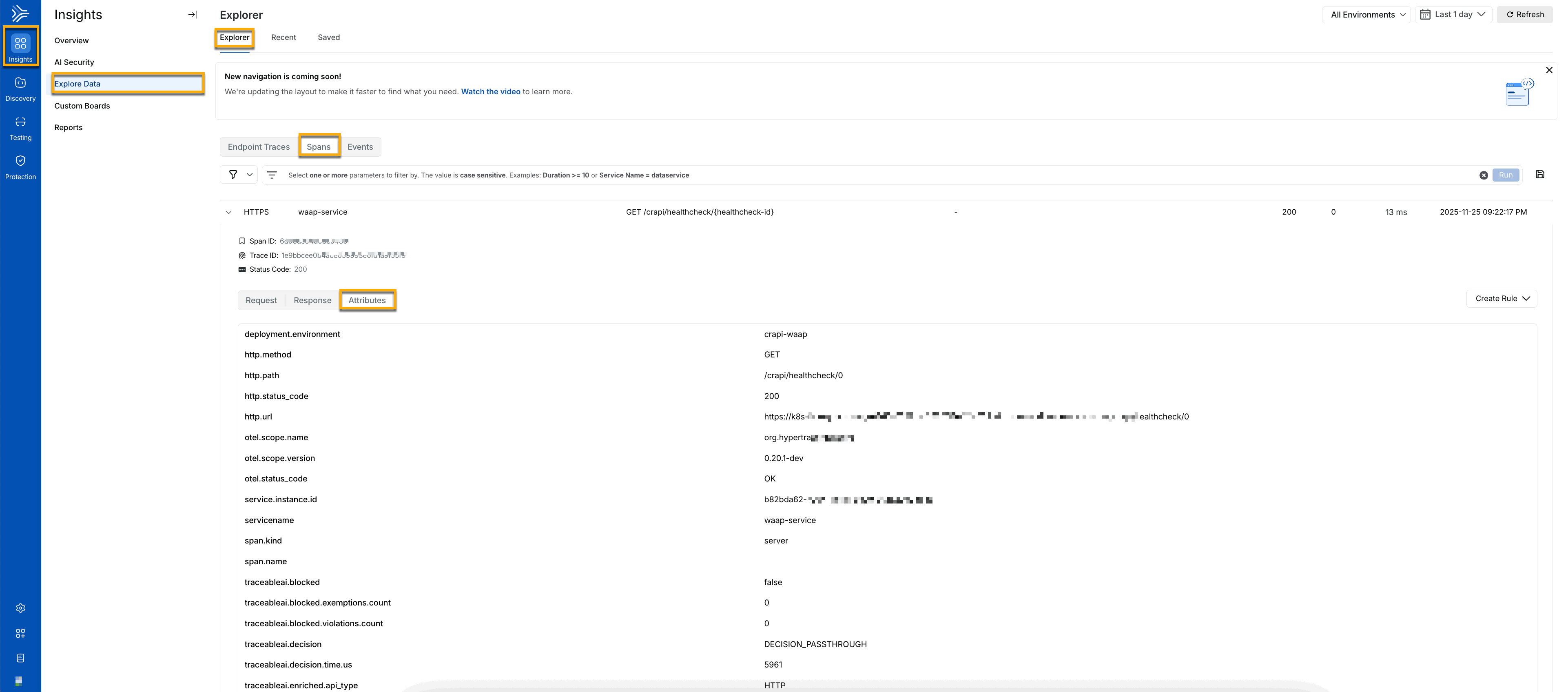
* References for span attributes that you can use for setting up a policy are available under **Insights** **→ Explore Data** → **Explorer** → **Spans** tab → **Results** → click any row item → **Attributes** tab.
Dynamic ownership Span Attributes
***
## Setting up Dynamic Ownership
You can set up API ownership by creating GraphQL policies using the `createPolicy` mutation. Traceable provides the following methods for dynamic assignment:
* [**Static Assignment**](#static-assignment) — Assign a constant owner based on a specific filter or condition. If the condition matches, Traceable assigns the API to the owner you specify in the policy.
* [**Dynamic Assignment**](#dynamic-assignment) — Assign the owner based on the availability of a specific span attribute. If the attribute exists, Traceable sets the span attribute value as the API owner.
* [**Regex-based Dynamic Assignment**](#regexbased-dynamic-assignment) — Assign the owner based on an attribute and a regular expression you specify. If the attribute exists, Traceable extracts the required value and sets it as the API owner.
The following sections discuss the above methods using examples.
### Static Assignment
The following example assigns a constant owner (`Test Owner`) for all APIs matching the following conditions:
* The service name is `Test Service`.
* The status code is between `200` and `400`.
```graphql
mutation createPolicyToStaticicallyAssignApiOwner {
createPolicy(
createPolicyRequest: {
name: "Set API owner to Test Owner if the service name is Test Service"
source: { type: SPAN }
filter: {
type: LOGICAL
policyLogicalFilter: {
logicalOperator: AND
policyFilters: [
{
type: RELATIONAL
policyRelationalFilter: {
operator: GREATER_THAN_OR_EQUALS
lhsType: EXPRESSION
rhsType: VALUE
lhsExpression: {
type: FIELD
field: { location: DATA, key: "stringAttribute", lookupKeys: ["http.status_code"] } # The attribute (lookupKeys) that Traceable should look for, in the spans
}
rhsConstant: "200" # The value that the above lookupKeys attribute should have
}
}
{
type: RELATIONAL
policyRelationalFilter: {
operator: LESS_THAN_OR_EQUALS
lhsType: EXPRESSION
rhsType: VALUE
lhsExpression: {
type: FIELD
field: { location: DATA, key: "stringAttribute", lookupKeys: ["http.status_code"] } # The attribute (lookupKeys) that Traceable should look for, in the spans
}
rhsConstant: "400" # The value that the above lookupKeys attribute should have
}
}
{
type: RELATIONAL
policyRelationalFilter: {
operator: EQUALS
lhsType: EXPRESSION
rhsType: VALUE
lhsExpression: {
type: FIELD
field: { location: DATA, key: "stringAttribute", lookupKeys: ["servicename"] } # The attribute (lookupKeys) that Traceable should look for, in the spans
}
rhsConstant: "Test Service" # The value that the above lookupKeys attribute should have
}
}
]
}
}
actions: [
{
type: ENTITY_UPDATE,
entityUpdate: {
entityType: "API",
entityUpdates: [
{
attributeKey: "API.owner", # The attribute Traceable should assign ownership to
valueExpression: {
type: CONSTANT,
constant: "Test Owner" # The value Traceable should assign to the above attribute
}
}
]
}
}
]
disabled: false
}
) {
id
}
}
```
### Dynamic Assignment
The following example assigns a dynamic owner based on the value of the `kubernetes.labels.owner` span attribute, if available.
```graphql
mutation createPolicyToDynamicallyAssignApiOwner {
createPolicy(
createPolicyRequest: {
name: "Set API owner dynamically from span attribute"
source: { type: SPAN }
filter: {
type: LOGICAL
policyLogicalFilter: {
logicalOperator: NOT
policyFilters: [
{
type: UNARY
policyUnaryFilter: {
type: EXPRESSION
expression: {
type: FIELD
field: { location: DATA, key: "stringAttribute", lookupKeys: ["kubernetes.labels.owner"] } # The attribute (lookupKeys) Traceable should look for, in the spans
}
operator: IS_MISSING
}
}
]
}
}
actions: [
{
type: ENTITY_UPDATE,
entityUpdate: {
entityType: "API",
entityUpdates: [
{
attributeKey: "API.owner", # The attribute Traceable should assign ownership to
valueExpression: {
type: FIELD
field: { location: DATA, key: "stringAttribute", lookupKeys: ["kubernetes.labels.owner"] } # The span attribute (lookupKeys) whose value Traceable should extract and assign to the above attribute key
}
}
]
}
}
]
disabled: false
}
) {
id
}
}
```
### Regex-based Dynamic Assignment
The following example assigns a dynamic owner based on the username it extracts from the email present in the `kubernetes.label.owner` span attribute, if available. For example, if the `kubernetes.label.owner` attribute has `testowner@traceable.ai` as the email, the regex extracts `testowner` and assigns it to the API.
```graphql
mutation createPolicyToExtractAndDynamicallyAssignApiOwner {
createPolicy(
createPolicyRequest: {
name: "Set API owner dynamically from span attribute"
source: { type: SPAN }
filter: {
type: LOGICAL
policyLogicalFilter: {
logicalOperator: NOT
policyFilters: [
{
type: UNARY
policyUnaryFilter: {
type: EXPRESSION
expression: {
type: FIELD
field: { location: DATA, key: "stringAttribute", lookupKeys: ["kubernetes.labels.owner"] } # The attribute (lookupKeys) Traceable should look for, in the spans
}
operator: IS_MISSING
}
}
]
}
}
actions: [
{
type: ENTITY_UPDATE,
entityUpdate: {
entityType: "API",
entityUpdates: [
{
attributeKey: "API.owner", # The attribute Traceable should assign ownership to
valueExpression: {
type: FUNCTION
function: {
name: REGEX
expressions: []
regex: {
input: {
type: FIELD
field: { location: DATA, key: "stringAttribute", lookupKeys: ["kubernetes.labels.owner"] } # The attribute (lookupKeys) whose value you wish to extract and modify
}
pattern: "([^@]+)(@.+)", # The RE2 regex pattern Traceable should use to extract the requried value
captureGroupIndex: 1 # The parenthesis in the above pattern from which Traceable should extract the value
fallbackIfNotMatched: {
type: CONSTANT
constant: ""
}
}
}
}
}
]
}
}
]
disabled: false
}
) {
id
}
}
```
***
## Verifying Ownership Assignment
Once you have created a policy, ownership may take up to 24 hours to be reflected in the Traceable platform. To verify ownership assignment, you can:
1. Navigate to **Discovery** → **Inventory** **→ API Endpoints**, and click the API endpoint on which you wish to verify the assignment.
2. View the assigned owner under the **API Ownership** section in the **Overview** tab. The owner is assigned based on the policy you created.
***
## Managing API Ownership
As your application ecosystem evolves, you may wish to modify the ownership of APIs based on the updated environment and teams. To do that, you can [view](#step-1-—-view-existing-policies), [update](#step-2-—-update-an-existing-policy), or [delete](#step-3-—-delete-an-existing-policy) the existing policies in your application, and update them according to your requirements.
### Step 1 — View Existing Policies
You can execute the following GraphQL query that lists all API ownership policies that you may have created:
```graphql
query getPolicies {
policies(filter: { policyActionTypes: ENTITY_UPDATE }) {
count
total
results {
id
name
disabled
actions {
type
entityUpdate {
entityType
entityUpdates {
attributeKey
valueExpression {
type
field {
location
key
lookupKeys
}
constant
}
}
}
}
filter {
type
policyLogicalFilter {
logicalOperator
policyFilters {
type
policyLogicalFilter {
logicalOperator
policyFilters {
type
policyRelationalFilter {
operator
lhsType
rhsType
lhsExpression {
type
field {
location
key
lookupKeys
}
}
rhsField {
location
key
lookupKeys
}
rhsConstant
}
policyArrayFilter {
type
arrayOperator
policyRelationalFilter {
operator
lhsType
rhsType
lhsExpression {
type
field {
location
key
lookupKeys
}
}
rhsField {
location
key
lookupKeys
}
rhsConstant
}
}
}
}
policyRelationalFilter {
operator
lhsType
rhsType
lhsExpression {
type
field {
location
key
lookupKeys
}
}
rhsField {
location
key
lookupKeys
}
rhsConstant
}
policyArrayFilter {
type
arrayOperator
policyRelationalFilter {
operator
lhsType
rhsType
lhsExpression {
type
field {
location
key
lookupKeys
}
}
rhsField {
location
key
lookupKeys
}
rhsConstant
}
}
}
}
}
policyScope {
scopeType
environmentIds
}
source {
policyEventType
}
}
}
}
```
### Step 2 — Update an Existing Policy
Once you have viewed the list of policies, you can update a policy to do the following:
* Refine existing filters or add new ones
* Update the API ownership logic
To do these, you can execute the following GraphQL query:
```graphql
mutation updatePolicy {
updatePolicy(
updatePolicyRequest: {
policy: {
id: "" # The ID corresponding to the policy you wish to update. To get this ID, you must execute the query in the above section
name: "New policy name" # The updated policy name
source: { type: SPAN }
filter: {
type: LOGICAL
policyLogicalFilter: {
logicalOperator: AND
policyFilters: [
{
type: RELATIONAL
policyRelationalFilter: {
operator: GREATER_THAN_OR_EQUALS
lhsType: EXPRESSION
rhsType: VALUE
lhsExpression: {
type: FIELD
field: { location: DATA, key: "stringAttribute", lookupKeys: ["http.status_code"] } # The updated attribute (lookupKeys) that Traceable should look for, in the spans
}
rhsConstant: "200" # The value that the above lookupKeys attribute should have
}
}
{
type: RELATIONAL
policyRelationalFilter: {
operator: LESS_THAN_OR_EQUALS
lhsType: EXPRESSION
rhsType: VALUE
lhsExpression: {
type: FIELD
field: { location: DATA, key: "stringAttribute", lookupKeys: ["http.status_code"] } # The updated attribute (lookupKeys) that Traceable should look for, in the spans
}
rhsConstant: "400" # The value that the above lookupKeys attribute should have
}
}
{
type: RELATIONAL
policyRelationalFilter: {
operator: EQUALS
lhsType: EXPRESSION
rhsType: VALUE
lhsExpression: {
type: FIELD
field: { location: DATA, key: "stringAttribute", lookupKeys: ["servicename"] } # The updated attribute (lookupKeys) that Traceable should look for, in the spans
}
rhsConstant: "Test Service" # The value that the above lookupKeys attribute should have
}
}
]
}
}
actions: [
{
type: ENTITY_UPDATE,
entityUpdate: {
entityType: "API",
entityUpdates: [
{
attributeKey: "API.owner", # The updated attribute Traceable should assign ownership to
valueExpression: {
type: CONSTANT,
constant: "Test Owner" # The updated value Traceable should assign to the above attribute
}
}
]
}
}
]
disabled: false
}
}
) {
id
}
}
```
### Step 3 — Delete an Existing Policy
You can delete an existing policy according to your requirements. To delete a policy, you can execute the following GraphQL Query:
```graphql
mutation deletePolicies {
deletePolicies(deletePoliciesRequest: { policyIds: <"policy_id"> }) { //The ID corresponding to the policy you wish to delete. To get this ID, you must execute the query in step 1
success
}
}
```
{% @harness-feedback/feedback %}