> For the complete documentation index, see [llms.txt](https://developer.harness.io/llms.txt). Markdown versions of documentation pages are available by appending `.md` to page URLs; this page is available as [Markdown](https://developer.harness.io/web-application-and-api-protection-waap/discovery/settings/security-scheme.md).
# Security Scheme
Updates (July 2026 to September 2026)
* *July 2026* — Updated the topic to add information about the URL regexes for creating role or scope mapping. For more information, see [Understand regex-based fallback matching](#understand-regexbased-fallback-matching1).
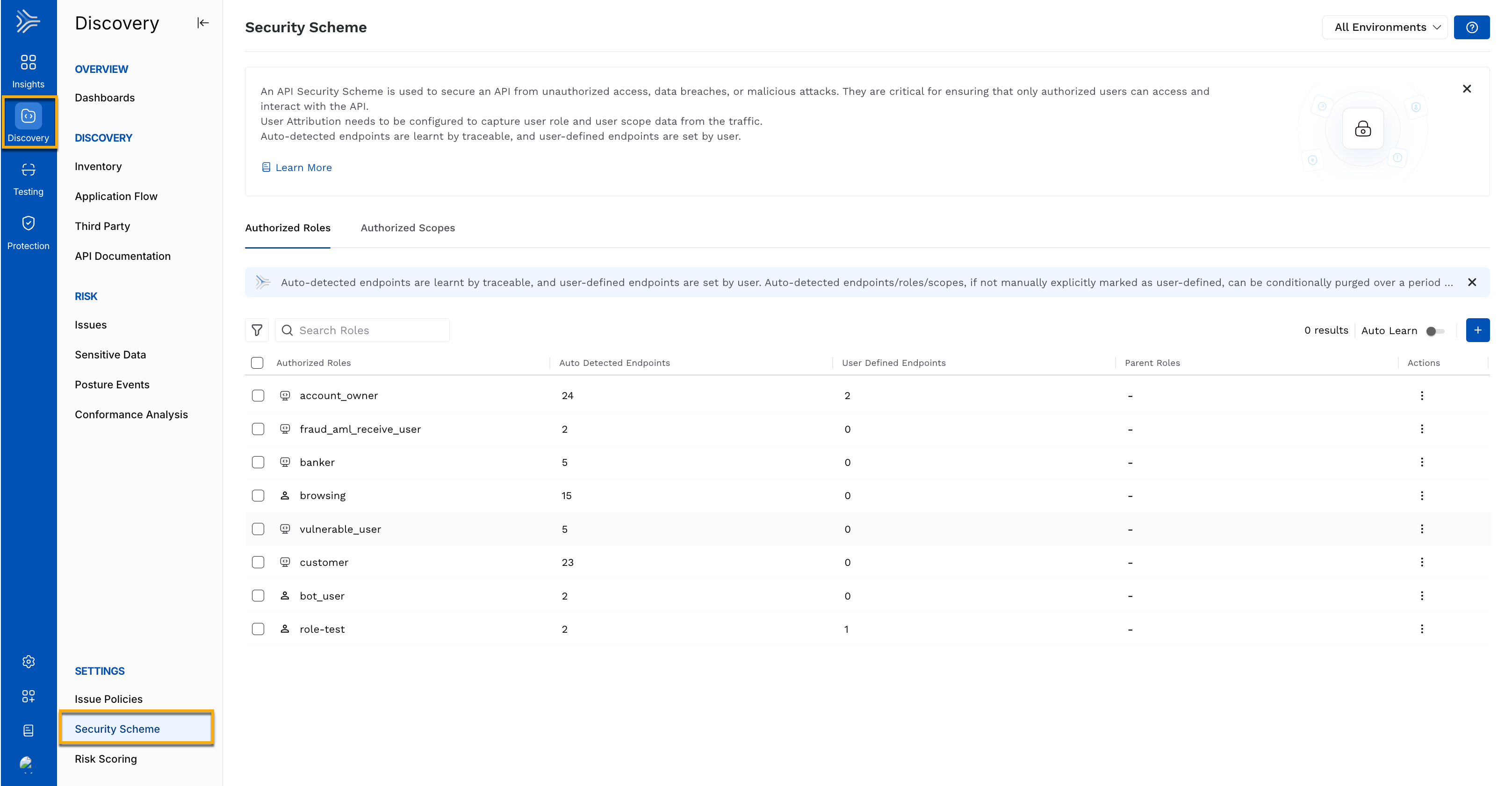
Securing your application ecosystem requires more than discovering APIs. It also requires ensuring that only the right users, with the appropriate roles and scopes, can access them. The security scheme in Traceable enables role and scope-based authorization for your APIs. It combines automatically learned access patterns with manually defined rules, allowing you to model your application's authorization behavior while maintaining full control where needed. By mapping roles, scopes, and the API endpoints they are permitted to access, you can enforce consistent authorization policies across your API ecosystem.
Security schemes work alongside user attribution, which extracts user, role, and scope information from authenticated API traffic. After configuring user attribution, you can define or validate authorization rules by associating roles and scopes with the API endpoints they are allowed to access. Traceable then uses these mappings to detect unauthorized access attempts, reduce the risk of data exposure, and help protect against broken-function-level-authorization (BFLA) attacks.
Security Scheme
## What will you learn from this topic?
By the end of this topic, you will be able to understand:
* The purpose of a security scheme is to prevent unauthorized access to APIs.
* The difference between the two security scheme configuration methods, including auto-learned and user-defined.
* The steps to configure role or scope mapping, including explicit endpoint mapping and regex-based fallback matching.
* How regex-based fallback matching extends BFLA detection to APIs without an explicit mapping.
***
## Before you begin
Before setting up a security scheme, make a note of the following:
* Make sure you have configured the user attribution. This allows Traceable to detect user roles and scopes from the incoming traffic. For information, see [User Attribution](/web-application-and-api-protection-waap/settings/discovery/user-attribution-and-session-identification/user-attribution.md).
***
## Understand the security scheme
The security scheme is designed to evaluate every API call based on who is making the request and what they are authorized to do. In Traceable, the security scheme page serves as a hub for managing roles and scopes across all API endpoints. The following table provides an overview of security schemes, including their purpose, how they work, and how you can use them in Traceable.
| **When to use** | **Why use it?** | **How can you leverage it?** |
| ------------------------------------------------------------------------------------------------------------------------------------------------------------------------------------------------------------------------------------------------------------------- | ----------------------------------------------------------------------------------------------------------------------------------------------------------------------------------------------------------------------------------- | ---------------------------------------------------------------------------------------------------------------------------------------------------------------------------------------------------------------------------------------------------------------- |
| Use security schemes after configuring user attribution to define and validate role and scope-based authorization for your APIs. It is especially useful when you want to ensure that users can access only the endpoints and operations they are permitted to use. | Security schemes help protect your APIs from unauthorized access and Broken Function-Level Authorization (BFLA) attacks by ensuring that every API request is evaluated against expected roles and scopes before access is granted. | Use the security scheme page to review roles and scopes detected from live traffic, define the expected authorization model for your APIs, identify authorization gaps, and maintain consistent access control across your API inventory from a single location. |
***
## Role and scope mapping modes
Traceable provides two modes of mapping roles and scopes. The following table discusses the types and the different metrics:
|
Learning Mode →
Comparison Metric↓
| **Auto-learn mode** | **User-defined mode** |
| --------------------------------------------------------------------------------------------------- | ---------------------------------------------------------------------------------------------------------------------------------------------------------------------------------------------------------------------------------------------------------------------------------------------------------------------------------------------------------------------------------------------------------------------------- | ---------------------------------------------------------------------------------------------------------------------------------------------------------------------------------------------------------------------------------------------------------------------------------------------------------------- |
| **Purpose** | Automatically discovers API authorization patterns from authenticated API traffic. | Manually defines and enforces the expected authorization model for your APIs. |
| **How it works** |
Analyzes incoming authenticated API traffic to dynamically identify roles, scopes, and their associated API endpoints.
Traceable auto-learns authenticated APIs only.
| Allows you to manually create roles and scopes and map them to the API endpoints they are authorized to access. |
| **Best suited for** | Discovering existing access patterns and accelerating the creation of security schemes with minimal manual effort. | Enforcing a known authorization model, especially for production environments and APIs handling sensitive data. |
| **Representation** | Displayed with the Auto-learn using the  icon. | Displayed with the user-defined using the  icon. |
| **Retention** | Auto-learned roles, scopes, and endpoint mappings are automatically removed if they are not observed for *7* consecutive days. | Roles, scopes, and endpoint mappings are retained until you delete them. |
| **Parent hierarchy** | Not supported. Auto-learned roles and scopes do not have parent-child relationships. |
Supports parent-child hierarchies, allowing parent roles or scopes to inherit permissions from their child roles or scopes.
The child role does not inherit access permissions granted to the parent role.
|
| **Endpoint mapping** | Endpoints are automatically associated with the detected roles and scopes. | You manually map API endpoints to the appropriate roles and scopes. |
| **Long-term management** | Auto-learned roles and scopes can be converted to user-defined roles and scopes to retain them permanently and continue enforcing access policies. For information on enabling auto-learn and converting a role, scope, or endpoint to user-defined, see the [Enable Auto-Learn](#autolearn-mode) and [Convert Auto-Learned Schemes to User-Defined](#converting-autolearned-schemes-to-userdefined) sections, respectively. | Configurations remain active until explicitly modified or deleted. For information on creating a user-defined role or scope mapping, see [Create a User-Defined Scheme](#creating-a-userdefined-scheme). |
***
## Understand regex-based fallback matching
Traceable detects a user accessing an API they are not allowed to use by evaluating each API call against the roles and scopes you have mapped to it. You can define regex patterns on a role or scope instead, for example, *GET* */admin/.\**, so a single pattern covers every matching endpoint. When a call has no explicit mapping, Traceable falls back to checking your patterns. A match triggers normal BFLA detection using the matched role or scope, and no match means the API is treated as unclaimed, with no alert raised.
### Understand fallback matching evaluation
When an API call arrives without an explicit role or scope mapping, Traceable checks whether any regex pattern you have defined on a role or scope matches the call's HTTP method and path.
* If a pattern matches, Traceable proceeds with BFLA detection normally, using the roles or scopes whose patterns matched.
* If no pattern matches, Traceable treats the API as unclaimed and does not raise an alert for it.
{% hint style="info" %}
A role or scope can use explicit API endpoint mappings, URL regexes, or a combination of both. If both are configured, Traceable first evaluates explicit endpoint mappings and falls back to URL regex matching only when no explicit mapping exists.
{% endhint %}
### Behavioral impact
The following table describes how BFLA detection behaves when regex-based fallback matching is applied, across each mapping scenario:
| **Scenario** | **Example** | **Result** |
| -------------------------------------------------------------------------------------------------------- | ----------------------------------------------------------------------------------------------------------------------------------------------------- | --------------------------------------------------------------------------------------------------------------------- |
| API has an explicit role or scope mapping. | *GET* */admin/users* is explicitly linked to the admin role. | Traceable evaluates the request against the explicit mapping to determine whether access is authorized. |
| API has no explicit mapping, but a role or scope pattern matches, and the user has an authorized role. | The admin role has the pattern *GET* */admin/.\**. A user with the admin role calls *GET* */admin/reports*. | No alert is generated because the request matches an authorized pattern. |
| API has no explicit mapping, but a role or scope pattern matches, and the user has an unauthorized role. |
The admin role has the pattern GET/admin/.\*. A user with the viewer role calls
GET/admin/reports.
| Traceable raises a BFLA alert because the request matches the endpoint pattern but the user's role is not authorized. |
| API has no explicit mapping and no role or scope pattern matches. | *GET /public/health* has no role or pattern covering it. | No authorization evaluation is performed because the endpoint is unclaimed, and no alert is generated. |
***
## Set up a security scheme
Traceable provides you with the flexibility to define security schemes according to your application architecture requirements. This flexibility is provided through auto-learn and user-defined schemes. This section highlights the recommendations on when to use these modes, along with the corresponding steps.
{% hint style="info" %}
Traceable recommends using:
* Auto-learn mode when you do not have information on your traffic, and want Traceable to learn and create schemes dynamically.
* User-defined schemes, when you wish to build access control based on the existing traffic insights.
{% endhint %}
### Enable auto-learn mode
Auto-learn allows Traceable to dynamically learn roles, scopes, and their associated authenticated endpoints from the incoming traffic. To enable auto-learn for authorized roles or scopes, complete the following steps:
Enabling Auto-Learn
1. Navigate to the **Security Scheme** page.
2. From the page’s top right corner, **Environment** drop-down, select the environment for which you wish to enable auto-learn. By default, Traceable selects *All Environments*.
3. Select the **Authorized Roles** or **Authorized Scopes** tab according to your requirements.
4. Click the **Auto-learn** toggle to enable it.
***
## Create a user-defined scheme
You can define the roles, scopes, and endpoints that assigned users can access. To create a user-defined role or scope and select the endpoints, complete the following steps:
1. Navigate to the **Security Scheme** page.
2. From the page’s top right corner, **Environment** drop-down, select the environment for which you wish to create a user-defined scheme. By default, Traceable selects *All Environments*.
3. Select the **Authorized Roles** or **Authorized Scopes** tab according to your requirements.
4. Click the **+** icon.
5. In the **Create Role Mapping** slide-out panel, complete the following steps:
Create Role Mapping
1. Specify the **Role** or **scope**.
2. (Optional) Select the **Parent role**.
3. Specify the **URL Regexes** using **+ Add Regex**:
1. Specify the **HTTP Method Regex**, for example, *GET.*
2. Specify the **API Endpoint Regex**, for example, */api/v1/users/\*.* For more information, see [Understand regex-based fallback matching](#understand-regexbased-fallback-matching3).
You can add one or more HTTP Method and API Endpoint Regexes according to your requirements.
4. Click **+ Add** to add accessible endpoints. In the **Select API Endpoint** window that appears, complete the following:
1. (Optional) Click the **Filter** (:filter:) icon to filter endpoints or use the search field to search.
2. Click **Select** corresponding to the endpoints you wish to choose.
3. In the window’s bottom left corner, click **Review** and verify the selected endpoints.
4. Click **Add** after verifying the selected endpoints.
5. Click **Create**.
### Demo
The following demo walks you through the steps to create role mapping in the security scheme:
{% embed url="" %}
***
## Manage security schemes
As your application ecosystem and APIs evolve, the roles and scopes require management as well. Traceable provides you with the flexibility to manage the security schemes according to your requirements. Using this, you can ensure that the access control is correct at all times. This section discusses the steps to convert auto-learned schemes to user-defined schemes, update schemes, and provides information on additional features available on the page.
### Convert auto-learned schemes to user-defined
Traceable automatically purges any auto-learned roles, scopes, and endpoints if it does not observe any related traffic in *7* consecutive days. This helps maintain the accuracy and relevancy of data. While these auto-learned schemes are purged, the user-defined ones are stored until you delete them explicitly. If you wish to retain the auto-learned schemes in the Traceable platform, you can convert them to user-defined schemes.
To convert an auto-learned role, scope, or endpoint to user-defined, complete the following steps:
1. Navigate to the **Security Scheme** page.
2. From the page’s top right corner, **Environment** drop-down, select the environment for which you wish to convert schemes. By default, Traceable selects *All Environments*.
3. Select the **Authorized Roles** or **Authorized Scopes** tab according to your requirements.
4. Depending on the role, scope, or endpoint you wish to convert, complete one of the following:
* To convert a role or scope:
1. Click the **Ellipse** (:ellipsis:) icon corresponding to the auto-learned role or scope, and click **Mark as User Defined**.
Converting a role or scope to user-defined does not automatically convert its endpoints. You must convert each endpoint manually. To do so, complete the below step.
2. In the confirmation window, click **Yes, Mark as User Defined**.
* To convert an endpoint:
1. Click the **Ellipse** (:ellipsis:) icon corresponding to the auto-learned role or scope and click **Edit**.
2. In the **Edit Role Mapping** window, **Endpoint** section, click the **Ellipse** (:ellipsis:) icon and click **Mark as User Defined**.
Converting any auto-learned endpoint for a role or scope to user-defined automatically converts the associated role or scope to user-defined as well.
3. Click **Update**.
### Demo
The following demo shows how to perform these steps in Traceable. It consists of two sections that show how you can convert a role or scope and an endpoint.
{% embed url="" %}
***
## Manage role and scope mappings
To manage mappings, click the **Ellipse** (:ellipsis:) icon corresponding to a role or scope. The following table explains the actions available for managing a security scheme mapping:
| **Action** | **Description** |
| ------------------------------------------------------- | --------------------------------------------------------------------------------------------------------------------------------------------------------------------------------------------------- |
| **View** | View the mapping without making any changes. |
| **Edit** | Modify the mapping. You can update all fields, add or remove endpoints, and add URL regexes to existing roles and scopes. |
| **Delete** |
Delete the mapping from the Traceable platform.
Deleted mappings cannot be restored.
|
| **Mark as User-Defined** *(Auto-Learned mappings only)* | Convert an auto-learned mapping to a user-defined mapping. User-defined mappings are retained even when authenticated traffic is unavailable, preventing Traceable from automatically purging them. |
### Additional features
In addition to the above features, you can also perform the following actions. The following table explains the additional actions available on the roles and scopes tabs:
| **Action** | **Description** |
| --------------- | ------------------------------------------------------------------------------------------------------------------------------------------------------------------------------------------------------------------------------------------ |
| **Search** | Use the search bar to find specific roles or scopes. |
| **Filter** | Click the **Filter** (:filter:) icon to display roles, scopes, and endpoints based on their mode (Auto-Learned or User-Defined). |
| **Bulk Delete** |
Select one or more roles or scopes, then click Delete at the bottom of the page to remove them.