> For the complete documentation index, see [llms.txt](https://developer.harness.io/llms.txt). Markdown versions of documentation pages are available by appending `.md` to page URLs; this page is available as [Markdown](https://developer.harness.io/continuous-integration/use-harness-ci/use-harness-ci/use-drone-plugins/run-a-git-hub-action-in-cie.md).
# Use the GitHub Actions Drone plugin
Run GitHub Actions in your Harness CI pipelines.
[GitHub Actions](https://docs.github.com/en/actions/learn-github-actions/understanding-github-actions) are a GitHub feature that enable you to automate various event-driven activities in GitHub, such as cloning a repository, generating Docker images, and testing scripts.
There are two ways you can run GitHub Actions in Harness CI pipelines:
* If you are using Harness Cloud build infrastructure, use the [built-in GitHub Action step](/continuous-integration/use-harness-ci/use-harness-ci/use-drone-plugins/ci-github-action-step.md).
* For all other build infrastructures, use the [GitHub Actions Drone plugin](https://github.com/drone-plugins/github-actions) in a **Plugin** step. When your pipeline runs, the GitHub Actions Drone Plugin runs the GitHub Action in the background using [nektos/act](https://github.com/nektos/act).
This topic explains how to use the GitHub Actions Drone plugin in a Plugin step.
### Add the Plugin step
You need a [CI pipeline](/continuous-integration/use-harness-ci/use-harness-ci/prep-ci-pipeline-components.md) with a [Build stage](/continuous-integration/use-harness-ci/use-harness-ci/set-up-build-infrastructure/ci-stage-settings.md).
1. In your pipeline's **Build** stage, and a [Plugin step](/continuous-integration/use-harness-ci/use-harness-ci/use-drone-plugins/plugin-step-settings-reference.md).
2. Enter a **Name** and optional **Description**.
3. For **Container Registry**, select a container registry connector that has Docker Hub access.
4. In **Image**, enter the name of the GitHub Actions Drone Plugin image: `plugins/github-actions`.
5. Under **Optional Configuration**, enable **Privileged**.
**Privileged** is required because the GitHub Actions Drone Plugin uses [nektos/act](https://github.com/nektos/act) to run GitHub Actions in Harness CI, which requires DinD (Docker-in-Docker) to run images.
#### Define Action variables and attributes
Use **Settings** to specify the GitHub Action you want to use and to pass variables and attributes required by the Action and the Drone Plugin. You must specify `uses` and `with`. You can use `env` to specify environment variables, such as GitHub tokens to access [private Action repos](#private-action-repos).
| Key | Description | Value format | Value example |
| ------ | ------------------------------------------------------------------------------------------------------------------------------------------------------------------------------------------------------------------------------------------------------------------------------------------------------------------------------------------------------- | -------------- | -------------------------------------------------------------------------------------------------------------------------------------------------- |
| `uses` | Required. Specify the Action's repo, along with a branch or tag. | `[repo]@[tag]` | `actions/setup-go@v3` |
| `with` | Required. Provide a map of key-value pairs representing settings required by the GitHub Action itself. | `key: value` | `go-version: '>=1.17.0'` or `{path: pom.xml, destination: cie-demo-pipeline/github-action, credentials: <+stage.variables.GCP_SECRET_KEY_BASE64>}` |
| `env` | Conditionally required. Specify a map of environment variables to pass to the Action. Required for [Private Action repos](#private-action-repos), [Duplicate Actions](#duplicate-actions), [Actions requiring a defined working directory](#actions-requiring-a-defined-working-directory), or if otherwise noted in the Action's usage specifications. | `key: value` | `GITHUB_TOKEN: <+secrets.getValue("github_pat")>` |
{% hint style="info" %}
You can use variable expressions for these values. For example, `credentials: <+stage.variables.[TOKEN_SECRET]>` uses a [stage variable](/harness-platform/use-harness-platform/pipelines/add-a-stage.md#stage-variables).
{% endhint %}
{% tabs %}
{% tab title="Visual editor example" %}

{% endtab %}
{% tab title="YAML example" %}
```yaml
- step:
identifier: gcsuploader
name: gcsuploader
type: Plugin
spec:
connectorRef: YOUR_DOCKER_CONNECTOR_ID
image: plugins/github-actions
privileged: true
settings:
uses: google-github-actions/upload-cloud-storage@main # Specify the GitHub Action you want to use.
with: # Specify Action settings
path: pom.xml
destination: cie-demo-pipeline/github-action
credentials: <+stage.variables.GCP_SECRET_KEY_BASE64> ## This example uses a stage variable to store a secret.
```
{% endtab %}
{% endtabs %}
#### Private Action repos
If you want to use an Action that is in a private repository, you must add a `GITHUB_TOKEN` environment variable to the **Plugin** step's `settings.env`. You need a [GitHub personal access token](https://docs.github.com/en/authentication/keeping-your-account-and-data-secure/creating-a-personal-access-token) that has pull permissions to the target repository. Additional permissions may be necessary depending on the Action's purpose. Store the token as a [Harness secret](/harness-platform/use-harness-platform/secrets.md) and use a variable expression, such as `<+secrets.getValue("YOUR_TOKEN_SECRET")>`, to call it.
* Key: `GItHUB_TOKEN`
* Value: `<+secrets.getValue("YOUR_TOKEN_SECRET")>`
Here's an example of the YAML for a `Plugin` step using an Action in a private repo:
```yaml
- step:
type: Plugin
name: private action
identifier: private_action
spec:
connectorRef: dockerhub
image: plugins/github-actions
privileged: true
settings:
uses: myorg/private-action-step@v1
with:
path: pom.xml
env:
GITHUB_TOKEN: <+secrets.getValue("github_pat")>
```
#### Duplicate Actions
If you run multiple instances of the same GitHub Action, either in parallel or with a looping strategy, you must set the `XDG_CACHE_HOME` environment variable.
The default value of this variable is `/home/ubuntu/.cache`; however, the `XDG_CACHE_HOME` variable must have a different value for each instance of the Action. If you have separate steps running in parallel, you can assign distinct values to each step, such as `XDG_CACHE_HOME: /home/ubuntu/.cache1`. If you apply a looping strategy to repeat one step multiple times, you can use an expression to generate distinct values, such as `XDG_CACHE_HOME: /home/ubuntu/.cache<+step.identifier>`.
In this example, two parallel `Plugin` steps run the same GitHub Action. Each step has a unique value for `XDG_CACHE_HOME`.
```yaml
- parallel
- step:
identifier: gcsuploader
name: gcsuploader
type: Plugin
spec:
connectorRef: YOUR_IMAGE_REGISTRY_CONNECTOR
image: plugins/github-actions
privileged: true
settings:
uses: google-github-actions/upload-cloud-storage@main
with:
path: pom.xml
destination: cie-demo-pipeline/github-action
credentials: <+stage.variables.GCP_SECRET_KEY_BASE64>
env:
XDG_CACHE_HOME: /home/ubuntu/.cache1
- step:
identifier: gcsuploader
name: gcsuploader
type: Plugin
spec:
connectorRef: YOUR_IMAGE_REGISTRY_CONNECTOR
image: plugins/github-actions
privileged: true
settings:
uses: google-github-actions/upload-cloud-storage@main
with:
path: pom.xml
destination: cie-demo-pipeline/github-action
credentials: <+stage.variables.GCP_SECRET_KEY_BASE64>
env:
XDG_CACHE_HOME: /home/ubuntu/.cache2
```
#### Output Variables from GitHub Actions Drone Plugin Step
When using GitHub Actions Drone Plugin step in Harness CI, it is now possible to output variables from steps in your workflow. This feature allows seamless passing of values between steps, enabling complex pipelines and dynamic workflows.
Here's an example pipeline that demonstrates how to use GitHub Actions Drone Plugin step in Harness CI to output variables and reference them in subsequent steps:
```yaml
execution:
steps:
- step:
identifier: gha_plugin
type: Plugin
name: gha_plugin
spec:
connectorRef: YOUR_IMAGE_REGISTRY_CONNECTOR
image: plugins/github-actions:1.0.0
settings:
uses: Ompragash/maths-action@main
with:
input1: "15"
input2: "25"
imagePullPolicy: Always
- step:
identifier: Run_1
type: Run
name: Run_1
spec:
connectorRef: YOUR_IMAGE_REGISTRY_CONNECTOR
image: alpine
shell: Sh
command: |-
echo <+execution.steps.gha_plugin.output.outputVariables.sum>
echo <+execution.steps.gha_plugin.output.outputVariables.product>
echo <+execution.steps.gha_plugin.output.outputVariables.message>
```
#### Actions requiring a defined working directory
Some GitHub Actions need to run on the cloned [codebase](/continuous-integration/use-harness-ci/use-harness-ci/codebase-configuration/create-and-configure-a-codebase.md). The GitHub Action plugin doesn't automatically set a working directory.
If this is required by the Action you want to run, and the Action offers a working directory parameter, then you need to specify the working directory as `/harness`. For example:
```yaml
- step:
type: Plugin
name: Action docker publish image
identifier: Action_docker_publish_image
spec:
connectorRef: YOUR_IMAGE_REGISTRY_CONNECTOR
image: plugins/github-actions
privileged: true
settings:
uses: elgohr/Publish-Docker-Github-Action@v4
with:
name: dockerhub/publish-docker-image
username: ${{ secrets.DOCKER_USERNAME }}
password: ${{ secrets.DOCKER_PASSWORD }}
workdir: /harness
```
If the Action ingests the working directory as an environment variable, place it under `env`.
If the Action doesn't offer a way to set a working directory, it most likely won't run in Harness.
### Pipeline YAML example
This YAML example uses a `Plugin` step to run the Google `upload-cloud-storage` GitHub Action. It uses a [stage variable](/harness-platform/use-harness-platform/pipelines/add-a-stage.md#stage-variables) to store a token secret required by the Action. If you copy this example, you need to modify the placeholder values, image, and other settings according to your needs. You'll also need to create your own secret and stage variable.
```yaml
pipeline:
name: default
identifier: default
projectIdentifier: default
orgIdentifier: default
tags: {}
stages:
- stage:
name: build
identifier: build
type: CI
spec:
cloneCodebase: true
execution:
steps:
- step:
type: Plugin
name: Plugin_1
identifier: Plugin_1
spec:
connectorRef: YOUR_DOCKER_CONNECTOR_ID
image: plugins/github-actions
privileged: true
settings:
uses: google-github-actions/upload-cloud-storage@main ## Specify the Action to use.
with: ## Specify Action settings
path: pom.xml
destination: cie-demo-pipeline/github-action
credentials: <+stage.variables.GCP_SECRET_KEY_BASE64>
infrastructure: ## Specify your build infrastructure
type: KubernetesDirect
spec:
connectorRef: YOUR_KUBERNETES_CLUSTER_CONNECTOR_ID
namespace: YOUR_NAMESPACE
automountServiceAccountToken: true
nodeSelector: {}
os: Linux
variables: ## This stage variable references a Harness secret.
- name: GCP_SECRET_KEY_BASE64
type: Secret
description: ""
required: false
value: YOUR_SECRET
properties:
ci:
codebase:
connectorRef: YOUR_CODEBASE_CONNECTOR_ID
repoName: YOUR_CODE_REPO
build: <+input>
```
{% hint style="info" %}
For more examples of GitHub Actions in Plugin steps, go to the [GitHub Actions Support in Harness CI blog post](https://harness.io/blog/continuous-integration/github-actions-support-harness-ci/).
{% endhint %}
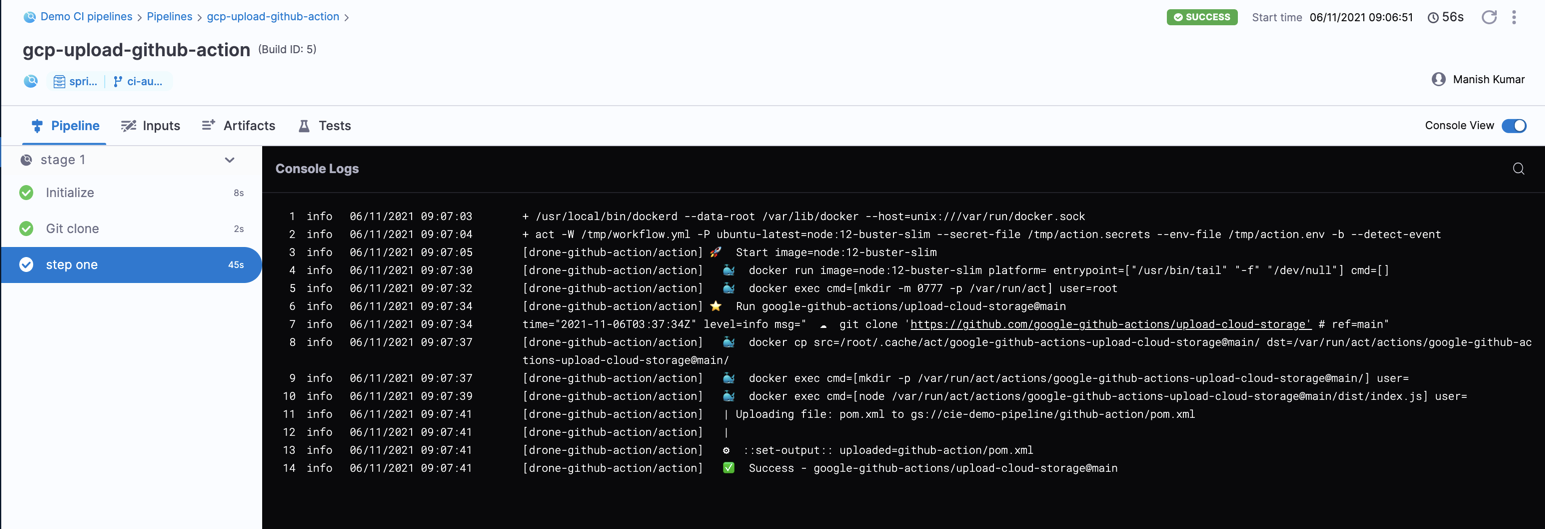
### Action logs
When you run the pipeline, you can observe the GitHub Action plugin logs in the build's logs.
### Troubleshooting GitHub Actions in Harness CI
Go to the [CI Knowledge Base](/continuous-integration/troubleshooting-and-resources/ci-articles-and-faqs/continuous-integration-faqs.md) for questions and issue related to plugins and integrations, including GitHub Actions. For example:
* [Can't connect to Docker daemon](/continuous-integration/troubleshooting-and-resources/ci-articles-and-faqs/continuous-integration-faqs.md#github-action-step-cant-connect-to-docker-daemon)
* [Not a git repository (or any of the parent directories)](/continuous-integration/troubleshooting-and-resources/ci-articles-and-faqs/continuous-integration-faqs.md#github-action-step-fails-with-not-a-git-repository-or-any-of-the-parent-directories)
* [PATH variable overwritten in parallel GitHub Action steps](/continuous-integration/troubleshooting-and-resources/ci-articles-and-faqs/continuous-integration-faqs.md#why-is-the-path-variable-overwritten-in-parallel-github-actions-steps)
{% @harness-feedback/feedback %}