> For the complete documentation index, see [llms.txt](https://developer.harness.io/llms.txt). Markdown versions of documentation pages are available by appending `.md` to page URLs; this page is available as [Markdown](https://developer.harness.io/release-notes/security-testing-orchestration.md).

# Security Testing Orchestration release notes

These release notes describe recent changes to Harness Security Testing Orchestration (NextGen SaaS).

{% hint style="info" %}
**ABOUT HARNESS RELEASE NOTES**

* **Progressive deployment:** Harness deploys changes to Harness SaaS clusters on a progressive basis. This means that the features described in these release notes may not be immediately available in your cluster. To identify the cluster that hosts your account, go to your **Account Overview** page in Harness. In the new UI, go to **Account Settings**, **Account Details**, **General**, **Account Details**, and then **Platform Service Versions**.
* **Security advisories:** Harness publishes security advisories for every release. Go to the [Harness Trust Center](https://trust.harness.io/?itemUid=c41ff7d5-98e7-4d79-9594-fd8ef93a2838\&source=documents_card) to request access to the security advisories.
* **More release notes:** Go to [Harness Release Notes](/release-notes/readme.md) to explore all Harness release notes, including module, delegate, Self-Managed Enterprise Edition, and FirstGen release notes.
  {% endhint %}

### August 2026 <a href="#august-2026" id="august-2026"></a>

#### Version 1.206.6 <a href="#version-12066" id="version-12066"></a>

**Fixed Issues**

STO now more accurately categorizes findings from [Wiz repository scan](/security-testing-orchestration/use-sto/sto-scanner-configuration/wiz/repo-scans-with-wiz.md) configured with Scan Configuration = Wiz Directory, correctly labeling them as SAST or SCA issues. As a result, you may notice a change in the distribution of issues for existing scans, for example, more SCA issues and fewer SAST issues than before. (STO-12498)

### July 2026 <a href="#july-2026" id="july-2026"></a>

#### Version 1.205.3 <a href="#version-12053" id="version-12053"></a>

**New Features and Enhancements**

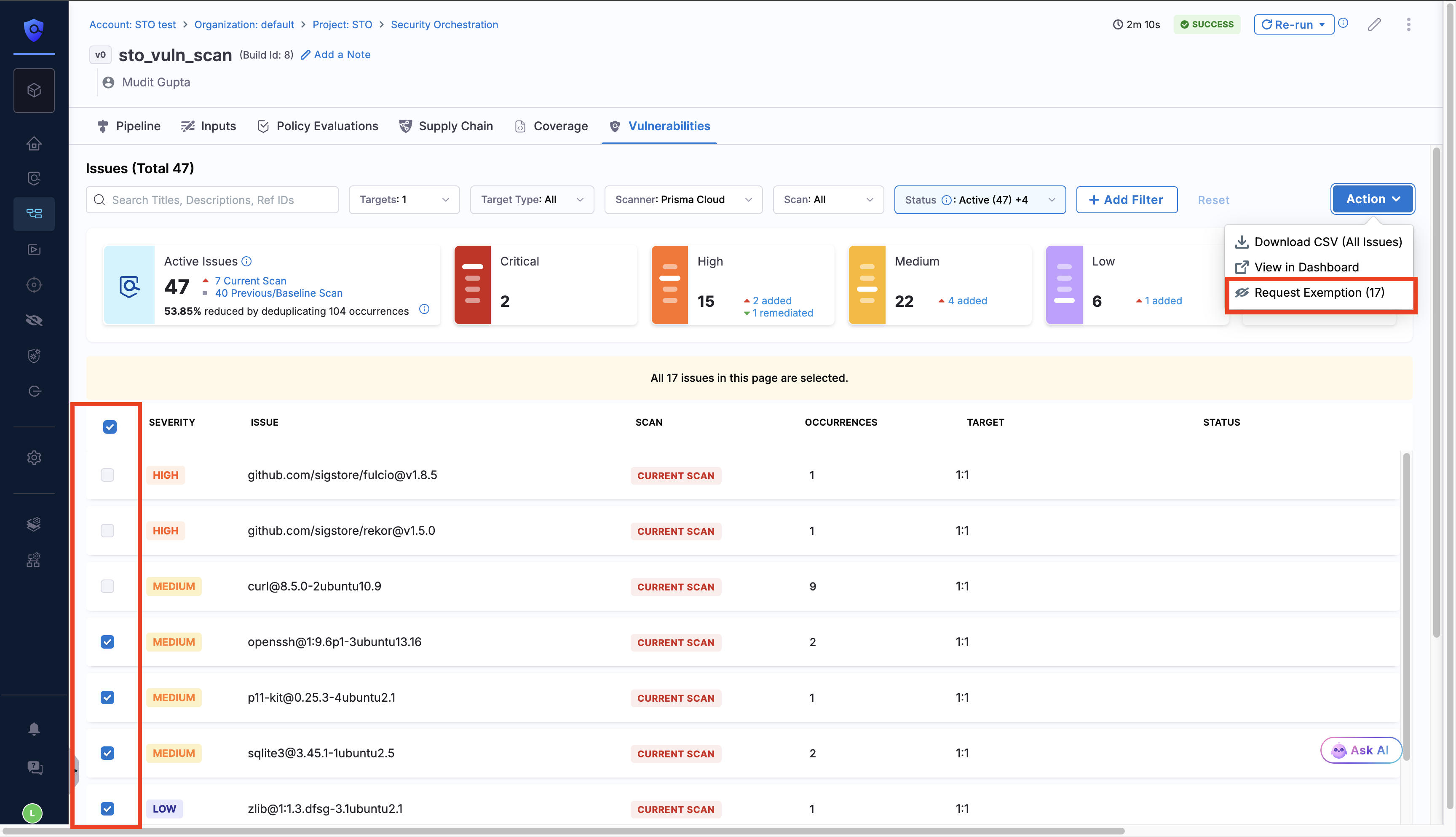
* Added support for [bulk exemption requests](/security-testing-orchestration/use-sto/sto-exempt-issues/exemption-workflows.md#create-bulk-exemption-requests). You can request exemptions for multiple vulnerabilities at once and apply the same scope (Target, Pipeline, or Project), duration, and reason across the selection. This feature is behind the feature flag `STO_ENABLE_BULK_EXEMPTION`. Contact [Harness Support](mailto:support@harness.io) to enable it.

  <figure><img src="/files/GIl6Py7x0RiwZ0QfL7C6" alt=""><figcaption><p>Click to view full size image</p></figcaption></figure>
* Added GitLab and Bitbucket support for [Create Pull Request](/security-testing-orchestration/use-sto/sto-remediate-issues/ai-based-remediations.md#create-pull-request-from-sto) from Harness AI remediation.
* [Enhanced Jira Ticket Metadata](/security-testing-orchestration/use-sto/jira-integrations.md#jira-ticket-metadata) is now **generally available (GA)**. Jira tickets created from STO include a vulnerability summary and relevant occurrence details to improve triage and prioritization. Previously, this was behind the feature flag `STO_JIRA_ENHANCED_TICKET_METADATA`.

**Fixed Issues**

* Fixed an issue where the **Vulnerabilities** tab displayed remediated issues only when an issue was remediated across all targets scanned in the same pipeline execution. (STO-11966)
* Fixed an issue where code snippets in the STO issue panel rendered with a yellow highlight that made them unreadable. (STO-12009)

### June 2026 <a href="#june-2026" id="june-2026"></a>

#### Version 1.200.2 <a href="#version-12002" id="version-12002"></a>

**New Features and Enhancements**

* Added support for [Cortex Cloud integration](/security-testing-orchestration/use-sto/sto-scanner-configuration/cortex-cloud-scanner-reference.md). This feature is behind the feature flag `STO_STEP_PALETTE_CORTEX_CLOUD`. Contact [Harness Support](mailto:support@harness.io) to enable it.
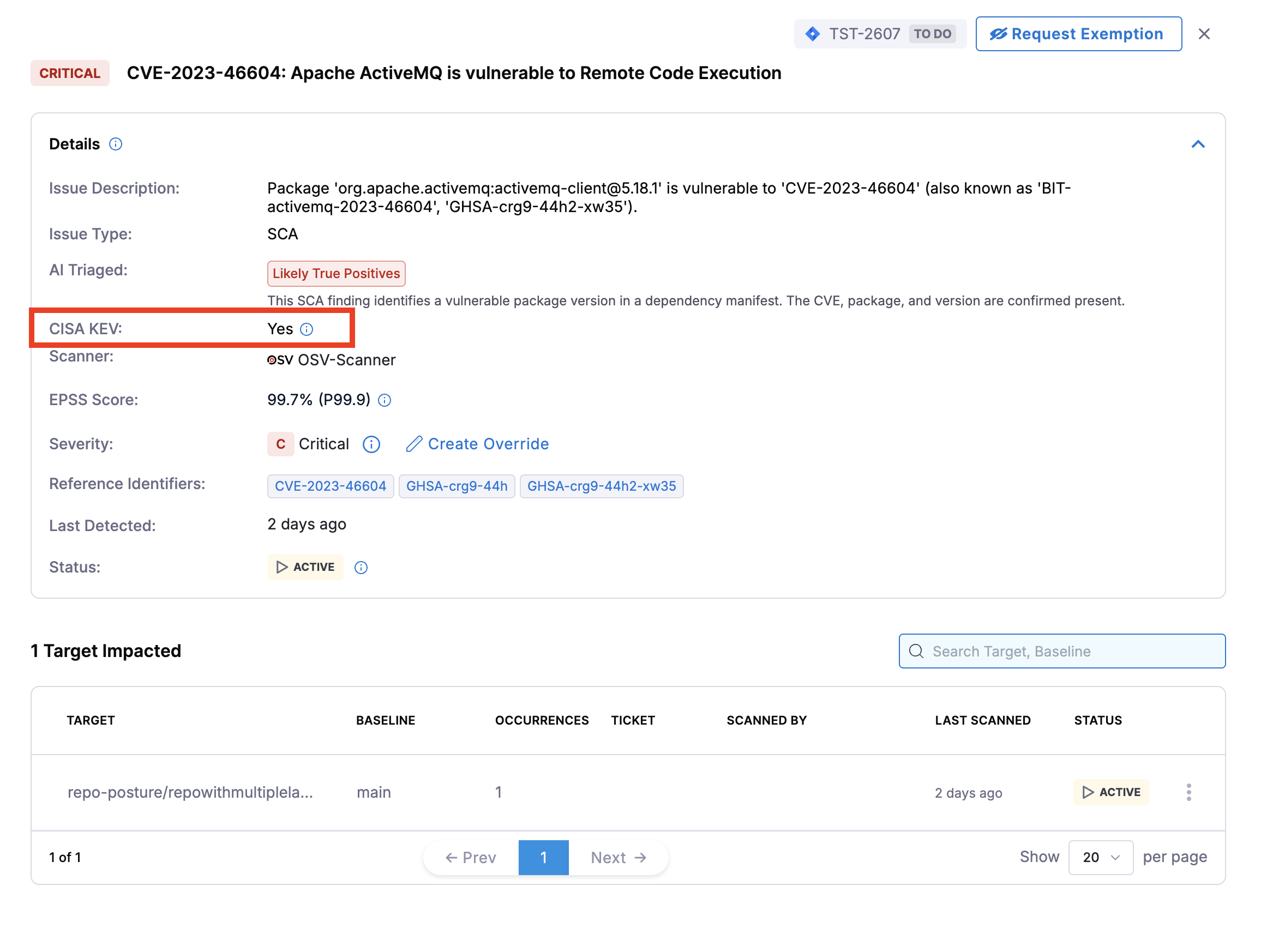
* Added [CISA KEV](/security-testing-orchestration/use-sto/sto-security-issues/cisa-kev.md) support to surface CISA Known Exploited Vulnerabilities status on the Issues page and Vulnerabilities tab, and introduced an [OPA policy](/security-testing-orchestration/use-sto/enforce-sto-policies-for-governance/create-opa-policies.md#warn-or-block-vulnerabilities-based-on-cisa-kev-count) to warn or block pipelines based on CISA KEV issue count. This feature is behind the feature flag `STO_ISSUE_KEV`. Contact [Harness Support](mailto:support@harness.io) to enable it.

<figure><img src="/files/7Kd0YnbnIEunOCxZcqwt" alt=""><figcaption><p>Click to view full size image</p></figcaption></figure>

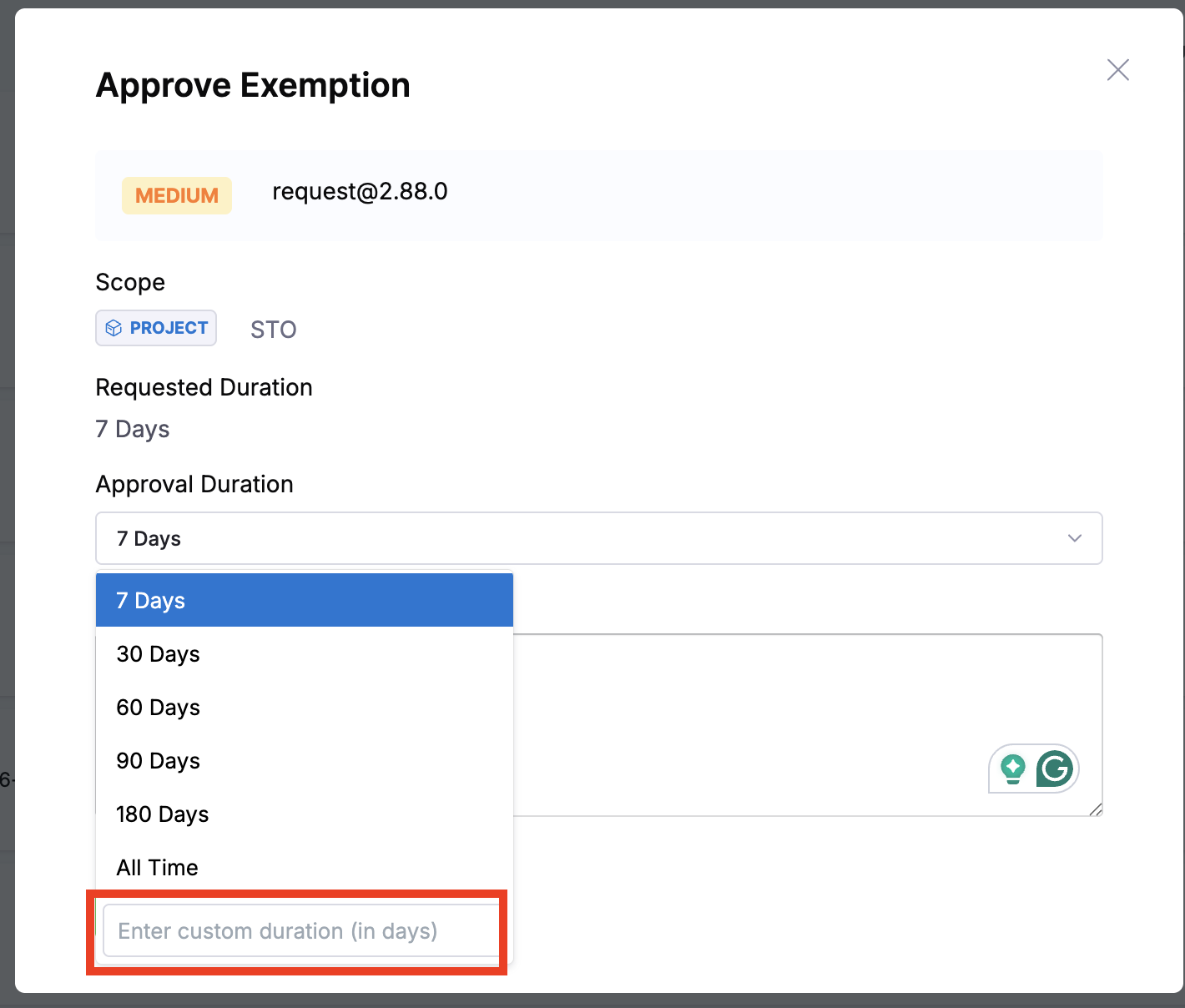
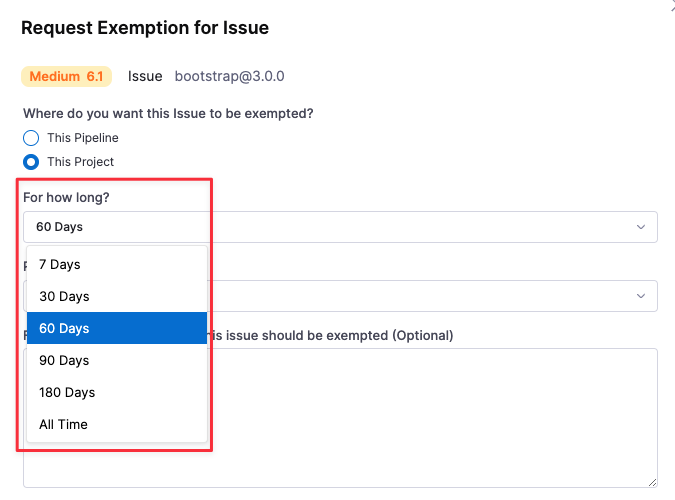
* Added [custom exemption duration](/security-testing-orchestration/use-sto/sto-exempt-issues/exemption-workflows.md#for-how-long) when submitting exemption requests and also approvers can now [override the requested duration](/security-testing-orchestration/use-sto/sto-exempt-issues/manage-exemptions.md#approve-an-exemption-request) when reviewing exemption requests.

<figure><img src="/files/mgrVDX8ngdxnPatRlrWz" alt=""><figcaption><p>Click to view full size image</p></figcaption></figure>

**Fixed Issues**

* Fixed an issue where remediations were not being recorded for scanners that leave subproduct as NULL (e.g. Aqua Trivy, Anchore, Grype), which also blocked auto closure of tickets for those scanners. (STO-11696)
* Fixed an issue where Harness SCA remediation and Auto PR suggested incorrect dependency upgrade versions, and **Create Pull Request** was unavailable when scan results included only a file name. (STO-11887)

### May 2026 <a href="#may-2026" id="may-2026"></a>

#### Version 1.197.0 <a href="#version-11970" id="version-11970"></a>

**New Features and Enhancements**

* [Enhanced Jira ticket metadata](/security-testing-orchestration/use-sto/jira-integrations.md#jira-ticket-metadata) with vulnerability summary and relevant occurrence details directly in Jira ticket. This feature is behind the feature flag `STO_JIRA_ENHANCED_TICKET_METADATA`. Contact [Harness Support](mailto:support@harness.io) to enable it.
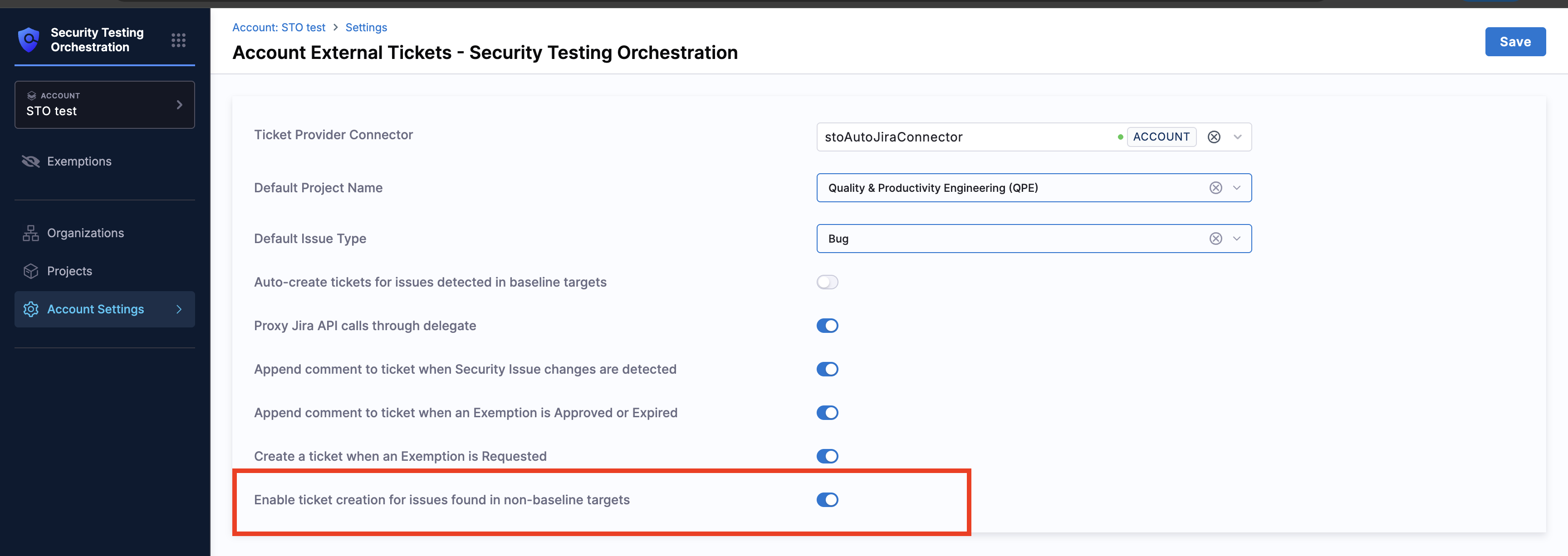
* Added support for [creating Jira tickets for non-baseline variants](/security-testing-orchestration/use-sto/jira-integrations.md#enable-ticket-creation-for-issues-found-in-non-baseline-targets), such as feature branches and pull requests. This feature is behind the feature flag `STO_NON_BASELINE_TICKETING`. Contact [Harness Support](mailto:support@harness.io) to enable it.

<figure><img src="/files/YOKdCK0SM3AwSrNDkEkK" alt=""><figcaption><p>Click to view full size image</p></figcaption></figure>

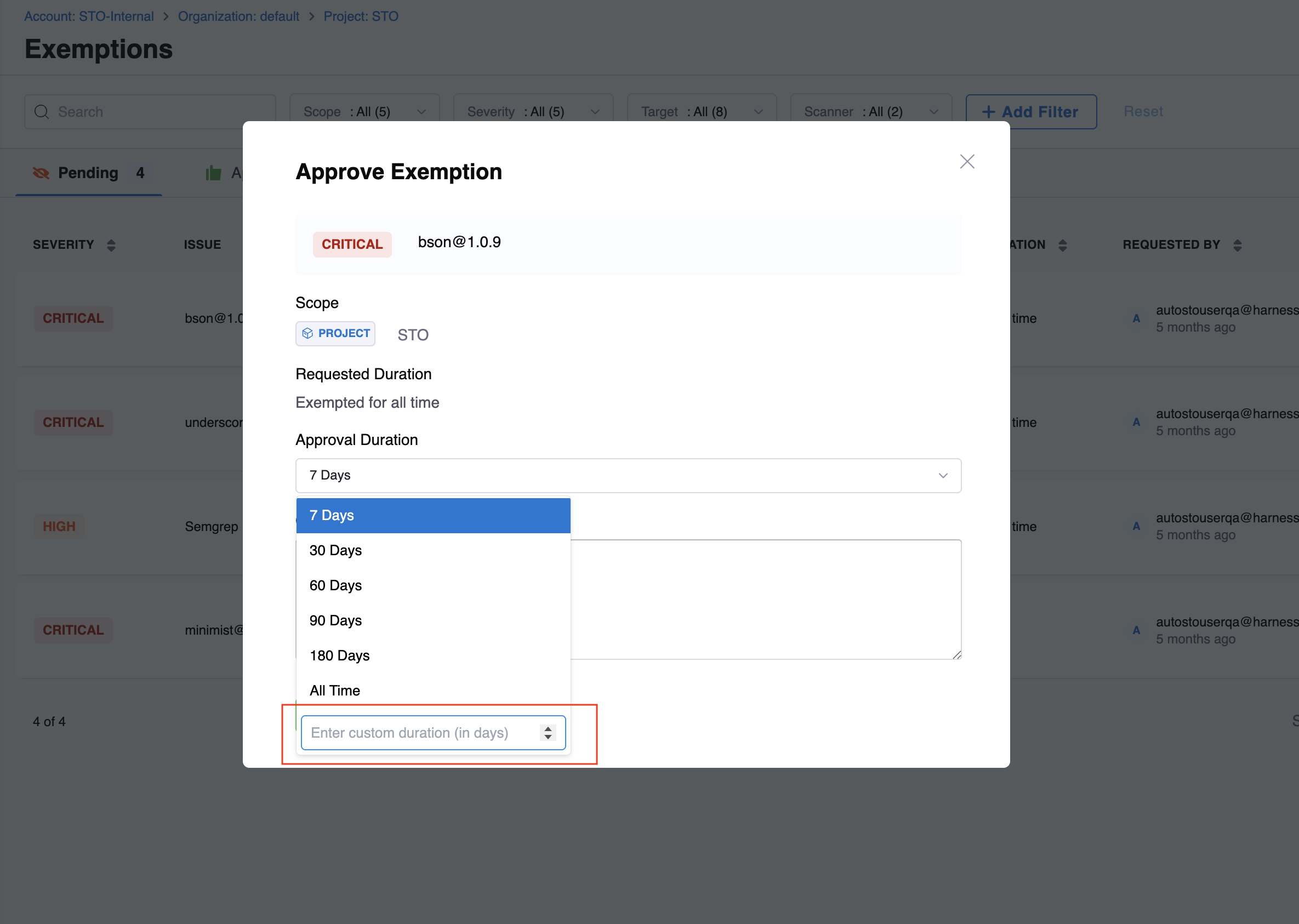
\- Introduced [Override Exemption duration](/security-testing-orchestration/use-sto/sto-exempt-issues/manage-exemptions.md#approve-an-exemption-request), providing approvers with greater control and flexibility when reviewing exemption requests and added custom duration time at the requester and approver level.

<figure><img src="/files/oocyx8cmytk3VKyNIcPQ" alt=""><figcaption><p>Click to view full size image</p></figcaption></figure>

**Fixed Issues**

* Fixed an issue where search by Issue ID did not work for remediated and exempted issues on the Issues page (STO-11441)
* Fixed an issue where the stage name did not appear against the step name in the filter on the **Vulnerabilities** tab (STO-11429).

<figure><img src="/files/nk0ztb8QqWdLADujI7NK" alt=""><figcaption><p>Click to view full size image</p></figcaption></figure>

### April 2026 <a href="#april-2026" id="april-2026"></a>

#### Version 1.191.2 <a href="#version-11912" id="version-11912"></a>

**New Features and Enhancements**

* [Linux ARM support for STO scanners](/security-testing-orchestration/new-to-sto/sto-whats-supported/infrastructure.md): All STO supported scanners now include Linux ARM support.
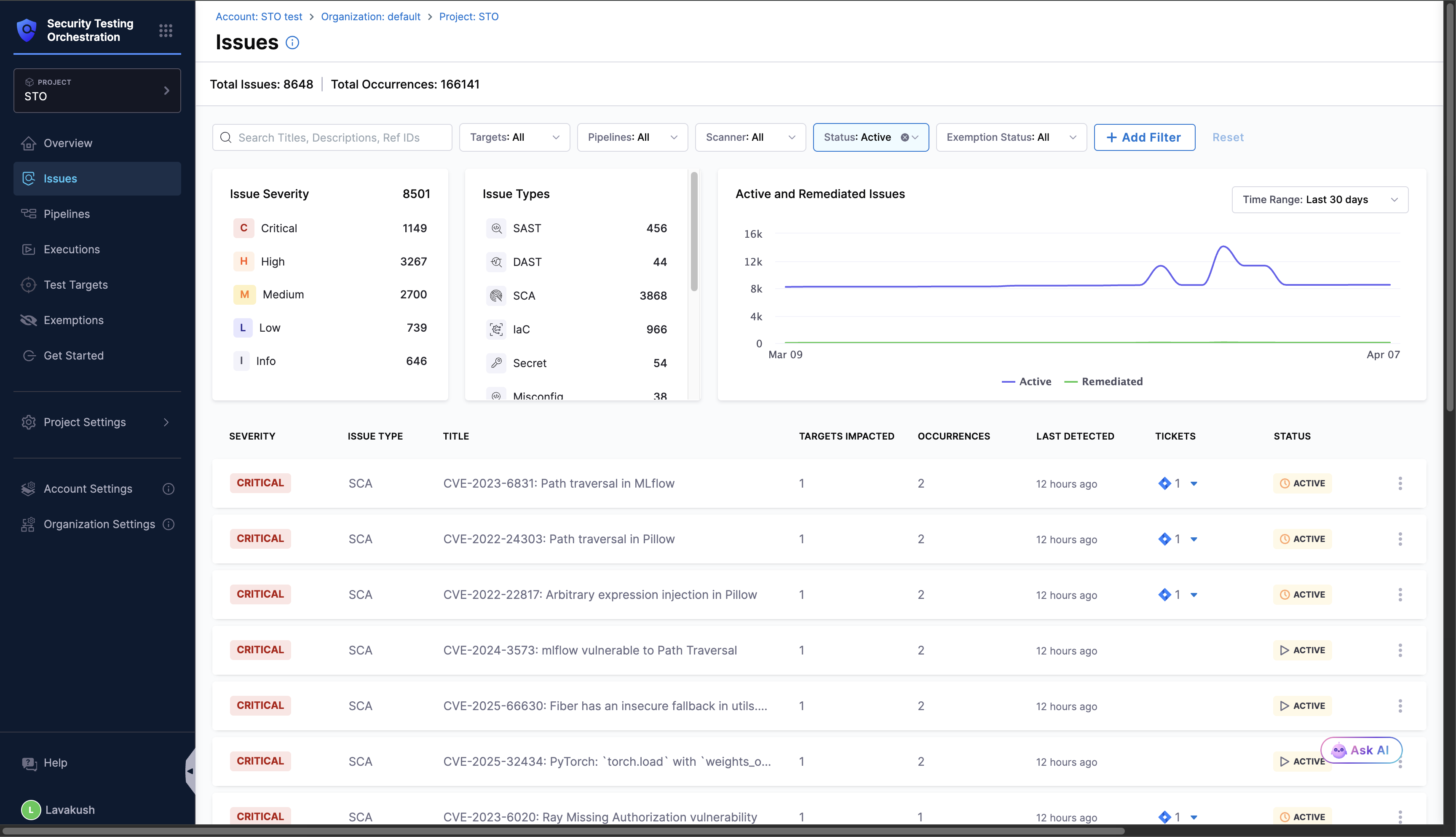
* **Redesigned STO Issues page:** The STO Issues page has been redesigned to provide a comprehensive security posture view across your project. It now includes graphs, trend analysis, and a summary to surface active and remediated issue trends across Targets within a project. This is behind the feature flag `STO_ISSUES_PAGE_V2`. Contact [Harness Support](mailto:support@harness.io) to enable it.

<figure><img src="/files/QQm2BwgDwrdhg2o4DZI4" alt=""><figcaption><p>Click to view full size image</p></figcaption></figure>

* **Self-serve trial for Harness Code and Container scanners:** Account admins can now self-start a 45-day trial for the Harness Code and Container scanners directly from the product, without needing to contact sales or support. This is currently available to limited accounts and will be rolled out to all accounts soon.
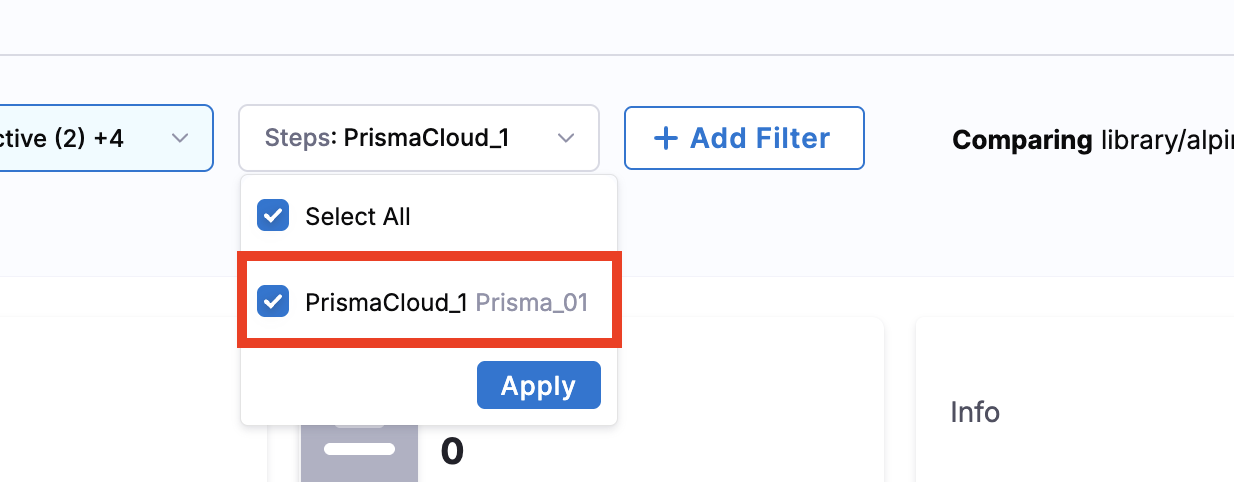
* Added FIPS support for the Nexus IQ and Prisma Cloud scanners.

**Fixed Issues**

* Fixed the issue where updating the status of an issue from the issue overview page was not reflecting in the issues page until a refresh (STO-11229).

#### Version 1.190.0 <a href="#version-11900" id="version-11900"></a>

#### New Features and Enhancements <a href="#new-features-and-enhancements" id="new-features-and-enhancements"></a>

**All Occurrences Dashboard**

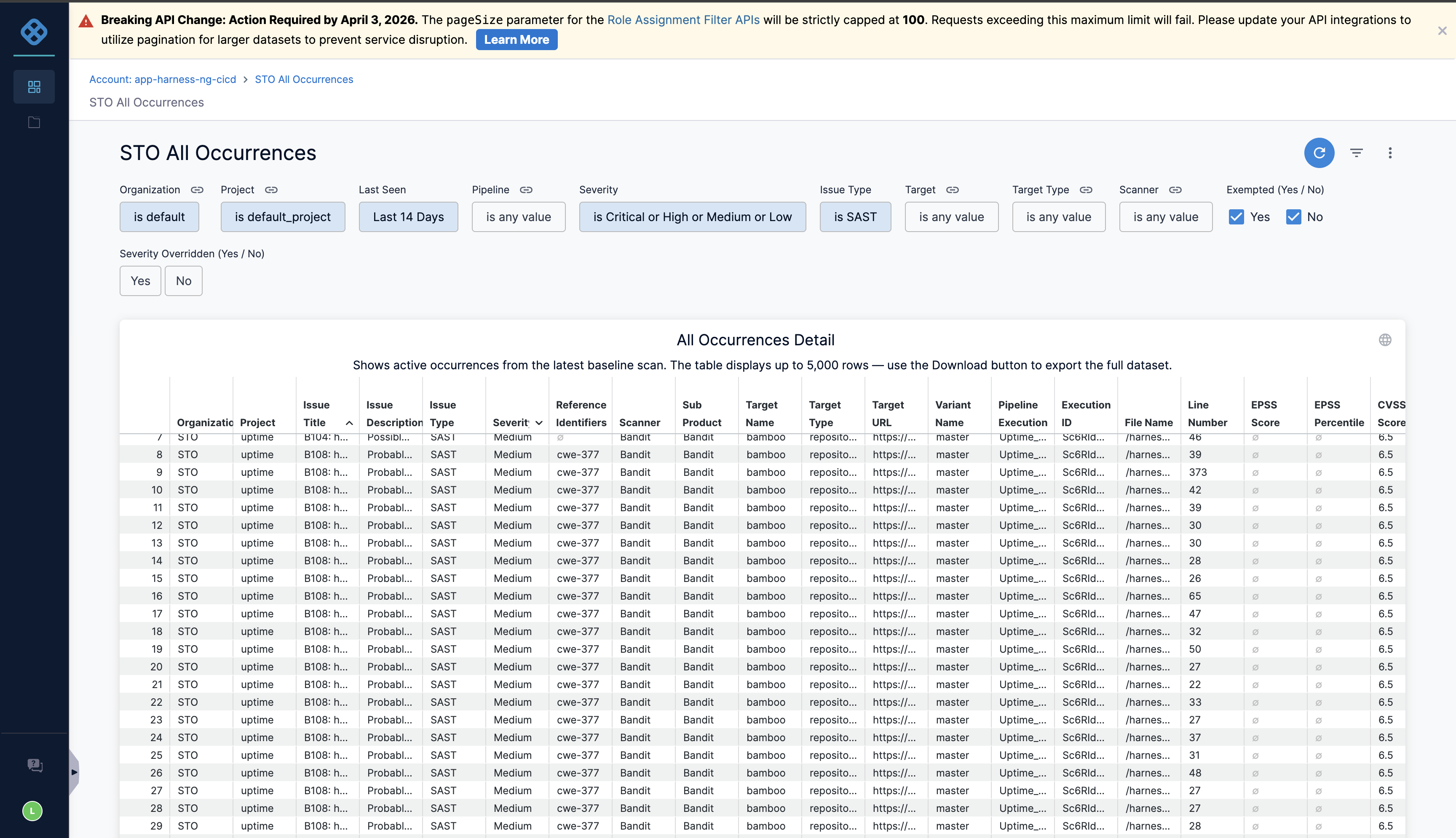
Introducing the new [All Occurrences Dashboard](/security-testing-orchestration/use-sto/sto-dashboards-and-reports/all-occurences-dashboard.md), providing an account-level view of all raw vulnerability findings across pipelines. Analyze underlying scanner results, understand how issues are derived, export occurrence-level data, and access detailed context (file paths, line numbers, repos) for faster remediation. This dashboard is currently available to limited accounts and will be rolled out to all accounts soon. Contact [Harness Support](mailto:support@harness.io) to enable it.

<figure><img src="/files/PBFAUEUDflPc0YGoPMux" alt=""><figcaption><p>Click to view full size image</p></figcaption></figure>

**Prisma Cloud scan result fields**

We've enhanced **Prisma Cloud** (formerly Twistlock) scan results by adding new fields (`File Name`, `Distro`, and `Distro Release`). The `File Name` field is derived from `packagePath` to improve vulnerability tracking and accuracy.

If you have previously run Prisma Cloud scans in STO, note the following on the first pipeline re-run after this update:

All occurrences that now include the `File Name` field may appear as remediated and reappear as new due to a change in how findings are identified and correlated. This is expected behavior; it reflects improved accuracy (not new vulnerabilities), and subsequent scans will behave normally.

Go to [Prisma Cloud (formerly Twistlock) step configuration](/security-testing-orchestration/use-sto/sto-scanner-configuration/prisma-cloud-scanner-reference.md) to read the same guidance in the product documentation.

<figure><img src="/files/6wRLX6HDnPAFQ812eJje" alt=""><figcaption><p>Click to view full size image</p></figcaption></figure>

### March 2026 <a href="#march-2026" id="march-2026"></a>

#### Version 1.187.2 <a href="#version-11872" id="version-11872"></a>

**New Features and Enhancements**

**Manual Severity Override - Now Generally Available**

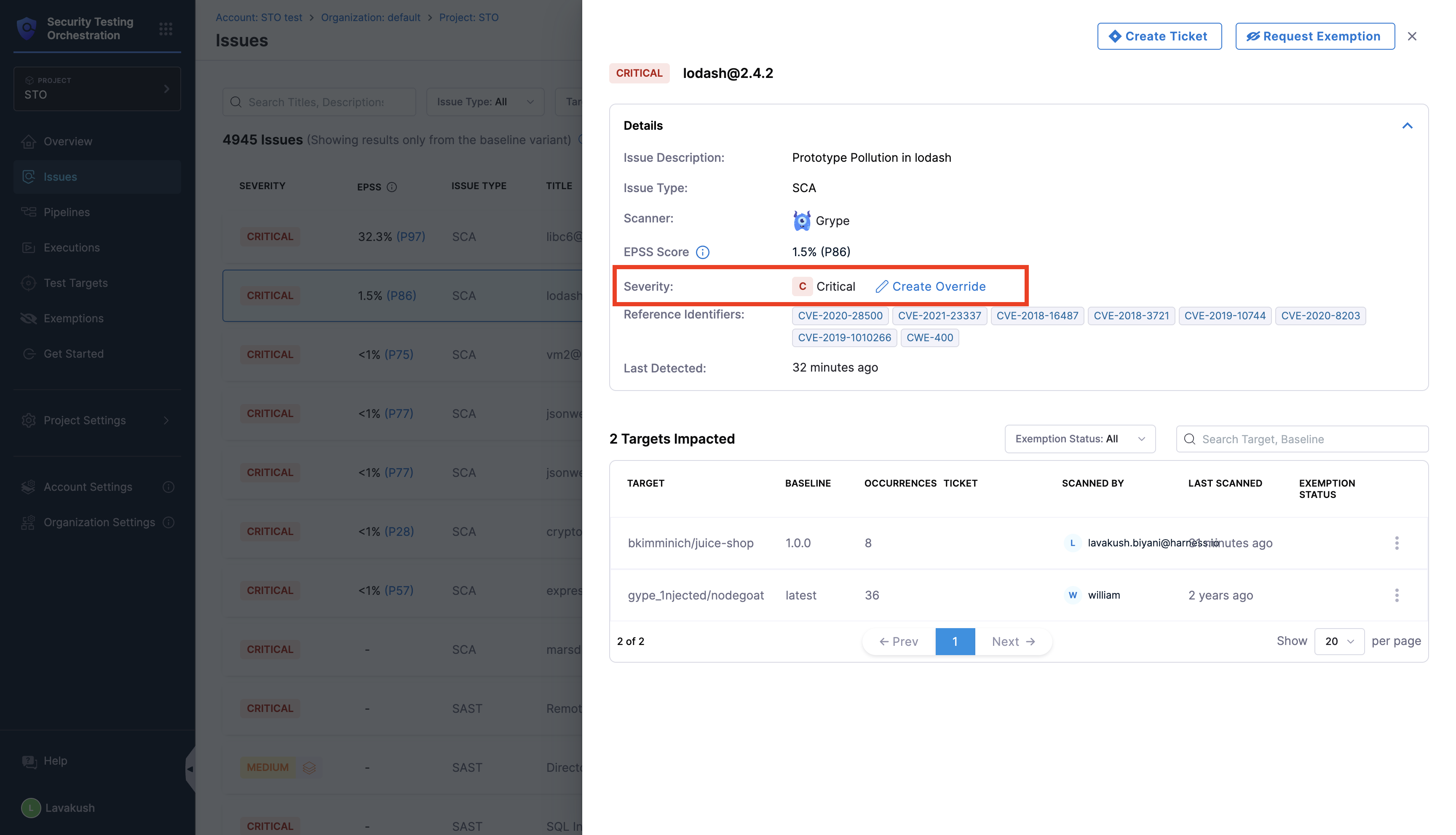
[**Manual Severity Override**](/security-testing-orchestration/use-sto/severity-override/manual-override.md) is now **generally available (GA)**. This feature allows you to manually override the severity of security issues when the severity assigned by Harness STO does not align with your internal risk assessments. This enables more accurate prioritization based on issue criticality, exploit exposure, compensating controls, and production impact. Previously, this was behind the feature flag `STO_ISSUE_OVERRIDE`.

**EPSS Scoring - Now Generally Available**

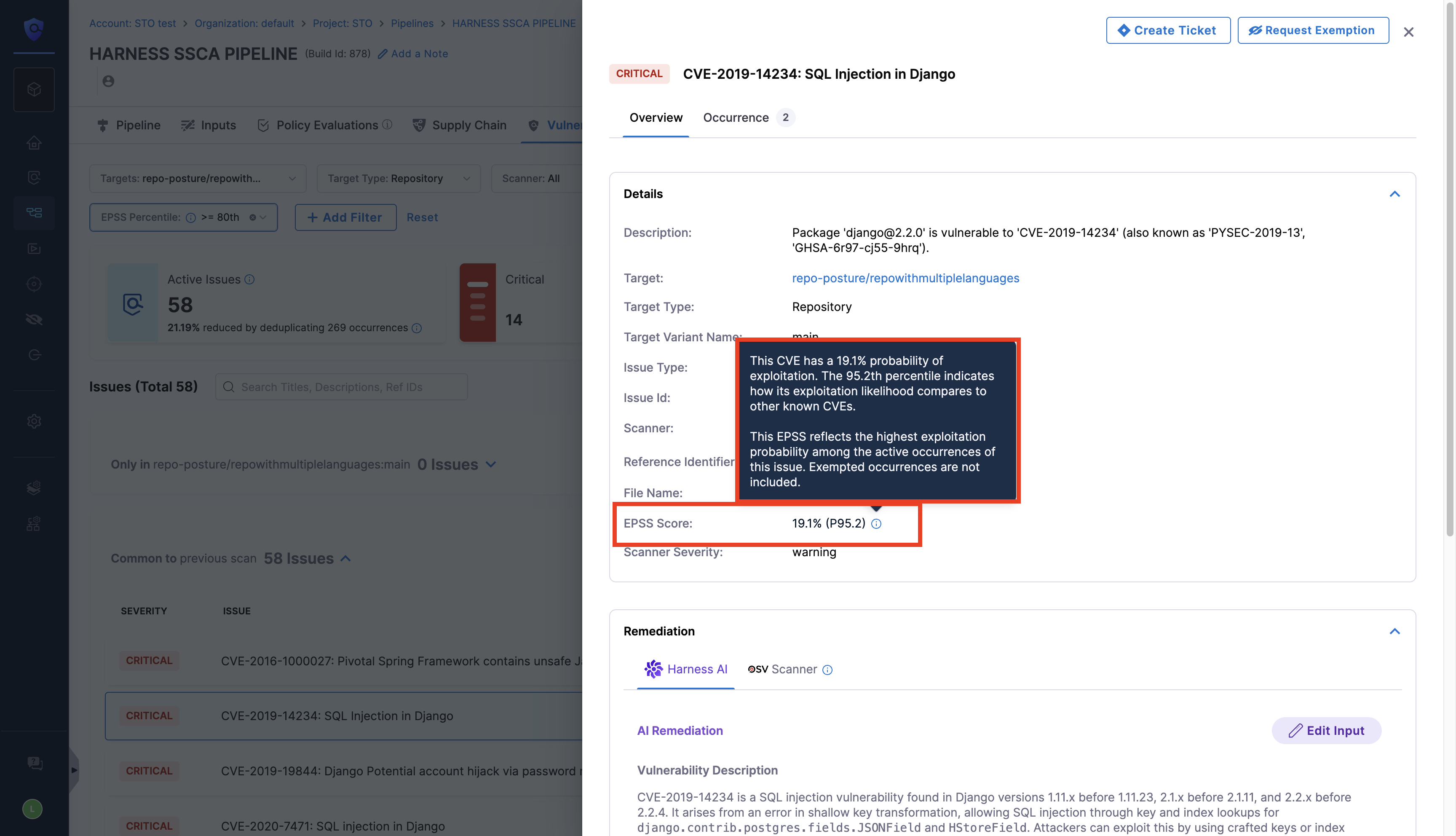
[**EPSS Scoring**](/security-testing-orchestration/use-sto/risk-and-priortization/epss-score.md) is now **generally available (GA)**. EPSS (Exploit Prediction Scoring System) scoring for CVE-associated security issues is available on the Issues and Vulnerabilities page. This supports a risk-based approach, helping you focus on vulnerabilities based on real-world exploitation signals rather than theoretical impact alone. Previously, this was behind the feature flag `STO_ISSUE_EPSS`.

**Exemptions Page Filters - Now Generally Available**

[**Exemptions Page Filters**](/security-testing-orchestration/use-sto/sto-exempt-issues/exemption-workflows.md#filters-in-exemption-section) are now **generally available (GA)**. You can now filter exemptions based on Issue Type, Target, Target Type, Severity, and many more criteria to quickly narrow down and manage exemption requests. Previously, this was behind the feature flag `STO_EXEMPTION_FILTER`.

**Container Image Digest as Variant**

Container scan steps now support using an **image digest** (for example, `@sha256:…`) as the **target variant**. This will allow for pulling and scanning images by digest.

**Harness SAST and SCA Scanners - Now Generally Available**

[**Harness SAST**](/security-testing-orchestration/use-sto/harness-security-scanners/sast.md) and [**Harness SCA**](/security-testing-orchestration/use-sto/harness-security-scanners/sca.md) scanners are now **generally available (GA)** for all customers. These native scanners enable you to run security scans directly as part of your CI/CD pipelines with one-click configuration, with built-in data flow visualization, reachability analysis, and AI-powered remediation.

**Wiz CLI Upgrade Notice**

The Wiz CLI will be upgraded from version `0.x` to `1.x`. Harness STO supports this upgrade transparently, and no pipeline changes are required. CLI version `0.x` will continue to work with existing credentials, while CLI version `1.x` requires new credentials. Credentials used with CLI `0.x` are not supported in CLI `v1.x`.

**Fixed Issues**

* Fixed an issue where filters set on the **Issues** page were also applied to the **Exemptions** page. Filters for each page are now independent (STO-10722).
* Fixed an issue where two or more issues with the same title in a pipeline execution opened the same issue detail. Selecting an issue now opens the correct finding for that scanner step (STO-9662, [ZD-91386](https://harnesssupport.zendesk.com/agent/tickets/91386)).
* Fixed an issue where the **Approved By** filter on the **Exemptions** page showed a count of zero on the **Pending**, **Rejected**, and **Expired** tabs. Tab counts now match the filtered exemption list (STO-11020).

### February 2026 <a href="#february-2026" id="february-2026"></a>

#### Version 1.183.0 <a href="#version-11830" id="version-11830"></a>

**New Features and Enhancements**

[**Manual Severity override:**](/security-testing-orchestration/use-sto/severity-override/manual-override.md) Added support for manually overriding the severity of security issues when the severity assigned by Harness STO does not align with internal risk assessments. This enables more accurate prioritization based on issue criticality, exploit exposure, compensating controls, and production impact. This feature is behind the feature flag `STO_ISSUE_OVERRIDE`. Contact [Harness Support](mailto:support@harness.io) to enable it.

<figure><img src="/files/bC2gwYt8Paw7jOLzcUnP" alt=""><figcaption></figcaption></figure>

[**EPSS scoring:**](/security-testing-orchestration/use-sto/risk-and-priortization/epss-score.md) Introduced EPSS scoring for CVE-associated security issues on the Issues and Vulnerabilities page. This supports a risk-based approach, helps you focus on vulnerabilities based on real-world exploitation signals rather than theoretical impact alone. This feature is behind the feature flag `STO_ISSUE_EPSS`. Contact [Harness Support](mailto:support@harness.io) to enable it.

<figure><img src="/files/Uq7aBZRd8dOYrYo9HPR9" alt=""><figcaption></figcaption></figure>

[**Exemptions page filters:**](/security-testing-orchestration/use-sto/sto-exempt-issues/exemption-workflows.md#filters-in-exemption-section) Added filters to the Exemptions page to narrow down issues based on Issue Type, Target, Target Type, Severity, and many more. This feature is behind the feature flag `STO_EXEMPTION_FILTER`. Contact [Harness Support](mailto:support@harness.io) to enable it.

**Delegate 3.0**: Delegate 3.0 is now supported for all STO steps on **Linux and MacOS** operating systems, across supported infrastructure types (Harness Cloud, Local (Docker), and Kubernetes).

**Fixed Issues**

* Fixed an issue where creating pull requests for the Harness Code Repository resulted in an error. Pull requests can now be created successfully (STO-10804).
* Fixed an issue where the STO Exemptions page displayed an incorrect approval time. The correct approval timestamp is now shown (STO-10726 , [ZD-102826](https://harnesssupport.zendesk.com/agent/tickets/102826)).
* Fixed an issue in the Mend scanner where the File Name field displayed incorrectly in SCA issues. The File Name now appears correctly on the Issue Overview page (STO-10192).

#### Version 1.179.4 <a href="#version-11794" id="version-11794"></a>

**New Features and Enhancements**

**Harness Native SAST and SCA scanners**

Harness STO now supports its own native **SAST and SCA** scanners, enabling you to run security scans directly as part of your CI/CD pipelines.

Harness SAST and SCA scanners offer one-click configuration, with Harness automatically managing authentication and licensing. The scanners provide built-in **data flow visualization**, **reachability analysis** to determine whether vulnerabilities are actually exploitable, and **AI-powered remediation** to help developers quickly understand and fix issues. These scanners are now **generally available (GA)**.

* [SAST](/security-testing-orchestration/use-sto/harness-security-scanners/sast.md) - Scans source code to identify security issues, exposed secrets, and vulnerable Open Source dependencies.
* [SCA](/security-testing-orchestration/use-sto/harness-security-scanners/sca.md) - Scans container images to detect vulnerabilities in operating system packages and libraries, with reachability-based risk prioritization.

**Licensing:** Running Harness SAST and SCA scans in pipelines requires the appropriate license. Contact [Harness Sales](mailto:support@harness.io) for licensing details.

**Availability:** Harness SAST and SCA scanners are being gradually rolled out and is currently enabled for some customers. Full availability across all accounts is coming soon.

<figure><img src="/files/qWLqA8vjwXpRY9cQD5RZ" alt=""><figcaption><p>Click to view full size image</p></figcaption></figure>

### January 2026 <a href="#january-2026" id="january-2026"></a>

#### Version 1.175.0 <a href="#version-11750" id="version-11750"></a>

**New Features and Enhancements**

* Added support for surfacing external policy failures as a distinct Issue Type in Harness STO. You can now view external policy failures alongside other scan results. Previously, these were treated as `Info` level issues. This feature is currently behind the `STO_EXTERNAL_POLICY_FAILURES_AS_VULNS` feature flag. Learn more about the [supported scanners](/security-testing-orchestration/use-sto/sto-security-issues/view-scan-results.md#external-policy-failures)(STO-6493).
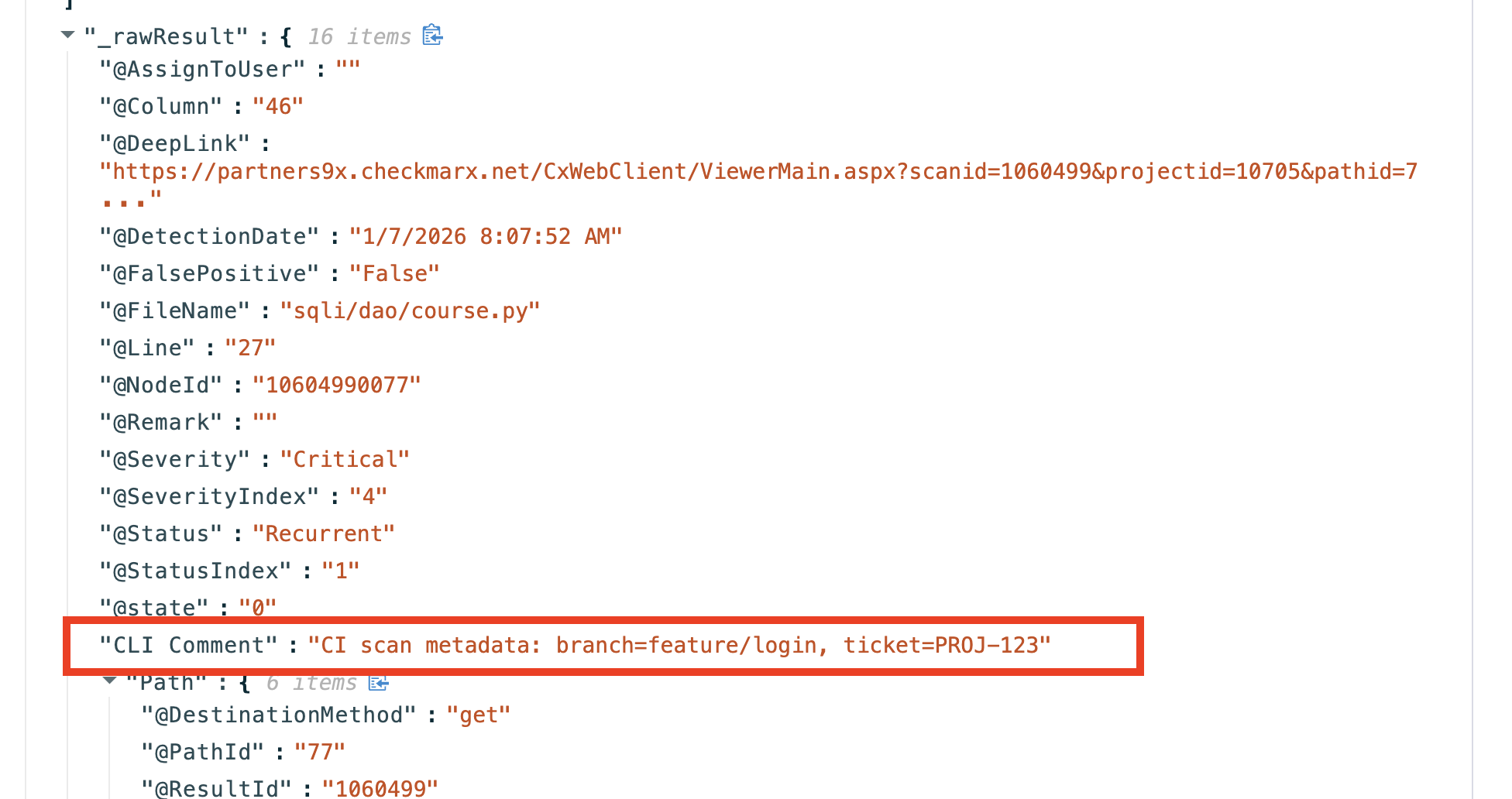
* Added a support to add the comment to the [checkmarx](/security-testing-orchestration/use-sto/sto-scanner-configuration/checkmarx/checkmarx-scanner-reference.md#additional-cli-flags) scan step. This is useful for attaching metadata. When specified, the value is added under Issue Raw Details in the Issue Details view as a `CLI Comment` (STO-9592).

<figure><img src="/files/gDVDt4yuzVCWoFSJgMlt" alt=""><figcaption><p>Click to view full size image</p></figcaption></figure>

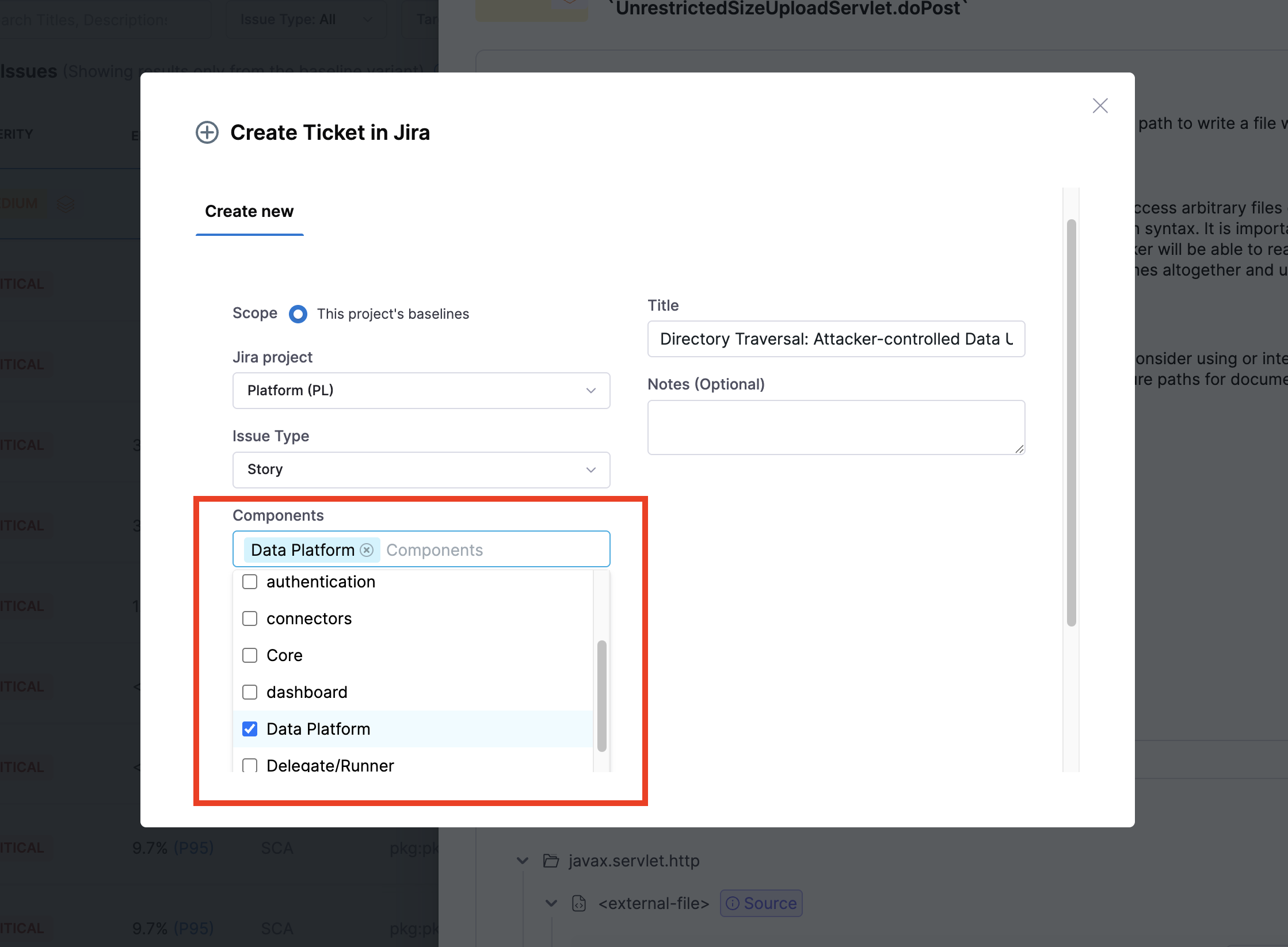
\- Added support for the Components field in Jira ticket. Previously, users had to type values manually, but now they can select from existing components when creating Jira tickets (STO-10068).

<figure><img src="/files/lLmhFtvgsGUkViVSKoNK" alt=""><figcaption><p>Click to view full size image</p></figcaption></figure>

### December 2025 <a href="#december-2025" id="december-2025"></a>

#### Version 1.171.1 <a href="#version-11711" id="version-11711"></a>

**New Features and Enhancements**

**Auto Create Jira Ticket Creation**

* Harness STO can automatically create a Jira ticket with the pre-defined template, when you request an exemption for a security issue. This helps teams track exemptions without relying on manual ticket creation. Refer to the [Auto Create Jira Ticket Creation documentation](/security-testing-orchestration/use-sto/jira-integrations.md#auto-create-jira-tickets-for-exemption-requests) to learn how to configure and use this feature (STO-9487). This feature is behind the `STO_EXEMPTION_TICKET` feature flag.
* Security results for STO are now aggregated across all pipeline stages and executions, providing a single, complete view even when pipelines are resumed after a failure. This includes reruns of failed stages and chained pipelines. Previously, results from rerun failed stages or chained pipelines were not combined in the vulnerabilities tab (STO-10231 , [ZD-84194](https://harnesssupport.zendesk.com/agent/tickets/84194), [ZD-89153](https://harnesssupport.zendesk.com/agent/tickets/89153)). This feature was behind Feature Flags `STO_AGGREGATE_RETRY_EXECUTIONS` and `STO_AGGREGATE_CHAIN_EXECUTIONS` now it is generally available (GA).
  * Additional details and scenarios explaining the behavior in the [Vulnerabilities tab](/security-testing-orchestration/use-sto/sto-security-issues/view-scan-results.md#navigate-to-security-test-results) have been added to the docs as the info, along with a table outlining the expected behavior for the [Download CSV](/security-testing-orchestration/use-sto/sto-security-issues/export-scan-results.md#export-as-csv-from-the-vulnerabilities-tab).
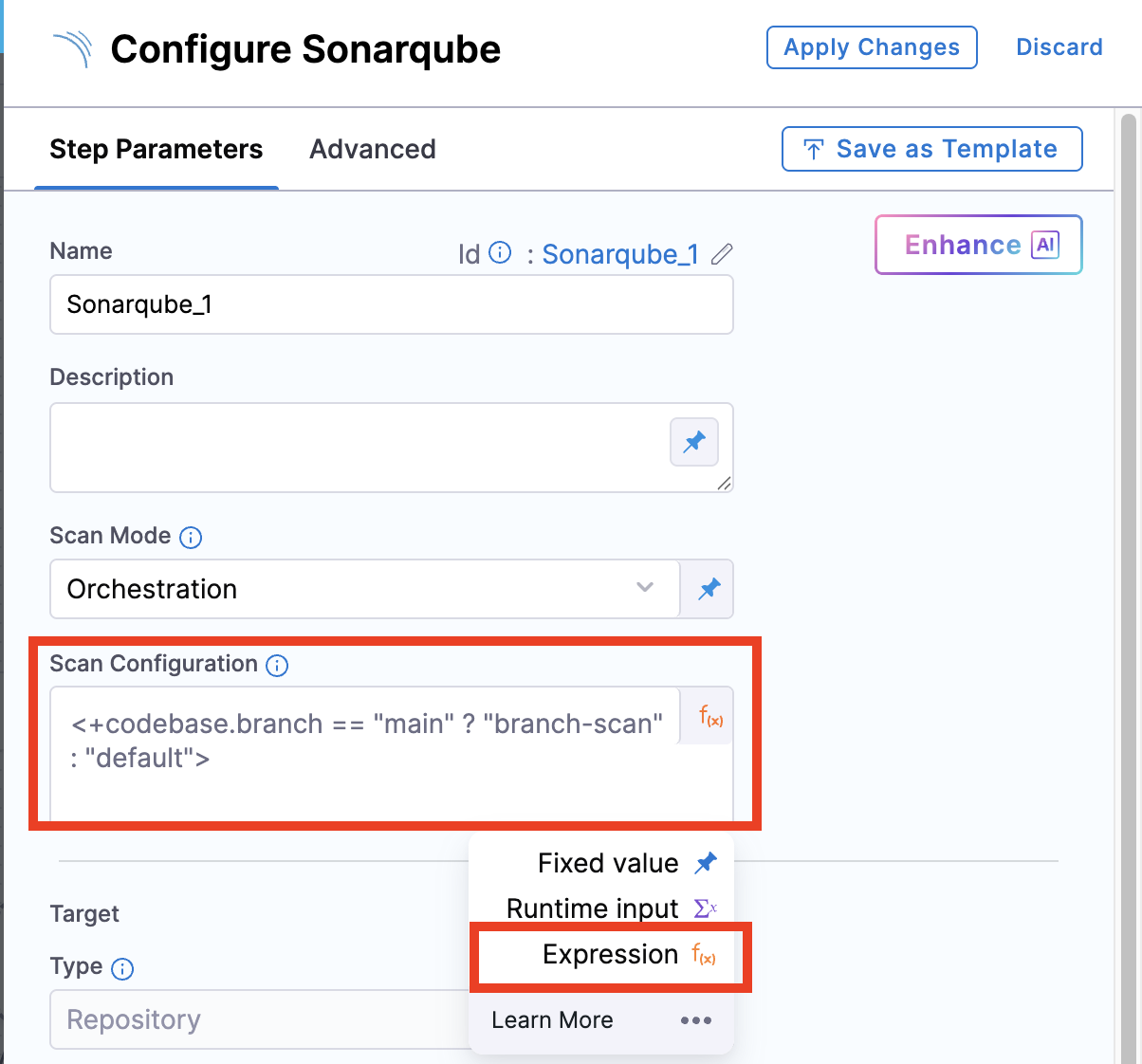
* Added support to accept [**Expression**](/harness-ai/use-harness-platform/variables-and-expressions/harness-variables.md) in scan configuration for all STO scanners which has the configuration field (STO-10071,[ZD-95979](https://harnesssupport.zendesk.com/agent/tickets/95979), [ZD-97076](https://harnesssupport.zendesk.com/agent/tickets/97076)).

<figure><img src="/files/sECt8pMOXeLM4TA7htHB" alt=""><figcaption><p>Click to view full size image</p></figcaption></figure>

* Scanner compatibility issues may occur with newer [Docker Engine version 29](/harness-ai/knowledge-base-and-faqs/articles/docker-29-version-compatibility.md). As a workaround, pin the Docker Engine version to 28.

**Fixed Issues**

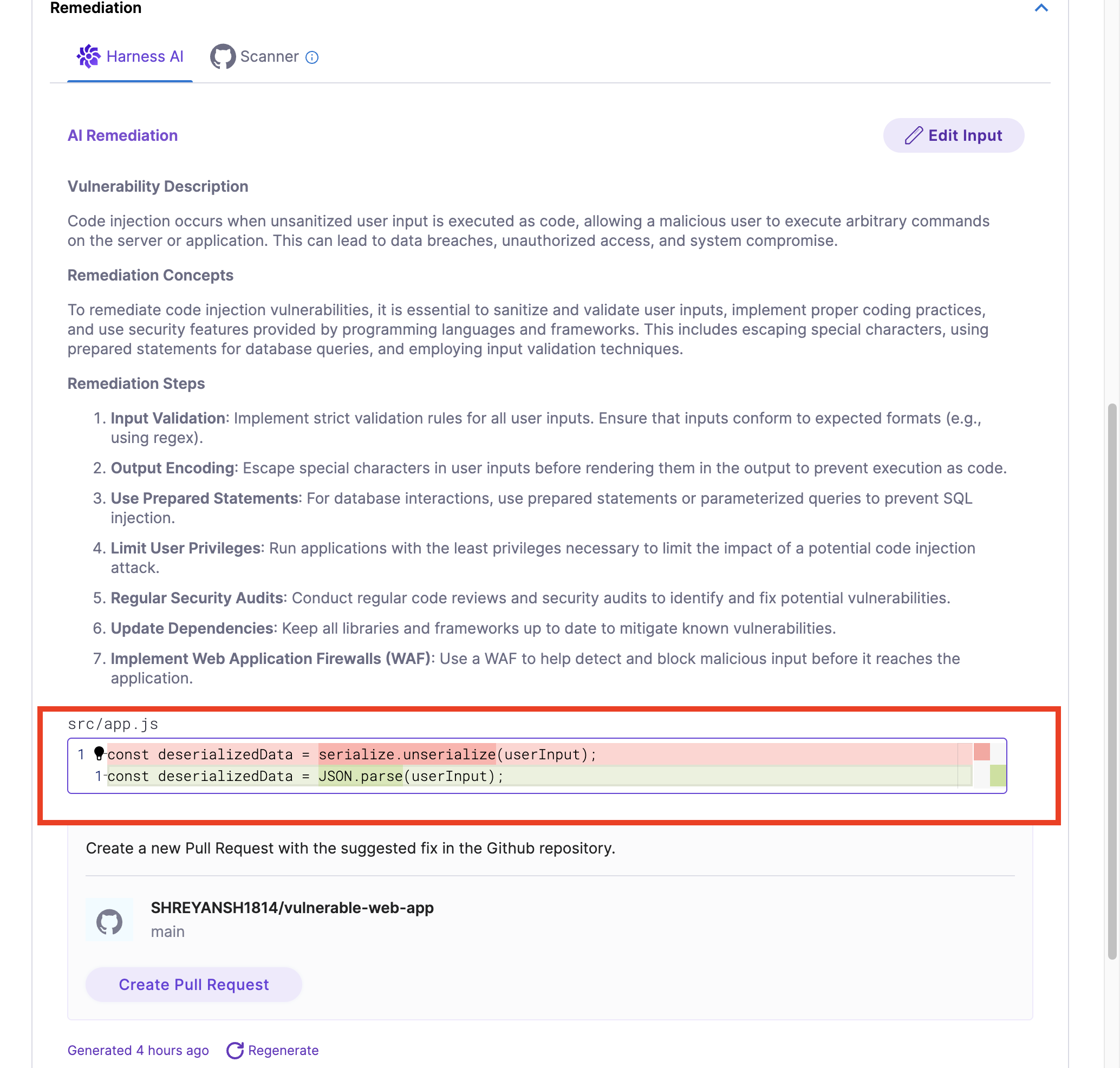
* Added support to display the suggested code diff snippet for the GitHub Advanced Security (GHAS) vulnerability findings. (STO-10151).

<figure><img src="/files/P61J20KESumQleEVrb5O" alt=""><figcaption><p>Click to view full size image</p></figcaption></figure>

\- Fixed an issue where GitHub Advanced Security (GHAS) - Dependabot orchestration always displayed results from the main branch. Results are now correctly shown for the branch selected by the user (STO-10063). - Fixed an issue in GitHub Advanced Security (GHAS) where CodeQL extraction could fail and return the error “The scan with \`scan-id\` has failed.” CodeQL scans now complete successfully as expected (STO-10065).

### November 2025 <a href="#november-2025" id="november-2025"></a>

#### Version 1.165.0 <a href="#version-11650" id="version-11650"></a>

**New Features and Enhancements**

**Base Image Detection**

Base Image Detection is now available in **Early Access**. This feature helps identify vulnerabilities originating from the base image layer versus the application layer. It is currently behind feature flags (`STO_BASE_IMAGE`, `STO_BASE_IMAGE_DETECTION`). Refer to the [Base Image Detection documentation](/security-testing-orchestration/use-sto/set-up-sto-scans/container-scanning/base-image-vulnerabilites/base-image-detection.md) or watch the [video guide](https://www.youtube.com/watch?v=hwMDORuctaQ) to learn how to configure and use this feature.

{% embed url="<https://www.youtube.com/watch?v=hwMDORuctaQ>" %}

**Mend CLI Upgrade with new Scan Configs**

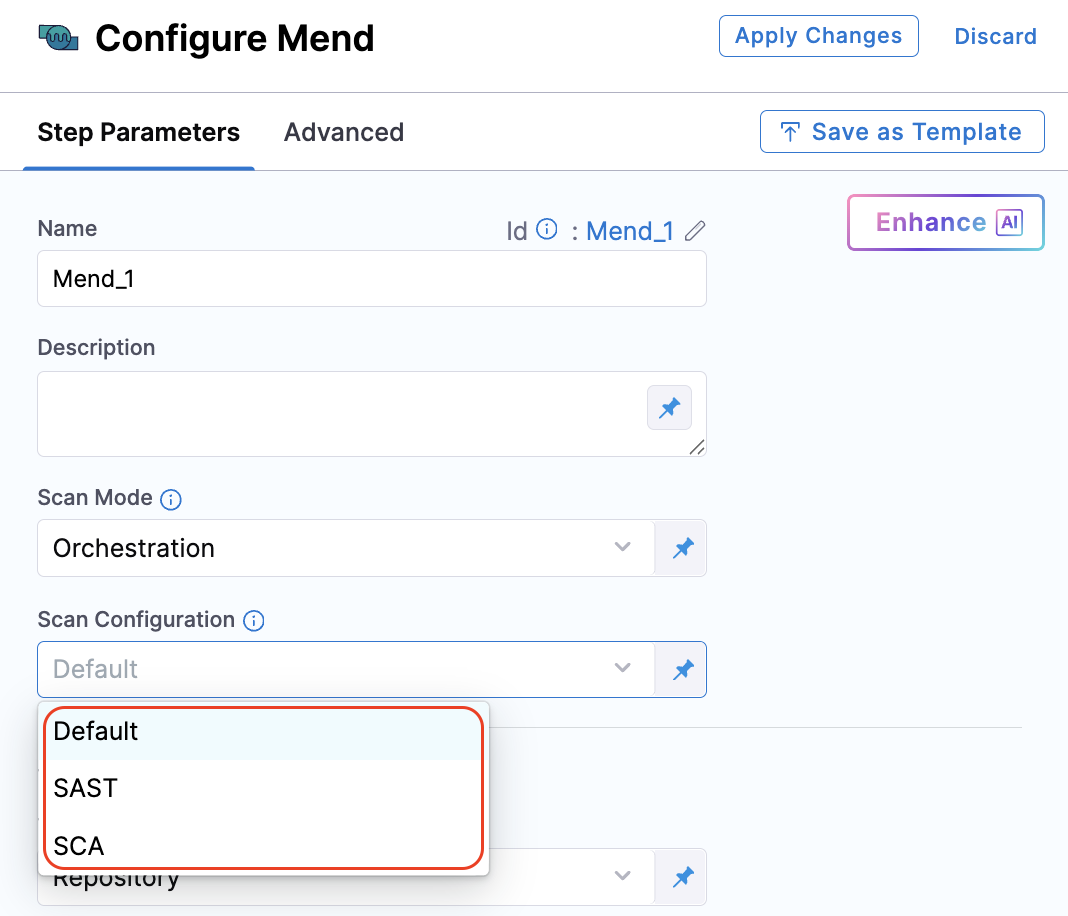
**Mend** now supports the **V3 API** and the latest CLI version. You can use the new scan configurations **SAST**, **SCA**, and **Container** for scanning code repositories and container images (STO-9858).

<figure><img src="/files/Oc4GqjBPWhDEy610UN0O" alt=""><figcaption><p>Click to view full size image</p></figcaption></figure>

**Fixed Issues**

* Fixed an issue where the **raw issue count** displayed in the **Vulnerabilities** tab was incorrect. Previously, the deduplication percentage and count did not align with the raw issue numbers shown by scanners (e.g., deduplicating from 185 instead of 823). The deduplication logic now correctly reflects the number of raw issues extracted by the scanner (STO-9980, ZD-94770, ZD-94772).
* Fixed an issue in the **GitHub Advanced Security** step where scans running in **Extraction** mode failed with the error: `Exited with message: The scan with ID <example_id> has failed`. This issue is now resolved (STO-10065).
* Updated the **CSV export** from scan results: The column header **Execution Id** is now renamed to **Pipeline Execution ID** for better clarity (STO-9876).

### October 2025 <a href="#october-2025" id="october-2025"></a>

#### Version 1.164.0 <a href="#version-11640" id="version-11640"></a>

**Fixed Issues**

* Fixed an issue where accessing vulnerabilities in a pipeline execution page resulted in a **“Something went wrong”** error (STO-9967, ZD-94901).
* Removed unexpected toast messages triggered by JIRA GET call failures. Toast messages will now only appear when related user actions occur (STO-9916, ZD-94003).
* Fixed an issue where the **Overview** page displayed a blank screen when navigating from the **Test Targets** or **Exemptions** pages (STO-9627).
* Fixed an issue in the **Issues** page where filtering vulnerabilities using the **Pipeline** filter did not work as expected (STO-10026).

#### Version 1.162.0 <a href="#version-11620" id="version-11620"></a>

**New Features and Enhancements**

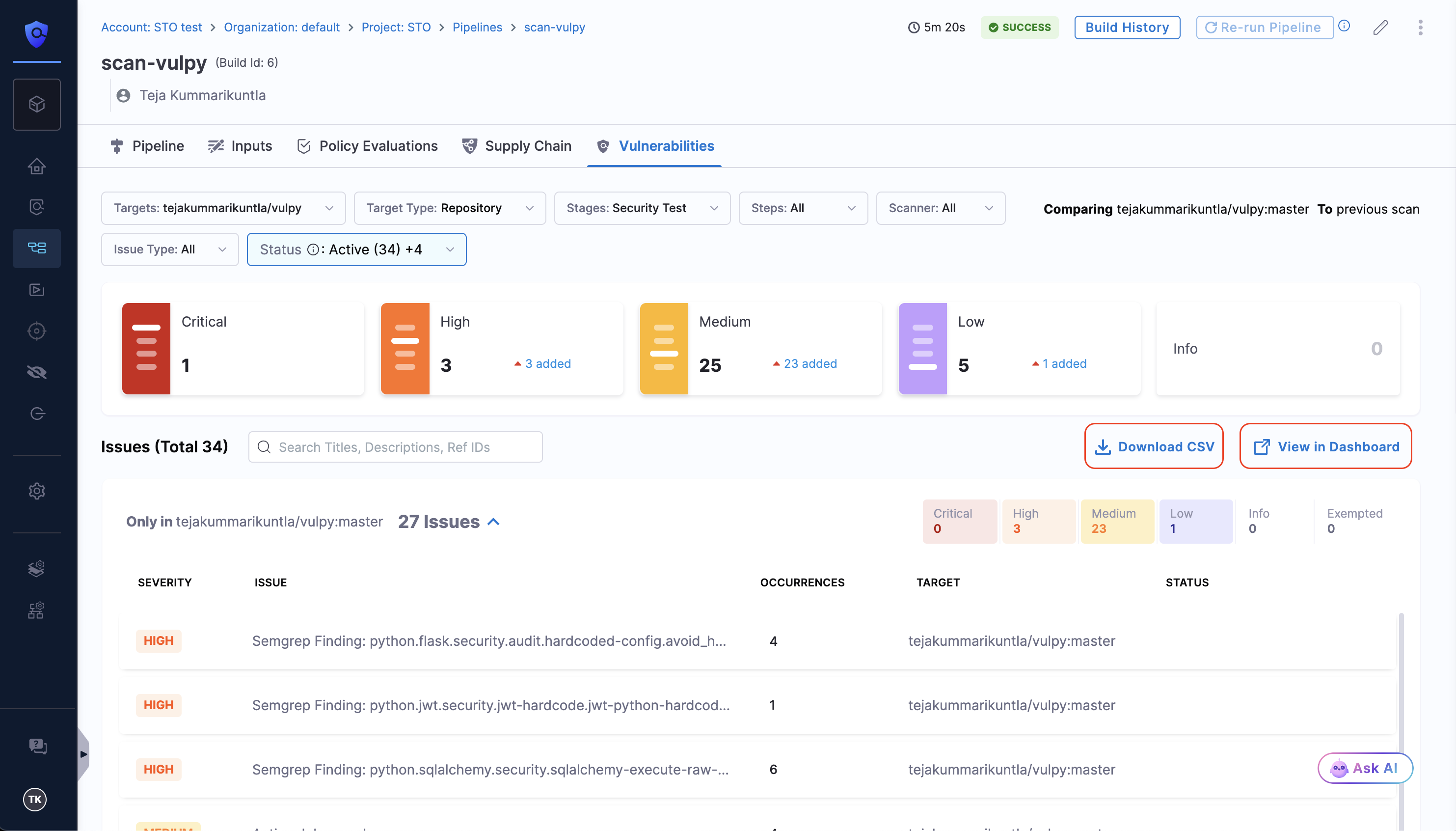
**Download CSV is now Generally Available**

The option to download security scan results as CSV from the **Vulnerabilities** tab is now **Generally Available (GA)**.

* The [**Download CSV**](/security-testing-orchestration/use-sto/sto-security-issues/export-scan-results.md) button in the Vulnerabilities tab allows you to export scan results directly.
* The **View in Dashboard** option now redirects you to the [**Pipeline Execution Summary Dashboard**](/security-testing-orchestration/use-sto/sto-dashboards-and-reports/sto-pipeline-execution-summary.md), automatically applying your pipeline execution ID as a filter to view detailed scan results.
* This feature was previously behind the feature flag `STO_DOWNLOAD_SCAN_SUMMARY`.

<figure><img src="/files/0Xk2QHz6xQy0C5r5kznC" alt=""><figcaption><p>Click to view full size image</p></figcaption></figure>

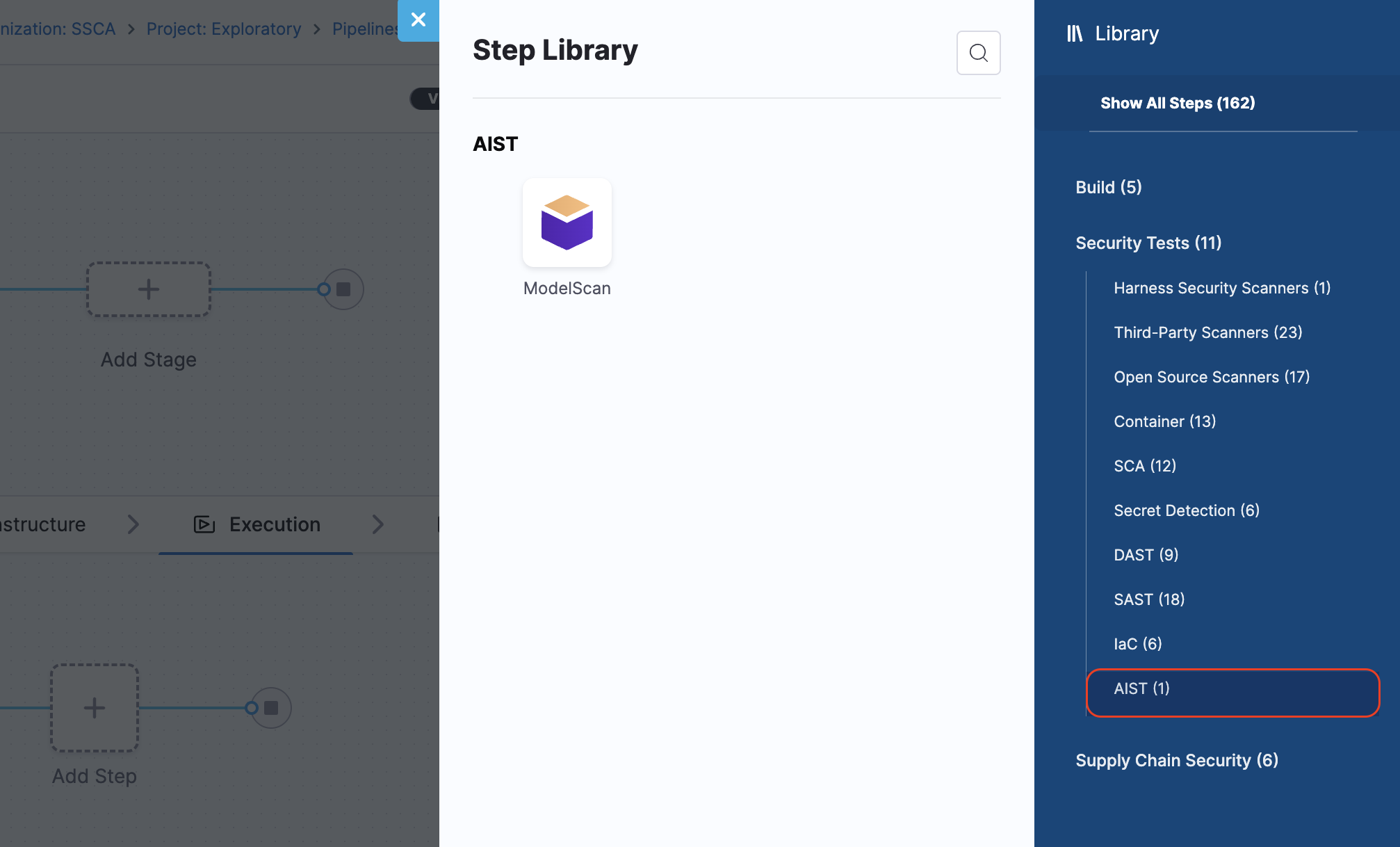
**AIML Scanner Category**

Introduced a new **AIML** scanner category dedicated to listing all AI/ML scanners. The [**ModelScan**](/security-testing-orchestration/use-sto/sto-scanner-configuration/modelscan.md) step is now included under this category (STO-9830).

<figure><img src="/files/B3DDh5VzxIome6BjMYJe" alt=""><figcaption><p>Click to view full size image</p></figcaption></figure>

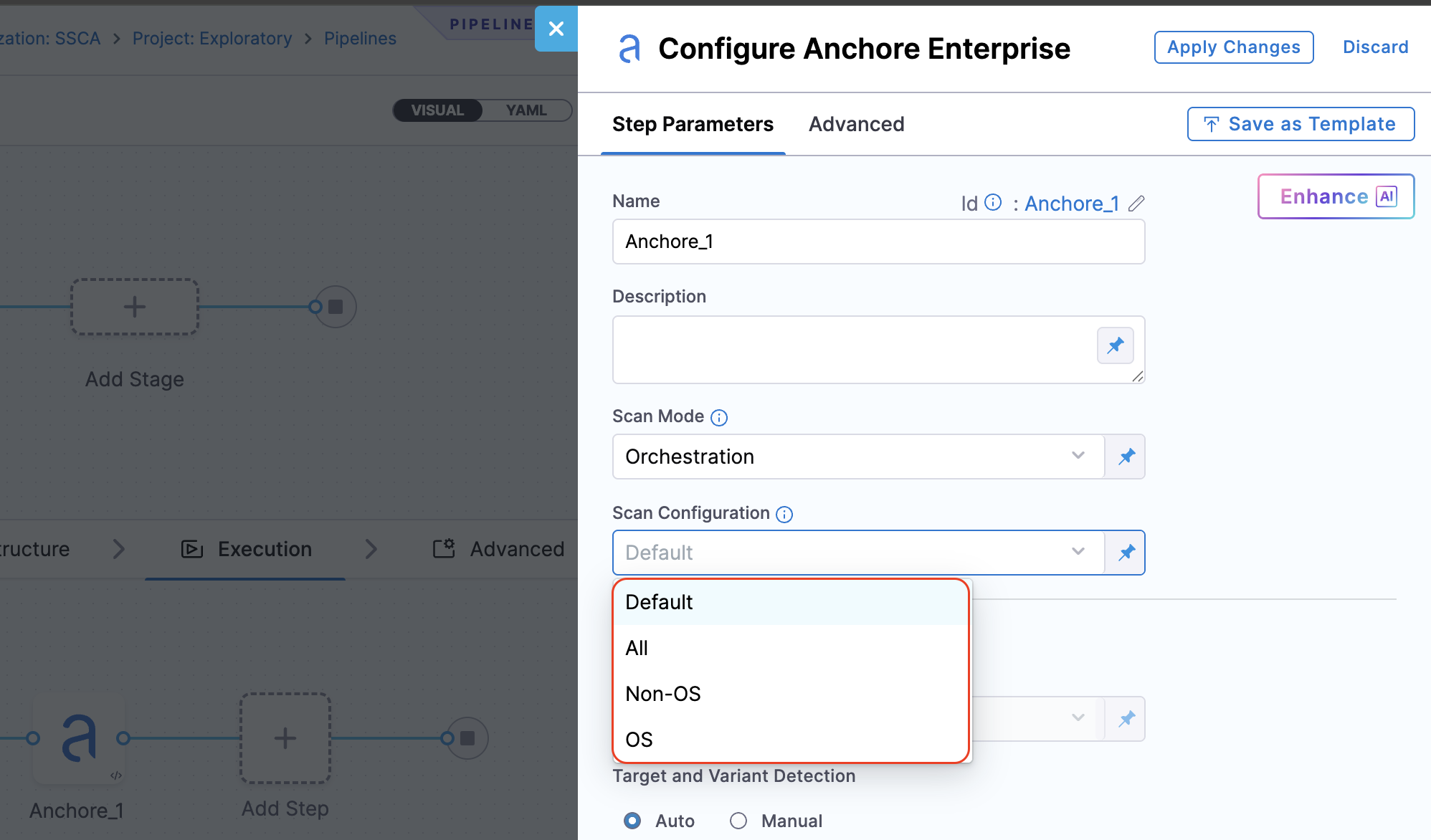
**New scan configurations for Anchore Enterprise step**

Added new **scan configurations** for **Orchestration** and **Extraction** modes in the [**Anchore Enterprise**](/security-testing-orchestration/use-sto/sto-scanner-configuration/anchore-enterprise-scanner-reference.md) step.\
These configurations let users control how reports are filtered when retrieved from the configured Anchore API:

* **OS:** Includes vulnerabilities related to operating system packages (RPM, DPKG, APK, etc.).
* **Non-OS:** Includes vulnerabilities related to language or application packages (NPM, GEM, Java Archive — JAR/WAR/EAR, Python PIP, .NET NuGet, etc.).
* **All** (or **Default**): Provides a combined report containing both OS and Non-OS vulnerability records.

<figure><img src="/files/0IhRr2Mswnt6sWDg6roz" alt=""><figcaption><p>Click to view full size image</p></figcaption></figure>

**Updated RBAC behavior for user info**

If a user has view permission, user information is now displayed correctly. Previously, users without permission to view user info would see a blank details section. Note that if the user has been deleted, data may still be unavailable (STO-8871, ZD-82948).

**Fixed Issues**

* Fixed a bug on the **Issues** page where navigating to a different page, opening the side panel, and closing it caused the view to reset to the first page. The view now remains on the selected page (STO-9848).
* Fixed an issue where STO dashboards did not correctly reflect issue statuses at scan time, resulting in discrepancies. Dashboards now account for exemption states at scan time, issues are shown as exempted only after approval and rescanning (STO-8623, ZD-74374, ZD-78347, ZD-91111).

### September 2025 <a href="#september-2025" id="september-2025"></a>

#### Version 1.160.0 <a href="#version-11600" id="version-11600"></a>

**New Features and Enhancements**

**ModelScan Integration:**

STO now integrates with **ModelScan**, enabling you to scan AI/ML models directly in your CI/CD pipelines. Refer to the [ModelScan documentation](/security-testing-orchestration/use-sto/sto-scanner-configuration/modelscan.md) and [video](https://youtu.be/PhvIXcwpme8) for details.

{% embed url="<https://youtu.be/PhvIXcwpme8>" %}
Scan you AI/ML Models using Harness STO
{% endembed %}

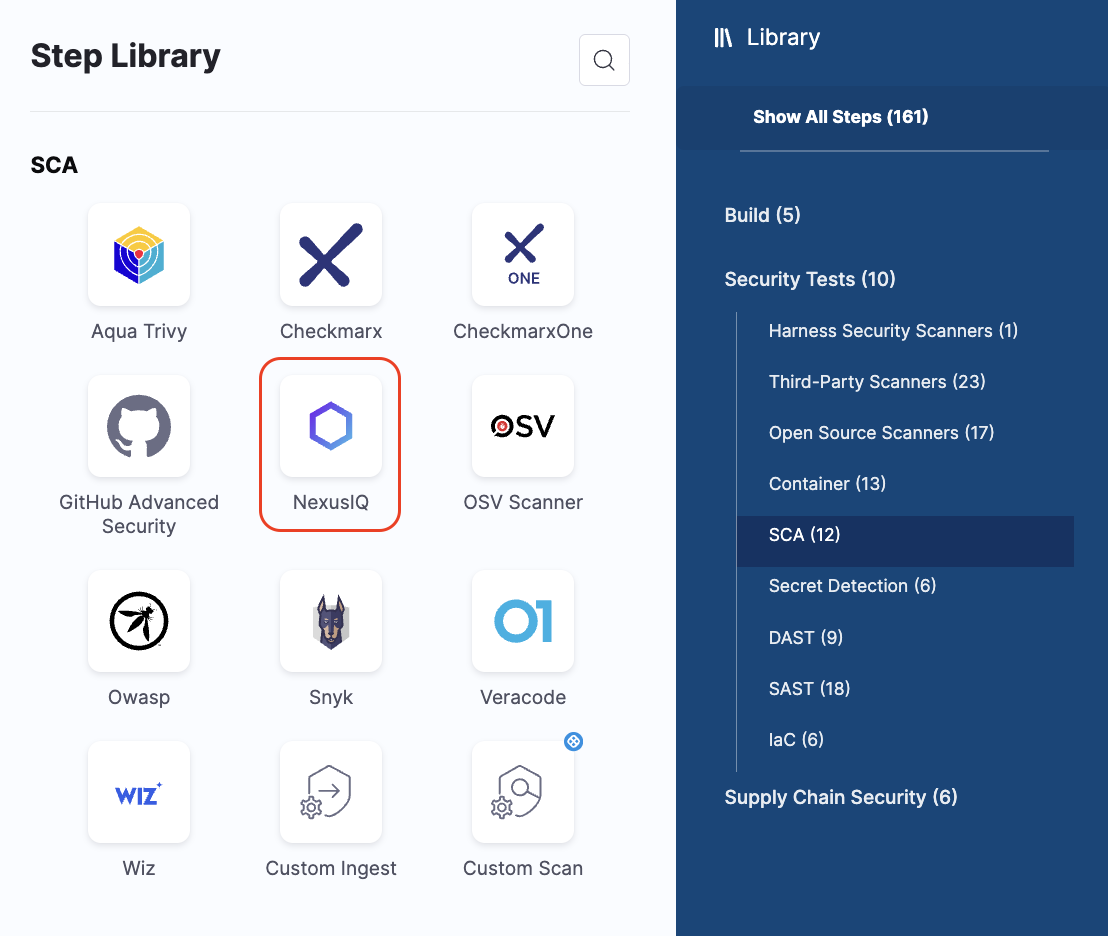
**Nexus IQ Integration:**

**Nexus IQ** is now available as a native step. Previously supported only through the Custom Scan step, you can now use the Nexus IQ native step for all scans. Refer to the [Nexus IQ documentation](/security-testing-orchestration/use-sto/sto-scanner-configuration/nexus-scanner-reference.md) for more details.

<figure><img src="/files/sopwK5vbkFrGauzdKe1R" alt=""><figcaption><p>Click to view full size image</p></figcaption></figure>

**Active Issues Component:**

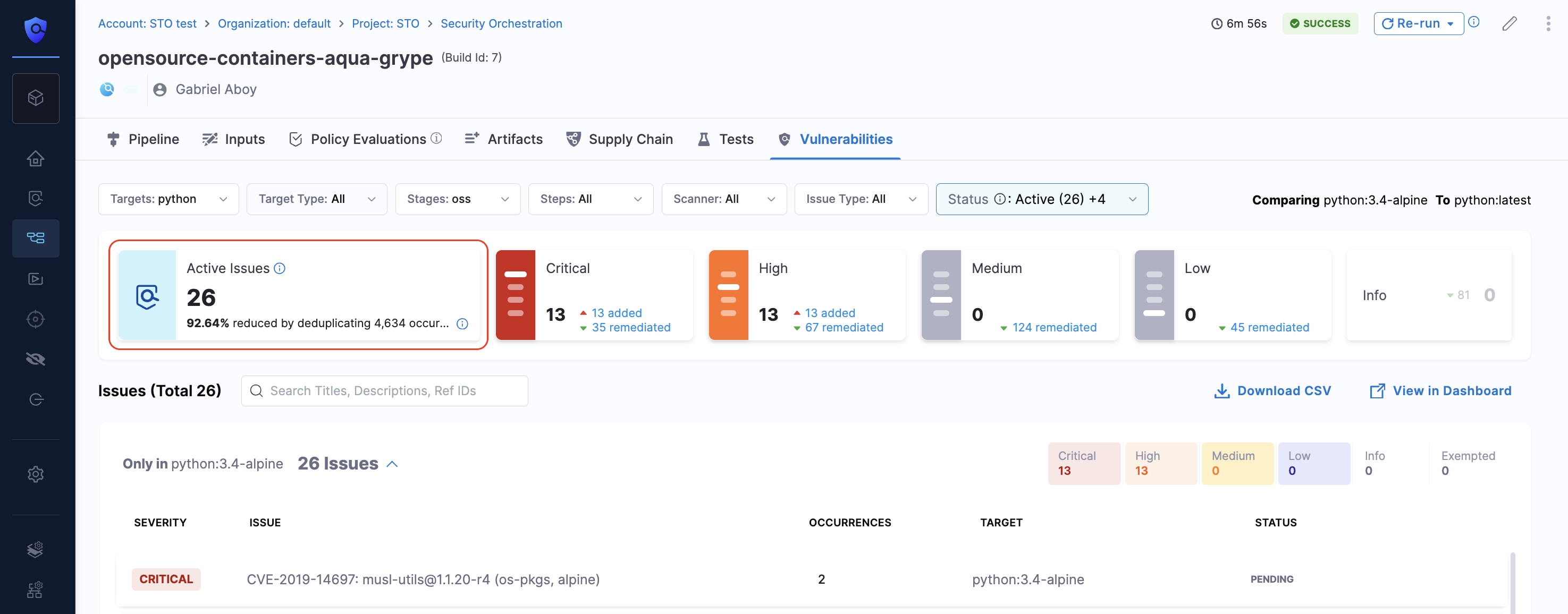
Added a new [**Active Issues**](/security-testing-orchestration/use-sto/sto-security-issues/view-scan-results.md#navigate-to-security-test-results) component to the **Vulnerabilities** tab.

* This count excludes exempted and remediated issues.
* Added **deduplication percentage**, which shows how much the issue count has been reduced compared to raw counts, based on STO’s deduplication logic.

<figure><img src="/files/8hNKdDZhVNxlbIVJwjfx" alt=""><figcaption><p>Click to view full size image</p></figcaption></figure>

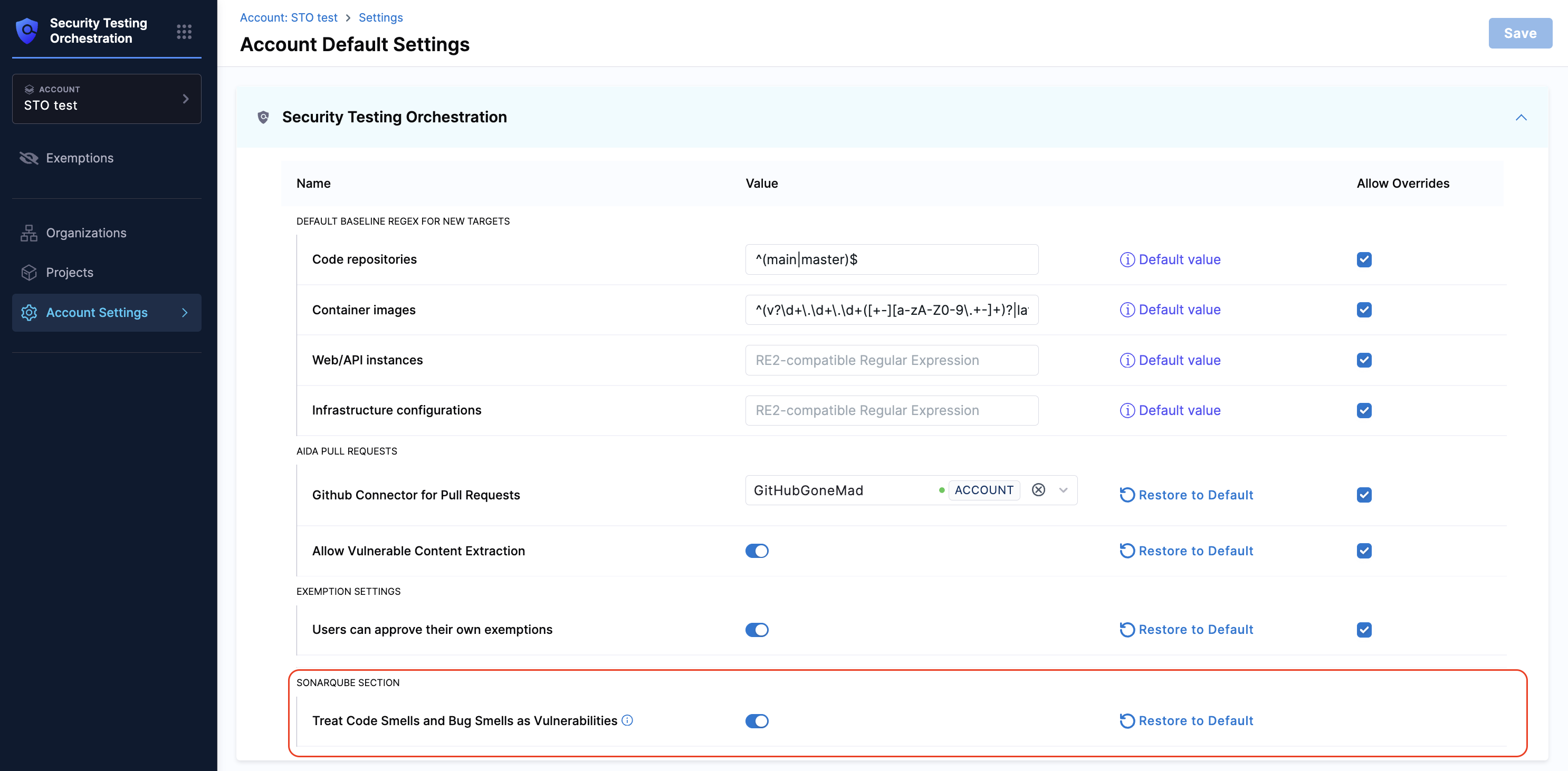
**SonarQube Step Enhancement:**

**SonarQube** issues with type `Code Smells` and `Bug Smells` now can include proper severity mapping instead of defaulting to `info` severity. (STO-8757)

* This is controlled by the **Treat Code Smells and Bug Smells as Vulnerabilities** setting (account-level, disabled by default). Refer to the [SonarQube documentation](/security-testing-orchestration/use-sto/sto-scanner-configuration/sonarqube-sonar-scanner-reference.md#sonarqube-issue-categorization-in-sto) for more details.

<figure><img src="/files/RaVVXkdP0oaS8Vh4uNxs" alt=""><figcaption><p>Click to view full size image</p></figcaption></figure>

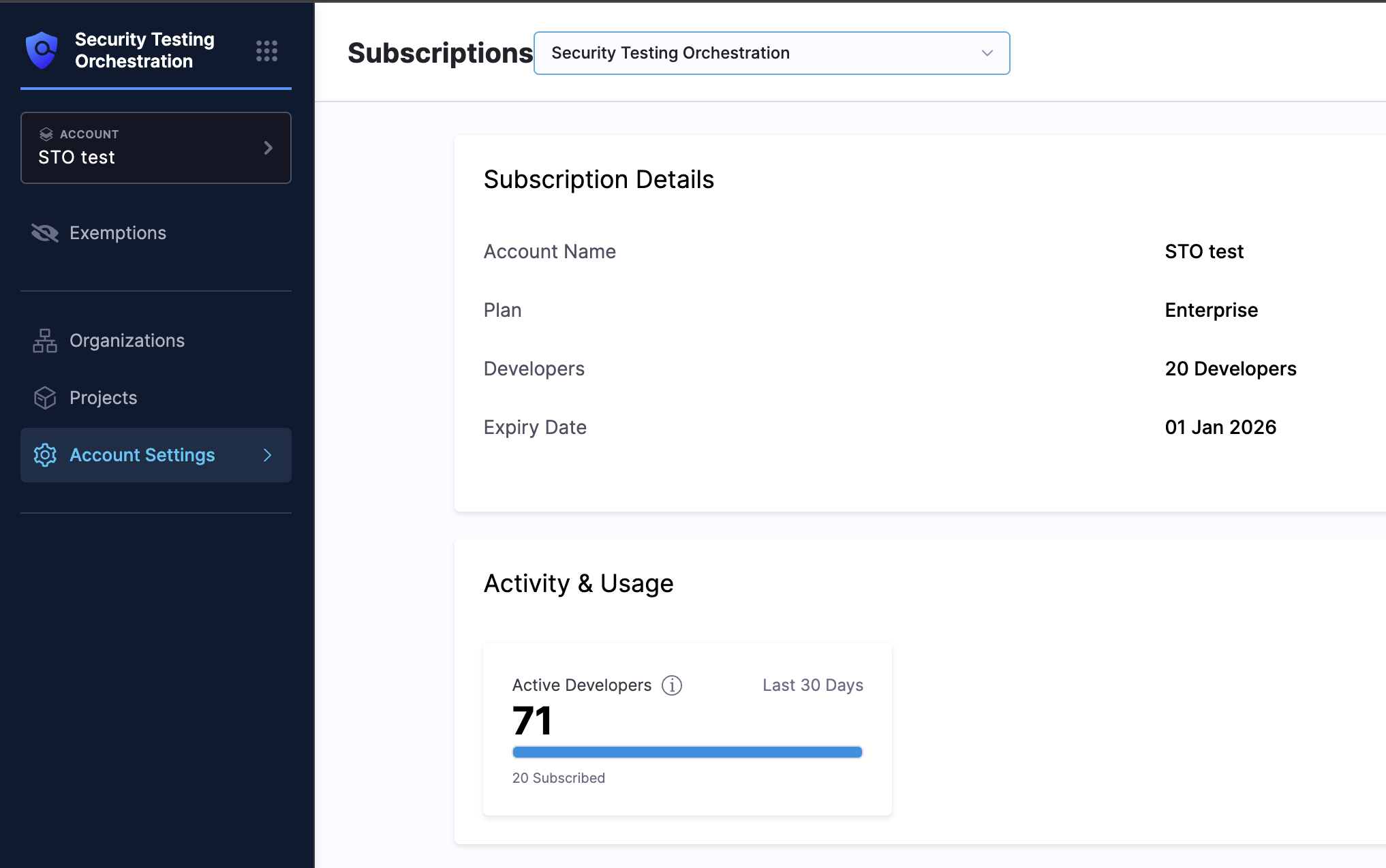
**STO License Details Update:**

Updated the STO License details view (STO-9757)

* Removed the **Overuse Banner** for Standard (Legacy) License accounts (still shown for Dev360 users).
* Updated tooltip text for Standard (Legacy) License accounts to clarify the developer-based model:
  * 1 Active Developer = 100 Security Scans / month
  * Each STO step (SAST, SCA, DAST, etc.) = 1 scan

<figure><img src="/files/ZRbI5PvbhPTNR16Rxgzu" alt=""><figcaption><p>Click to view full size image</p></figcaption></figure>

**Fixed Issues**

* Fixed an issue where dashboard components displayed as “Untitled” with no data due to a pipeline link generation problem. Visualizations in dashboards now render as expected (STO-9171, ZD-80253).
* Fixed an issue where URLs in the **Reference URLs** field of the Issue Details pane overflowed. They now wrap to a new line (STO-9749).

#### Version 1.158.0 <a href="#version-11580" id="version-11580"></a>

**New Features and Enhancements**

* STO now integrates with [**GitHub Advanced Security (GHAS)**](/security-testing-orchestration/use-sto/sto-scanner-configuration/github-advanced-security.md). This integration supports the following GHAS products and scan modes:

  * **CodeQL (SAST):** Identify vulnerabilities in code. Supported in **Orchestration**, **Extraction**, and **Ingestion** scan modes.
  * **Dependabot (SCA):** Detect vulnerable open-source dependencies. Supported in **Orchestration**, **Extraction**, and **Ingestion** scan modes.
  * **Secret Scanning:** Detect exposed secrets. Supported in **Extraction** and **Ingestion** scan modes.

  Refer to [GitHub Advanced Security Documentation](/security-testing-orchestration/use-sto/sto-scanner-configuration/github-advanced-security.md) for more information.
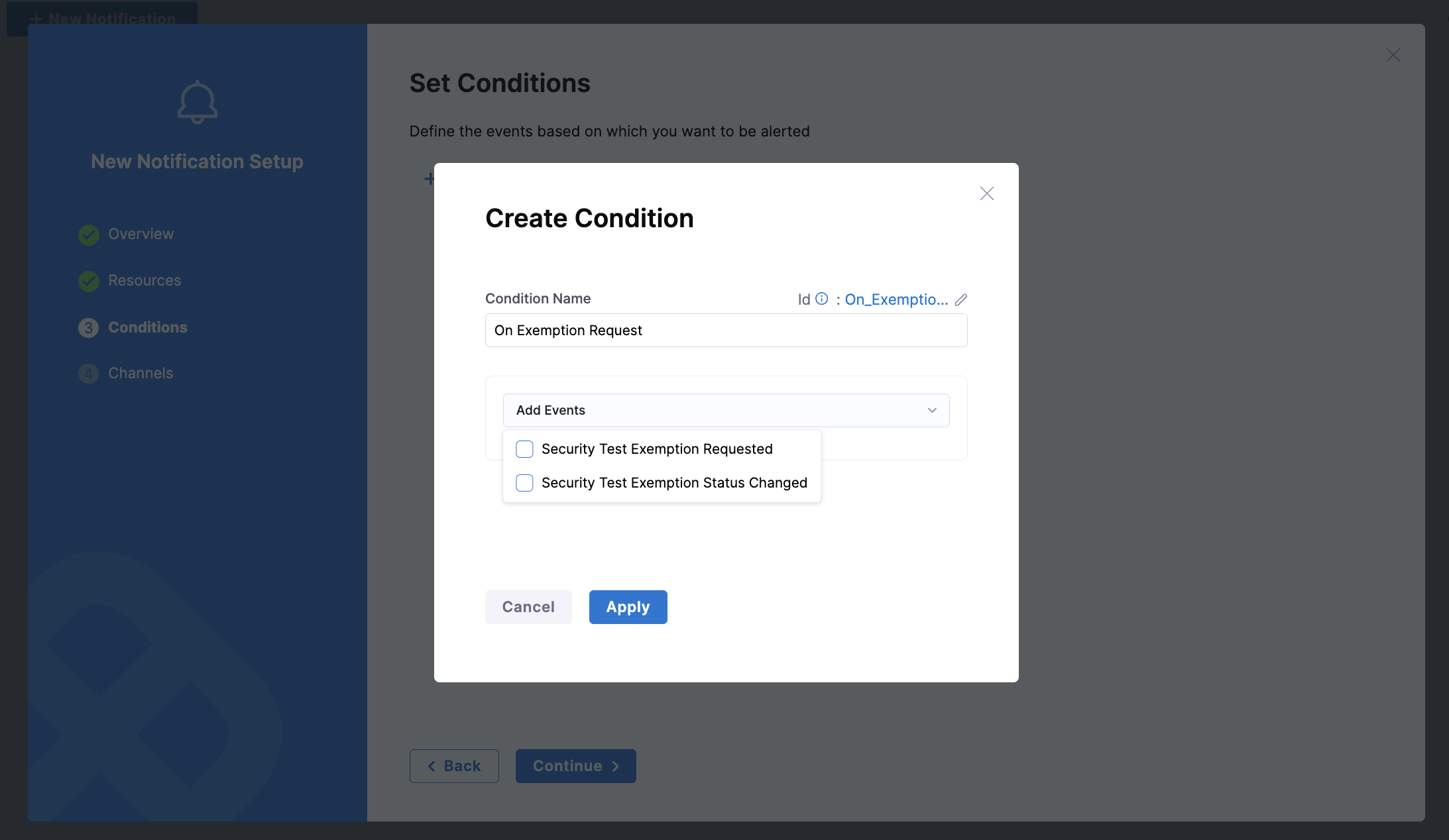
* STO now supports **Notifications for Exemption Management**. You can configure notifications for exemption-related events such as when an exemption request is created or when its status changes. [View the Documentation on Notifications for Exemptions](/security-testing-orchestration/use-sto/sto-set-notifications/exemption-notifications.md) and the [Video on Set up Notifications for Exemption Requests](https://youtu.be/f5JyySFQG4E) (currently behind the feature flag `PL_CENTRAL_NOTIFICATIONS`)

  <figure><img src="/files/2Fhu2QCMdMfADeNybYaO" alt=""><figcaption><p>Click to view full size image</p></figcaption></figure>

{% embed url="<https://youtu.be/f5JyySFQG4E>" %}
Set up Notifications for Exemption Requests
{% endembed %}

* You can now **export scan results from the Vulnerabilities tab**. (currently behind the feature flag `STO_DOWNLOAD_SCAN_SUMMARY`)

  * Download results in **CSV format** directly from the **Vulnerabilities** tab.
  * Navigate to the **Pipeline Execution Summary Dashboard** from the same tab to export results in **CSV or PDF**. Refer to [Export Scan Results Documentation](/security-testing-orchestration/use-sto/sto-security-issues/export-scan-results.md) for more details.

  <figure><img src="/files/0Xk2QHz6xQy0C5r5kznC" alt=""><figcaption><p>Click to view full size image</p></figcaption></figure>
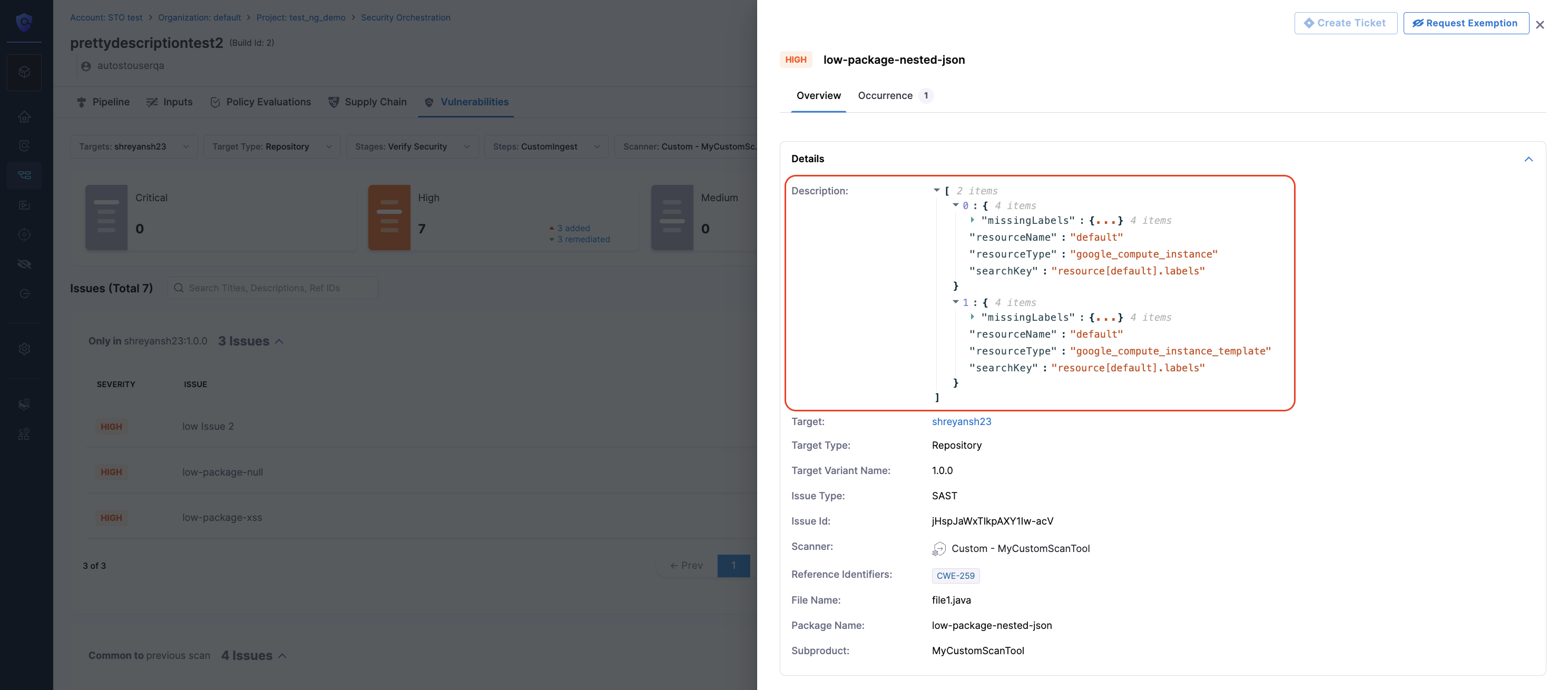
* Issue descriptions in the **Issue Details** view will now render as a formatted JSON tree when the description is in JSON format. The JSON can be expanded or collapsed for easier viewing (STO-8885, ZD-83369).

  <figure><img src="/files/aP0JnDhzLreF0YMMiMWL" alt=""><figcaption><p>Click to view full size image</p></figcaption></figure>

**Fixed Issues**

* Fixed an issue where the **Project Filter** on the Exemptions page (at the Account level) was not correctly filtering exemption data based on the selected project (STO-9669).
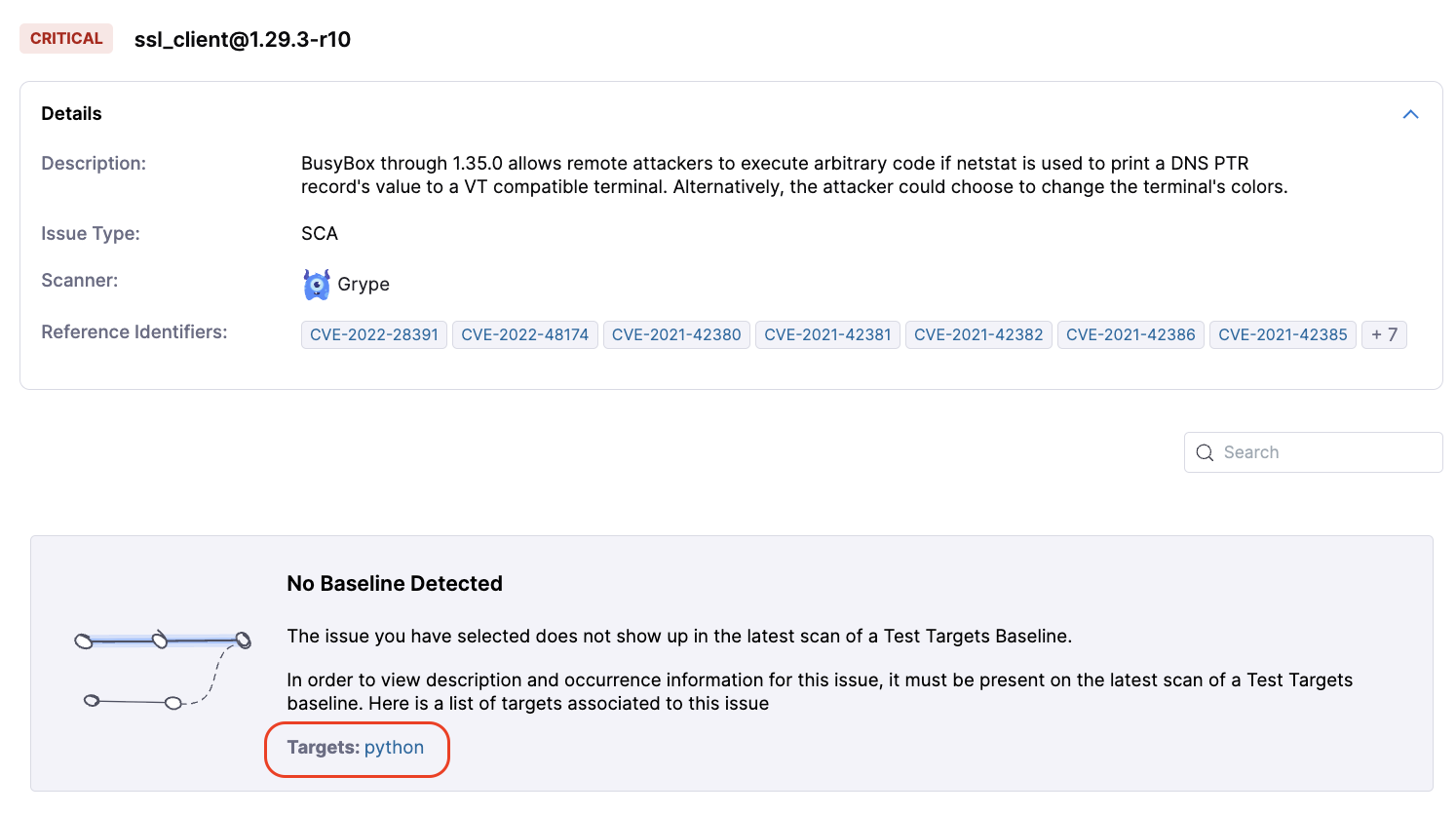
* For exemptions without a configured baseline target, the **Set in target** button (previously leading to a 404) has been removed. Instead, a direct link to the relevant target on the **Test Targets** page is now provided (STO-9715, STO-9556).

  <figure><img src="/files/UtEnXrdpLkING7hVZeBY" alt=""><figcaption><p>Click to view full size image</p></figcaption></figure>
* Fixed an issue where the CSV downloaded from the **Vulnerabilities** tab had empty entries. The CSV data is now correctly populated (STO-9646, STO-9645).
* Fixed an error when configuring the **port** in the **ZAP** step’s *Scan Tool* section. Previously, the port had to be entered as a string, causing a save error. The visual editor now correctly treats the port value as an integer or runtime input, and saves without errors (STO-9316).

### August 2025 <a href="#august-2025" id="august-2025"></a>

#### Version 1.155.2 <a href="#version-11552" id="version-11552"></a>

**New Feature**

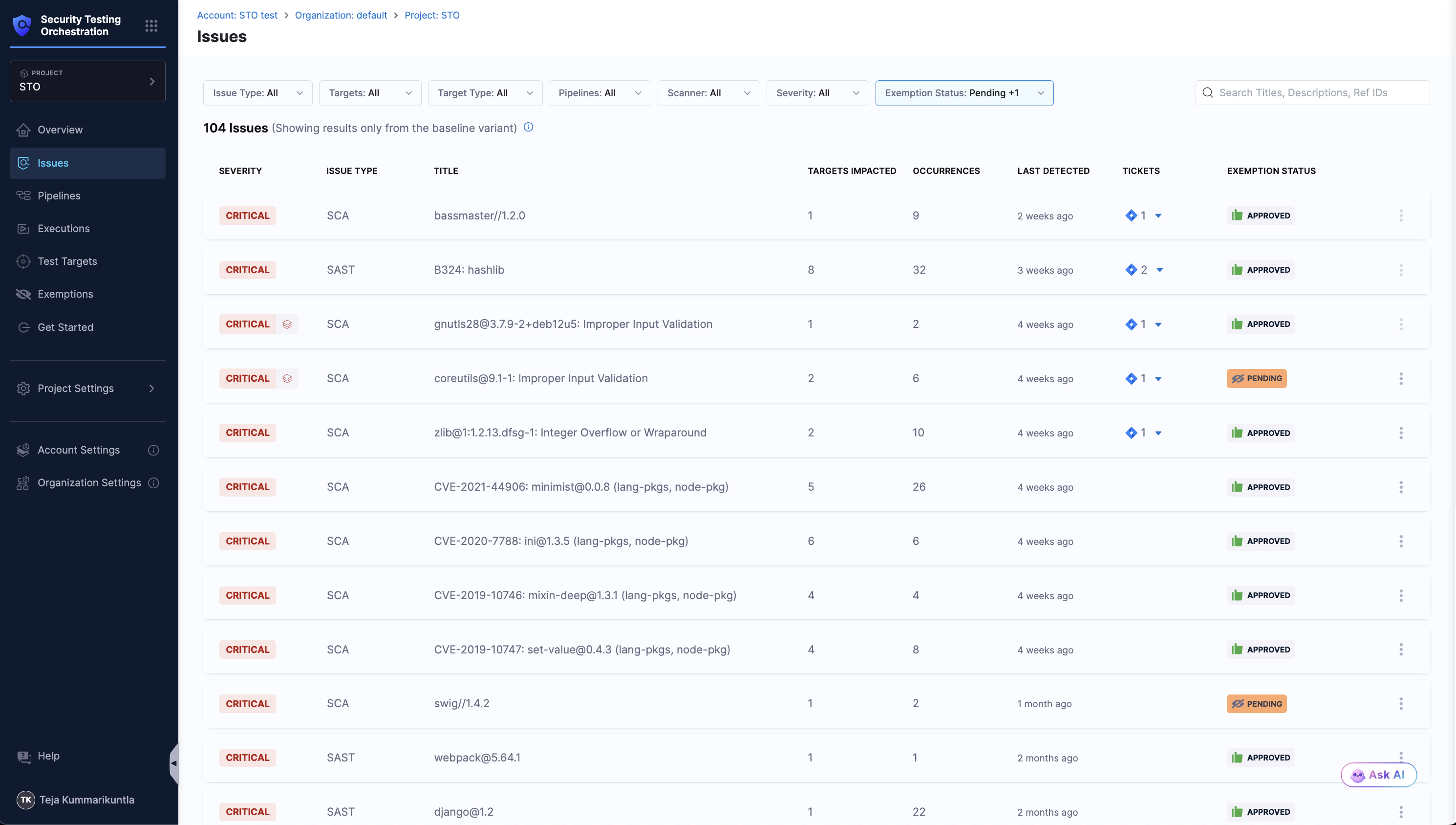
* **Issue** Page is now **Generally Available**. This section provides a consolidated view of all security issues affecting your baseline targets, providing a comprehensive list of issues identified across the scans in your Project. This page is currently available only at the **Project** level. Support for **Organization** and **Account** levels will be available soon. Refer to [View and manage baseline issues](/security-testing-orchestration/use-sto/sto-security-issues/issues.md) and video on [Introducing Issue Page for AppSec Teams](https://youtu.be/CLqFqmZh2YM) for more details.

  <figure><img src="/files/N1GuHoqsJK5lpundrpDa" alt=""><figcaption><p>Click to view full size image</p></figcaption></figure>

{% embed url="<https://youtu.be/CLqFqmZh2YM>" %}
Navigating the Issues section
{% endembed %}

**Fixed Issues**

* Fixed an issue where the **View Execution Results** option on the [Exemptions](/security-testing-orchestration/use-sto/sto-exempt-issues/manage-exemptions.md) page did not route correctly to the pipeline execution window. This is fixed by correcting the `projectId` and `orgId` to the URL (STO-9658, ZD-91336).
* Fixed a bug in the [**Vulnerabilities**](/security-testing-orchestration/use-sto/sto-security-issues/view-scan-results.md) tab where applying a filter by **Status** affected the overall severity counts incorrectly. Severity counts now reflect accurate data irrespective of applied filters (STO-9548).
* Fixed incorrect project details being shown in the [**Exemption Status**](/security-testing-orchestration/use-sto/sto-exempt-issues/manage-exemptions.md) view inside the Issue Details pane, specifically for exemptions scoped at the project level (STO-9628).
* Fixed an issue where filtering by the [**Exemptions**](/security-testing-orchestration/use-sto/sto-exempt-issues/manage-exemptions.md) card in the [**Vulnerabilities**](/security-testing-orchestration/use-sto/sto-security-issues/view-scan-results.md) tab displayed exempted issues incorrectly. Also resolved a problem where the Dashboard view showed data, but the CSV download returned empty results (STO-9640).
* Fixed a bug where exemption requests did not appear in the [**Exemptions**](/security-testing-orchestration/use-sto/sto-exempt-issues/manage-exemptions.md) page despite the tab showing a pending count. This issue occurred intermittently and is now resolved (STO-9411, ZD-89459).
* Fixed an error (`414 URI Too Long`) caused when selecting a large number of options in the **Project** and **Organization** filters on the [**Exemptions**](/security-testing-orchestration/use-sto/sto-exempt-issues/manage-exemptions.md) page. Filtering now works as expected without errors at both Organization and Account levels (STO-9516, STO-9562).

#### Version 1.153.3 <a href="#version-11533" id="version-11533"></a>

**New Features and Enhancements**

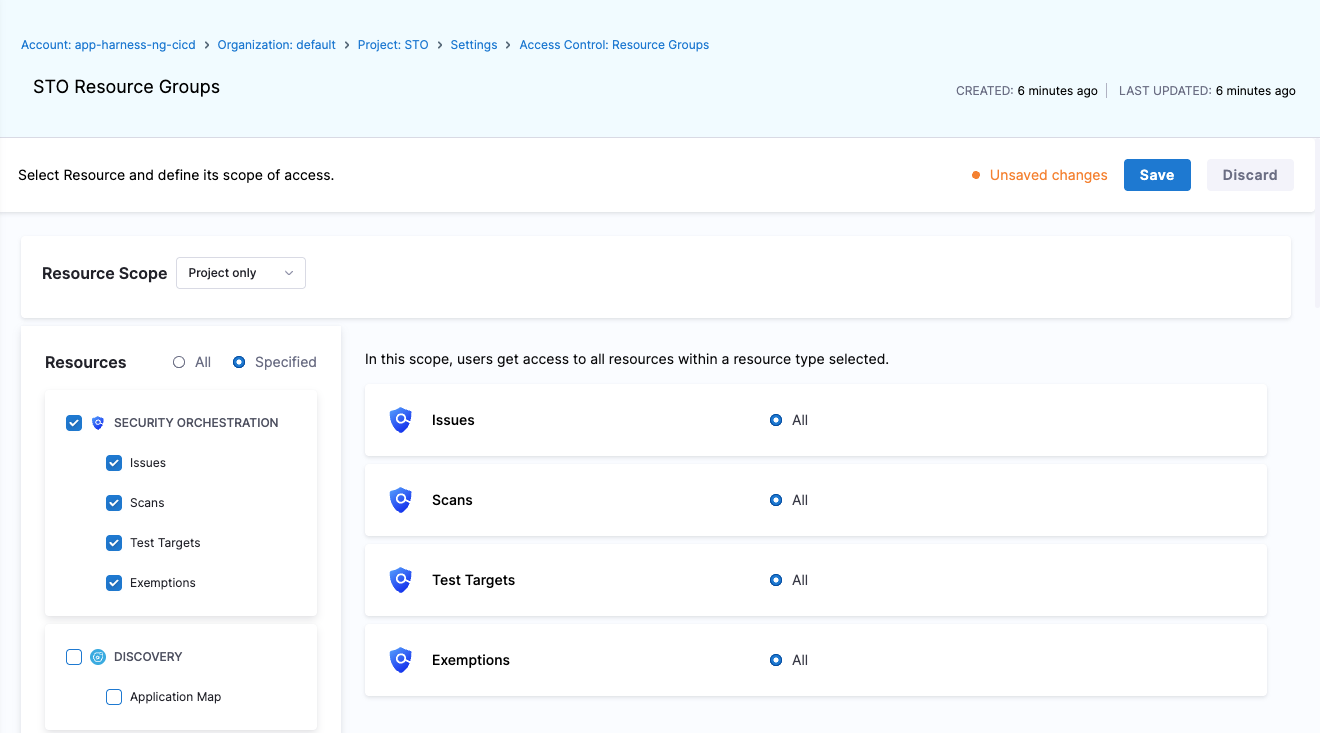
* Added support for [**Harness Resource Groups**](/harness-ai/use-harness-platform/platform-access-control/manage-resource-groups.md) at the Project, Org, and Account scopes. See the [STO RBAC documentation](/security-testing-orchestration/troubleshooting-and-resources/rbac.md) and [video on configuring STO RBAC](https://youtu.be/c_JU141TGas) for details (STO-9217).

  <figure><img src="/files/bg81pCV4plOXOE3kb7U5" alt=""><figcaption><p>Click to view full size image</p></figcaption></figure>

{% embed url="<https://youtu.be/c_JU141TGas>" %}
How to Configure RBAC Permissions for Harness STO
{% endembed %}

* Added a tooltip to the **Create Pull Request** button in [Harness AI recommendations](/security-testing-orchestration/use-sto/sto-remediate-issues/ai-based-remediations.md), which displays the reason when the required conditions for opening a pull request are not met (STO-9014).
* External ticket badges now indicate when a linked ticket is broken or unclickable (STO-8479, ZD-84689).

**Fixed Issues**

* Updated severity override logic in the **Vulnerabilities** tab to correctly reflect changes. For example, when a severity is overridden from *medium* to *low* by **Snyk**, the UI now displays the correct direction of the override (STO-9483).
* Fixed an issue in the **All Issues** page where applying filters or performing a search while on a higher pagination page could result in a misleading “No Issues Found” message. The page now resets to the first page automatically (STO-9413).

### July 2025 <a href="#july-2025" id="july-2025"></a>

#### Version 1.150.7 <a href="#version-11507" id="version-11507"></a>

**New Features and Enhancements**

* Upgraded the [SonarQube step](/security-testing-orchestration/use-sto/sto-scanner-configuration/sonarqube-sonar-scanner-reference.md) CLI from version `4.7` to `7.1`, introducing security updates and enhancements (STO-9143).
* Improved error messaging for the [Custom Scan step](/security-testing-orchestration/use-sto/sto-custom-scanning-and-ingestion/custom-scan-reference.md). For example, clearer messages now appear when specifying a key field that does not exist in the JSON input (STO-6110).

**Fixed Issues**

* Fixed an issue in the Vulnerabilities tab where selecting an option from the scanner filter dropdown during a [Custom Scan](/security-testing-orchestration/use-sto/sto-custom-scanning-and-ingestion/custom-scan-reference.md) step caused other dropdowns to fail to populate, preventing the target name and variant from rendering correctly (STO-9376, ZD-88728).

#### Version 1.148.4 <a href="#version-11484" id="version-11484"></a>

**New Features and Enhancements**

* [Aqua Trivy](/security-testing-orchestration/use-sto/sto-scanner-configuration/trivy/aqua-trivy-scanner-reference.md) step now supports the **Filesystem** scan configuration for scanning a repository or file using `trivy fs` (STO-8711, ZD-81541).
* [Aqua Trivy](/security-testing-orchestration/use-sto/sto-scanner-configuration/trivy/aqua-trivy-scanner-reference.md) step now supports the **Trivy SBOM** scan configuration for scanning SBOM files using `trivy sbom /path/to/cyclonex.json` (STO-8940).
* [Wiz](/security-testing-orchestration/use-sto/sto-scanner-configuration/wiz/repo-scans-with-wiz.md) step now recognizes exempted issues and no longer lists them as active. Previously exempted issues may now appear as **Remediated** after the next Wiz scan (STO-9229).
* Added the checkbox field **Use Scanner Raw Severity** to the [Checkmarx](/security-testing-orchestration/use-sto/sto-scanner-configuration/checkmarx/checkmarx-scanner-reference.md) step to use the scanner-provided severity instead of CVSS-based severity. This is functionally equivalent to setting `ingest_tool_severity: true` (STO-8547).

**Fixed Issues**

* Fixed a bug in [Checkov](/security-testing-orchestration/use-sto/sto-scanner-configuration/checkov-iac-scan.md) scan handling where multiple vulnerability types in one scan were not processed correctly (STO-9153, ZD-85529).
* Enhanced the **Scanner** filter in the Vulnerabilities tab to support subproduct-based filtering, fixes the issue where custom scanners couldn’t be individually selected in the UI (STO-9010, ZD-84685).
* Fixed a data consistency issue that caused some issues to be incorrectly marked as remediated in Custom Dashboards (STO-8997, ZD-84585).
* Fixed a data inconsistency where some older scans (over a year old) had no previous scan reference, which caused confusion in the Vulnerabilities tab of pipeline executions (STO-9216).

### June 2025 <a href="#june-2025" id="june-2025"></a>

#### Version 1.142.1 <a href="#version-11421" id="version-11421"></a>

**New Features and Enhancements**

* Added support for the **SonarQube** step to include privileges for creating and using the Sonar cache (STO-8889).
* Improved the **SonarQube** step to support occurrence detection and exemption handling for Code Coverage and Bug Smells issues (STO-9067).
* Enhanced normalization in the **Traceable** step to handle variations in scanner outputs for CVE and CWE properties (STO-9085).
* Updated URLs in STO Custom Dashboards to use vanity URL format (STO-8643, ZD-74374).

**Fixed Issues**

* Fixed an issue causing incorrect counts for remediated issues in the **Security Testing Dashboard** (STO-9002, ZD-84585).
* Fixed a bug where the **GitLeaks** step failed when symlinks were present in the scanned codebase (STO-8911, ZD-83119).

### May 2025 <a href="#may-2025" id="may-2025"></a>

#### Version 1.140.1 <a href="#version-11401" id="version-11401"></a>

**New Features and Enhancements**

* Added support for the setting `ingest_tool_severity: true` in the [**Checkmarx One**](/security-testing-orchestration/use-sto/sto-scanner-configuration/checkmarx/checkmarxone-scanner-reference.md#use-raw-scanner-severity), [**Anchore**](/security-testing-orchestration/use-sto/sto-scanner-configuration/anchore-enterprise-scanner-reference.md#use-raw-scanner-severity), and [**Prisma Cloud**](/security-testing-orchestration/use-sto/sto-scanner-configuration/prisma-cloud-scanner-reference.md#use-raw-scanner-severity) steps. When added, STO will use the severity provided directly by the scanner instead of calculating it based on CVSS scores (STO-8776, STO-8778, STO-8779).
* Renamed the built-in STO role from `Security Testing SecOps` to `Security Testing AppSec`. This is not a breaking change and remains fully backward compatible (STO-7392).
* Added support for the SonarQube step to include privileges for creating and using the Sonar cache (STO-8889).

**Fixed Issues**

* Fixed an issue in the Snyk step where the filename and upgrade version were missing in some cases (STO-8914).
* Fixed an issue in the Veracode step where files with modification dates earlier than 1980 caused the scan to fail (STO-8910).

### April 2025 <a href="#april-2025" id="april-2025"></a>

#### Version 1.136.1 <a href="#version-11361" id="version-11361"></a>

**New Features and Enhancements**

* Updated the Jira ticket creation dialog to dynamically fetch and display all required fields for ticket creation (STO-8521).

**Fixed Issues**

* Fixed an issue where the CVSS score of issues did not match the severity label in some cases (STO-8807).
* Fixed an issue where Harness AI failed to present remediation details if the cloned codebase did not match the ingested scan result’s repository; remediation is now shown correctly for the ingested repo (STO-8664).

#### Version 1.134.1 <a href="#version-11341" id="version-11341"></a>

**New Features and Enhancements**

* Switched to using the Harness GAR registry as the default source instead of DockerHub to avoid rate-limiting issues (STO-8669).

**Fixed Issues**

* Fixed a bug where the `ListTickets` endpoint did not respect `projectID` and `orgID` scopes (STO-8628).
* Fixed an issue in `Local OCI/Docker archive in this stage` image scans where the tar file name was incorrectly passed to the CLI instead of the image name (STO-8690, ZD-80330).
* Resolved an issue where STO failed to parse the latest results from BlackDuckHub (STO-8718, ZD-81315).

### March 2025 <a href="#march-2025" id="march-2025"></a>

#### Version 1.130.6 <a href="#version-11306" id="version-11306"></a>

**New Features and Enhancements**

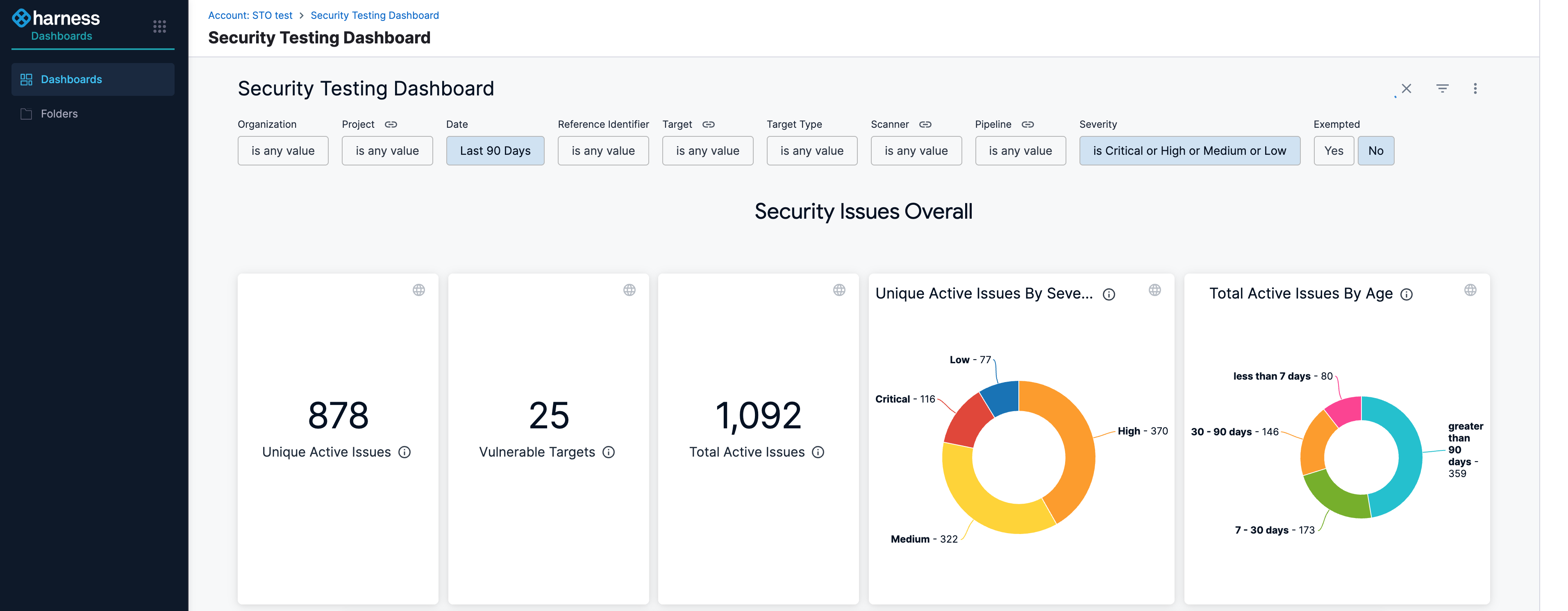
* Enhanced [**Security Tests Dashboard**](/security-testing-orchestration/use-sto/sto-dashboards-and-reports/security-testing-dashboard.md) performance by optimizing queries for faster and more efficient data loading; data load times are now significantly reduced (STO-8584).

  <figure><img src="/files/jKP96QxJX2lD0nLmjEnC" alt=""><figcaption><p>Click to view full size image</p></figcaption></figure>
* Improved **Harness AI** error responses with additional context for better understanding (STO-8570).

**Fixed Issues**

* Fixed a regression that could cause early-access STO features, enabled for specific customers, to be disabled or hidden (STO-8624).
* Fixed an issue where the Gitleaks scanner was running in the wrong mode, causing Docker authentication to be ignored and leading to rate limit issues (STO-8611).
* Resolved a permission denied error that occurred when running STO steps in parallel with different users (STO-8560, ZD-77709).
* Fixed an issue where the **Request Exemption** button on the scan results page appeared disabled (STO-8596).

### February 2025 <a href="#february-2025" id="february-2025"></a>

#### Version 1.127.5 <a href="#version-11275" id="version-11275"></a>

**New Features and Enhancements**

* CheckmarxOne is now available as an STO step, currently behind the feature flag `STO_STEP_PALETTE_CHECKMARX_ONE` (STO-5747).
* Checkmarx step now supports scan configurations for Checkmarx SCA and Checkmarx OSA. These can be used by setting the **Scan Configuration** field to `CxSCA` or `CxOSA` (STO-7891).

**Fixed Issues**

* Fixed an issue where unsupported connectors were listed when configuring the Container Registry field in STO steps; the list now only displays supported connectors for selection (STO-8398, ZD-75006).
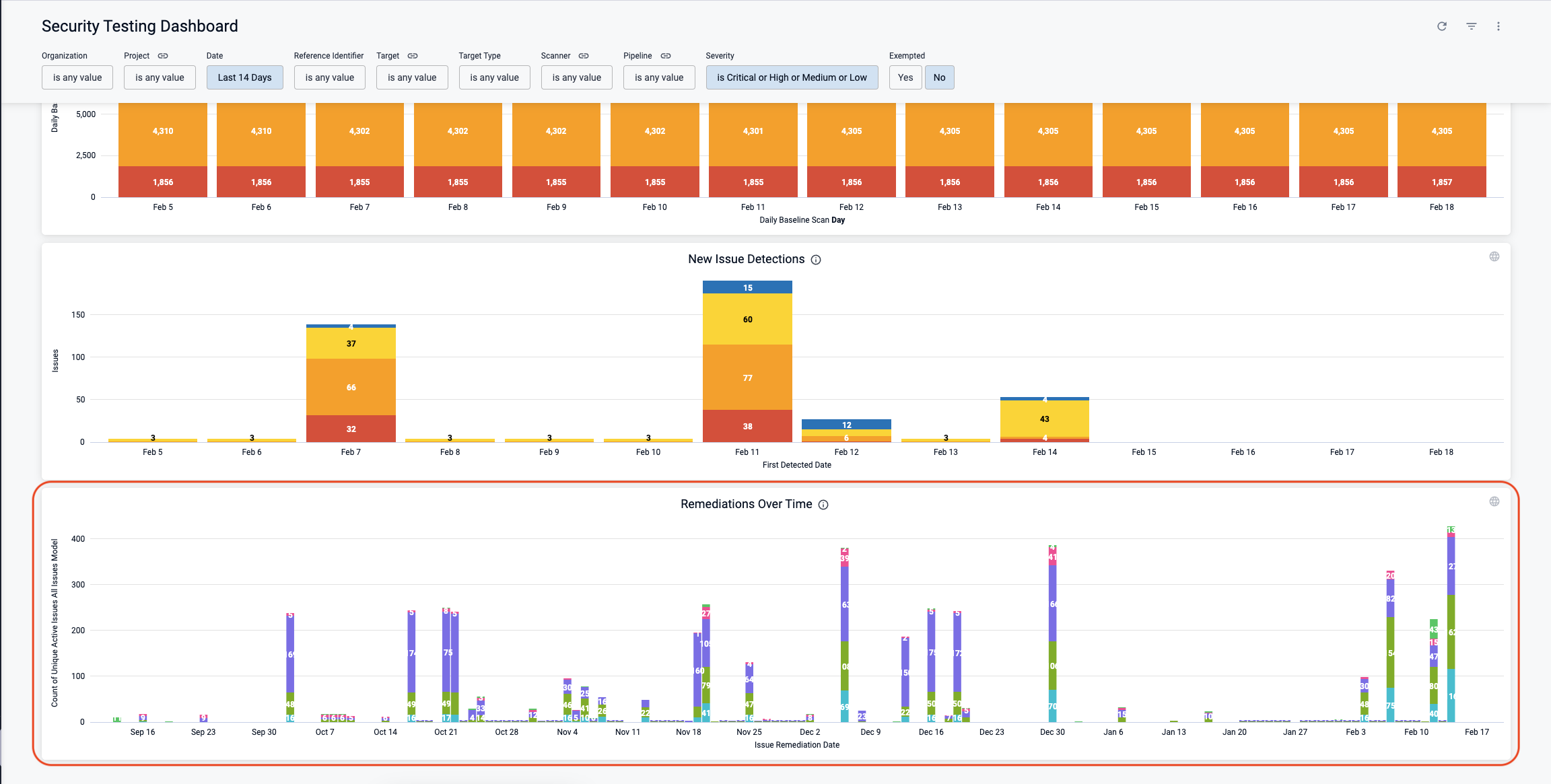
* Fixed an issue where remediation calculations were skipped due to an internal race condition; this now ensures accurate remediation trends in the **Remediation Over Time** graph on the **Security Testing Dashboard** (STO-8456).

  <figure><img src="/files/1NQdR1YV68gwFTjZtqif" alt=""><figcaption><p>Click to view full size image</p></figcaption></figure>
* Fixed AI remediation steps failing with a 403 error when triggered by a project admin; added support for eligible scopes like project and org (STO-8483, ZD-76591).
* Fixed an issue preventing users from canceling an issue exemption; users with the necessary privileges can now cancel issue exemptions without issues.

#### Version 1.125.0 <a href="#version-11250" id="version-11250"></a>

**New Features and Enhancements**

* Added a new "STO Usage Dashboard" to display user usage data (STO-8340).
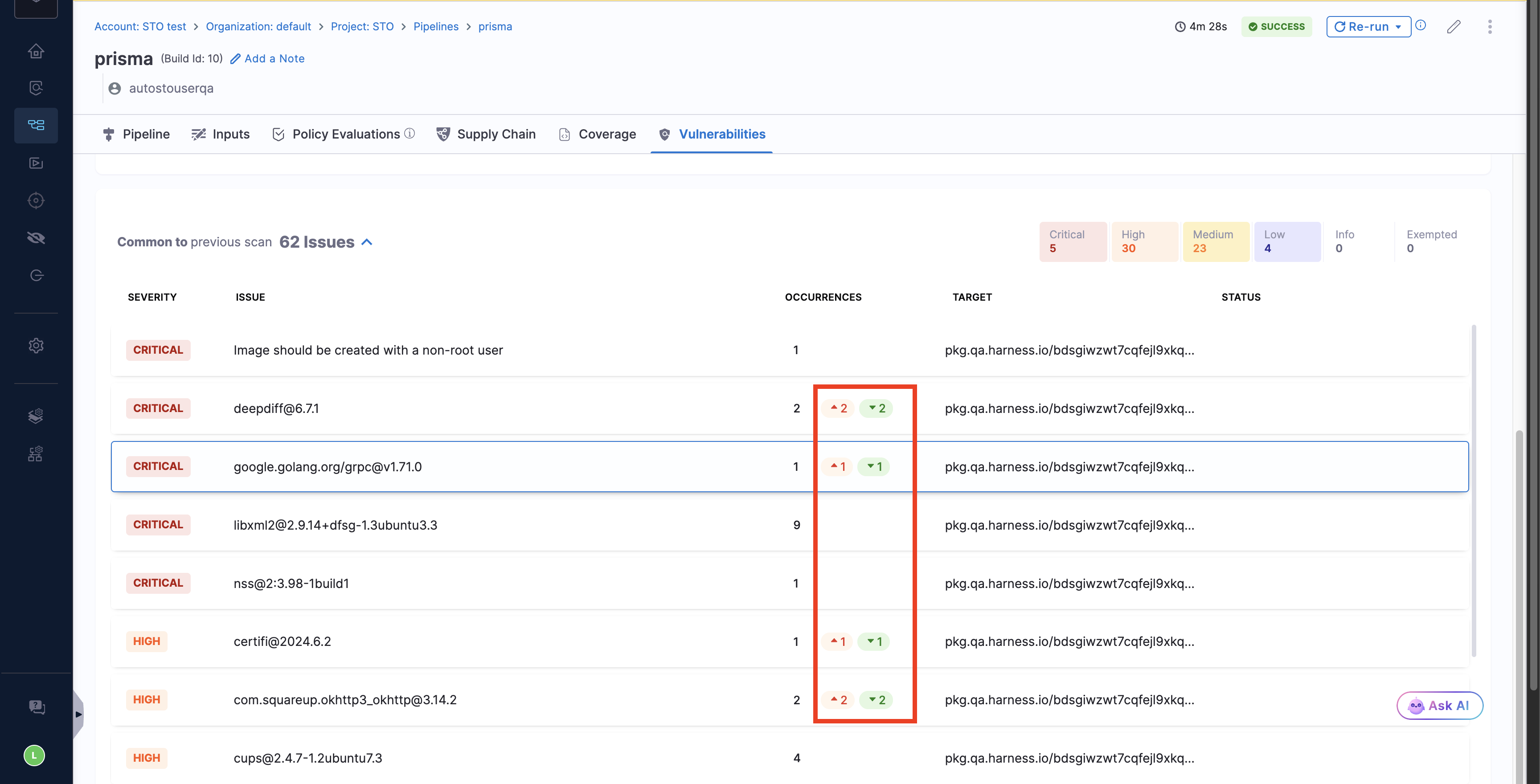
* Added a new "Occurrences" column to the issue list on the security test page, showing the total number of detected occurrences, along with new detections and remediation numbers. The status column was moved to the end, and the title column was renamed to "Issue" (STO-8085).

**Fixed Issues**

* Fixed an issue where Gitleaks may not work properly if the clone and scan steps were not run by the default user (STO-8473, ZD-76568).

### January 2025 <a href="#january-2025" id="january-2025"></a>

#### Version 1.124.3 <a href="#version-11243" id="version-11243"></a>

**New Features and Enhancements**

* Prisma Cloud step in STO now automatically pulls the appropriate CLI version to match the user’s version (STO-5300).
* Custom Ingestion scanner results now display both the scanner details and scanning results (STO-8352).
* Fixed an issue where adding an additional route to the Domain field in the Checkmarx step would not properly process the URL (STO-5669).

#### Version 1.122.1 <a href="#version-11221" id="version-11221"></a>

**New Features and Enhancements**

* Enhanced the Veracode step in STO to use an existing Veracode application with the Target name specified during the step configuration. If no matching application exists, the step creates a new one. (STO-8359)

**Fixed Issues**

* Fixed an issue where Trivy scans failed if no vulnerabilities were found but secrets were detected; the scan now passes successfully, reporting detected secrets with no vulnerabilities (STO-8404, ZD-75298).
* Fixed an issue that prevented the creation of a new Veracode Sandbox from the STO Veracode step (STO-8377, ZD-72535).

### December 2024 <a href="#december-2024" id="december-2024"></a>

#### Version 1.120.4 <a href="#version-11204" id="version-11204"></a>

**New Features and Enhancements**

* Veracode step is now available as an SCA scanner (STO-8275).
* Improved logic in the Checkmarx scanner to handle empty scan reports (STO-8282).
* Extended support for SonarQube external policies to work with SonarQube server version 10 (STO-8251).

**Fixed Issues**

* Fixed an issue where SonarQube step execution failed if the title referenced a null character (STO-8329, ZD-74246, ZD-74368).
* Fixed a Snyk Code scan issue that caused failures when no results were found; the scan will now complete successfully (STO-8294, ZD-71796).
* Resolved misclassification of issues as new when scanning the same target multiple times with the same scanner (STO-8169).
* Fixed a configuration issue in some Harness production environments that prevented STO steps from running in IaCM stages (STO-8291, ZD-73770).
* Fixed a scan failure that occurred when all commit SHA characters were numbers (STO-8367, ZD-74690).
* Fixed an issue where repository details could not be fetched when raising a pull request from Harness AI remediation suggestions (STO-8351).

### November 2024 <a href="#november-2024" id="november-2024"></a>

#### Version 1.117.2 <a href="#version-11172" id="version-11172"></a>

**New features and enhancements**

* Improved SARIF rules processing to handle rules with missing names and descriptions. (STO-8248)

**Fixed issue**

* Resolved issue where vulnerabilities mitigated in Veracode SCA scans were not properly filtered in STO; mitigated flaws are now correctly handled. (STO-8259, ZD-73220)
* Fixed issue where occurrence-level code snippets were inadvertently hidden from the issue details panel. (STO-8202)

### October 2024 <a href="#october-2024" id="october-2024"></a>

#### Version 1.114.3 <a href="#version-11143" id="version-11143"></a>

**New features and enhancements**

* Improved issue details formatting to support various data formats from scanners (STO-8058, STO-7845, ZD-6673).
* Added AquaSecurity's ECR registries as a fallback to prevent rate-limit issues when their GHCR (STO-8157).
* Container image scanning without using the Docker-in-Docker step does not recognize certificates passed through the delegate. This issue has now been fixed (STO-8140).
* Anchore policy failures now show as "Info" level issues of type "External Policy" in scan results (STO-6494).

**Documentation enhancements**

* Added a video tutorial for [SonarQube Orchestration scan mode](/security-testing-orchestration/use-sto/sto-scanner-configuration/sonarqube-sonar-scanner-reference.md).
* Added a video on [How to perform Local Docker/OCI Archive scanning with Harness STO.](https://www.youtube.com/watch?v=x1NXBJaHF7U\&list=PLXsYHFsLmqf1wmAiQZkL65Xt6VarH_DuH\&index=8\&t=7s)

#### Version 1.112.5 <a href="#version-11125" id="version-11125"></a>

**New features and enhancements**

* The Snyk step scan modes for [Code scanning](/security-testing-orchestration/use-sto/sto-scanner-configuration/snyk/snyk-code-scanning.md), [Container scanning](/security-testing-orchestration/use-sto/sto-scanner-configuration/snyk/snyk-container-scanning.md), and [IaC (Infrastructure as Code) scanning](/security-testing-orchestration/use-sto/sto-scanner-configuration/snyk/snyk-iac-scanning.md) are now generally available (GA). Previously, these scan modes were behind the feature flag `STO_SNYK_ORCHESTRATION_ENHANCEMENTS`.
* Resolved a performance issue that caused the Exemptions page to fail to load in some projects (STO-8104, ZD-70734).
* Updated the Nexus IQ runner to copy custom certificates from the delegate to the JVM (STO-8060).
* Cleaned up issue details fields and added a new **Issue type** field to all issues (STO-8080).

**Fixed issue**

* Fixed a bug that caused scanners to ignore additional settings with boolean values. For example, in the Anchore scanner configuration, setting the `ANCHORECTL_UPDATE_CHECK` variable to `true` or `false` was previously ignored. With this fix, STO will properly recognize all the boolean value variables (STO-8006, ZD-69654).

### September 2024 <a href="#september-2024" id="september-2024"></a>

#### Version 1.110.3 <a href="#version-11103" id="version-11103"></a>

**New features and enhancements**

* STO ingestion now works on [MacOS Harness hosted builds](/security-testing-orchestration/use-sto/sto-scanner-configuration/security-step-settings-reference.md#operating-systems-and-architectures-supported-by-sto).
* STO now supports [private network connectivity](/harness-ai/use-harness-platform/references/private-network-connectivity/private-network-connectivity.md) for Harness Hosted
* The steps Snyk, Wiz, Prisma Cloud, Aqua Security, Aqua Trivy, and Grype can now run without Docker-in-Docker as a dependency.
* Improved the performance of the STO graph "Issue distribution over time"

**Fixed issue**

* Resolved the issue that caused the "Issue distribution over time" graph on the Overview page to time out and fail to load (STO-6037).
* Fixed the problem where exempted issues were occasionally counted incorrectly in the "Issue distribution over time" graph on the Overview page. (STO-6037).
* Resolved the issue that caused the SonarQube step to fail during the upload of scan results (STO-7961).
* Fixed the problem in the Checkmarx Ingestion where the SARIF normalizer failed to handle null values in the output (STO-7997).

#### Version 1.108.2 <a href="#version-11082" id="version-11082"></a>

**New features and enhancements**

* The [SonarQube](/security-testing-orchestration/use-sto/sto-scanner-configuration/sonarqube-sonar-scanner-reference.md) step will now present the code coverage data in Orchestration, Ingestion, and Extraction scan modes, this can be found as an INFO level issue item in your pipeline executions. (STO-7100)
* The [Burp Suite Enterprise Edition](/security-testing-orchestration/use-sto/sto-scanner-configuration/burp-scanner-reference.md) step has been upgraded to use the `scope_v2` API version instead of `scope`. This update is designed to support server version `v2023.3`, while still maintaining backward compatibility with earlier supported versions. (STO-7955)

### August 2024 <a href="#august-2024" id="august-2024"></a>

#### Version 1.104.3 <a href="#version-11043" id="version-11043"></a>

**New features and enhancements**

* The [Veracode scan step](/security-testing-orchestration/use-sto/sto-scanner-configuration/veracode-scanner-reference.md) in STO now ignores issues mitigated on the Veracode side, so the scan results exclude any mitigated issues.
* The STO dashboard now includes a new graph to view the **Top 5 Vulnerable Targets**, showing code repositories, artifacts, instances, and configurations across the account.
* You can now override the security testing scanner image at the step level. Learn more about [configuring your pipeline to use STO images from your private registry](/security-testing-orchestration/troubleshooting-and-resources/sto-use-cases/set-up-sto-pipelines/configure-pipeline-to-use-sto-images-from-private-registry.md#configure-your-pipeline-to-use-images-from-your-registry).

### July 2024 <a href="#july-2024" id="july-2024"></a>

#### Version 1.104.3 <a href="#version-11043" id="version-11043"></a>

**New features and enhancements**

* You can now override the image that runs the STO step directly in the scanner step UI. Expand **Additional Configuration** and then set **Container Registry** and **Image Tag**. (STO-7724)
* The Bandit, Anchor, and Semgrep steps now support [private network connectivity](/harness-ai/use-harness-platform/references/private-network-connectivity/private-network-connectivity.md) within STO. (STO-7666)
* The dark theme for Harness AI is improved. Its appearance is now consistent with other UI components. (STO-7849)

#### Version 1.103.3 <a href="#version-11033" id="version-11033"></a>

**New features and enhancements**

* In the [Checkmarx step](/security-testing-orchestration/use-sto/sto-scanner-configuration/checkmarx/checkmarx-scanner-reference.md) under the **Scan Tool**, the fields **Team Name** and **Project Name** are now mandatory for step configuration. Previously, these fields were optional. (STO-7681)
* We now track the number of occurrences for a given issue/scan combination independently of the associated occurrence IDs. Newly created issues will only store up to 1,000 occurrences, with the total number of occurrences being stored separately. Occurrences are stored based on severity, with higher-severity occurrences given priority. (STO-5979)

  These following endpoints now include `numOccurrences` at the issue level, showing the total number of occurrences for the issues:

  * `GET api/v2/issues/{issueId}`
  * `GET api/v2/scans/{scanId}/issue/{issueId}`
  * `GET api/v2/scans/{scanId}/issues`

  Also, the following endpoints now accept an optional payload parameter `numOccurrences`, representing the total number of occurrences associated with the issue:

  * `POST api/v2/issues`
  * `PUT api/v2/issues/{issueId}`

#### Version 1.102.2 <a href="#version-11022" id="version-11022"></a>

**New features and enhancements**

* Branch Scanning in [SonarQube](/security-testing-orchestration/use-sto/sto-scanner-configuration/sonarqube-sonar-scanner-reference.md#scan-configuration) is now Generally Available(GA), previously behind the `STO_SONARQUBE_BRANCHING` feature flag. Customers can now perform branch scans using the SonarQube step.
* Added a new setting called **Users can approve their own exemptions**. This setting helps control whether users can approve their own exemptions, and it can be easily enabled or disabled based on their preference. Find this setting under **Exemption settings** on the **Default settings** page. This is available in the project, organization and account level settings. (STO-7675).

{% hint style="info" %}
The setting **Users can approve their own exemptions** is behind the feature flag `STO_EXEMPTION_SETTING`. Contact [Harness Support](mailto:support@harness.io) to enable this setting.
{% endhint %}

### June 2024 <a href="#june-2024" id="june-2024"></a>

#### Version 1.100.2 <a href="#version-11002" id="version-11002"></a>

**Fixed issue**

* Fixed an issue where an Anchore Enterprise step failed when trying to extract scan results in the following edge case. (STO-7754)
  1. An Anchore user scanned an image (for example, `sto-plugin.v1.2.3`).
  2. An Anchore user then scanned an image with the same digest as `sto-plugin.v1.2.3` but a different name or tag such as `sto-plugin.latest`.
  3. In this case, the Anchore step could extract results for `sto-plugin.v1.2.3` but any attempts to extract results for `sto-plugin.latest` failed with the error "Unable to find matching image."

#### Version 1.99.2 <a href="#version-1992" id="version-1992"></a>

**Features that are no longer behind feature flags**

The following features are now generally available:

* Built-in scans:
  * [SAST](/security-testing-orchestration/use-sto/set-up-sto-scans/built-in-scanners.md)
  * [SCA](/security-testing-orchestration/use-sto/set-up-sto-scans/built-in-scanners.md)
  * [Secret Detection](/security-testing-orchestration/use-sto/set-up-sto-scans/built-in-scanners.md)
  * [Container](/security-testing-orchestration/use-sto/set-up-sto-scans/built-in-scanners.md)
  * [DAST](/security-testing-orchestration/use-sto/set-up-sto-scans/built-in-scanners.md)
* [Default baselines based on regular expressions](/security-testing-orchestration/troubleshooting-and-resources/sto-use-cases/set-up-sto-pipelines/set-up-baselines.md#default-baselines-based-on-regular-expressions)
* [Jira tickets for detected vulnerabilities](/security-testing-orchestration/use-sto/jira-integrations.md)
* Wiz support for scanning [artifacts](/security-testing-orchestration/use-sto/sto-scanner-configuration/wiz/artifact-scans-with-wiz.md), [code repositories](/security-testing-orchestration/use-sto/sto-scanner-configuration/wiz/repo-scans-with-wiz.md), and [IaC repositories](/security-testing-orchestration/use-sto/sto-scanner-configuration/wiz/iac-scans-with-wiz.md)

**New feature**

* The Semgrep scan step now supports a set of new **Scan Configuration** settings that enable you to select the set of Semgrep rulesets to include in your scan. (STO-7599)

  The following configurations are supported:

  * **Default** Include the following rulesets:
    * [auto](https://semgrep.dev/p/bandit)
    * [bandit](https://semgrep.dev/p/bandit)
    * [brakeman](https://semgrep.dev/p/brakeman)
    * [eslint](https://semgrep.dev/p/eslint)
    * [findsecbugs](https://semgrep.dev/p/findsecbugs)
    * [flawfinder](https://semgrep.dev/p/flawfinder)
    * [gosec](https://semgrep.dev/p/gosec)
    * [phps-security-audit](https://semgrep.dev/p/phpcs-security-audit)
    * [security-code-scan](https://semgrep.dev/p/security-code-scan)
  * **No default CLI flags** Run the `semgrep` scanner with no additional CLI flags. This setting is useful if you want to specify a custom set of rulesets in **Additional CLI flags**.
  * **p/default** Run the scan with the [default ruleset](https://semgrep.dev/p/default) configured for the Semgrep scanner.
  * **Auto only** Run the scan with the [recommended rulesets specific to your project](https://semgrep.dev/p/auto).
  * **Auto and Ported security tools** Include the following rulesets:
    * [auto](https://semgrep.dev/p/auto)
    * [brakeman](https://semgrep.dev/p/brakeman)
    * [eslint](https://semgrep.dev/p/eslint)
    * [findsecbugs](https://semgrep.dev/p/findsecbugs)
    * [flawfinder](https://semgrep.dev/p/flawfinder)
    * [gitleaks](https://semgrep.dev/p/gitleaks)
    * [gosec](https://semgrep.dev/p/gosec)
    * [phps-security-audit](https://semgrep.dev/p/phpcs-security-audit)
    * [security-code-scan](https://semgrep.dev/p/security-code-scan)
  * **Auto and Ported security tools except p/gitleaks**

**Fixed issues**

* Audit trails for STO targets and exemptions now display user-friendly resource names instead of IDs. (STO-5717)

#### Version 1.98.7 <a href="#version-1987" id="version-1987"></a>

**New features and enhancements**

* Harness STO now supports the Anchore v2 API and Anchore Enterprise Server 5.5.0. This change means that the Anchore v2 API and Anchore Enterprise Server v5.0 or higher are required to run orchestration and extraction scans. (STO-7614)
* You can now run Wiz IaC scans in an **Infrastructure** stage. (STO-7632)

**Fixed issues**

* Fixed an issue where Burp scans failed when trying to ingest base64 data that included zero byte and “Symbol Other” UTF-8 characters. (STO-7714)
* Updates to Burp Enterprise orchestration to resolve multiple issues. (STO-7635, ZD-64154)
  1. Added another API call to resolve a Burp schedule item iD to its corresponding latest Burp scan ID.
  2. Added logic to perform updates on matching Burp sites rather than trying to create a new Burp site with the same name.
  3. Removed default port from being set by runner and will only set port if user specifies in the step.

#### Version 1.97 <a href="#version-197" id="version-197"></a>

**New feature**

* The STO API is now generally available and publicly documented. For more information, go to [STO](https://apidocs.harness.io/tag/Exemptions) in the Harness API documentation. (STO-5281)

**Fixed issues**

* Updates to Burp Enterprise orchestration to resolve multiple issues. (STO-7635, ZD-64154)
  * Added another API call to resolve a Burp schedule item iD to its corresponding latest Burp scan ID.
  * Added logic to perform updates on matching Burp sites rather than trying to create a new Burp site with the same name.
  * Removed default port from being set by runner and will only set port if user specifies in the step.
* Fixed an issue where a updated runner image caused repository scans to fail in some cases. (STO-7634, ZD-64116)
* Implemented a fix to improve data processing times for certain edge cases. (STO-7521, ZD-62602, ZD-62694)

### May 2024 <a href="#may-2024" id="may-2024"></a>

#### Version 1.96.2 <a href="#version-1962" id="version-1962"></a>

**Breaking change**

Harness introduced a back-end dashboard change to support features that are currently in development. As a result, you must re-create any custom dashboards cloned from the Security Testing Dashboard before this change was introduced. If the cloned dashboard has scheduling enabled, you must also re-create the schedule. (STO-7199)

**Fixed issues**

* Fixed an issue where running an orchestrated Burp scan resulted in the runtime error `No matching scan configurations`. (STO-7585, ZD-63508)
* Fixed a Jira integration issue that allowed tickets to be created for issues that were not in a target baseline. When the **Ticket Summary** page was viewed from these tickets, they produced a vague error page. This fix prevents the creation of new non-baseline tickets and improves the error messages shown for existing tickets. (STO-7394, ZD-60778)
* Fixed a Jira integration issue where setting the default Jira project and issue type in the **External Tickets** page resulted in duplicated database records and an error response from the ticketing service. (STO-7485)

#### Version 1.95.0 <a href="#version-1950" id="version-1950"></a>

**New features and enhancements**

* The default behavior for Semgrep orchestration scans has changed. Semgrep steps now include the following rulesets. (STO-7560)
  * [auto](https://semgrep.dev/p/auto)
  * [bandit](https://semgrep.dev/p/bandit)
  * [brakeman](https://semgrep.dev/p/brakeman)
  * [eslint](https://semgrep.dev/p/eslint)
  * [findsecbugs](https://semgrep.dev/p/findsecbugs)
  * [flawfinder](https://semgrep.dev/p/flawfinder)
  * [gosec](https://semgrep.dev/p/gosec)
  * [phps-security-audit](https://semgrep.dev/p/phpcs-security-audit)
  * [security-code-scan](https://semgrep.dev/p/security-code-scan)

**Fixed issues**

* Fixed a Prisma Cloud step issue where `twistcli` didn't honor step-level variables when running in Harness Cloud. You can set `JOB_NAME` in the [Settings](/security-testing-orchestration/use-sto/sto-scanner-configuration/prisma-cloud-scanner-reference.md#settings) field in a Prisma Cloud step, and thereby add a searchable tab in the Prisma Cloud UI. This functionality is now available on Harness Cloud as well as Kubernetes and local build infrastructures. (STO-7508, ZD-61272)
* Fixed an issue where a Wiz step failed when it scanned a package that had policies applied to it but no vulnerabilities. (STO-7573, STO-7575, ZD-63342)
* Fixed an issue where **Security Tests** showed all detected issues as new when comparing the current scan against the baseline branch, even when the baseline was correctly specified in **Test Targets**. With this fix, you can simply run an affected pipeline again and produce correct results. (STO-7575, STO-7582, ZD-63551, ZD-73374)

#### Version 1.94.4 <a href="#version-1944" id="version-1944"></a>

**New features**

* You can now use [Plugin steps](/continuous-integration/use-harness-ci/use-harness-ci/use-drone-plugins/plugin-step-settings-reference.md) and [GitHub Action steps](/continuous-integration/use-harness-ci/use-harness-ci/use-drone-plugins/ci-github-action-step.md) in Security stages without a CI license. (STO-7442)
* You can now scan code repositories using the [Grype](/security-testing-orchestration/use-sto/sto-scanner-configuration/grype/grype-scanner-reference.md) scan step. (STO-7531)

**Fixed issues**

* Fixed an issue where the Built-in Grype step would time out when uploading scan results. (STO-7464, ZD-61941)
* Fixed an issue where OPA failed with the error `Unexpected error occurred while evaluating Policies`. With this fix, STO limits the number of occurrences per issue (max 1000) that it sends to OPA. (STO-7562, ZD-63083)

### April 2024 <a href="#april-2024" id="april-2024"></a>

#### UI update 1.15.0 <a href="#ui-update-1150" id="ui-update-1150"></a>

**New feature: Built-in SAST scans**

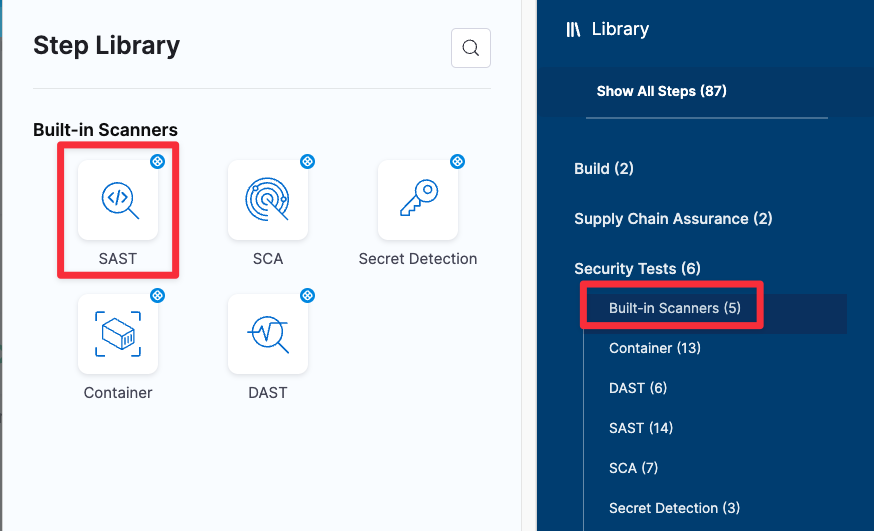
This release introduces a new [built-in SAST step](/security-testing-orchestration/use-sto/set-up-sto-scans/built-in-scanners.md) that adds a preconfigured [Semgrep step](/security-testing-orchestration/use-sto/sto-scanner-configuration/semgrep/semgrep-scanner-reference.md) that's ready to run as soon as you add it. (STO-7180)

<figure><img src="/files/1ABQJ32SuRsZQvEfQgLf" alt=""><figcaption><p>Add built-in SAST scan step</p></figcaption></figure>

\-->

**New feature: Orchestrated Semgrep scans**

Harness STO now supports running [Semgrep scans](/security-testing-orchestration/use-sto/sto-scanner-configuration/semgrep/semgrep-scanner-reference.md) in **Orchestration** mode. (STO-7142)

#### STO Manager version 1.22.1 <a href="#sto-manager-version-1221" id="sto-manager-version-1221"></a>

**New features and enhancements**

* Harness is in the process of updating the STO UI. The following changes are cosmetic and do not affect the underlying YAML definitions of STO pipelines. Harness expects all of these changes to be deployed in all namespaces by the end of April 2024.
  * The **Security Tests** stage is now called **Security** when you add a new stage and select the stage type. (STO-7384)

    <figure><img src="/files/Azz4vS1OdjzfuZ0wVEvE" alt=""><figcaption><p>Custom Scan step at the end of the list of Security Test steps</p></figcaption></figure>
  * The **Custom Scan** step is used for scanner integrations that do not have their own configuration step. Previously, this step was called **Security**. This step also has a new icon. (STO-7385)

    **Custom Scan** appears at the end of the list of Security Test steps in the Step Library.
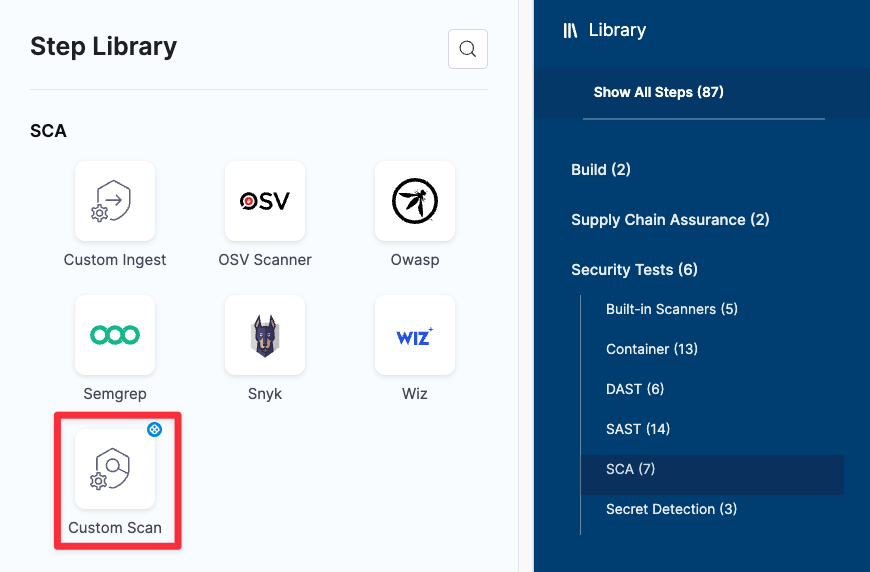
    <figure><img src="/files/7e8uTyHH8c4hIjk1BEZI" alt=""><figcaption><p>Custom Scan step at the end of the list of Security Test steps</p></figcaption></figure>
* Harness STO now supports ingesting scan results in stages that run on ARM64 build infrastructures. This eliminates the need to cache results from a previous ARM64 stage and then ingest them in a stage on a supported platform. (STO-7236)

**Fixed issues**

* Fixed a UI issue where the [**Context Name**](/security-testing-orchestration/use-sto/sto-scanner-configuration/zap/zap-scanner-reference.md#context-name) field in the ZAP step did not capture the specified file. (STO-7287)

#### Version 1.92.1 <a href="#version-1921" id="version-1921"></a>

**Fixed issues**

* Fixed an issue with pull-down filters in STO dashboards: If a pipeline had no issues detected, the pipeline would appear in some filters but not others. This fix ensures consistent behavior: all dashboard filters show only pipelines with detected issues. (STO-7179, ZD-58614)
* Introduced a fix to ensure that Git-triggered pipelines run correctly when the **Repository Name** is specified as a runtime input. (STO-7029, ZD-55622)

#### Version 1.90.1 <a href="#version-1901" id="version-1901"></a>

**New features and enhancements**

* OWASP scan steps can now load Java certificates. (STO-7220)
* The Black Duck Hub scan step has been upgraded to use [Synopsis Detect 9.5.0](https://community.synopsys.com/s/question/0D5Uh000008jpd2KAA/synopsys-detect-950-for-black-duck-has-been-released). This is a major feature release with new features, enhancements, and fixed issues. (STO-7353, ZD-60592)

**Fixed issues**

* Fixed an issue where the **Test Targets** page would display an error for certain projects. (STO-7399)
* Fixed an issue where spidering in a ZAP scan resulted in the error `Unable to find binary in default location`. (STO-7316)
* Fixed an issue where ZAP scans that required authentication resulted in the error `Scanner object has no attribute 'hostname'`. This fix also includes changes to the shared paths where you need to include ZAP scripts in your pipeline. For more information, go to [Important notes](/security-testing-orchestration/use-sto/sto-scanner-configuration/zap/zap-scanner-reference.md#important-notes-for-running-zap-scans-in-sto) in the ZAP scanner reference. (STO-7288)
* ZAP is no longer a part of OWASP. The UI and documentation have been updated to remove references to OWASP ZAP. (STO-7296)
* Removed “Inactive options are coming soon” from the **Request Exemption** dialog box. All options in this dialog box are generally available. (STO-7297)

### March 2024 <a href="#march-2024" id="march-2024"></a>

#### Version 189.2 <a href="#version-1892" id="version-1892"></a>

**Features that are no longer behind feature flags**

The following features are now generally available:

* [OPA policies for Security Test results](#new-feature-opa-policies-for-security-test-results)
* [Target and variant auto-detection for scanners with configurable UIs](#new-feature-auto-detect-targets-and-variants)
* [Open Source Vulnerabilities (OSV)](/security-testing-orchestration/use-sto/sto-scanner-configuration/osv-scanner-reference.md) scanner integration

**New features and enhancements**

* The AWS Security Hub scan step now supports passing `AWS_SESSION_TOKEN` as an environment variable to support session-based authentication with AWS. You can pass the token as a key-value pair in the [Settings](/security-testing-orchestration/use-sto/sto-scanner-configuration/aws-security-hub-scanner-reference.md#settings) field. (STO-6371, ZD-48947)
* Issues tables in **Security Tests** now include a **Target** column. (STO-4918)
* Harness STO now supports ingesting scan results in stages that run on Harness Cloud Windows AMD64 build infrastructures. This eliminates the need to cache results from a previous Windows stage and then ingest them in a Linux stage. (STO-5428)

**Fixed issues**

* Fixed an issue with database migrations that impacted upgrading Self-Managed Platform from version 0.13.x to 0.14.x. (STO-7309)
* Fixed a UI issue in **Security Tests** when the same issue was detected by multiple scans in the same pipeline. The **Issues** table showed multiple identical rows for that issue, and clicking on an issue selected all of the identical rows. With this fix, the rows are differentiated by **Target**. Clicking on an issue selects only that one issue. (STO-4918)

#### Version 1.88.2 <a href="#version-1882" id="version-1882"></a>

**New feature: built-in scanners**

* This release introduces a new set of built-in steps for adding scans to your pipelines quickly and with minimal configuration. The scanners used in these steps are free to STO users and are ready to run as soon as you add them to your pipeline. (STO-6935)

  ![](/files/qQaH5ONXUJQOD8LrLfBO)

  You can add built-in scanners for the following scan types:

  * [**Secret Detection**](/security-testing-orchestration/use-sto/set-up-sto-scans/built-in-scanners.md) Add a GitLeaks scan to detect passwords and other secrets in your code repositories.
  * [**SCA**](/security-testing-orchestration/use-sto/set-up-sto-scans/built-in-scanners.md) Add an OWASP Dependency Check or OSV scan to detect vulnerabilities in your open-source libraries and packages.
  * [**Container**](/security-testing-orchestration/use-sto/set-up-sto-scans/built-in-scanners.md) Add an Aqua Trivy or Anchor Grype scan to detect vulnerabilities in your container images.
  * [**DAST**](/security-testing-orchestration/use-sto/set-up-sto-scans/built-in-scanners.md) Add a Zed Attack Proxy (ZAP) scan to detect vulnerabilities in your application instances.

**New feature: Wiz scanner integration**

You can include [Wiz](/security-testing-orchestration/use-sto/sto-scanner-configuration/wiz/artifact-scans-with-wiz.md) vulnerability scans in your Harness pipelines. Wiz is a cloud security platform that scans IaC templates, container images, and directories/repositories before deployment. Wiz can detect security misconfigurations, vulnerabilities, and exposed secrets. (STO-6035)

**Fixed issues**

* Fixed a UI issue that prevented the Exemptions page from loading for some accounts. (STO-7266)
* Implemented a UI fix to ensure that the STO UI correctly renders scanner output formatted in markdown. (STO-6881)
* Improved UI wording in the Exemptions table when an exemption applies to multiple issues. (STO-6700)

#### Version 1.87.4 <a href="#version-1874" id="version-1874"></a>

**New feature: Ingest Aqua Security assurance policy violations**

The [Aqua Security step](/security-testing-orchestration/use-sto/sto-scanner-configuration/aquasec-scanner-reference.md) can now ingest assurance policy violations. These violations appear as INFO-level issues in **Security Tests**. (STO-7164)

The Aqua Security step also publishes a new output variable, `EXTERNAL_POLICY_FAILURES`, that captures the number of assurance policy violations detected by the scan. You can use this variable to enforce governance policies if the pipeline detects any assurance policy violations. (STO-6499)

For more information, go to:

* [Workflow description for creating STO governance policies](/security-testing-orchestration/use-sto/enforce-sto-policies-for-governance/create-opa-policies.md)
* [Exclude vulnerabilities using STO output variables](/security-testing-orchestration/use-sto/enforce-sto-policies-for-governance/create-opa-policies.md#exclude-vulnerabilities-using-sto-output-variables)

**New feature: Harness AI remediations for STO stage failures**

* Harness AI remediations are now available for STO stage failures. (STO-6966, STO-7254, ZD-56426, ZD-59425)

#### Version 1.87.2 <a href="#version-1872" id="version-1872"></a>

**New enhancement**

* The **Pipeline Execution** > **Security Tests** > **Issue Details** pane now includes a link to the scanned target on the Test Targets page. This link is included for all issues. Previously, only the **Exemptions** > **Issues Details** pane included this link. (STO-7114)

**Fixed issues**

* Fixed an issue that prevented the **Exemptions** page from loading in some accounts. (STO-7263, ZD-59507)
* Fixed an issue in the **Test Targets** page that delayed UI updates after each keystroke when a user entered a RegEx baseline. (STO-7242)

#### Version 1.86.1 <a href="#version-1861" id="version-1861"></a>

**Early access feature: default regular expressions for target baselines**

You can specify default baselines for specific target types: code repositories, container images, application instances, and configurations. STO includes a set of predefined defaults for repository and container image targets. The default baseline for repositories is `master` or `main`. The default for images is `latest` or the most recently scanned Semantic Version number if it can be detected. (STO-7127)

For more information, go to [Default RegEx baselines by target type](/security-testing-orchestration/troubleshooting-and-resources/sto-use-cases/set-up-sto-pipelines/set-up-baselines.md#default-regex-baselines-by-target-type).

#### Version 1.85.0 <a href="#version-1850" id="version-1850"></a>

**New feature: Auto-detect targets and variants**

Security Tests steps with configurable UIs, such as [**Aqua Trivy**](/security-testing-orchestration/use-sto/sto-scanner-configuration/trivy/aqua-trivy-scanner-reference.md#detect-target-and-variant), [**Semgrep**](/security-testing-orchestration/use-sto/sto-scanner-configuration/semgrep/semgrep-scanner-reference.md#target-and-variant-detection), and [**ZAP**](/security-testing-orchestration/use-sto/sto-scanner-configuration/zap/zap-scanner-reference.md#target-and-variant-detection), now include an auto-detect option for targets and variants. This option eliminates the need to specify the target variant manually. (STO-6704)

* For container images, the step detects the target and variant using the **Container Image Name** and **Tag** defined in the step or runtime input.
* For code repositories, the step detects these values using `git`:
  * To detect the target, the step runs `git config --get remote.origin.url`.
  * To detect the variant, the step runs `git rev-parse --abbrev-ref HEAD`. The default assumption is that the `HEAD` branch is the one you want to scan.
* For application instances, the step detects these values as follows:
  * The target is based on the **Instance Domain** and **Path** defined in the step or runtime input, for example, `https://qa.jpgr.org:3002/login/us`.
  * The variant is the timestamp when the step scanned the instance.

**New feature: OPA policies for Security Test results**

You can now write and enforce [OPA policies](/harness-ai/use-harness-platform/governance/policy-as-code/harness-governance-overview.md) against your [security tests](/security-testing-orchestration/use-sto/sto-security-issues/view-scan-results.md), and stop your pipelines if a security test has any issues that violate your policies.(STO-6738)

This greatly extends the range of policies that you can use to stop pipelines. Previously, STO only supported OPA policies against [severity output variables](/security-testing-orchestration/new-to-sto/key-concepts/output-variables.md).

This release includes a set of security test policy samples, which make it easy to create policies such as:

* A security test cannot include any issues in a list of severities such as Critical or New Critical.
* A security test cannot include any issues for CVEs past a certain age, for example no critical-severity CVEs more than three years old.
* A security test cannot include any issues in a list of titles such as `libsqlite3` or `javascript.express.security.audit`.
* A security test cannot include any more than 75 occurrences of TAR-related issues (issue title matches regex `".*tar.*"`).
* A security test cannot include any issues in a list of reference IDs such as CWE-78 or CVE-2023-52138.

For more information, go to [Stop pipelines using OPA](/security-testing-orchestration/use-sto/enforce-sto-policies-for-governance/create-opa-policies.md).

**New feature: Open Source Vulnerabilities (OSV) scanner integration**

You can scan your code repositories using [Open Source Vulnerabilities (OSV)](https://google.github.io/osv-scanner/), a tool that finds existing vulnerabilities that affect your project's dependencies. (STO-6767)

**Fixed issues**

* STO output variables are now supported within nested step groups. (STO-6973, ZD-56586, ZD-58121)
* Upgraded `twistcli` to version 32.03.123 in the Twistlock scanner image to resolve intermittent 400 response errors. (STO-7223)
* Previously, the ingestion engine assigned a scan type of SAST to all SARIF data by default. As a result, the STO UI would display SARIF scan results as SAST even when they were not. With this fix, the ingestion engine assigns the correct scan type based on the scan results. (STO-7176, ZD-58495)
* Fixed an issue that would cause a pipeline creation or update to fail if a Security Tests stage used a Harness Code repository. (STO-7208)
* Fixed an issue where the Aqua Security normalizer copied top-level scan data across all raw issues, which caused the wrong reference identifiers to be shown across all issues in the same scan. This fix ensures that all new Aqua Security issues have the correct reference identifiers and vulnerability data. (STO-7140)
* With this release, the STO UI shows expiration values for Approved and Expired exemptions only. (STO-6786)

### February 2024 <a href="#february-2024" id="february-2024"></a>

#### Version 1.84.0 <a href="#version-1840" id="version-1840"></a>

**Enhancements**

* The Issues table in **Issue Details** and the **Exemptions** tables now include popups for issues whose original severities were [overridden by a Snyk security policy](/security-testing-orchestration/use-sto/sto-scanner-configuration/snyk/snyk-scanner-reference.md#show-original-issue-severities-overridden-by-snyk-security-policies). (STO-6927)

  ![](/files/JZvou8W55BQrigmuVJjO)
* This release includes back-end improvements to ensure that dashboards refresh less than five minutes after a database update. (STO-7084, ZD-57533)
* This release introduces a new behavior when the baseline for a target changes. (STO-7105)

  * Previous behavior:

    When [**Security Tests**](/security-testing-orchestration/use-sto/sto-security-issues/view-scan-results.md) showed scan results, it categorized issues as **Only in <*****target*****>:<*****variant*****>** and **Remediated** by comparing the scanned variant to the baseline specified at the time the page was loaded.
  * New behavior:

    The baseline for a scan is fixed when STO ingests the results. **Only in <*****target*****>:<*****variant*****>** and **Remediated** issues are based on the baseline specified at the time of the scan.

  Harness has introduced this behavior to avoid ambiguous or unexpected results when a target baseline changes. This can happen automatically when a pipeline uses [dynamic baselines](/security-testing-orchestration/troubleshooting-and-resources/sto-use-cases/set-up-sto-pipelines/set-up-baselines.md#specify-dynamic-baselines-using-regular-expressions) based on regular expressions. This new behavior also ensures that the **Security Tests** UI for a given pipeline execution always uses the same criteria to categorize issues as **Only in <*****target*****>:<*****variant*****>** and **Remediated**.

#### Version 1.83.1 <a href="#version-1831" id="version-1831"></a>

**Deprecation notice: SonarQube support for scans in Java 11**

[SonarQube has deprecated support for running scans in a Java 11 runtime environment.](https://community.sonarsource.com/t/java-11-is-deprecated-as-a-runtime-env-to-scan-your-projects/96597) It can still scan older Java code, but the scanner must be run in Java 17. Upgrading the the scanner to Java 17 is incompatible with older SonarQube servers. You might need to upgrade your SonarQube server version because of this change. (STO-6970, ZD-57092)

**Enhancements**

* You can now [configure a Snyk step](/security-testing-orchestration/use-sto/sto-scanner-configuration/snyk/snyk-scanner-reference.md#show-original-issue-severities-overridden-by-snyk-security-policies) to show the original score when a [Snyk Enterprise security policy](https://docs.snyk.io/enterprise-configuration/policies/security-policies) overrode the severity of an issue coming from the `snyk` CLI. You can see this information in **Issue Details**. (STO-7041)
* Implemented back-end changes to improve performance and scalability when processing scan results. (STO-7037)

**Fixed issues**

* Fixed a UI issue where the Exemptions page would show the incorrect severity of an issue if that severity was overridden after the original scan. (STO-7069)
* The SonarQube integration includes better support for orchestrated branch and pull-request scanning with SonarQube Enterprise. (STO-7122, STO-6840, STO-6857, ZD-58021, ZD-55282, ZD-55592)
  * Previously, the orchestration scan step downloaded results for the main or master branch regardless of the branch specified in the runtime input or the pull request.
  * With this enhancement, the orchestration step always downloads results for the scanned branch or pull request.
  * When **Branch Scan** is selected in the [Scan Configuration](/security-testing-orchestration/use-sto/sto-scanner-configuration/sonarqube-sonar-scanner-reference.md#scan-configuration), the step scans the branch or pull request specified in the pipeline execution.

{% hint style="info" %}
~~**Branch Scan** is behind the feature flag `STO_SONARQUBE_BRANCHING`. Contact~~ [~~Harness Support~~](mailto:support@harness.io) ~~to enable this option.~~

**Update on July 2024:** SonarQube Branch Scan feature, which was previously available in early access, became generally available GA in [Version 1.102.2](#version-11022)
{% endhint %}

### January 2024 <a href="#january-2024" id="january-2024"></a>

#### Version 1.81 <a href="#version-181" id="version-181"></a>

**Fixed issue**

Fixed an issue on Self-Managed Enterprise Edition platforms where approving or rejecting an exemption threw a 500 error. (STO-6958)

#### Version 1.80.1 <a href="#version-1801" id="version-1801"></a>

**Feature enhancements**

* You can now run STO scans with a [CI Free](https://www.harness.io/pricing?module=ci) license. In a CI Build step, select **Add step** and then go to **Security** and **Security Tests** in the step library. All STO steps are available. The only limits to this functionality are those imposed by the CI Free license. (STO-6824)
* The Security Tests UI displays a more helpful, accurate message when no issues match the show/hide filters. (STO-6919)

#### January 11 runner update <a href="#january-11-runner-update" id="january-11-runner-update"></a>

**Feature enhancements**

* You can now scan .exe and .net files using the OWASP scan step. (STO-6852, ZD-55558)
* OWASP scans now display the package name and version for all issues. (STO-6725)

#### Version 1.78 <a href="#version-178" id="version-178"></a>

**Fixed issue**

* Version incompatibility between Harness services resulted in STO pipelines failing on the `git clone` step in some specific cases. The issue was resolved via rollback. (STO-6905, ZD-56022)

### December 2023 <a href="#december-2023" id="december-2023"></a>

#### Version 1.77.1 <a href="#version-1771" id="version-1771"></a>

**New enhancement**

This release introduces a behavior change when ingesting SARIF data. Previously, issues with a level of **Error** in SARIF got assigned a severity of **Critical** in STO. These issues now get assigned a severity of **High**. (STO-6845, ZD-55359)

**Fixed issue**

Fixed an issue where the SonarQube step was assigning incorrect values to the Java Binaries setting. (STO-6808)

#### Version 1.76 <a href="#version-176" id="version-176"></a>

**New enhancements**

* Added a new setting for Checkmarx scans, which is useful when you want STO to exclude issues detected by Checkmarx but flagged as Not Exploitable. (STO-6712, ZD-53483)

  To enable this setting, go to the **Checkmarx** or **Security** step and add the following key-value pair under Settings:

  `hide_not_exploitable` : `True`
* The expiration time for an exemption now starts when the exemption is approved. (STO-6604)

**Fixed issue**

Fixed an issue where only the first run in a SARIF file was being ingested. This occurred when Snyk was configured with the `--all-projects` flag. (STO-6832, ZD-55065)

### November 2023 <a href="#november-2023" id="november-2023"></a>

#### Version 1.75.1 <a href="#version-1751" id="version-1751"></a>

**New enhancement**

* Browser windows and tabs have more descriptive titles to improve navigation across the primary STO windows. (STO-4555)
  * STO Overview
  * Test Targets
  * Exemptions
  * STO Getting Started

#### Version 1.74.1 <a href="#version-1741" id="version-1741"></a>

**New features and enhancements**

* You can now ingest container-image scan results from [Aqua Security Enterprise](/security-testing-orchestration/use-sto/sto-scanner-configuration/aquasec-scanner-reference.md). This integration was previously behind the feature flag `STO_STEP_PALETTE_AQUASEC` but is now generally available. (STO-5661, ZD-41491)
* The **Exemptions** table now shows the pipeline name in the **Scope** column and not the ID. This keeps the user experience consistent with other areas of the application. (STO-6631)

**Fixed issues**

* Fixed an issue that caused the **Issue Details** pane to show target names from other projects in the same account. (STO-6693)
* Fixed a back-end API linking issue that could cause rendering/linking issues in the **Security Tests** tab. (STO-6586)

#### Version 1.73.1 <a href="#version-1731" id="version-1731"></a>

**Early access feature**

You can now scan your repositories and other components used in your code with [Anchore Enterprise](/security-testing-orchestration/use-sto/sto-scanner-configuration/anchore-enterprise-scanner-reference.md), a scanner that provides visibility into supply chain security risks. This integration was previously behind the feature flag `STO_STEP_PALETTE_AQUASEC` but is now generally available. (STO-6382)

**Fixed issues**

* Fixed a configuration issue in a back-end service that prevented Harness AI from generating remediation steps. (STO-6610)
* Fixed a UI issue where the module sidebar in the left-side menu would scroll when a user clicked different menus within STO. With this fix, the module sidebar maintains its position when a user clicks different menus. (STO-6219)
* Fixed a UI issue in the **Security Tests** tab where the **Stage** and **Step** pull-down filters showed the `identifier` fields. These filters now show the `name` fields, which are more human-readable. (STO-6629)

### Previous releases <a href="#previous-releases" id="previous-releases"></a>

#### Jan-Oct 2023 releases <a href="#jan-oct-2023-releases" id="jan-oct-2023-releases"></a>

<details>

<summary>Jan-Oct 2023 releases</summary>

**October 2023**

**Version 1.72.0**

**New features and enhancements**

* You can now provide feedback about the [AI-generated remediation step](https://developer.harness.io/docs/security-testing-orchestration/use-sto/view-and-troubleshoot-vulnerabilities/ai-based-remediations) for a selected issue. (STO-6593)

  ![](/files/wHD3QJezgP7O2XbHfA3c)
* The following Early Availability features are now generally available:
  * You can specify a time limit when you request an exemption. (STO-6367, formerly behind feature flag `STO_TIMEBOUND_EXEMPTIONS`)

    <figure><img src="/files/xp603oYHS02qVXuWidbn" alt="Select the time limit for an exemption"><figcaption></figcaption></figure>

    The **Exemptions** table includes a **Time Remaining** column that shows when each exemption is scheduled to expire. The table is sorted by this column by default so that soonest-to-expire exemptions are listed first.

    ![](/files/X10Vu2jTfOOCe18B9Yb5)
  * You can click on a row in the **Exemptions** table to view details for the issue associated with that exemption. (STO-5056, formerly behind feature flag `STO_EXEMPTION_DETAILS`)

    For best results in STO, you should [specify a baseline for every target](/security-testing-orchestration/new-to-sto/key-concepts/targets-and-baselines.md). To encourage this, the **Exemption Details** pane hides details for an issue if there is no baseline detected. To specify the baseline, select **Set in Targets**.
  * The **Security Tests** tab includes a set of **Security Executions** pull-down menus so you can filter the issue lists by Target, Target Type, Step, Stage, and Scanner. (STO-5212, formerly behind feature flag `STO_DROPDOWN_FILTERS`).

    ![Click on a tile to filter issues by severity](/files/udSRZ156oZBDdGKqXmk8)

**Fixed issues**

* Updated the UI terminology to better communicate the relationship between issues in the current scan vs. previous scans. (STO-6613)

  The **Security Test** UI now uses the following labels to describe issues found in the current scan that are common to previous scans:

  * **Common to <*****target*****>:<*****variant*****>** Issues also found in the last scan of the specified variant.
  * **Common to previous scan**
    * Issues also found in the last scan (if the scanned target has no baseline), OR
    * Issues also found in the last scan of the baseline (if the scanned variant is the baseline).
  * **Common to previous / baseline scan** Issues also found in the both the last scan of the specified variant AND the last scan of the baseline.
* Fixed a UI issue in **Security Tests** when all vulnerabilities detected in a scan had exemptions. The tab showed "No Security Issues Found", all issue counts were 0, and no issues appeared in the UI even when the selected filter included exempted issues. (STO-6642)

**Version 1.71.1**

**Early access**

* Updated the exemptions page to bubble up soon-to-expire exemptions to the top of the list. Available in the time bound exemption early access feature available behind the STO\_TIMEBOUND\_EXEMPTIONS flag. Contact [Harness Support](mailto:support@harness.io) to enable the feature. (STO-6367)

**Fixed issues**

* The STO dashboard used a marketplace graph which was not available in hosted environments. A new native graph has been chosen so the Security Issues (Overall) graph will be available on all environments. (STO-6613)
* Updated the icon for a false positive exemption to match the other icons (STO-6555)

**Version 1.70.1**

**New features and enhancements**

* Improved the look and feel of the exemptions page, and added information about the severity of the issue associated with exemptions and exemption requests. (STO-6592)

**Early access**

* Added support for Matrix pipelines to the pipeline execution results filters

  This fixes an issue in a feature behind the Feature Flag `STO_DROPDOWN_FILTERS`. Contact [Harness Support](mailto:support@harness.io) to enable the feature. (STO-6405)

**Version 1.69.3**

**Early access**

* This release includes the following UI enhancements for working with exemptions. (STO-6078)

  * You can click on a row in the **Exemptions** table to view details for the issue associated with that exemption.

    ![](/files/BE27rawwzIP5e1PcGvef)
  * For best results in STO, you should [specify a baseline for every target](/security-testing-orchestration/new-to-sto/key-concepts/targets-and-baselines.md). To encourage this, the **Exemption Details** pane hides details for an issue if there is no baseline detected. To specify the baseline, select **Set in Targets**.

    ![](/files/CZVPTpBcrKEjMg1K10rS)

  These enhancements are behind the Feature Flag `STO_EXEMPTION_DETAILS`. Contact [Harness Support](mailto:support@harness.io) to enable the feature. (STO-5056)

**Fixed issue**

* Occurrences page size longer resets on page update. (STO-6472)

**September 2023**

**Version 1.68.0**

**Fixed issues**

* Fixed the following UI issues in in **Security Tests**:
  * Users with view access for Security Issues at the Project level, but not the Account level, could not view issue details. (STO-6421)
  * Some scanners such as Gitleaks would appear with the label **Unknown Scan Tool** rather than the correct product name. (STO-6454, STO-6337)
  * Added an **Exclude** field to the SonarQube step and removed the **Include** step. The **Exclude** field corresponds to the `sonar.exclusions` setting, which you can use to [narrow the focus](https://docs.sonarsource.com/sonarqube/latest/project-administration/analysis-scope/#excluding-specific-rules-from-specific-files) of a SonarQube scan. (STO-6441)

**Version 1.67.2**

**New features and enhancements**

* In the STO Overview, **Today's Snapshot** shows new and remediated issue counts if today's issue counts include any newly detected vulnerabilities or new remddiations. (STO-4998)

**Fixed issues**

* Fixed an issue with setting up SSL certificates in Checkmarx, which caused Java keytools to fail. Upgrading to JDK-11 fixed the issue. (STO-6512)
* Implemented fixes to improve scan times for large jobs using Checkmarx, Snyk, and other scanners. (STO-6408, STO-5676, ZD-49328, ZD-41409, ZD-42436, ZD-49383)

**August 2023**

**Version 1.67.1**

**New features and enhancements**

* The target list table in **Test Targets** is now paginated. You can configure the list to show 10, 20, 50, or 100 targets per page. (STO-4818)

**Fixed issues**

* Fixed a pagination issue in the Security Tests page where switching between different pages resulted in a "Failed to get issues" error. The error occurred when switching from a page of issues (such as 21-40) to another issue for which those settings were invalid. (STO-6465)
* Fixed an issue where the Security Tests page would fail with a 500 internal error if the scan detected no issues. (STO-6437, ZD-49803)
* Previously, the Black Duck Hub step ran DOCKER scans only by default. With this release, the scanner runs DETECTOR and SIGNATURE scans by default as well. (STO-6447)

  You can configure this step with supported command-line arguments. For more information, go to [Additional CLI flags](/security-testing-orchestration/use-sto/sto-scanner-configuration/black-duck-hub-scanner-reference.md#additional-cli-flags) in the [Black Duck Hub scanner reference](/security-testing-orchestration/use-sto/sto-scanner-configuration/black-duck-hub-scanner-reference.md).
* Fixed a UI issue in the Security Tests tag where the clickable severity tiles — introduced in version 1.64.1, described [below](#august-09-2023-version-1641) — had an extra border on the right. (STO-6372)

**SonarQube runner update**

**Fixed issues**

This update to the SonarQube runner includes the following fixed issues:

* Fixed an issue where the SonarQube step would ignore additional path segments in the domain name. If the domain was set to `https://mysonar.com/sonar`, for example, the SonarQube step would ignore the full path and try to communicate with `https://mysonar.com`. (STO-6442)
* Fixed an issue where the SonarQube step could not override some SonarQube scan CLI parameters specified in the **Additional CLI arguments** field. (STO-6443)

**Version 1.66.1**

**Fixed issues**

* Fixed a UI issue where the module sidebar in the left-side menu would scroll when a user clicked different menus within STO. With this fix, the module sidebar maintains its position when a user clicks different menus. (STO-6219)
* Fixed an issue where users could not select multiple projects in the Security Testing Dashboard or any custom dashboards that use STO components. With this fix, you can select multiple projects from a list of checkboxes. (STO-6228)

  ![](/files/9PntgmWyPeGYfTk0wArg)

**Version 1.64.1**

**New features and enhancements**

* Aqua Trivy scans now capture and report on secrets in plain text, in addition to vulnerabilities. (STO-6345)
* The Account Settings > Subscriptions > Security Testing Orchestration UI has been updated to display scan limits more clearly. The UI now shows scan limits based on the number of subscribed security developers. (STO-6096)
* You can now click the severity tiles in the **Security Tests** tab to filter the issues list by severity. (STO-5784) ![Click on a tile to filter issues by severity](/files/EHEU78VOT5CeNDuv47Mv)
* The issue lists in the the **Security Tests** tab are now paginated. You can configure each list to show 20, 50, or 100 issues per page. This makes the overall page much easier to navigate if the scan results include a lot of issues. (STO-5949, STO-6099)

**Early access**

* The **Security Tests** tab includes a set of pull-down menus so you can filter the issue lists by Target, Target Type, Step, Stage, and Scanner. (STO-5212). ![Click on a tile to filter issues by severity](/files/udSRZ156oZBDdGKqXmk8)

  This feature is behind the Feature Flag `STO_DROPDOWN_FILTERS`. Contact [Harness Support](mailto:support@harness.io) to enable the feature. (STO-5056)

**Fixed issues**

* Fixed a UI issue where the **Issue Details** pane rendered long HTML values as markdown. These values are now correctly rendered as HTML. (STO-6339)

**Version 1.62.2**

**Fixed issues**

* Fixed an issue that made it difficult to set up proxy details for a Veracode scan. Veracode scans can now handle `https_proxy`, `http_proxy`, and `no_proxy` environment variables as `-D` flags that get passed to Java. (STO-6081, ZD-45891)

**July 2023**

**Version 1.61.1**

**New features and enhancements**

You can now define dynamic target baselines using regular expressions. Dynamic baselines more accurately reflect the current "root" element in the context of a real-world software development life cycle. Dynamic baselines also make it easier to track the introduction and remediation of specific vulnerabilities. (STO-5670)

This feature is behind the Feature Flag `STO_BASELINE_REGEX`. For more information, go to [Set up target baselines](/security-testing-orchestration/troubleshooting-and-resources/sto-use-cases/set-up-sto-pipelines/set-up-baselines.md).

**Fixed issues**

* Fixed an issue that broke the capability to customize the code snippet for AI-augmented remediations in the Security Tests module. (STO-6181)

**Fossa runner update**

* Updated a Fossa runner image to fix an issue that caused the step to fail with a 400 client error. (CDS-6120, ZD-46601)

**Version 1.60.0**

**New features and enhancements**

* You can now set up your STO scan images and pipelines to run scans as non-root and establish trust for your own proxies using self-signed certificates. This workflow supports any STO-compatible scanner that can run natively without root access. This workflow also supports build environments that use a self-signed proxy server between the Harness Delegate and the Harness Manager.

  For information on how to set up this workflow, go to [Configure your pipeline to use STO images from private registry](/security-testing-orchestration/troubleshooting-and-resources/sto-use-cases/set-up-sto-pipelines/configure-pipeline-to-use-sto-images-from-private-registry.md).
* Reference Identifiers selected for Harness AI enhancement in a Security Issue are now remembered, upon generation, and shown when revisited in the UI. (STO-6032)

**Early Access**

* The [Burp integration](/security-testing-orchestration/use-sto/sto-scanner-configuration/burp-scanner-reference.md) now supports scanner templates, which make it much easier to set up a scan step.

  This integration is behind the Feature Flag `STO_STEP_PALETTE_BURP_ENTERPRISE`. Contact [Harness Support](mailto:support@harness.io) to enable the feature. (STO-5056)
* You can scan your code repositories using [CodeQL](/security-testing-orchestration/use-sto/sto-scanner-configuration/codeql-scanner-reference.md), an analysis engine used by developers to automate security checks, and by security researchers to perform variant analysis.

This integration is behind the Feature Flag `STO_STEP_PALETTE_CODEQL`. Contact [Harness Support](mailto:support@harness.io) to enable the feature. (STO-5366)

* You can scan container images and repositories using [Fossa](/security-testing-orchestration/use-sto/sto-scanner-configuration/fossa-scanner-reference.md), a scanner that detects security vulnerabilities and other issues in open-source projects. (STO-5111)

This integration is behind the Feature Flag `STO_STEP_PALETTE_FOSSA`. Contact [Harness Support](mailto:support@harness.io) to enable the feature.

* You can scan container images and repositories using [Semgrep](/security-testing-orchestration/use-sto/sto-scanner-configuration/semgrep/semgrep-scanner-reference.md), a scanner that detects security vulnerabilities and other issues in open-source projects. (STO-5886)

This integration is behind the Feature Flag `STO_STEP_PALETTE_SEMGREP`. Contact [Harness Support](mailto:support@harness.io) to enable the feature.

**Fixed Issues**

* Fixed an issue where some Reference Identifiers were not listed in the Harness AI **Edit Inputs** form for enhancing a Security Issue's remediation steps. (STO-6102)

**June 2023**

**Version 1.58.3**

**Early access features**

Harness AI uses state-of-the-art AI technology to streamline the process of triaging and fixing security vulnerabilities. For every vulnerability detected by STO, Harness AI explains the issue precisely and provides detailed advice — including code changes and package upgrades — on how to fix it. Harness AI is based on large, well-trained language models. It learns continuously based on feedback and the latest public knowledge. Optionally, you can regenerate advice with additional context and thereby optimize your results.

Harness AI reduces developer toil by streamlining and simplifying the process of fixing vulnerabilities. It enables developers and security personnel to manage security-issue backlogs and address critical issues promptly. Harness AI can dramatically reduce your TTR, speed up your software delivery lifecycle, and improve the security posture of your applications and services. (STO-5882)

For more information, go to [Remediations with Harness AI](/security-testing-orchestration/use-sto/sto-remediate-issues/ai-based-remediations.md).

**Fixed issues**

* A defective Zap runner image was rebuilt to resolve failures in orchestrated Zap scans. (STO-6094, ZD-46330)
* In the **Request Exemption** dialog, you need to provide a reason only when the **Other** exemption reason is selected. (STO-5942)

**Version 1.57.4**

**New features**

* Added the existing Typescript scanning library to Sonarqube scans so that Typescript is always supported. (STO-6007)
* Added a `product_zip_max_size` setting to Checkmarx scans that enable you to override the maximum size of ZIP files uploaded to the STO pipeline (the default size is 200 MB). To override this setting in a Checkmarx scan step, add the `product_zip_max_size` setting and value (in MB) under **Settings (*****optional*****)**. (STO-5991)

  ![](/files/e23ig6LNlufokMXuWuy0)

**Fixed issues**

* Fixed an issue where STO results were not showing up in output variables when using STO steps inside a step group in a security stage. (STO-6038, ZD-45802)
* Updated the Golang library used in STO code to remediate CVE-2022-21698. (STO-5993)

**May 2023**

**Version 1.54.1**

**New features**

* This release include new scanner templates, with simplified UIs and workflows, for the following scanners. (STO-5990)
  * [AWS ECR](/security-testing-orchestration/use-sto/sto-scanner-configuration/aws-ecr-scanner-reference.md)
  * [AWS Security Hub](/security-testing-orchestration/use-sto/sto-scanner-configuration/aws-security-hub-scanner-reference.md)
  * [Brakeman](/security-testing-orchestration/use-sto/sto-scanner-configuration/brakeman-scanner-reference.md)
  * [Custom Ingest](/security-testing-orchestration/use-sto/sto-custom-scanning-and-ingestion/custom-ingest-reference.md)
  * [Nikto](/security-testing-orchestration/use-sto/sto-scanner-configuration/nikto-scanner-reference.md)
  * [Nmap](/security-testing-orchestration/use-sto/sto-scanner-configuration/nmap-scanner-reference.md)
  * [OWASP](/security-testing-orchestration/use-sto/sto-scanner-configuration/owasp-scanner-reference.md)
  * [Prowler](/security-testing-orchestration/use-sto/sto-scanner-configuration/prowler-scanner-reference.md)
* The **Account Settings** > **Subscriptions** page has a new **Activity & Usage** section that shows the number of security scans and user activity over the past 30 days. (STO-4942)
* This release includes a minor UI update. In **Security Tests** > **Details**, the **Exempt** button has been renamed to **Request Exemption** to make the button's purpose more clear. (STO-5928)

**Fixed issues**

* Fixed a UI issue where **Security Tests** would briefly display the message "No issues were found" when the window initially loaded. (STO-5927)
* Fixed an issue in non-Kubernetes builds where a scan would not produce output variables. This meant that failing a pipeline using `fail_on_severity` was not supported on non-Kubernetes builds. Now, STO can generate output variables and fail pipelines using `fail_on_severity` on all supported build infrastructures. (STO-5483)

**Version 1.53.0**

**New features**

* Code snippets in Security Issue details are now displayed in the UI with syntax highlighting. (STO-5959)

  ![](/files/Vbqa9Zo9DrdvbrRl82IU)

**Fixed issues**

* Fixed an issue that would sometimes cause long-running scans to fail with a `requests.exceptions.ReadTimeout` exception and scan results to be lost. (STO-5907)

**Version 1.50.3**

**What's new**

* You can now ingest ZAP scan results from both JSON and XML reports. For information about the ZAP XML report format, go to [Traditional XML Report](https://www.zaproxy.org/docs/desktop/addons/report-generation/report-traditional-xml/) in the ZAP documentation. (STO-5868)
* The Security Tests tab now renders tables from tool-provided descriptions in the **Issue Details** panel. (STO-5857)
* The UI now uses consistent terminology when referring to exemptions. All references to *ignore* and *ignored* have been updated to *exempt* and *exempted*. (STO-5749)
* The Security Testing Dashboard includes a new **Target Type** filter. (STO-5732)

  ![](/files/hNFPcxk9TOc7PXVPD2iq)
* The **Security Tests** tab now paginates results for scans that detect a lot of issues. You can set the pagination to 20, 50, or 100 issues per page. (STO-5211)
* STO now supports [looping strategies](/harness-ai/use-harness-platform/pipelines/looping-strategies/looping-strategies-matrix-repeat-and-parallelism.md) for Security Tests stages. (STO-5726)
* You can now select a high-level reason when you [request an exemption](/security-testing-orchestration/use-sto/sto-exempt-issues/exemption-workflows.md) for a detected issue. The **Request Exemption for Issue** dialog box includes a new **Reason** pull-down menu with a set of common reasons for exempting an issue. (STO-5730)

  ![](/files/vBBWO2CDarWnrKP3qaXv)

**Fixed issues**

* Fixed a UI issue to ensure that all input fields related to STO security steps appear the Template Studio view. (STO-5746, ZD-42167)
* Fixed a UI issue where the **Default Project** and **Default Issue Type** drop-downs in the External Tickets settings page always used the account-level Jira connector, even when a different connector was selected on the project- or organization-level settings page. (STO-5756)
* Fixed an issue with Mend scans that caused builds to fail with the log message “Missing valid image". (STO-5867)
* Fixed an issue with Mend scans where the `product_domain` step setting did not get passed to the CLI, causing the scan to point to the default US server. (STO-5708)
* Added a **Privileged** checkbox to the UI for Security steps and scanner templates. This fixes an issue where `privileged` would automatically reset to `true` whenever a user updated the step, which required setting this option back to `false` in the YAML editor. (STO-5773)
* Implemented fixes to improve UI speed and performance in the Security Testing Dashboard. (STO-5612)

**Plugin update version 1.11.1**

**Fixed issues**

This update includes the following fixed issues:

* This release updates the Twistlock normalization algorithm. Issues with Moderate severity in Twistlock are now assigned Medium (not High) severity in STO. (STO-5861)
* Fixed a Snyk ingestion issue that caused the scan to scan step to fail if the target name included a space. (STO-5855)

**April 2023**

**Plugin update version 1.10.1**

This update includes the following fixed issues:

* Fixed an issue that caused orchestrated Snyk scans to fail when passing in `--all-projects` via **Additional CLI flags** or as `tool_args`. This update now reflects the new supported Snyk workflow for specifying target variants: instead of using using `--project-name` to specify variants (old behavior), STO now uses the new `-—target-reference` flag (new behavior). (STO-5821, ZD-42967)

  For more information about the use of these flags, see the following topics in the Snyk documentation:

  * [Group projects for monitoring](https://docs.snyk.io/snyk-cli/test-for-vulnerabilities/grouping-projects-by-branch-or-version)
  * [Does the Snyk CLI support monorepos or multiple manifest files?](https://support.snyk.io/hc/en-us/articles/360000910577-Does-the-Snyk-CLI-support-monorepos-or-multiple-manifest-files-)
* Fixed an issue where Snyk scans were processing container vulnerabilities only and ignored application vulnerabilities. STO now processes both container and application scan data from Snyk by default. (STO-5828)
* Fixed an issue that prevented orchestrated Mend scans from running if the [Use version in project names](https://docs.mend.io/en-US/bundle/sca_user_guide/page/using_version_in_product_or_project_names.html) setting was turned off. (STO-5774)

**Version 1.43.1**

**Fixed issues**

* Fixed a UI issue in **External Tickets Settings** for setting up Jira integrations: **Default Project** and **Default Issue Type** always used the account-level Jira connector, even when a different connector was selected for the current project or organization. (STO-5756)
* Fixed a search issue in **Security Tests**: If a search term included certain special characters, the UI would fail with a JavaScript exception. (STO-5745)
* The new Sonarqube step in the scanner template didn't pass `project_key` field required for data extraction mode. STO Manager v1.0.79100 now has the logic process this parameter correctly. (STO-5712)
*

**March 2023**

**Version 1.40.2**

**What's new**

* The Snyk integration has been updated. Orchestrated Snyk scans now upload results to the external Snyk portal by default. (STO-5607)

**Early access**

* This release includes the following enhancements to the [Jira integration](/security-testing-orchestration/use-sto/jira-integrations.md):

  * After you create a new ticket, **Issue Details** replaces the **Create Ticket** button with a link to the new ticket and the ticket status. (STO-5518)

    Before:

    ![](/files/mFMpfHqOEsJDUx0ZRTi1)

    After:

    ![](/files/k40qqYyseDlmZd2zKI44)

  **External Tickets** now automatically populates the **Default Project Name** and **Default Project Type** menus based on the selected ticket-provider connector. (STO-5492)

**Fixed issues**

* Fixed an issue with SonarQube scans: if a repository had a .gitignore with a specific pattern, all files were ignored during the scan. (STO-5711)
* Fixed an issue with Snyk scans to ensure that **Issue Details** shows all remediation information from the scan results under Remediation. (STO-5663)
* Fixed an issue where, if a scan detected no issues and a later scan detected one or more issues, **Issue Details** would include remediation information from the later scan. (STO-5463)
* Fixed a UI issue where the **Security Tests** tab was incorrectly showing issue counts and the Ignored status for some issues. This was due to a DB query that caused exemptions scoped to an issue in one project to be applied to the same issue in all projects in the account. (STO-5718)

**Version 1.38.3**

**Fixed Issues**

* Fixed an issue that caused OWASP scans of Go apps to fail with the message `[ERROR] Unexpected exception occurred initializing Golang Mod Analyzer`. (STO-5602)
* Fixed a UI issue in **Issue Details** that caused some redundant fields such as `CWE` to appear. (CI-5365)

**Version 1.37.1**

**Fixed issues**

* The search pull-down widget has been removed from the Security Tests > Overview page. To search for and drill down into specific issues, go to the Security Testing Dashboard. (STO-5592)
* Fixed an issue in **Security Tests** > **Overview** where the **Issue distribution over time** graph was empty for some projects. (STO-5318)

**Scanner Template GA release**

This release includes a set of new scanner-specific steps (step palettes) for Aqua Trivy, Bandit, SonarQube, and other popular scanners. These steps greatly simplify the process of setting up scans in your pipelines. Previously, the workflow for all scanners was to enter a set of hard-coded key and value strings in a Security step. These new steps have simplified user-friendly UIs that include only the options relevant to the specific scanner, mode, and target.

The following security steps are now generally available:

* [Aqua Trivy](/security-testing-orchestration/use-sto/sto-scanner-configuration/trivy/aqua-trivy-scanner-reference.md) (STO-5393)
* [Bandit](/security-testing-orchestration/use-sto/sto-scanner-configuration/bandit-scanner-reference.md) (STO-5050)
* [Black Duck Hub](/security-testing-orchestration/use-sto/sto-scanner-configuration/black-duck-hub-scanner-reference.md) (STO-5052)
* [Checkmarx](/security-testing-orchestration/use-sto/sto-scanner-configuration/checkmarx/checkmarx-scanner-reference.md) (STO-5073)
* [Grype](/security-testing-orchestration/use-sto/sto-scanner-configuration/grype/grype-scanner-reference.md) (STO-5394)
* [Mend (formerly Whitesource)](/security-testing-orchestration/use-sto/sto-scanner-configuration/mend-scanner-reference.md) (STO-5392)
* [Prisma Cloud (formerly Twistlock)](/security-testing-orchestration/use-sto/sto-scanner-configuration/prisma-cloud-scanner-reference.md) (STO-5055)
* [Snyk](/security-testing-orchestration/use-sto/sto-scanner-configuration/snyk/snyk-scanner-reference.md) (STO-5053)
* [SonarQube](/security-testing-orchestration/use-sto/sto-scanner-configuration/sonarqube-sonar-scanner-reference.md) (STO-5051)
* [Zed Attack Proxy (ZAP)](/security-testing-orchestration/use-sto/sto-scanner-configuration/zap/zap-scanner-reference.md) (STO-5058)

**Version 1.34.0**

**Early access**

* The new [Jira integration](/security-testing-orchestration/use-sto/jira-integrations.md) has been enhanced. If an issue has an associated Jira ticket, **Issue Details** now shows the ticket status along with the number. (STO-5491)

**Fixed issues**

* Fixed an issue in the Jira integration to ensure that **Create Ticket** now appears in **Issue Details**, even if an issue has an Exemption associated with it. (STO-5526)
* Fixed an issue in the Jira integration that allowed users to try to create tickets against targets with no baseline specified, which is not supported and resulted in a 404 response. (STO-5477)
* Fixed an issue in the Back Duck configuration UI where the in-tool help said that the Image Region setting was required when scanning AWS ECR container images. This field is optional. (STO-5450)

**Version v1.32.1**

**What's new**

* The Twistlock integration has been upgraded to use version 22.12.582. (STO-5575)
* The Brakeman, Nikto, and Nmap scanner integrations now enable you to customize scans by passing CLI arguments to the scanner via the `tool_args` setting. (STO-5465)
* The Bandit scanner integration now enables you to customize scans by passing CLI arguments to the scanner via the `tool_args` setting. (STO-5415)
* The Mend integration now supports SCA scans. (STO-5242)
* Bandit scan results have been enhanced. When you open the Details pane for a detected issue, the Raw Details JSON now includes links to further information under `_rawIssueCwe : link` and `_rawMoreInfo`. (STO-5422)
* The Security Testing Dashboard includes a new set of filters for drilling down into specific issues by project, creation date, scanner, target, pipeline, severity, and so on. You can drill down to a set of relevant issues and then click on a pie slice, chart element, or other UI element to view details on the relevant issues. (STO-5329)

  Note the following:

  * The Security Testing Dashboard requires an Enterprise account.
  * You must click **Refresh** (top right) to apply the filter after you configure it.
  * To view details for an issue from the search results, click the pipeline name or ID and choose **View in Harness Platform**.

    ![](/files/1BFvEojvvXL3fh5UULO4)
  * The **Created Date** menu has several non-working options: `is null`, `is not null`, and `matches a user attribute`. This is a known issue that Harness is working to address.

![Security Testing Dashboard -- filters and Refresh button](/files/OhydiBFclqHtO4nBIXY8)

**Early access**

* Improved UI for configuring scan steps (STO-4867)

  This release includes a set of Security steps with an improved UI for configuring scans. Each step shows only the settings that apply to the specific scan.

  Note the following:

  * This release includes new steps for the following scanners: Aqua Trivy, Bandit, Black Duck, Checkmarx, Grype, Mend, Prisma Cloud, Snyk, SonarQube, and ZAP.
  * Docker-in-Docker is no longer required for these steps *unless* you're scanning a container image in a Kubernetes build infrastructure. For more information, go to [Docker-in-Docker requirements for STO](/security-testing-orchestration/use-sto/sto-scanner-configuration/security-step-settings-reference.md#configuring-docker-in-docker-dind-for-your-pipeline).
  * These steps are currently available in Security stages only.
  * Support is currently limited to Kubernetes and Harness Cloud AMD64 build infrastructures only.
* This release includes a Jira integration that enables you to create Jira tickets for issues detected during an STO build. For more information, go to [Create Jira tickets for detected issues](/security-testing-orchestration/use-sto/jira-integrations.md). (STO-5467)

**Fixed issues**

* The ShiftLeft integration now uses the latest CLI, which fixes an issue where orchestrated ShiftLeft scans would fail with an error. (STO-4994)

**February 2023**

**Version 1.31.4**

**Fixed issue**

* Fixed a race condition allowing for duplicate targets to get created. (STO-5481)

**February 16**

**Fixed issue**

* Fixed an issue with Prisma Cloud (formerly Twistlock) scans where the step would fail when a twistcli policy encountered a Compliance or Vulnerabilities threshold check that failed. (STO-5559)

**February 5**

**What's new**

* **Issue Details** now shows the message “No recommendations are available at this time” when the scan tool doesn't return remediation steps for a specific issue. (STO-5380)

**Fixed issues**

This release does not include fixed issues.

**January 2023**

**Version 1.25.0**

**What's new**

* You can now ingest results from a specific Checkmarx scan. This option is useful for ensuring that a pipeline ingests the scan triggered by a specific event. Add the setting `product_scan_id` = `MY_SCAN_ID` to the Checkmarx step. This overrides the default behavior, which is to ingest results for the most recent scan. (STO-5424)
* You can now enable debug-level logging for Snyk and Aqua Trivy scans. To do this, add this setting to the scan step: `log_level` = `debug`. (STO-5405)
* Grype scans now support a `tool_args` field. You can use this field to run the plugin with specific command-line arguments. To scan all layers in an image, for example, add this setting to the Grype scan step: `tool_args` = `--scope all-layers`. (STO-5400)
* To make **Issue Details** easier to navigate, Raw Details JSON data is now collapsed by default. (STO-5398)

**Fixed issues**

* Fixed an issue that caused a scheduled AWS ECR scan to time out or to terminate with a status of Invalid. (STO-5449)

**Version 1.24.1**

**What's new**

* Aqua Trivy scans now support a `tool_args` field. You can use this field to run the plugin with specific command-line arguments. To run an offline scan, for example, specify `tool_args` = `---offline-scan`. (STO-5388)

**Fixed issues**

* Fixed an issue where, in some situations, the severity and severity code of a detected issue were not updated when new occurrences of the same issue were detected. (STO-4809)

**Version 1.22.0**

**What's new**

* Checkmarx scans now support a `tool_args` field. You can use this field to run the Checkmarx plugin with specific command-line arguments. To run an incremental scan, for example, specify `tool_args` = `-incremental`. (STO-5041)
* STO now supports orchestrated scans using [Grype](/security-testing-orchestration/use-sto/sto-scanner-configuration/grype/grype-scanner-reference.md). (STO-5161)

**Version 1.21**

**New features**

* The Issues Details pane has been revised to make it easier to navigate. Raw JSON data now appears at the bottom of each occurrence and is collapsed by default. (STO-4839)

**Fixed issues**

This release does not include fixed issues.

</details>

#### 2022 releases <a href="#id-2022-releases" id="id-2022-releases"></a>

<details>

<summary>2022 releases</summary>

**December 18, 2022**

**New features**

* Remediated issues are no longer included in the issue counts logged near the end of a Security Step run and provided as output variables. (STO-5304)
* With this release, you can run a SonarQube scan and specify a collection of SSL certificates rather than a single certificate. This option is useful when you don't know which specific certificate in a collection is required by the server. (STO-5243)

**Fixed issues**

* Fixed an issue where `product_lookup_type` being set to `byTokens` causes the step to perform a Dataload instead of OrchestratedScan. (STO-5166)

**December 11, 2022**

**New features**

* STO is now supported on Linux (amd64 and arm64 platforms) in [Harness Cloud](/continuous-integration/use-harness-ci/use-harness-ci/set-up-build-infrastructure/use-harness-cloud-build-infrastructure.md). (STO-5314)
* Instead of using Service Dependencies for Docker-in-Docker configuration, users should use new Background steps. (STO-5268)

**Fixed issues**

This release does not include fixed issues.

**December 4, 2022**

**New features**

This release does not include new features.

**Fixed issues**

* Fixed an issue that resulted in intermittent failures with OWASP orchestrated scans. (STO-5289)

**November 28, 2022**

**New features**

This release does not include new features.

**Fixed issues**

* Fixed an issue where the Security Tests tab on the Pipeline Execution page was periodically reloading in a visually jarring way and losing scroll position. (STO-5208)
* Fixed an issue where the Security Tests tab would show previously-found issues as "remediated" while the scan was in progress. (STO-4985)
* Improved the Security Tests UI to highlight new issues found in the current target only vs. issues also found in the baseline, or in the previous scan if no baseline was specified. (STO-5198)

**November 6, 2022**

**New features**

* You can now include Run steps in Security Test stages. You can also include Security Tests stages in STO pipelines without a CI license. (STO-5208)
* You can now configure a pipeline to ingest Snyk data from multiple files and paths. For an example of how to set this up, go to [Ingest Scan Results from Snyk](/security-testing-orchestration/use-sto/sto-scanner-configuration/snyk/snyk-code-scanning.md#snyk-code-scan---ingestion-mode). (STO-4958)

**Fixed issues**

* Fixed an issue where the issue counts reported in output variables vs. the Security Tests page were inconsistent for scans of target baselines, or for targets with no specified baseline. (STO-5042)

**October 31, 2022**

**What's New**

* New output variables – This release includes a new set of output variables you can use to determine the next stage of your pipeline. These variables show the number of new issues detected in the current scan compared to the last scan. If this is the first scan for the target, these variables reflect new issues compared to the baseline. You can use these variables to determine the next stage of your pipeline:
  * NEW\_CRITICAL
  * NEW\_HIGH
  * NEW\_MEDIUM
  * NEW\_LOW
  * NEW\_UNASSIGNED (Reserved for future use)
  * NEW\_TOTAL (STO-4866)
* STO Overview – The STO Overview provides a single, interactive view of all baseline issues detected by all scans in your project. A time series chart shows the daily distribution of issues by severity over the past 30 or 90 days. A daily snapshot shows the sum of all baseline issues based on the latest scan of each baseline. You can also drill down into active, failed, and in-progress baseline scans. (STO-3629)
* STO scans on VMs using Docker delegates – You can now run builds with STO scans using Docker delegates running on Linux VMs in AWS and other cloud platforms. This extends the support for STO scans with Kubernetes delegates. For information about setting up a VM build infrastructure, see Set Up Build Infrastructure in the CI docs. (STO-4639)
* Two-step Exemption and Security Review – This release enhances support for a two-step process for requesting and approving security exemptions:
  * Developers can request (but not approve) exemptions to unblock pipeline builds for specific issues.
  * Only SecOps users can approve exemption requests and choose to mute or ignore specific issues. (STO-4479)
* AWS Security Hub – STO now supports scans in AWS Security Hub. (STO-4873)
* AWS ECR – STO now supports scans on AWS Elastic Container Registry (ECR). (STO-4969)

**August 2, 2022**

**What's New**

The STO module launches its first GA product with the following capabilities:

* Pipeline-Driven STO:
  * Standalone STO:
    * Provision to create standalone STO Stages and secure Pipelines (Ex: Pipelines initiated via Gitlab or Github).
  * Orchestrate scanners inside Harness CI Pipeline:
    * Run scanners as an additional stage or steps within a Harness CI Pipeline.
  * Orchestrate scanners inside Harness CD Pipeline:
    * Run scanners as an additional Stage or Steps within a Harness CD Pipeline.
* Developer-first Remediation: Security testing results normalized, deduplicated, and prioritized across all scanners.
* Dedicated Security Exemptions Section: Ability to grant and manage security exemptions by SecOps owners on identified vulnerabilities or issues during security testing. Exemptions can also be made in the STO Pipeline against specific issues.
* Custom Dashboards & Reports: Ability to create custom visualizations and reports based on attributes related to STO and secure pipeline creation (40+ attributes).
* OPA-based Governance Policies: Support for crafting governance policies for STO specific Pipelines and workflows.
* Platform Integration: Audit trails and other Enterprise Platform features like RBAC, Notifications, Pipeline Config-as-Code
  * Default RBAC roles for STO Developer & STO SecOps Personas
  * Notification Channels:
    * Email, Slack, PagerDuty, Microsoft Teams
* Self-Managed Platform (On-premise software)
  * Helm Chart package with bundled Harness CI and CD modules

See Security Testing Orchestration Basics.

**Enhancements**

N/A

**Fixed issues**

N/A

</details>